

DNS Servers Explained: Root, TLD, Recursive Resolver & Authoritative Nameserver (2026 Guide)
Quick answer: DNS servers convert domain names like example.com into IP addresses so devices know where to send traffic on the internet. The DNS system uses four server types working together: Recursive Resolvers (your ISP’s “librarian” that asks other servers on your behalf), Root Servers (the starting point that directs to TLD servers), TLD Servers (managers for .com, .net, .org extensions), and Authoritative Nameservers (the final authority holding actual DNS records). When you type “skynethosting.net,” your browser asks the recursive resolver, which queries root → TLD → authoritative server in less than 50 milliseconds. Core DNS records include A/AAAA (IP addresses), CNAME (aliases), MX (email routing), NS (nameservers), and TXT (verification). Modern DNS adds protections like DNSSEC, DNS over HTTPS, and globally distributed clusters for speed and reliability.
TL;DR
- DNS servers convert domain names like example.com into IP addresses so devices know where to send traffic on the internet.
- The DNS system uses recursive resolvers, root servers, TLD servers, and authoritative nameservers to answer each domain lookup step-by-step.
- Core DNS records such as A, AAAA, CNAME, MX, NS, TXT, and SOA control where websites, email, and verification services are routed.
- Recursive DNS resolvers usually belong to ISPs, VPNs, or public DNS providers and handle queries on behalf of users automatically.
- Performance and reliability improve with globally distributed, redundant DNS clusters that keep domains online even if one server fails.
- Modern DNS setups add protections like DNSSEC, DNS over HTTPS, and DNS firewalls to improve privacy and block malicious traffic.
If you have ever typed a URL into your browser and waited even for a split second for the page to load, you have interacted with the Domain Name System (DNS).
For most people, this process is invisible. It feels like magic. You type “google.com,” and the website appears. But as someone who has spent the last decade working in systems administration and web hosting, I can tell you that what happens in those few milliseconds is a complex, beautifully choreographed dance of data across the globe.
In 2026, understanding this process isn’t just for network engineers. With the rise of AI-driven traffic and the demand for instant page loads, the speed and reliability of your DNS infrastructure directly impact your user experience and your SEO rankings.
Whether you are a developer debugging a connection error, a business owner wondering why your site is slow, or a student learning the ropes, this guide will break down exactly how DNS servers work. We will strip away the jargon and look at the roles of Root, TLD, Recursive, and Authoritative servers to see how they power the internet.
What Are DNS Servers and Why Do They Exist?
Why the internet needs DNS servers
The internet doesn’t speak English (or any human language, for that matter). It communicates through numbers. Every device connected to the internet—from the server hosting your website to the smartphone in your pocket—is identified by an IP address, like 192.0.2.1 (IPv4) or 2001:db8::1 (IPv6).
Memorizing these strings of numbers for every website you visit would be impossible. Imagine trying to remember 142.250.190.46 just to check your email. DNS servers exist to solve this usability problem. They act as the internet’s phonebook (or, more accurately for 2026, its contact list), mapping human-friendly names to machine-friendly IP addresses.
Human-readable domains vs machine IP addresses
This translation layer is crucial. Humans are good at remembering names like skynethosting.net, while computers need IP addresses to route data packets to the correct destination. The DNS system bridges this gap. When you type a domain name, the DNS system translates that request into the specific coordinates where that website lives.
DNS as the backbone of the internet
Without DNS, the internet as we know it would collapse. It is the backbone of web navigation. If DNS servers go down, it doesn’t matter if your web server is perfectly healthy and your internet connection is blazing fast—you won’t be able to reach the website because your browser won’t know where to find it.
How DNS Resolution Works Step by Step
What happens when you enter a domain name
Let’s walk through the journey. You sit down at your computer and type skynethosting.net into your browser. Your computer doesn’t know the IP address for that domain yet. It first checks its local cache (a short-term memory of recent visits). If it’s not there, it sends a query out to the internet saying, “Where can I find this website?”
Role of DNS queries and responses
This request is called a DNS query. It kicks off a chain reaction involving four specific types of servers (which we will detail shortly). The query passes from server to server, moving down the hierarchy until it finds the specific IP address. Once found, that address is returned to your browser in a DNS response.
Where DNS caching fits in
To make sure this doesn’t happen every single time you click a link, the information is stored—or “cached”—at various points along the way. Your browser, your operating system, and your Internet Service Provider (ISP) all save these results for a set period. This caching is why visiting a site the second time is usually faster than the first.
What Is a Recursive DNS Resolver?
Definition of recursive resolver
The recursive resolver (often just called the “resolver”) is the workhorse of the DNS query. Think of it as a concierge or a librarian. When you ask for a website, you aren’t asking the internet directly; you are asking your recursive resolver.
This server is usually provided by your ISP, but many tech-savvy users configure their systems to use public resolvers like Cloudflare (1.1.1.1) or Google (8.8.8.8) for better speed and privacy.
Why browsers rely on recursive DNS
Your web browser is lazy. It doesn’t want to run around the internet asking multiple servers for information. It wants to send one request and get one answer. The recursive resolver does the heavy lifting. It accepts the request from your browser and then initiates the sequence of queries to the Root, TLD, and Authoritative servers to hunt down the answer.
Examples of common recursive resolvers
If you haven’t manually changed your network settings, you are likely using your ISP’s recursive resolver. However, public resolvers have gained popularity because they often have better caching and security features. For example, Quad9 focuses on blocking malicious domains, while OpenDNS offers parental controls.
What Are Root DNS Servers?
Definition of root DNS servers
The recursive resolver doesn’t know where every website is, but it knows where to start looking. That starting point is the Root Server. Root servers sit at the very top of the DNS hierarchy.
When the recursive resolver receives a query for skynethosting.net, its first step is to ask a Root Server, “Who handles .net domains?”
How many root servers exist globally
There is a common misconception that there are only 13 root servers in the world. While there are 13 IP addresses for root servers (named A through M), there are actually hundreds of physical servers scattered across the globe using a technology called Anycast. This ensures that no matter where you are, a root server is nearby to answer queries quickly.
Why root servers never store IP addresses
The root server will never tell you the IP address of the website you are looking for. It doesn’t know it. Its only job is to direct traffic to the next level of the hierarchy. It responds to the resolver by saying, “I don’t know where skynethosting.net is, but here is the address for the .net TLD server. Go ask them.”
What Is a TLD DNS Server?
Meaning of Top-Level Domain (TLD)
TLD stands for Top-Level Domain. This refers to the suffix of a domain name, such as .com, .org, .net, or country codes like .uk or .de.
Role of TLD servers like .com, .org, .net
TLD servers are the managers of their specific domain extensions. The TLD server for .net maintains a massive list of all domain names ending in .net.
How TLD servers guide DNS queries
When the recursive resolver arrives at the .net TLD server, it asks, “Where is skynethosting.net?”
Like the Root server, the TLD server doesn’t have the final IP address. However, it knows exactly which specific server is responsible for that specific domain. It responds, “I don’t have the IP, but I know that skynethosting.net uses authoritative nameservers located at these addresses. Go ask them.”
What Is an Authoritative Nameserver?
Definition of authoritative DNS server
This is the end of the line. The Authoritative Nameserver is the final authority on a specific domain. It is the server that holds the actual DNS records.
Where actual DNS records are stored
When you purchase a domain and set up hosting, you configure authoritative nameservers. If you are hosting with us at Skynet Hosting, for example, our nameservers hold the specific map for your website.
Why authoritative servers control your domain
When the recursive resolver finally knocks on the door of the authoritative server and asks, “Where is skynethosting.net?”, the authoritative server checks its records and replies, “It is located at 192.0.2.55.”
The recursive resolver takes this IP address, rushes back to your browser, and the website loads.
How Root, TLD, Recursive, and Authoritative DNS Servers Work Together
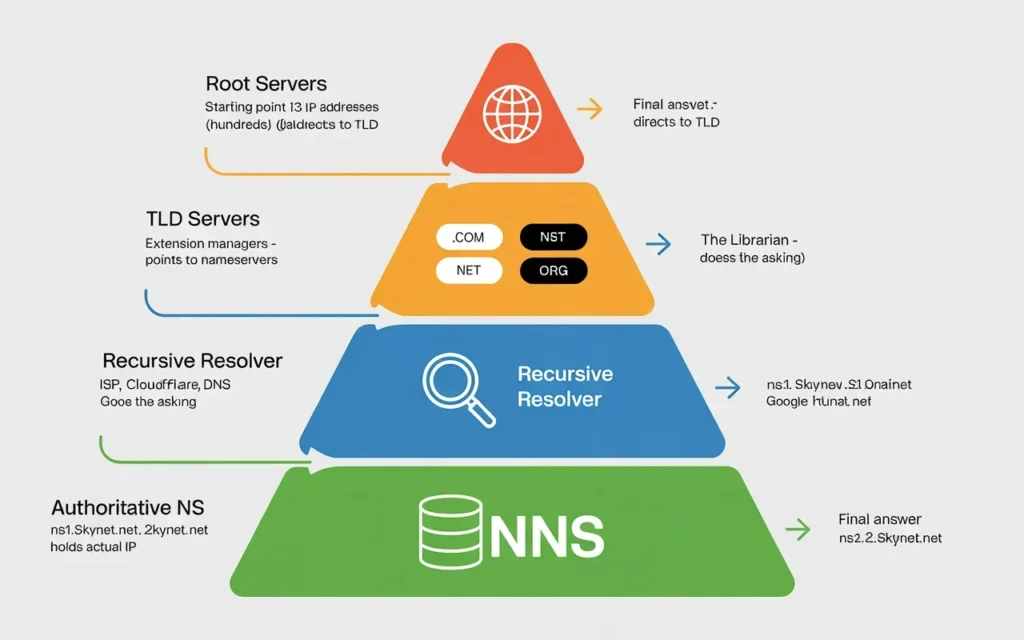
Complete DNS hierarchy explained
To visualize this, imagine looking for a specific book in a massive library system:
- Recursive Resolver: You (the browser) ask the Librarian (Resolver) to find the book.
- Root Server: The Librarian checks the main index (Root), which tells them which section (TLD) to look in.
- TLD Server: The Librarian goes to the
.netsection (TLD Server), which points them to the specific shelf (Authoritative Server). - Authoritative Server: The Librarian looks at the shelf, picks up the specific book, and hands it to you.
Query flow from browser to authoritative server
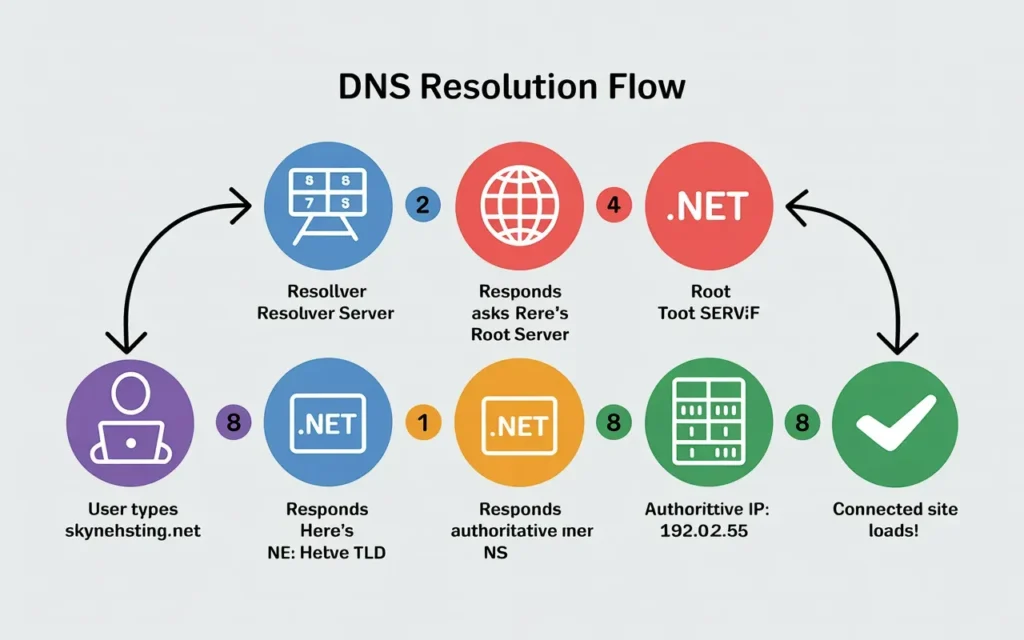
- User: Types
skynethosting.net. - Resolver: Asks Root “Where is
.net?” - Root: “Here is the
.netTLD server.” - Resolver: Asks TLD “Where is
skynethosting.net?” - TLD: “Here is the Authoritative Server.”
- Resolver: Asks Authoritative “What is the IP?”
- Authoritative: “The IP is
192.0.2.55.” - Browser: Connects to
192.0.2.55.
Why DNS resolution happens in milliseconds
This might sound like a long journey, but thanks to optimized infrastructure and high-speed fiber optics, this entire conversation usually happens in less than 50 milliseconds.
What DNS Records Live on Authoritative Nameservers?
Once the resolver reaches the authoritative server, it looks for specific types of “Records.”
A and AAAA records
The A Record is the most common type. It maps a domain name to an IPv4 address. An AAAA Record does the same thing but for IPv6 addresses (which are longer and look like hexadecimal strings).
CNAME records
CNAME (Canonical Name) records are used to create aliases. For example, www.skynethosting.net might be a CNAME that points to skynethosting.net. It tells the browser, “Use the same IP address as the main domain.”
MX and TXT records
MX (Mail Exchange) records tell email servers where to send emails for your domain. If these are wrong, you won’t receive mail. TXT (Text) records are used for verification purposes, such as proving to Google that you own the domain or setting up email security (SPF/DKIM).
NS records and delegation
NS (Nameserver) records indicate which authoritative nameservers handle the domain. These are the pointers that the TLD server uses to send traffic to the right place.
How DNS Caching Improves Speed and Performance
Browser-level DNS caching
If your browser had to do that 4-step lookup every time you loaded an image on a page, the internet would be painfully slow. Browsers store DNS answers for a short time so they can reuse them instantly.
ISP and resolver caching
Your ISP’s recursive resolver also caches answers. If your neighbor visited skynethosting.net five minutes ago, the ISP resolver already knows the IP address and can give it to you immediately without checking the Root or TLD servers again.
TTL and cache expiration
How long does this memory last? That is controlled by the TTL (Time To Live) setting in your DNS records. If you set a TTL of 3600 seconds (1 hour), other servers will cache your IP for one hour before checking for an update.
What Happens When One DNS Server Fails?
DNS redundancy and failover
In the world of hosting, reliability is everything. That is why you are almost never assigned a single nameserver. You will usually see ns1.example.com and ns2.example.com.
Why multiple nameservers are required
By standard, domains require at least two nameservers. If ns1 goes offline due to a power outage or maintenance, the resolver will automatically try ns2.
Impact of DNS outages on websites
If all authoritative nameservers for a domain fail, the website effectively vanishes from the internet. The server could be running perfectly, but no one can find the “address” to get there. This is why choosing a hosting provider with robust DNS infrastructure is critical.
How DNS Server Quality Affects Website Speed and SEO
DNS latency and page load time
Google creates its rankings based on user experience, and speed is a massive factor. If your authoritative nameserver is slow to respond, it adds “latency” to the page load time. A slow DNS lookup can add 100ms or more before the website even starts to load content.
DNS reliability and uptime
If your DNS is flaky, search engine bots may fail to crawl your site. If Googlebot tries to visit your site and gets a DNS error, it can’t index your content. Repeated failures can lead to de-indexing.
SEO risks of poor DNS infrastructure
In 2026, Core Web Vitals are stricter than ever. Investing in cheap, slow DNS is one of the easiest ways to sabotage your SEO efforts before you even write your first blog post.
Why Hosting DNS Infrastructure Matters More Than You Think
Difference between free DNS and premium DNS
Not all DNS servers are created equal. Free DNS provided by basic registrars often operates from a single location with limited capacity. Premium DNS utilizes a global network of servers (Anycast) to ensure that a user in Tokyo gets a DNS response from a server in Tokyo, not one in New York.
Global DNS routing advantages
For a global audience, geographic routing is essential. It ensures the lowest possible latency for users, regardless of their physical location.
Business risks of unreliable DNS
For an e-commerce store or a business portal, DNS downtime equals lost revenue. It creates a perception of unreliability that can damage your brand reputation permanently.
Why Skynethosting.net Provides Reliable DNS Architecture
High-availability authoritative DNS
At Skynet Hosting, we have spent 20 years refining our infrastructure. We understand that your hosting is only as good as the DNS that supports it. Our Reseller and VPS plans are backed by redundant, high-availability DNS clusters.
Global DNS presence
With 25 worldwide locations, our infrastructure ensures that your domain resolution happens close to your users. Whether your traffic is coming from London, Singapore, or New York, our network is designed to respond instantly.
Expert DNS support for businesses
DNS can be tricky. A misplaced period or a wrong IP in an A record can take a site offline. Our 24/7 expert support team helps you troubleshoot complex DNS issues, ensuring your records—from MX to TXT—are configured correctly for maximum uptime and deliverability.
Conclusion
Recap of DNS server roles
We have covered a lot of ground. Remember: The Recursive Resolver does the asking. The Root points to the TLD. The TLD points to the Authoritative server. And the Authoritative Server holds the final answer (the IP address).
Understanding DNS hierarchy in simple terms
While the process is complex, it is ultimately a system of delegation. No single server knows everything, but every server knows who to ask next.
Choosing the right DNS and hosting partner
In the fast-paced digital landscape of 2026, you cannot afford to have a weak link in your infrastructure. Understanding DNS empowers you to make better decisions about your hosting and troubleshooting.
If you are looking for a hosting partner that treats DNS stability with the seriousness it deserves, we are here to help. Check out our reseller and VPS plans at Skynet Hosting to build your presence on a foundation of speed and reliability.
FAQs
What is a DNS server?
How does a DNS lookup work?
What are the main types of DNS servers?
Which DNS records are most important?
Why are DNS servers important for website speed?
How can I make my DNS setup more secure?
