

SPF DKIM DMARC Explained 2026: Complete Email Authentication Setup Guide
TL;DR
- SPF, DKIM, and DMARC are DNS‑based email authentication methods that help block spoofing, phishing, and brand impersonation.
- SPF lists allowed sending servers, DKIM signs messages cryptographically, and DMARC enforces alignment with policies like none, quarantine, or reject.
- Correct SPF, DKIM, and DMARC records significantly improve deliverability and are now expected by major email providers.
- SPF defines authorized IPs or hosts, DKIM publishes a public key in DNS, and DMARC adds policy plus reporting addresses.
- Broken or missing SPF, DKIM, or DMARC can push legitimate email to spam or cause rejection under stricter provider rules.
- Safely deploying DMARC means starting with p=none, reviewing reports, fixing alignment, then gradually enforcing quarantine and reject.
Ever sent an important email to a client, only to find out days later it landed straight in their spam folder? It’s frustrating. And frankly, in 2026, it’s a business risk you can’t afford to take.
With phishing attacks becoming smarter and email providers like Gmail and Yahoo tightening their security rules, hitting “send” isn’t enough anymore. You need to prove you are who you say you are. That’s where the “big three” come in: SPF, DKIM, and DMARC.
If those acronyms sound like alphabet soup to you, don’t worry. You aren’t alone. I’ve spent over a decade helping businesses fix their email delivery issues, and I can tell you that while these protocols sound technical, the concepts behind them are actually pretty simple.
Think of them like a security checkpoint at an airport. SPF is your ticket, proving you’re allowed to fly. DKIM is your passport, verifying your identity hasn’t been faked. And DMARC? That’s the security officer deciding what happens if your papers don’t match up.
In this guide, I’m going to walk you through exactly what these protocols do, why they matter more than ever in 2026, and how to set them up correctly so your emails actually reach the inbox.
What Are SPF, DKIM, and DMARC and Why Do They Matter?
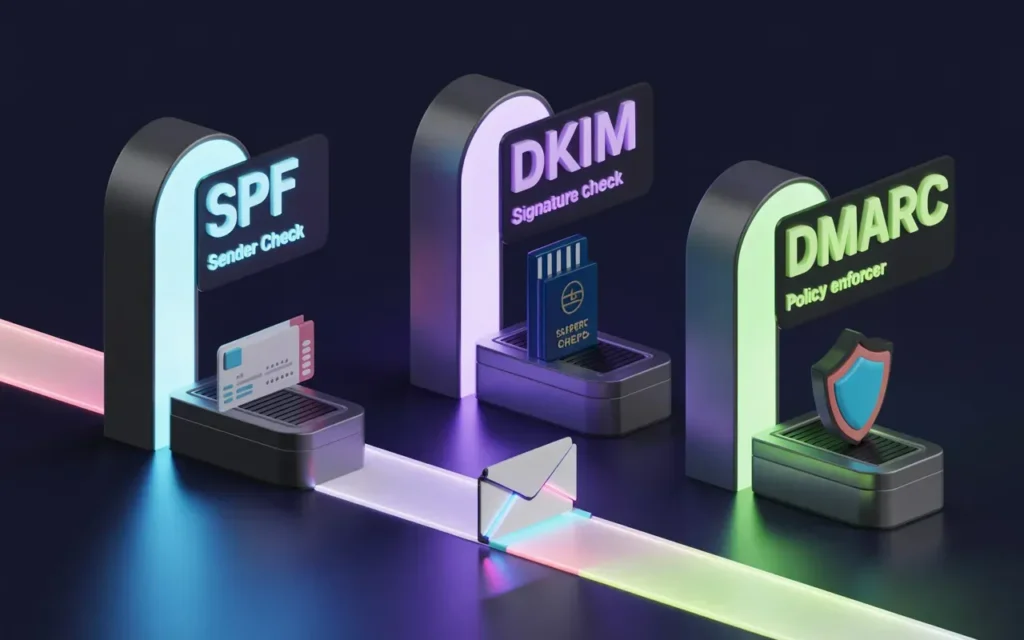
Before we dive into the “how-to,” let’s clear up the “what.” These three protocols work together to authenticate your emails. They tell receiving servers (like the one handling your client’s inbox) that the message is legitimate and hasn’t been tampered with by hackers.
Without them, your domain is wide open to spoofing—where bad actors send emails pretending to be you.
Definition of SPF (Sender Policy Framework)
SPF, or Sender Policy Framework, is the first line of defense. It’s essentially a whitelist of IP addresses that are authorized to send email on behalf of your domain.
When you send an email, the receiver checks your domain’s SPF record. If the email comes from an IP address listed there, it passes. If it comes from an unknown server—say, a hacker’s laptop in a basement—it fails.
Definition of DKIM (DomainKeys Identified Mail)
DKIM stands for DomainKeys Identified Mail. While SPF looks at where the email comes from, DKIM looks at the email itself.
It adds a digital signature to your emails that is linked to your domain. This signature proves two things: first, that the email was indeed sent by your domain, and second, that the message content wasn’t altered in transit. It’s like putting a wax seal on an envelope; if the seal is broken, the receiver knows something is wrong.
Definition of DMARC (Domain-based Message Authentication, Reporting & Conformance)
DMARC is the boss of the operation. It stands for Domain-based Message Authentication, Reporting, and Conformance.
SPF and DKIM are just verification tools—they don’t tell the receiving server what to do if the check fails. DMARC solves this. It uses the results from SPF and DKIM to determine if an email is valid. More importantly, it lets you (the domain owner) set a policy that tells receivers: “If an email fails authentication, throw it in the spam folder” or “Reject it entirely.”
Why email authentication prevents spoofing and phishing
In 2026, email providers have zero tolerance for unauthenticated mail. If you don’t have these records set up, your emails look suspicious.
Hackers love to spoof domains because people trust brands they know. If a criminal sends a fake invoice from “billing@yourcompany.com” and you don’t have DMARC set up, that email might actually land in your customer’s inbox. If you do have these protocols in place, that fake email gets blocked before your customer ever sees it.
How Does SPF Work and How to Set It Up?
SPF is usually the easiest record to set up, but it’s also the easiest to mess up. Let’s look at how it works under the hood.
How SPF verifies sender IP addresses
When an email arrives, the receiving mail server looks at the “Return-Path” domain in the email header. It then queries the DNS (Domain Name System) for that domain to find a TXT record starting with v=spf1.
If the IP address of the sending server matches an IP or service listed in that record, it’s a pass.
Creating and publishing SPF DNS records
To set this up, you need to add a TXT record to your domain’s DNS settings.
A typical SPF record looks like this:v=spf1 include:_spf.google.com ip4:192.168.0.1 -all
- v=spf1: This identifies the record as SPF.
- include:: This authorizes third-party services. If you use Google Workspace, you’d include
_spf.google.com. If you use Skynethosting.net, you’d include our mail servers. - ip4:: This authorizes a specific IP address.
- -all: This is the “hard fail” mechanism. It tells servers, “If the sender isn’t on this list, reject the email.”
Common SPF setup mistakes to avoid
I see a lot of people make the mistake of having multiple SPF records. You can only have one SPF record per domain. If you use multiple services (like Gmail for business and Mailchimp for marketing), you must combine them into a single record using multiple “include” statements.
Another common issue is the DNS lookup limit. SPF is limited to 10 lookups. If you include too many third-party services, your record will break, and your emails might start bouncing.
How DKIM Protects Your Emails
DKIM is a bit more cryptographic, but you don’t need to be a math genius to use it. It relies on a pair of keys: a private key (kept secret on your server) and a public key (published in your DNS).
What DKIM signatures do
When your server sends an email, it uses the private key to create a digital signature for the message header. This signature is attached to the email.
When the email arrives, the receiving server grabs the public key from your DNS records. It uses that public key to decrypt the signature. If the decryption works, it proves the email was signed by your private key—and therefore, by you.
Generating DKIM keys and DNS records
Unlike SPF, you usually don’t write a DKIM record yourself. Your email provider generates it for you.
If you are using cPanel hosting with Skynethosting.net, this is often done automatically. If you use a service like Microsoft 365 or Google Workspace, you’ll find a “Generate new record” button in their admin settings.
Once generated, you’ll get a TXT record name (selector) and a long string of random characters (the key). You just copy and paste these into your DNS zone editor.
How email servers validate DKIM signatures
The validation happens in the background. The server checks if the signature matches the content. If a hacker intercepted the email and changed the bank account number in your invoice, the hash wouldn’t match the signature, and DKIM would fail. This integrity check is vital for preventing “man-in-the-middle” attacks.
What DMARC Does and Why It’s Crucial
DMARC ties everything together. It solves the problem of “Okay, SPF failed… now what?”
Understanding DMARC policies (none, quarantine, reject)

DMARC allows you to set one of three policies:
- p=none: This is “monitoring mode.” You are telling receivers, “Check my emails, but don’t block them if they fail. Just send me a report.” You should always start here.
- p=quarantine: This tells receivers, “If authentication fails, put the email in the spam folder.”
- p=reject: This is the ultimate goal. It says, “If authentication fails, bounce the email. Do not let it reach the user.” This provides maximum security against spoofing.
How DMARC aligns SPF and DKIM
DMARC checks for “alignment.” It ensures that the domain in the “From” header (what the user sees) matches the domain validated by SPF and DKIM.
For example, if you send an email via a third-party newsletter tool, the “Return-Path” might be the newsletter tool’s domain (passing SPF), but the “From” address is your domain. Without proper alignment, DMARC might fail. Proper configuration ensures these domains match or align correctly.
Setting up DMARC DNS records
A basic DMARC record looks like this:v=DMARC1; p=none; rua=mailto:dmarc-reports@yourdomain.com
- v=DMARC1: Identifies the record.
- p=none: Sets the policy to monitoring mode.
- rua=: Tells receivers where to send the daily XML reports about your email traffic.
Monitoring and interpreting DMARC reports
Once you set up the rua tag, you will start receiving daily reports. These are messy XML files that are hard for humans to read. I highly recommend using a DMARC analysis tool (there are many free and paid ones) that turns these files into readable graphs.
These reports will show you every server sending email on your behalf. You might be surprised to find an old marketing tool you forgot about is sending unauthenticated emails!
How SPF, DKIM, and DMARC Work Together
It’s rarely a case of choosing just one. In 2026, the standard is using all three.
Email authentication workflow
Here is the journey of a secured email:
- Send: You send an email. Your server signs it with DKIM.
- Transit: The email travels to the recipient.
- Check 1: The receiver checks SPF. Is the IP authorized?
- Check 2: The receiver checks DKIM. Is the signature valid?
- Check 3: The receiver checks DMARC. Do SPF/DKIM align with the “From” address? What is the policy?
- Result: If DMARC passes, the email goes to the inbox. If it fails, the policy (none, quarantine, reject) is applied.
Preventing spoofing and phishing attacks
By enforcing a p=reject policy, you effectively lock down your domain. A hacker can try to send an email as “ceo@yourdomain.com,” but since they don’t have your private DKIM key and their IP isn’t in your SPF record, the email hits a brick wall.
Improving email deliverability
Internet Service Providers (ISPs) track reputation. If your domain sends authenticated mail, your reputation score goes up. A high reputation means your legitimate marketing emails and newsletters are far less likely to be flagged as spam. It’s a direct ROI on your setup time.
How to Test and Troubleshoot Email Authentication
You’ve added the records. Now, how do you know they work?
Online SPF, DKIM, DMARC validators
There are plenty of free tools available online. Search for “DMARC checker” or “SPF validator.” You simply type in your domain, and the tool will scan your DNS records to see if there are syntax errors or deprecated tags.
Using email headers for verification
You can also do a manual check. Send an email to a Gmail account. Open the email, click the three dots in the top right, and select “Show Original.”
Google gives you a summary at the top. You want to see “PASS” next to SPF, DKIM, and DMARC. If you see “SOFTFAIL” or “FAIL,” you have some debugging to do.
Common issues and solutions
- SPF PermError: Usually caused by exceeding the 10-lookup limit. You might need to “flatten” your SPF record (replacing hostnames with IP addresses).
- DKIM Fail: Often happens if you change hosting providers and forget to move your private keys or update your DNS.
- DMARC Fail: Usually an alignment issue. Check if your third-party senders (like CRM or Helpdesk software) are properly configured to sign emails with your domain, not theirs.
How Skynethosting.net Helps With Email Authentication
We know this stuff can be intimidating. If you are a business owner, you want to focus on sales, not DNS propagation. That’s why at Skynethosting.net, we’ve built tools to make this effortless.
Preconfigured SPF, DKIM, DMARC support
When you host with us, whether it’s our Reseller Hosting or our NVMe SSD plans, we handle the heavy lifting. Our cPanel environment automatically generates valid SPF and DKIM records for your domains. We ensure that your email leaves our servers fully authenticated from day one.
Expert guidance for setup
Got a complex setup with external marketing tools? Our 24/7 support team has seen it all. We can guide you on exactly what to add to your include statements to ensure MailChannels, Google Workspace, or any other service plays nicely with your hosting account.
Monitoring and reporting tools
We provide access to tools that help you monitor your delivery rates. Plus, our premium MailChannels integration (available on select plans) uses AI to identify and stop spam coming from your accounts, protecting your domain’s reputation automatically.
Conclusion
In the digital world of 2026, trust is currency. SPF, DKIM, and DMARC are the mint that prints that currency.
Setting these up might seem like a technical chore, but it’s actually a fundamental branding exercise. It tells the world that you take your business—and your customers’ security—seriously. By following the steps we’ve outlined, you aren’t just tweaking settings; you are ensuring your messages get heard.
Recap of SPF, DKIM, and DMARC importance
Remember: SPF verifies the sender’s IP. DKIM verifies the message integrity. DMARC enforces the rules. You need all three for complete protection.
Step-by-step setup summary
- Create an SPF record listing all your sending IPs.
- Generate and publish DKIM keys for your domain.
- Publish a DMARC record starting with
p=noneto monitor traffic. - Analyze reports and fix any unauthorized senders.
- Move your DMARC policy to
p=quarantineand eventuallyp=reject.
Ensuring secure, deliverable emails in 2026
Don’t let your hard work get lost in the junk folder. Take an hour today to audit your email authentication. If you get stuck, reach out to us at Skynethosting.net—we’re here to help you host securely.
FAQs
What are SPF, DKIM, and DMARC in plain language?
Why do I need SPF, DKIM, and DMARC in 2026?
How does an SPF record actually work?
An SPF record is a TXT entry in DNS that defines allowed sending hosts or IP ranges for your domain. Receiving mail servers compare the sending server’s IP against this list to decide whether the message is authorized or potentially spoofed.
What does DKIM do that SPF can’t?
How does DMARC improve security beyond SPF and DKIM?
What’s the safest way to deploy DMARC without breaking email?
