

Reseller Hosting Features Explained: What You Really Need to Succeed
TL;DR
- Reseller hosting lets you buy server resources wholesale, split them into client accounts, and profit, while the parent host manages complex server infrastructure and maintenance.
- Critical reseller features include WHM/cPanel, white-label branding, NVMe or SSD storage, automated backups, strong security, and WHMCS billing automation to scale without burning time.
- White-label tools, private nameservers, and branded panels make you look like the real hosting provider, protecting margins and building long-term client trust and loyalty.
- Automation via WHMCS handles signups, provisioning, invoicing, and suspensions, turning hosting into mostly passive income rather than constant manual account setup and chasing payments.
- Security, backups, and uptime—SSL/HTTPS, malware scanning, firewalls, daily off-site backups, and 99.9% uptime—are essential to avoid disasters that destroy reputation and client retention.
- Overhyped “unlimited” resources and flashy add-ons matter less than solid performance, clear limits, scalability paths to VPS, and reseller-focused support that can even help your clients.
Starting a hosting business is exciting. I still remember when I landed my first few clients about ten years ago. I was designing websites, and I realized I was leaving money on the table by sending them to GoDaddy or Bluehost. I thought, “Why don’t I just host them myself?”
It seemed like a simple idea. But when I looked at the feature lists for reseller plans, my head started spinning. I saw terms like WHM, inodes, white-labeling, and NVMe. I had no idea which ones actually mattered and which ones were just marketing fluff.
If you are feeling that same confusion right now, don’t worry. You are in the right place.
I have spent the last decade navigating the hosting industry, and I’ve learned exactly what features keep a business running smoothly—and which ones you can ignore. Choosing the right features isn’t just about technical specs. It is about your sanity. It is about automating the boring stuff so you can focus on selling.
In this guide, I am going to break down every essential feature you need to look for. We will cut through the jargon and look at what actually helps you build a profitable, scalable business.
What Is Reseller Hosting and Why Do Features Matter?
Reseller hosting basics explained
Think of reseller hosting like real estate. A large hosting company owns a massive apartment complex (the server). They rent you a whole floor (the reseller plan). You then divide that floor into individual apartments (cPanel accounts) and rent them out to your own tenants (clients).
You pay the big landlord a fixed fee, and you keep whatever profit you make from your tenants. It is a fantastic model because you don’t have to build the apartment complex yourself. You don’t worry about the foundation or the plumbing; you just manage the tenants.
How features impact profit and scalability
The features you choose determine how many “apartments” you can fit on your floor and how happy your tenants will be.
If you pick a plan with poor resource management features, one noisy tenant could wake up the whole floor, causing everyone else to leave. If you lack automation features, you will be stuck manually collecting rent checks (invoices) at 2 AM. The right features let you scale from 10 clients to 100 without working ten times harder.
Common misunderstandings about reseller plans
A lot of beginners think they need to be a server administrator to be a reseller. That is false. The main benefit of reseller hosting is that the provider handles the heavy technical lifting.
Another myth is that you need “unlimited” everything. You don’t. You need reliable limits. We will get into why “unlimited” is often a trap later on, but for now, just know that stability beats flashy marketing every time.
Which Control Panels Are Used in Reseller Hosting?
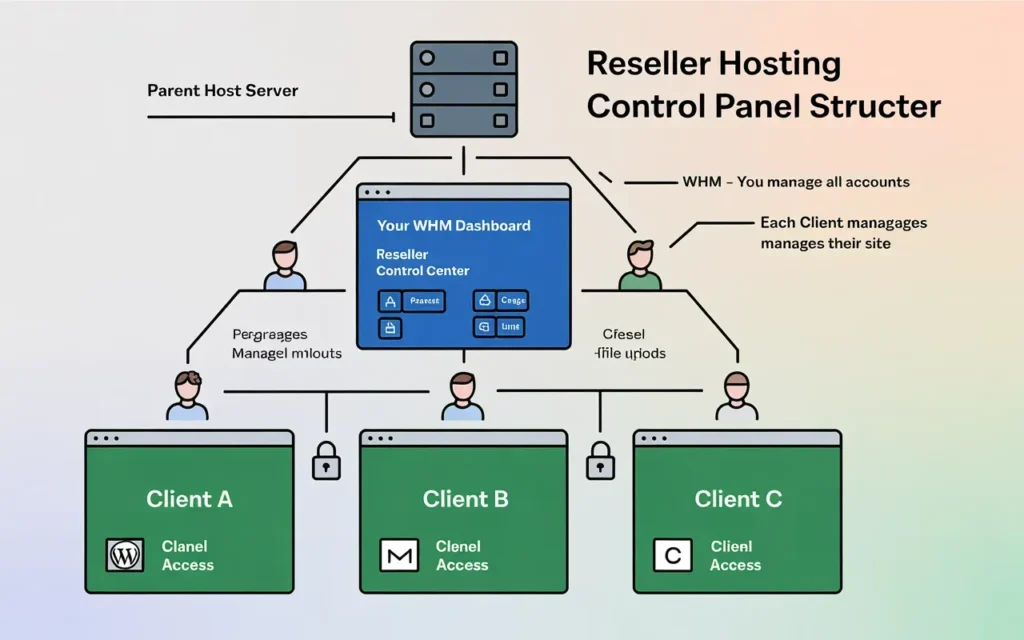
cPanel & WHM explained
If you are looking at Linux-based hosting (which is the industry standard), you are going to see two acronyms everywhere: cPanel and WHM.
WHM (Web Host Manager) is for you, the landlord. This is where you create packages, set prices, and suspend accounts if someone doesn’t pay.
cPanel is for your client, the tenant. This is where they install WordPress, set up email accounts, and manage their files.
Why WHM access is critical for resellers
You cannot run a serious reseller business without WHM access. Some budget hosts might try to sell you a glorified standard hosting plan where you just add domains as “addons.” Do not do this.
Without WHM, all your clients are stuck on one account. If one client gets hacked, they all get hacked. WHM isolates every client into their own secure container. It also lets you create custom packages. You can create a “Starter Plan” with 5GB of space and a “Pro Plan” with 20GB. You control the limits.
Alternative control panels and limitations
While cPanel/WHM is the gold standard, you might see others like Plesk or DirectAdmin. They are fine, and they do the job. However, cPanel is what 90% of your clients will expect. It is what they are used to. If you choose a weird control panel to save a few dollars, you might find yourself spending hours explaining to clients how to do simple tasks. Stick to the industry standard when you are starting out.
What Is White-Label Hosting and Why Is It Important?
Branding hosting under your own company
White-labeling is the art of invisibility. When your client logs into their control panel, they shouldn’t see “HostGator” or “SkynetHosting.” They should see Your Brand.
White-label features allow you to remove the provider’s logo and replace it with your own. This makes you look professional. It makes you look like you own the data center, even if you are running the business from your living room.
Private nameservers and logo customization
This is a big one. Nameservers are the addresses domains point to. Standard nameservers look like ns1.hostingprovider.com.
With private nameservers, you get ns1.yourcompany.com.
Why does this matter? If a savvy client checks their domain settings and sees another company’s name, they might Google them. If they find out they can buy the hosting cheaper directly from the source, you lose a client. Private nameservers protect your business.
Building trust with white-label features
Trust is your currency. If clients feel like you are just a middleman, they might question your value. But if the entire experience—from the billing emails to the control panel—carries your branding, they trust you as their technology partner. It justifies the price you charge.
How Does Account and Resource Management Work?
Disk space, bandwidth, and account limits
Your reseller plan acts as a pool of resources. You might buy a plan with 100GB of disk space and 1TB of bandwidth.
Your job is to slice that pie. You need to be careful not to give away too much. If you allocate 50GB to a client who only uses 500MB, you are wasting potential inventory. Good account management means creating packages that fit realistic needs, not imaginary ones.
Creating and managing client hosting accounts
In WHM, creating an account takes about 30 seconds. You enter the domain, pick a username, and select a package (like “Gold Plan”).
The system does the rest. It creates the cPanel, sets up the DNS zones, and sends the welcome email. As a reseller, you need this process to be fast and error-free.
Avoiding overselling issues
Overselling is a strategy where you sell more space than you actually have, betting that clients won’t use it all. It is like an airline selling more tickets than seats.
It can be profitable, but it is risky. If every client suddenly decides to upload a massive video library, you will hit your limit and your provider might suspend your account. Look for a host that gives you tools to monitor your total usage so you never hit that wall unexpectedly.
What Security Features Should Reseller Hosting Include?
SSL certificates and HTTPS
Ten years ago, an SSL certificate (the little padlock icon) was a luxury. Today, it is a requirement. Google penalizes sites without it.
Your reseller plan must include free AutoSSL. This feature automatically installs and renews security certificates for every domain you host. If you have to manually install certificates for 50 clients every three months, you will hate your life. Make sure it is automated and free.
Malware scanning and firewalls
You are sharing a server with other people. Good reseller hosting includes a server-side firewall (like CSF) and a malware scanner (like Imunify360).
These run in the background. They stop hackers from brute-forcing passwords and clean up infected files if a client installs a bad plugin. You do not want to be the one manually cleaning viruses out of WordPress files. Let the host’s software handle that.
Backups and disaster recovery
Here is a hard truth: clients break things. They will delete their entire website by accident and call you in a panic.
You need a feature like JetBackup or Acronis. These allow you (or the client) to restore their website to how it looked yesterday with a single click. If your reseller plan doesn’t include daily off-site backups, you are playing with fire.
How Does Billing and Automation Work for Resellers?
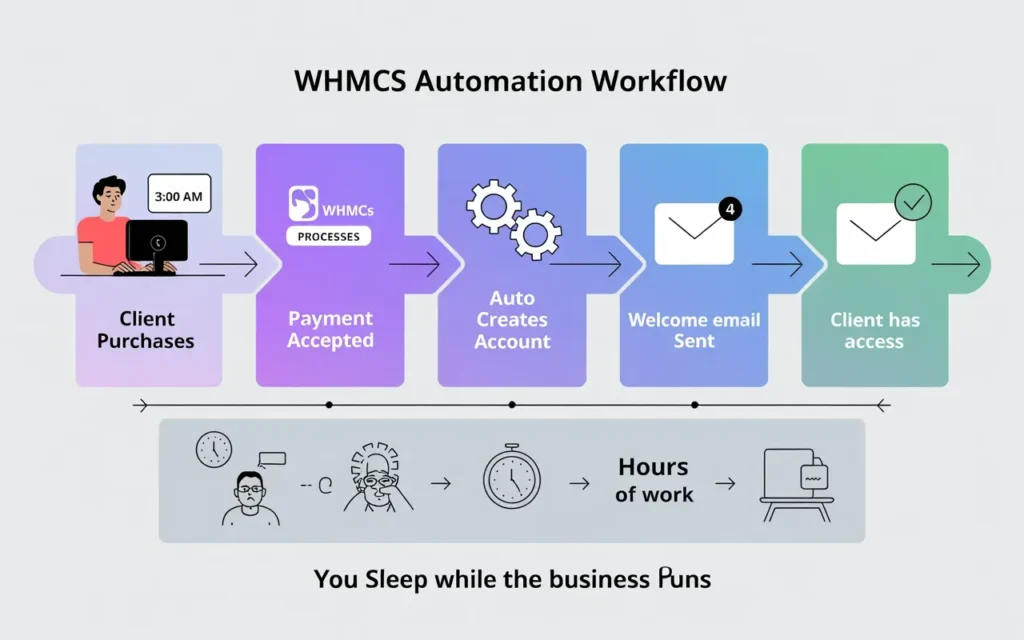
WHMCS integration explained
You cannot scale if you are sending PayPal invoices manually.
WHMCS (Web Host Manager Complete Solution) is the brain of your business. It is a software that handles billing, support tickets, and automation. It connects your website to your WHM account.
Automating invoices, payments, and suspensions
Here is the magic workflow:
- A client buys a plan on your website at 3 AM.
- WHMCS takes their credit card payment.
- WHMCS tells WHM to create the account.
- The client gets their login details instantly.
If they stop paying, WHMCS waits a few days, then automatically suspends their site. You don’t have to lift a finger.
Reducing manual workload with automation
Automation is the only way to make real profit. If you are spending 20 minutes setting up every $10/month account, you are losing money on labor. Look for reseller hosts that offer a free or discounted WHMCS license, as it can be expensive to buy separately.
What Support Features Do Reseller Hosting Providers Offer?
Server-side vs client-side support
This is the most common point of confusion.
- Server-side support: The host fixes the server if it crashes. This is their job.
- Client-side support: You help your client fix their WordPress plugin. This is usually your job.
White-label support options
Some premium providers offer “white-label support.” This means if your client has a technical issue, the host’s team answers the ticket—but they sign it as your support team. This is a game-changer if you want to sleep at night and not worry about technical tickets.
Why 24/7 support matters for resellers
Websites don’t just crash during business hours. If your server goes down on Thanksgiving, you need a provider who is there. Test their support before you buy. Send a ticket at an odd hour and see how fast they reply.
How Important Are Performance and Uptime Features?
SSD/NVMe storage benefits
Speed is everything. Old servers use HDD (spinning hard drives). Newer ones use SSD. The best ones use NVMe.
NVMe drives are incredibly fast—up to 900% faster than traditional SATA drives. If you host a WordPress site on NVMe, it loads instantly. This helps your clients’ SEO rankings and makes them love your service. Don’t settle for old spinning drives.
Server optimization and caching
Look for “LiteSpeed Web Server.” It is a piece of software that replaces the standard Apache server. It handles traffic spikes much better and includes a caching plugin for WordPress that makes sites fly.
Uptime guarantees and monitoring
If your server is offline, your clients lose money. Look for a 99.9% uptime guarantee. This is standard. If a host doesn’t promise this, run away.
What Scalability Features Should You Look For?
Upgrading reseller plans easily
You might start with 20 accounts. Next year, you might have 200. Can you click a button and upgrade your disk space? Or do you have to move to a new server? Seamless upgrades are vital.
Transitioning from reseller to VPS
Eventually, you might outgrow shared reseller hosting. A good provider offers a clear path to a VPS (Virtual Private Server). This gives you your own private slice of power without sharing resources with other resellers.
Supporting long-term business growth
You don’t want to switch hosts every two years. Moving accounts is stressful. Pick a provider that has the infrastructure to support you when you are small and when you are huge.
Which Features Help Increase Reseller Hosting Profits?
Upsell-ready features (email, backups, security)
Profit isn’t just the hosting fee. It’s the add-ons.
- Sell professional email (spam-free).
- Sell premium backup services.
- Sell advanced security scanners.
Bundling hosting with other services
If you are a web designer, bundle hosting with maintenance. “For $50/month, you get hosting, backups, and I update your plugins.” The hosting costs you $5, but the value is $50.
Reducing churn with better features
Churn is when clients leave. They usually leave because the site is slow or down. High-performance features (like NVMe and LiteSpeed) keep clients happy. Happy clients pay their bills for years.
Which Reseller Hosting Features Are Often Overhyped?
Unlimited hosting myths
“Unlimited Disk Space” is a lie. Physically, hard drives have limits. Hosts who promise this usually have hidden limits in the Terms of Service (like a limit on the number of files, or “inodes”). It is better to have a clear limit (like 50GB) that is high-performance than “unlimited” space on a slow, overcrowded server.
Free add-ons that don’t add value
Be wary of “advertising credits” or outdated software bundles. Focus on the core infrastructure: speed, security, and support.
Features beginners don’t actually need
You don’t need root access (administrator access to the whole server) when you are starting. It creates security risks. Stick to managed reseller hosting where the provider secures the server for you.
How Skynethosting.net Supports Resellers With the Right Features
I’ve seen a lot of hosts over the last 20 years, but Skynethosting.net has built their reputation specifically on supporting resellers.
White-label reseller hosting tools
They get the branding aspect right. You get private nameservers and a completely anonymous backend so you can build your own brand identity without interference.
Reliable infrastructure and support
They don’t cut corners on hardware. They use NVMe storage, which is massive for performance. Plus, they offer something rare: End-User Support. This means their team can actually answer support tickets for your clients, completely anonymously. That frees you up to focus on growing your business.
Scalable plans for growing resellers
They include a free WHMCS license on their plans, which saves you about $16 a month right off the bat. With 25 worldwide locations, you can host your clients close to where they live, which improves speed even more.
How to Choose the Right Reseller Hosting Plan Based on Features
Feature checklist for beginners
Before you buy, check these boxes:
- WHMCS License: Is it included?
- Storage: Is it NVMe or SSD?
- Backups: Are they automated?
- White-label: Can I use my own nameservers?
- SSL: Is AutoSSL free?
Matching features to business goals
If you are a developer, look for features like SSH access and Git integration. If you are a marketer, focus on the white-label and easy WordPress installers.
Avoiding costly reseller hosting mistakes
The biggest mistake is buying on price alone. A $2/month plan will give you $2/month performance. Your reputation is on the line. If your clients’ sites go down, they blame you, not the provider. Spend a little more for reliability.
Conclusion
Features matter more than price alone
The difference between a struggling reseller and a successful one is often the foundation they build on. You can be the best salesperson in the world, but if your product (the hosting) is slow or insecure, you will lose clients.
Building a sustainable reseller hosting business
Focus on features that save you time (automation), protect your clients (security), and keep sites fast (performance).
Do your homework. Look for those NVMe drives. Make sure you get that WHMCS license. And choose a partner like Skynethosting.net that understands the reseller model inside and out.
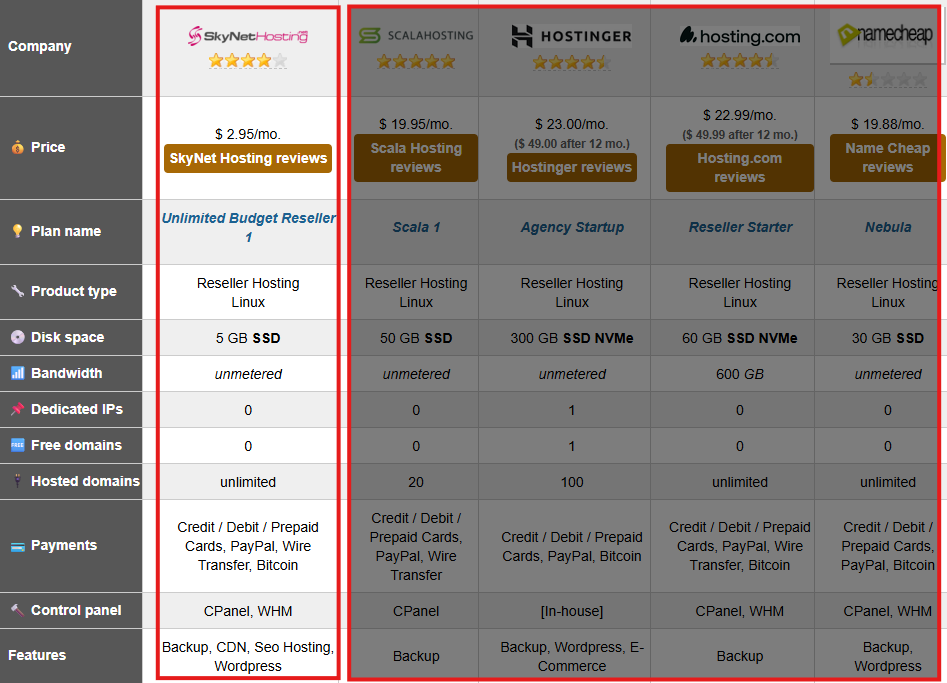
It’s also worth noting that SkyNetHosting.Net’s reseller platform has earned industry recognition as well. The company was ranked the #1 Reseller Hosting provider for 2026 by WHTOP, an independent hosting directory that evaluates providers across thousands of brands using real user feedback, service reliability data, and long-term performance metrics rather than paid listings.
The right features turn a stressful side hustle into a passive income machine. Choose wisely, and good luck!
FAQs
What is reseller hosting in simple terms?
Why are features so important in a reseller hosting plan?
Why do I need WHM and cPanel for reselling?
What does white-label reseller hosting actually do for me?
White-label features hide the parent provider’s branding and show only your logo, domain, and nameservers. Clients see your brand everywhere—login pages, control panels, emails—so they view you as the hosting provider, not a middleman, which protects pricing and perceived value.
How does WHMCS help automate my reseller hosting business?
