

Is Reseller Hosting Suitable for High-Traffic Client Websites?
TL;DR
- Reseller hosting handles sustained traffic fine via caching but fails on sudden spikes from viral campaigns or sales.
- Focus concurrent users over monthly visitors; 50 concurrent on heavy WordPress crashes basic reseller plans easily.
- CloudLinux isolates accounts with CPU/RAM caps, protecting others but throttling high-traffic clients at limits.
- Optimize with LiteSpeed Cache, CDN, image compression to push reseller hosting for blogs up to 1,000 daily visits.
- Use hybrid model: reseller for 95% low-traffic clients, VPS for top 5% high-traffic e-commerce or apps.
- Skynethosting.net offers NVMe, LiteSpeed, 50% VPS discounts for seamless reseller-to-dedicated upgrades.
It is the phone call every agency owner and reseller dreads. It’s 3:00 PM on a Tuesday, and your biggest client calls you in a panic. Their site is crawling. Or worse, it’s down completely.
They launched a marketing campaign, traffic spiked, and your hosting plan couldn’t keep up.
If you have been in the hosting game as long as I have—over a decade now—you know that balancing cost with performance is a tightrope walk. You want to maximize your margins by keeping clients on your reseller account. But you also can’t afford to lose a client because their site crashed during their biggest sale of the year.
So, is reseller hosting actually suitable for high-traffic client websites?
The short answer is: It depends on the type of traffic.
The long answer involves understanding concurrent users, resource limits, and knowing exactly when to hit the “upgrade” button. Let’s break it down, honest and simple.
What Counts as a High-Traffic Website?
Before we talk about server specs, we need to define “high traffic.” I see resellers panic over numbers that really shouldn’t worry them, and ignore numbers that are actual red flags.
Monthly visitors vs concurrent users
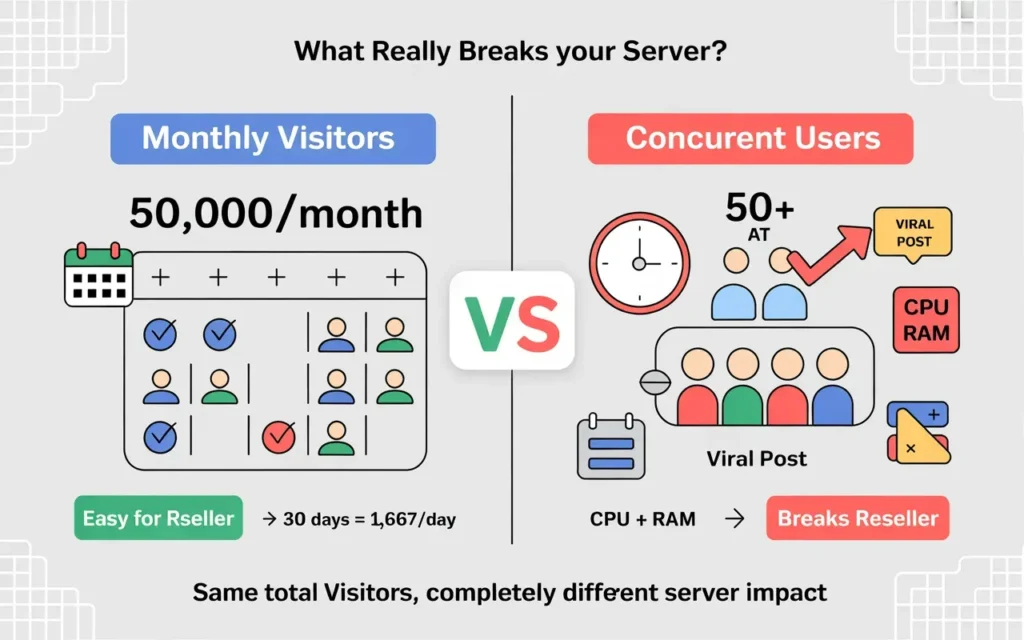
This is the most common misconception I see. A client might tell you, “We expect 50,000 visitors this month.” That sounds like a lot.
But let’s do the math. 50,000 visitors spread evenly over 30 days is about 1,600 visitors a day. Spread that over 24 hours, and you are looking at roughly 60 to 70 visitors an hour. That is basically one visitor per minute.
Even the cheapest budget reseller plan can handle one visitor per minute easily.
The metric that actually breaks servers is concurrent users. This is the number of people clicking around the site at the exact same second. If those 50,000 visitors all arrive within a two-hour window because of a viral email blast, that is a problem. Reseller hosting cares much less about the monthly total and much more about how many people are hitting the database simultaneously.
Traffic spikes vs sustained traffic
Sustained traffic is predictable. It allows caching systems to work efficiently. If a news blog gets a steady stream of readers all day, reseller hosting usually handles it fine because the server isn’t getting hammered all at once.
Traffic spikes are different. Imagine a ticket sales site opening for a concert, or a flash sale on an e-commerce store. These events force the server’s CPU to work overtime instantly. This is where standard reseller hosting often hits a wall.
Why traffic numbers alone can be misleading
You can’t just look at a number and decide. A static brochure website could handle 10,000 daily visitors on a reseller plan because it’s just serving simple HTML files.
However, a heavy WordPress site with a bloated theme, five different page builders, and unoptimized database queries might crash with just 50 concurrent users. It’s not just about how many people visit; it’s about how heavy the website is for the server to load.
How Does Reseller Hosting Handle Website Traffic?
To understand the limits, you have to understand the architecture. When you buy a reseller plan, you aren’t buying a server. You are renting a slice of a massive, powerful server, which you then slice up further for your clients.
Shared server architecture explained
Think of a reseller server like a large apartment building. The building (the server) has massive resources—huge industrial water pipes and electricity lines.
Your clients are the tenants. They each have their own apartment (cPanel account). Generally, the building has enough resources for everyone to live comfortably. But if everyone in the building turns on their shower and runs the dishwasher at the exact same time, the water pressure drops.
Resource allocation in reseller plans
In the old days of hosting, one “noisy neighbor” could crash the whole server. If one client used too much CPU, everyone else slowed down.
Today, high-quality providers use operating systems like CloudLinux. This places a cage around every single cPanel account. It assigns specific limits to each client.
For example, a client might be limited to:
- 1 CPU Core
- 1GB of RAM
- 20 Entry Processes
This protects the server. But it also means that if your client hits that 1GB RAM limit, their site goes down (or shows a “Resource Limit Reached” error), even if the rest of the server is empty.
How account isolation actually works
Account isolation is a safety feature. It ensures that if Client A gets a virus or a massive traffic spike, Client B (who is a dentist with a low-traffic site) doesn’t even notice.
For you as a reseller, this is great because it protects your reputation. But for the high-traffic client, that “cage” is a hard ceiling. Once they hit the ceiling, there is no wiggle room unless you upgrade their specific package limits.
What Are the Performance Limits of Reseller Hosting?
You need to know the technical bottlenecks so you can explain them to your clients.
CPU, RAM, and I/O constraints
- CPU: This is the brain power. Every time a visitor loads a dynamic page (like a checkout page or a WordPress dashboard), the CPU has to “think.” High traffic requires more thinking.
- RAM: This is short-term memory. Heavy plugins and complex scripts eat RAM. If you run out, the site starts swapping to the hard drive, which is slow.
- I/O (Input/Output): This is often the silent killer. It measures how fast data can be written to or read from the disk. Even with fast SSDs, there is a limit on how much data one account can move per second.
Effects of noisy neighbor accounts
Even with CloudLinux isolation, “noisy neighbors” can still be an issue on lower-quality hosts. If the host oversells the server (puts too many resellers on one machine), the overall server load might get high.
This causes “micro-lags.” The site doesn’t go down, but it feels sluggish. For a high-traffic e-commerce client, sluggishness loses sales.
Server throttling and fair usage policies
Most reseller plans have a “Fair Usage Policy.” If a client consistently uses 100% of their allocated CPU for days on end, the host might ask you to move them.
Throttling is automated. If a script tries to use more resources than allowed, the server automatically delays the process. To the user, the site just looks like it’s loading forever. This is the main risk for high-traffic sites on reseller plans—the invisible throttle.
When Is Reseller Hosting Enough for Client Websites?
I don’t want to scare you away from reseller hosting. For 90% of the clients you will likely manage, it is perfect.
Blogs, business sites, and portfolio websites
I have hosted local news blogs that get decent traffic (500-1000 visits a day) on reseller accounts without a hiccup. Why? Because people are mostly reading text. If you use caching properly, these sites barely touch the CPU.
Business portfolios, restaurant menus, and service-based websites (plumbers, lawyers) are also safe bets. They rarely have sudden, massive spikes in concurrent users.
Low-to-medium traffic e-commerce stores
You can absolutely host e-commerce on a reseller account. A local boutique selling handmade jewelry isn’t going to crash the server.
If the store gets steady sales throughout the day, reseller hosting is cost-effective. The danger zone is only during massive launches or Black Friday events.
Regional vs global traffic considerations
If your client is a local bakery in Chicago, their traffic is limited to a specific time zone and geographic area. The server sleeps at night.
Global sites get traffic 24/7. This creates a constant load on the server resources (RAM specifically), which can eventually trigger those resource limits we talked about earlier.
When Does Reseller Hosting Become Risky for High Traffic?
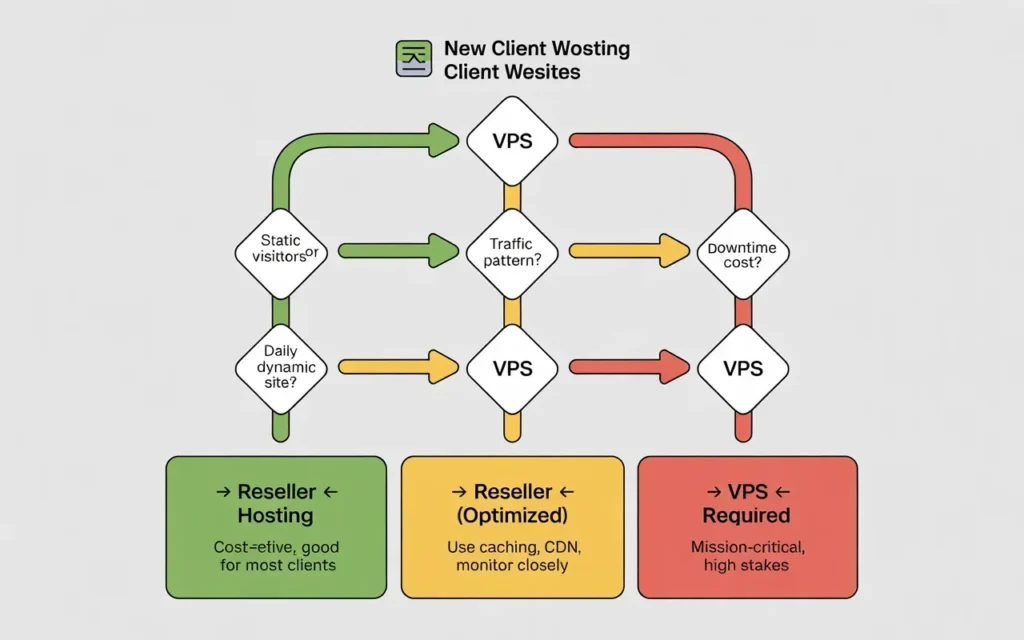
Here is where I would advise you to be cautious. If your client fits these descriptions, you should be looking at a VPS or Dedicated server.
Sudden traffic spikes and viral campaigns
Does your client run TV ads? Do they have an influencer with 1 million followers posting about them tomorrow?
Reseller hosting is not elastic. It cannot magically grow to handle a spike of 5,000 users in ten minutes. The resource cage will slam shut, and the site will throw a 503 error. Nothing looks worse for an agency than a client site crashing right when they are getting famous.
Resource-heavy applications
I once had a client who ran a learning management system (LMS) on WordPress. It wasn’t “high traffic” in terms of visitors, but every user was taking quizzes, generating PDFs, and tracking progress simultaneously.
That is heavy lifting. 20 students taking a quiz simultaneously used more CPU than 2,000 people reading a blog post. Complex apps usually need dedicated resources.
Mission-critical client websites
Ask your client: “How much money do you lose if your website is down for one hour?”
If the answer is “$50,” reseller hosting is fine.
If the answer is “$5,000,” do not put them on a shared reseller plan. The risk isn’t worth the $20/month savings.
How Can You Optimize Reseller Hosting for Higher Traffic?
If you want to squeeze more performance out of your reseller account, you need to optimize. You can make a reseller plan punch above its weight class if you are smart.
Caching and CDN usage
This is non-negotiable. You must use caching.
If your host uses LiteSpeed Web Server (which is ideal), use the LiteSpeed Cache plugin. It saves a static copy of your pages. When a visitor comes, the server shows them the copy instead of generating the page from scratch. This reduces CPU usage by up to 90%.
Also, use a CDN (Content Delivery Network) like Cloudflare. It offloads traffic by serving images and static files from their servers, not yours.
Image and database optimization
Giant images kill bandwidth and I/O limits. Automate image compression on all client sites.
Clean the database. Old revisions and spam comments bloat the database, making every query slower and heavier on the CPU.
Monitoring resource usage
Don’t wait for the client to call. Check your WHM (Web Host Manager) regularly. Look at the “Current User Usage” reports. If you see a client consistently hitting their RAM or CPU limits, reach out to them before they crash. Upsell them on an upgrade.
Reseller Hosting vs VPS for High-Traffic Websites
Eventually, a client will outgrow you. Or rather, they will outgrow your reseller plan.
Performance comparison
A VPS (Virtual Private Server) is like owning a townhouse. You share the building structure, but you have your own dedicated entrance and utilities.
On a VPS, the RAM and CPU are reserved for you. No one else can touch them. This provides consistent performance that doesn’t fluctuate based on other people’s traffic.
Cost vs stability trade-offs
Reseller hosting is cheap and easy. A VPS costs more—usually double or triple the price for a good managed one.
But you are paying for stability. For high-traffic clients, that stability is the product. You aren’t selling hosting; you are selling uptime assurance.
Upgrade paths for growing clients
The best reseller providers offer a seamless path. You should be able to press a button and move a single cPanel account from your reseller node to a VPS without downtime. If your current host requires you to manually migrate files to upgrade, you are in for a headache.
Can You Mix Reseller Hosting and VPS for Clients?
Yes, and this is actually the smartest business model for agencies.
Hybrid hosting strategies
You don’t have to choose one or the other. Keep 95% of your clients on your Reseller Account. These are your bread-and-butter small business sites.
Then, buy a separate VPS for your top 5% of high-traffic clients. You manage everything, but the heavy hitters get their own hardware.
Assigning hosting based on traffic levels
Create tiers in your agency pricing:
- Basic Hosting ($20/mo): Hosted on your Reseller account. Good for up to 10k visits.
- Performance Hosting ($100/mo): Hosted on a VPS. Good for high traffic and e-commerce.
This sets expectations right from the start.
Maintaining brand consistency
Your clients don’t need to know the infrastructure changes. To them, it’s all “Your Agency Hosting.” You just move the backend gears to ensure they stay online.
How Hosting Provider Quality Impacts High-Traffic Performance
Not all reseller plans are created equal. The hardware your host uses determines how much traffic you can handle.
Server hardware and optimization
If your host is still using spinning HDD hard drives or older SATA SSDs, run away. For high traffic, you need NVMe SSDs.
NVMe drives are roughly 900% faster than traditional drives. This matters for database-heavy sites (like WordPress). A reseller plan on an NVMe server can handle significantly more traffic than the same plan on an older server.
Also, look for LiteSpeed Web Server. It handles concurrent connections much better than Apache (the old standard). It is designed to resist DDoS attacks and traffic spikes.
Support response during traffic spikes
When a site crashes, you need help immediately. You cannot wait 4 hours for a ticket response while your client screams at you. Test your potential host’s support. Do they have live chat? Do they actually fix things, or just send generic links?
Why provider choice matters
Providers like Skynethosting.net have built their infrastructure specifically for this. They use NVMe storage and LiteSpeed web servers, which gives you a massive performance buffer compared to budget hosts.
How Skynethosting.net Supports Resellers With High-Traffic Clients
Since we are diving into specific capabilities, let’s look at how Skynet helps you manage this growth.
Optimized reseller servers
Skynet Hosting doesn’t use old hardware. Their reseller plans run on Dual Xeon servers with 128GB RAM and, crucially, NVMe storage. Because the I/O speed is so fast, your client sites can handle more database queries per second.
They also include LiteSpeed Web Server and LSCache by default. This alone can make a reseller account perform like a small VPS.
Easy upgrade to VPS or dedicated
This is a huge feature for growing agencies. Skynethosting.net offers VIP Resellers a 50% recurring discount on VPS and Dedicated servers.
This means when your client outgrows the reseller plan, you can grab a powerful VPS at half price, move them over, and keep your profit margins high. You don’t lose the client; you just move them to a bigger room.
Performance-focused support
With 24/7 end-user support available, Skynet can help troubleshoot load issues. If a client is spiking, their team can help identify if it’s real traffic or a bot attack, helping you save resources.
How Should Resellers Decide Hosting for High-Traffic Clients?
Let’s wrap this up with a decision framework you can use today.
Traffic-based decision checklist
- Is the site purely informational? -> Reseller Hosting is fine.
- Is it an e-commerce store with < 20 orders a day? -> Reseller Hosting is fine.
- Is it a busy news site or viral blog? -> VPS recommended.
- Is it a high-volume e-commerce store? -> VPS or Dedicated required.
- Does downtime cost immediate revenue? -> VPS required.
Risk management for client SLAs
If you promise your client 99.99% uptime in a Service Level Agreement (SLA), be careful with reseller hosting. You are sharing the kernel. For strict SLAs, you need the control of a VPS.
Planning scalable hosting architecture
Start small, but have an exit strategy. Use a host that allows instant upgrades. The goal is to never have to tell a client, “Sorry, we can’t host you anymore because you became too successful.”
Conclusion
So, is reseller hosting suitable for high-traffic websites?
Yes, provided the hardware is modern (NVMe/LiteSpeed) and the traffic isn’t hitting massive concurrent spikes. For the vast majority of small-to-medium business clients, a high-quality reseller plan from a provider like Skynethosting.net is more than enough.
However, recognizing the limit is part of being a professional.
Reseller hosting works—within limits
It is the most profitable way to start. It handles 90% of the web. But for that top 10% of heavy users, you need a plan B.
Choosing stability over short-term savings
Don’t be afraid to charge your high-traffic clients more for a VPS. They will happily pay for the peace of mind. And you will sleep better knowing you won’t get that panic call at 3 AM.
FAQs
Is reseller hosting good for high-traffic sites?
What matters more: monthly visitors or concurrent users?
How to optimize reseller plans for more traffic?
Implement LiteSpeed Cache to serve static pages, add Cloudflare CDN for offloading static files, compress all images automatically, and clean bloated databases regularly. Monitor WHM usage reports daily to spot issues early and upsell upgrades before client complaints.
When should you switch a client to VPS?
Why choose Skynethosting.net for reseller high-traffic?
