

Reseller Hosting Support and SLA Explained: What You’re Really Getting
TL;DR
- Providers support you on servers/network; you handle client WordPress/password issues unless end-user support included.
- Premium plans offer white-label end-user support where provider answers client tickets branded as your team.
- SLAs promise 99.9% uptime (43 min/mo downtime allowed), 99.99% premium; credits only, no cash refunds.
- Exclusions: client errors, misconfigs, force majeure, scheduled maintenance don’t count toward SLA downtime claims.
- Test providers pre-purchase: live chat speed, ticket response; align your client SLA with theirs exactly.
- Skynethosting.net provides 24/7 end-user support, NVMe/CloudLinux stability for reliable reseller uptime goals.
Imagine this scenario. It’s 2:00 AM on a Tuesday. Your phone buzzes. It’s your biggest client. Their e-commerce site is down right in the middle of a flash sale. They are losing money by the second, and they are blaming you.
You log in to check the server. You can’t fix it. It’s an issue at the data center level. You are now entirely at the mercy of your hosting provider’s support team.
If they answer in 5 minutes and fix it in 10, you look like a hero. If they take 4 hours to respond, you might lose that client forever.
This is the reality of reseller hosting. You are the face of the business, but the engine belongs to someone else. When you buy a reseller plan, you aren’t just buying disk space or bandwidth. You are buying a safety net.
In my decade of experience in this industry, I’ve seen more reseller businesses fail due to poor support structures than due to pricing issues. You need to know exactly what you are signing up for.
Let’s break down exactly how reseller support works, what an SLA actually guarantees (and what it doesn’t), and how to read the fine print before you build your brand on someone else’s foundation.
What Does Support Mean in Reseller Hosting?
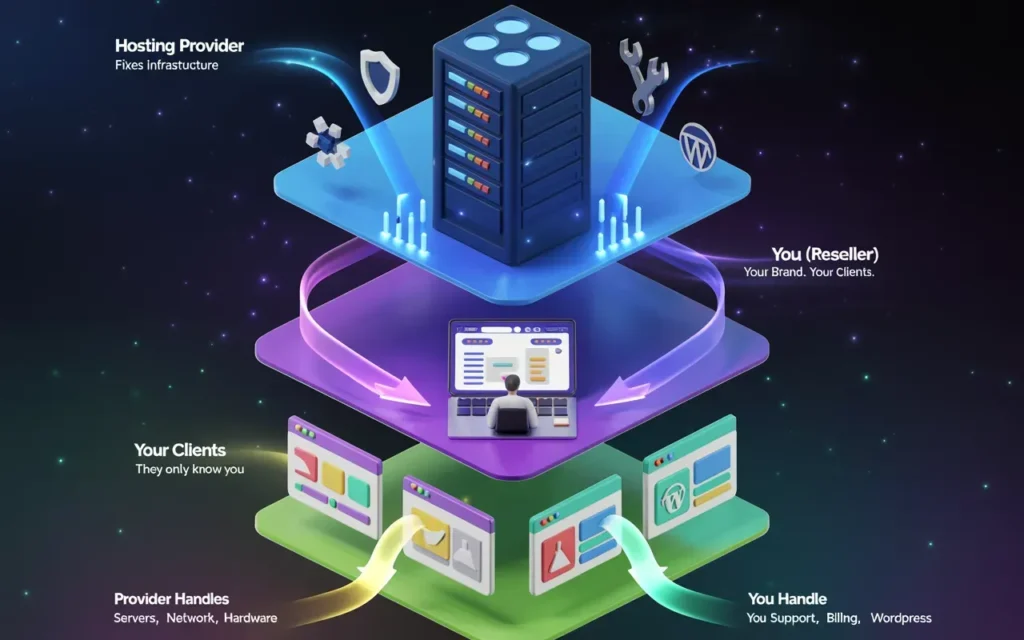
When you sign up for a standard hosting plan, support is straightforward: you have a problem, they fix it. But in reseller hosting, there is a “middleman” dynamic that changes everything.
Provider support vs reseller responsibility
The most common misconception I see among new resellers is assuming the provider will handle everything. That is rarely the case.
In a standard model, your provider supports you (the reseller). They are responsible for the infrastructure. If the server crashes, the network fails, or the hardware melts, that is their job to fix.
You, however, are responsible for supporting your clients. If your client forgets their WordPress password, deletes a file by accident, or doesn’t know how to set up email on their iPhone, that is usually on you to resolve.
Think of it like renting an apartment building to sublet the units. The building owner fixes the roof and the plumbing (infrastructure). But if a tenant locks themselves out or needs a lightbulb changed, they call you, not the building owner.
Who supports the end customer
This is where the lines can get blurry. Most budget reseller plans follow the “you support them” model I described above. You act as the first line of defense. If you can’t fix it, you open a ticket with your provider, wait for an answer, and then relay that answer to your client.
However, some premium providers offer “End-User Support.” I noticed Skynethosting.net offers this, and it’s a game-changer for scaling.
With white-label end-user support, the provider’s team answers your clients’ tickets directly, but they do it under your brand name. They act as your employees. This frees you up to focus on sales rather than troubleshooting email configurations all day.
Why support structure matters
Your reputation is tied to your support speed. If you are the only person doing support, you are on call 24/7/365. If you want to go on vacation or sleep through the night, you need a provider that either:
- Responds to you instantly so you can relay the fix quickly.
- Handles the support for you.
Choosing the wrong structure is the fastest way to burn out.
What Types of Support Are Typically Included?
Not all “support” is created equal. You need to know what you can escalate and what you have to figure out on your own.
Server-level and infrastructure support
This is the non-negotiable stuff. Your provider must handle:
- Operating System updates: Keeping CloudLinux or CentOS patched.
- Web Server software: Ensuring LiteSpeed or Apache is running smooth.
- Database server stability: Making sure MySQL isn’t crashing.
- Uptime monitoring: Watching the physical server status.
If any of these break, it affects all your clients at once. This is the provider’s domain.
Network, hardware, and security support
Beyond the software, the provider manages the physical world. This includes replacing failed hard drives (hopefully seamlessly if they use RAID), managing the data center power, and protecting the network from DDoS attacks.
If your dashboard says “Network Unreachable,” there is nothing you can do. You are relying 100% on their team to be onsite and fixing it.
What resellers must handle themselves
Unless you pay for a managed service or end-user support, prepare to handle:
- CMS issues: Debugging a client’s broken WordPress theme.
- Script errors: Fixing PHP errors in a client’s custom code.
- Billing: Collecting money from your clients.
- Migration: Often, you are responsible for moving your clients’ sites in (though good providers offer tools for this).
What Is an SLA in Reseller Hosting?
SLA stands for Service Level Agreement. It sounds fancy, but in the hosting world, it is essentially a prenup. It outlines what happens when things go wrong.
SLA definition explained simply
An SLA is a contract where the provider promises a certain level of reliability, usually expressed as a percentage of “uptime.”
If they fail to meet that promise—for example, if your site is down for 5 hours—the SLA dictates that they owe you compensation. It is not a guarantee that the server will never go down. It is a guarantee that if it does, they will pay a penalty.
Why hosting providers offer SLAs
Trust. That is the only reason. Since you are building a business on their servers, you need assurance that they are financially motivated to keep the lights on. It tells you that they are confident enough in their infrastructure to put money on the line.
Common SLA terminology
- Uptime: The time the server is accessible via the internet.
- Downtime: The time the server is completely inaccessible.
- Scheduled Maintenance: Planned repairs. This usually does not count as downtime in an SLA.
- Credit: The money they give you back (usually as a discount on next month’s bill).
What Does a Typical Reseller Hosting SLA Include?

You will see numbers thrown around in marketing, but you need to check the Terms of Service to see what they mean.
Uptime guarantees (99.9%, 99.99%, etc.)
The difference between nines is huge.
- 99.9% Uptime: This allows for about 43 minutes of downtime per month. This is the industry standard.
- 99.99% Uptime: This allows for only 4 minutes of downtime per month. This is premium.
- 100% Uptime: This is usually marketing fluff, or it relies on complex cloud clusters. Be skeptical of 100% promises on standard reseller plans.
Response time commitments
Some SLAs cover support speed, not just server uptime. They might promise a “30-minute initial response time.” This means a human will acknowledge your ticket within 30 minutes. It does not necessarily mean they will fix it in 30 minutes.
Maintenance and planned downtime clauses
This is the biggest loophole. If a provider sends you an email saying, “We are rebooting the server Tuesday at 3 AM for updates,” and the server is down for 20 minutes, that does not count against their uptime guarantee. It is considered “maintenance.”
Good providers keep this to a minimum and do it during off-peak hours. Bad providers use it as an excuse for instability.
What Is Not Covered by Most Hosting SLAs?
If you try to claim an SLA credit, you might get denied. Here is why.
Client-side issues
If your client installs a bad plugin that crashes their site, but the server itself is running fine, that is not downtime. That is user error. The SLA covers the server, not the individual website’s health.
Software misconfigurations
If you mess up a DNS record or configure a firewall rule that locks you out, that is on you. The provider’s infrastructure is working; you just can’t reach it because of a setting you changed.
Force majeure and third-party failures
“Force Majeure” is legal speak for “Acts of God.” Floods, earthquakes, wars, or a backhoe digging up a fiber line down the street. Most SLAs exclude events that are physically out of the provider’s control.
How Do Support Quality and SLA Affect Your Clients?
Your clients don’t know who your provider is. They only know you.
Downtime impact on client businesses
If you host online stores, downtime costs money. If you host corporate email, downtime stops communication. Clients are generally understanding of a standard 5-minute blip. They are not understanding of a 4-hour outage with no updates.
Reputation risks for resellers
When downtime happens, you are the one responding to angry emails. If your provider leaves you in the dark, you have nothing to tell your clients. You look incompetent.
I have seen resellers lose 20% of their client base after a single 24-hour outage because they couldn’t get a straight answer from their provider.
SLA gaps resellers must manage
If your provider guarantees 99.9% uptime, but you promise your clients 100% uptime, you have created a gap. You are liable for that gap.
Always align your promises with your provider’s reality. If your provider refunds you $5 for downtime, but you have to refund your client $50, you are losing money.
How to Evaluate Reseller Hosting Support Before Buying
Don’t wait until things break to test the support.
Support channels and availability
Do they have Live Chat? Is it 24/7? Is there a phone number?
Check if the “24/7” claim applies to technical support or just sales. Many hosts have 24/7 sales, but tech support goes home at 5 PM.
Average response vs resolution times
Send a test ticket before you buy. Ask a technical question, like “What are the PHP limits?” See how fast they reply. If it takes 24 hours to answer a pre-sales question, run away. They will be even slower once they already have your money.
Red flags in support promises
- “Unlimited Support”: Nothing is unlimited.
- Vague terms: If they can’t define their uptime guarantee in numbers, it doesn’t exist.
- Outsourced support: If the support team clearly doesn’t know the infrastructure and is just reading from a script, you will struggle during a crisis.
How to Read and Compare Hosting SLAs Correctly
Fine print that matters
Look for the “monitoring” clause. Some providers only count downtime if their internal monitor reports it. If your monitor says it’s down but theirs says it’s up, they might deny the claim.
Credit compensation vs real protection
SLA compensation is almost always in service credits. They will give you a free month of hosting. They will rarely write you a check for lost business revenue.
The SLA is not insurance for your business losses; it is a penalty mechanism for the provider.
SLA comparison checklist
When comparing Provider A and Provider B:
- What is the uptime %?
- How do they calculate it? (Monthly or yearly?)
- What is the max credit? (Usually capped at 100% of the monthly fee).
- How do I claim it? (Do you have to open a ticket within 7 days?)
How Resellers Can Create Their Own SLA for Clients
You should offer your clients some assurance, but be smart about it.
Aligning your SLA with the provider’s SLA
Copy your provider’s SLA terms. If they promise 99.9%, you promise 99.9%. If they exclude “Force Majeure,” you exclude it too. Never promise more than your supplier can deliver.
Setting realistic uptime promises
99.9% is safe. It sounds good to customers but gives you wiggle room. Avoid using the word “guarantee” if you can; use “uptime goal” or “commitment” in your marketing to lower legal liability.
Managing expectations during outages
Transparency is key. If your provider tells you a switch failed, tell your clients (in simple terms) that hardware is being replaced. Clients hate silence more than they hate downtime.
When Support and SLA Should Trigger an Upgrade
Sometimes, support issues aren’t the provider’s fault—they are a sign you have outgrown your plan.
Shared reseller limits
Reseller hosting is usually on a shared server. If your clients are using too much CPU or RAM, the provider might throttle you. This looks like downtime, but it’s actually a resource limit.
Moving to VPS or dedicated hosting
If you need custom configurations or higher reliability, you move to a VPS (Virtual Private Server). Here, you aren’t fighting other resellers for resources.
SLA improvements at higher tiers
Dedicated servers often come with better SLAs. Since you are paying more, the provider prioritizes your hardware replacements. If a drive fails on a $10 reseller plan, you wait in line. If it fails on a $200 dedicated server, you are often priority #1.
How Skynethosting.net Handles Reseller Support and SLA
Looking at Skynet Hosting specifically, they have structured their support to solve the exact pain points I mentioned earlier.
Infrastructure-level support coverage
They use CloudLinux and LiteSpeed Webserver. This is crucial for resellers because CloudLinux isolates your tenants. If one of your clients gets a traffic spike, it doesn’t crash your other clients. This stability makes it much easier for them to hit their uptime goals.
They also mention NVMe storage, which is significantly less prone to failure than spinning mechanical drives, adding another layer of physical reliability.
Transparent uptime commitments
They openly advertise their network and server monitoring. With 25 worldwide locations, they have a distributed risk model. If one network path has issues, it doesn’t necessarily take down the whole global operation.
Reseller-focused escalation process
The standout feature here is the End-User Support. Skynet allows their team to answer your clients anonymously.
This is massive for an SLA perspective. It means the “Response Time” your client experiences is based on Skynet’s 24/7 team, not on whether you are awake to check your email. It effectively upgrades your personal SLA to an enterprise level without you doing the work.
Conclusion
At the end of the day, your hosting provider is your business partner. An SLA is just a piece of paper until things go wrong.
When you are choosing a reseller host, look past the “Unlimited Bandwidth” marketing. Look at the support structure. Look at the uptime history.
Can you reach them? Will they help your end users? Do they have a proven track record?
Your brand’s reputation is built on reliability. Don’t risk it to save a few dollars a month. Choose a provider like Skynet that offers the infrastructure, the support team, and the technology to keep your clients online and happy.
FAQs
What support does reseller hosting actually include?
How does a reseller hosting SLA work?
What isn’t covered by typical SLAs?
How to evaluate support quality before buying?
