

SaaS Hosting Architecture: Designing Scalable and Reliable Platforms
TL;DR
- Multi-tenant design shares infrastructure across customers while logically isolating data via tenant IDs or schemas.
- Load balancers distribute traffic evenly; auto-scaling groups add resources during peaks without downtime.
- Microservices architecture decouples features into containers (Kubernetes/Docker) for independent scaling and updates.
- Databases use partitioning or separate instances per tenant to ensure security and compliance like GDPR.
- API gateways manage authentication (OAuth/JWT), rate limiting, and third-party integrations centrally.
- Monitoring/billing layers (Stripe, Prometheus) track usage, automate invoicing, and maintain SLAs automatically.
Building a SaaS product is exciting. But here’s the thing most founders and developers underestimate: your hosting architecture will make or break your platform before your users even notice your features.
I’ve spent over a decade working with SaaS companies across all sizes, from two-person startups to enterprise platforms serving millions of users. The ones that scale smoothly? They got their hosting architecture right early. The ones that struggle? They usually outgrew a setup they never properly planned.
This guide walks you through everything you need to know about SaaS hosting architecture. What it is, how it works, which components matter most, and how to design a system that handles growth without falling over. By the end, you’ll have a clear picture of how to structure your platform for performance, security, and reliability.
What Is SaaS Hosting Architecture?
Definition and key purpose
SaaS hosting architecture is the technical blueprint behind how your software-as-a-service application runs, scales, and stays available to users. It covers everything from where your code lives to how data is stored, how traffic is routed, and how the system recovers when something goes wrong.
Think of it as the foundation of a building. Users never see it. But if it’s poorly designed, the whole structure becomes unstable over time.
The core purpose is simple: keep your application fast, secure, and always available, no matter how many customers you serve.
How SaaS differs from traditional web hosting
Traditional web hosting is built for relatively static workloads. One website, a fixed amount of traffic, straightforward requirements.
SaaS is different. You’re serving multiple customers simultaneously from a single platform. Each one expects consistent performance, total data privacy, and zero downtime. Traffic patterns are often unpredictable. Customer data keeps growing. New features ship constantly.
That’s why the hosting infrastructure behind a SaaS product needs to be far more flexible and resilient than what you’d use for a standard business website. For a detailed comparison of how hosting types differ, this breakdown of cloud hosting vs VPS vs dedicated is worth reading.
Single-tenant vs multi-tenant models
This is one of the first architectural decisions you’ll make, and it shapes almost everything else.
In a single-tenant model, each customer gets their own isolated instance of the application and database. More secure by design. Easier to customize per client. But expensive to scale, because every new customer means a new environment to maintain.
In a multi-tenant model, all customers share the same application instance. Data is logically separated using tenant IDs, row-level security, or separate database schemas, but the infrastructure is shared. This is far more cost-efficient and scales much more easily.
Most modern SaaS platforms run on multi-tenancy. Salesforce, Slack, HubSpot, all of them serve millions of tenants from shared infrastructure. The key is building strong isolation so customers never see each other’s data.
What Are the Core Components of SaaS Hosting?
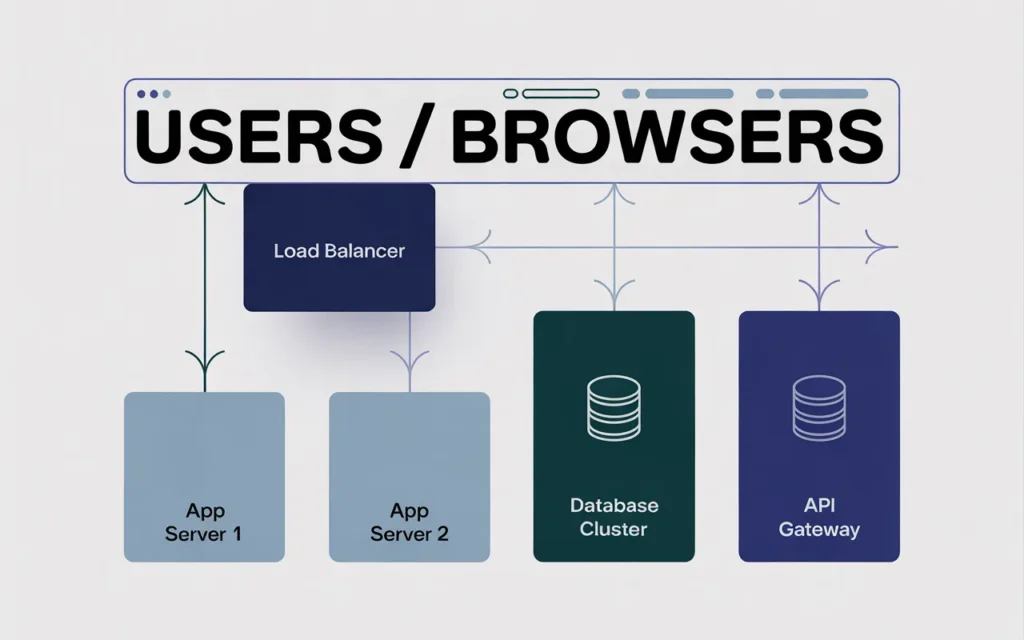
Application servers and web servers
Your web server handles incoming HTTP requests and routes them to the right place. NGINX and Apache are two of the most common choices. LiteSpeed is also popular for performance-sensitive environments.
Your application server is where your business logic runs. This could be Node.js, Python, Ruby, PHP, or any number of frameworks depending on your stack. The two layers often work together, with the web server acting as the front door and the application server doing the heavy processing behind it.
Databases and storage layers
The database layer is often the most critical, and the most frequently underestimated, part of SaaS hosting architecture.
You’ll typically have a primary relational database like PostgreSQL or MySQL handling structured data. Depending on your needs, you might add a NoSQL layer for unstructured data, a caching layer like Redis for fast reads, and object storage for files, media, and backups.
Multi-tenant platforms need to think carefully about how data is partitioned. Shared databases with row-level security are cost-efficient. Separate schemas per tenant offer more isolation. Separate databases per tenant offer maximum isolation but at a higher operational cost.
API and microservices infrastructure
Most SaaS platforms expose APIs, either for customers to integrate with or for their own front-end applications to consume. Your API layer needs to be fast, authenticated, and rate-limited to prevent abuse.
As platforms grow, many teams shift from a monolithic application to a microservices architecture. Instead of one large application, you have many smaller, independent services, each responsible for a specific function. This makes individual components easier to scale and update without touching the whole system.
How Does Multi-Tenant Architecture Work?
Sharing resources while isolating customer data
The fundamental challenge in multi-tenancy is serving many customers from one system while ensuring each customer only ever sees their own data.
The most common approach is adding a tenant_id column to every table in the database. Every query filters by this ID, so Customer A’s records never appear in Customer B’s results. Combine that with row-level security policies enforced at the database level, and you have a strong baseline of data isolation.
As noted by the team at SuperTokens, multi-tenant systems can reduce infrastructure costs by up to 50% compared to single-tenant setups, because shared resources are used far more efficiently.
Benefits for cost efficiency and scalability
When you share infrastructure across tenants, each new customer adds very little overhead. You’re not spinning up new servers or databases for every signup. You’re adding rows to an existing system.
This dramatically reduces your hosting costs per customer. It also means you can onboard customers instantly. No provisioning delay, no manual setup, just a new tenant record and they’re in.
Scaling becomes centralized too. Add more compute power to your shared environment, and all tenants benefit simultaneously.
Security considerations for multi-tenant environments
Shared infrastructure requires stricter security discipline. A misconfigured query that forgets the tenant filter could expose another customer’s data. That’s a serious breach.
Defense in depth is essential here. Enforce tenant filtering at multiple layers: in the application code, at the database level via row-level security, and through strict access controls in your API layer. Regular security audits and automated testing for data leakage are non-negotiable.
Encryption at rest and in transit, strong authentication, and principle of least privilege access all apply with extra urgency in a multi-tenant system.
How Do Cloud Hosting Platforms Support SaaS?
Auto-scaling and resource allocation
One of the biggest advantages cloud infrastructure offers SaaS platforms is auto-scaling. Your application can automatically allocate more CPU, memory, and instances when traffic spikes, then scale back down when things quiet.
This means you’re not overprovisioning for peak load 24/7. You match resources to actual demand in real time. For SaaS platforms with unpredictable or seasonal usage patterns, this keeps costs manageable while maintaining performance.
Container orchestration tools like Kubernetes are widely used here. They manage the deployment, scaling, and operation of containerized application components, spinning up new pods when load increases and terminating them when it drops.
Load balancing and redundancy
Load balancers sit in front of your application servers and distribute incoming traffic across multiple instances. No single server takes all the hits. If one instance has a problem, the load balancer routes traffic to healthy ones automatically.
Redundancy goes hand in hand with this. Running your application across multiple availability zones or data centers means a localized outage doesn’t take down your entire platform. Your SaaS stays available even when individual servers fail.
SkyNetHosting.Net operates 25+ global data centers with redundant power, cooling, and network connections, giving SaaS platforms a strong foundation for geographic redundancy.
Monitoring and performance optimization
You can’t fix what you can’t see. Monitoring your SaaS infrastructure in real time is critical. Tools like Prometheus and Grafana are widely used to track application performance, database query times, server resource usage, and error rates.
Set up alerts for anomalies before they become outages. Proactive monitoring catches a database connection leak or a memory spike long before it cascades into a customer-facing incident. For more on what managed monitoring looks like in practice, see this guide to cloud managed data center services.
What Security Measures Are Essential for SaaS Hosting?
Data encryption at rest and in transit
All customer data should be encrypted in transit using TLS 1.2 or higher. That protects data moving between users’ browsers and your servers, and between internal services.
At rest, AES-256 encryption is the widely recommended standard. This ensures that even if someone gains physical access to storage media, the data is unreadable without the encryption keys.
For SaaS platforms operating in regulated industries, compliance with GDPR, HIPAA, and PCI-DSS often mandates these encryption standards explicitly.
Access control and authentication
Strong identity and access management is foundational. Users should authenticate through secure methods, multi-factor authentication is increasingly expected by enterprise customers.
Internally, every service and team member should operate on the principle of least privilege. No one gets more access than they need for their specific role. API keys and service credentials should be rotated regularly and never hardcoded in source code.
For multi-tenant platforms, role-based access control (RBAC) within each tenant context adds another layer. A member of Tenant A’s organization can’t escalate privileges into Tenant B’s data, even if they know where to look.
Backup and disaster recovery strategies
Backups aren’t optional. They’re your last line of defense against data loss, whether from a bug, a bad deployment, a ransomware attack, or an accidental deletion.
Automate backups and store them in geographically separate locations from your primary data. Test restores regularly. Knowing your backups exist is not the same as knowing they work.
Your disaster recovery plan should define clear recovery time objectives (RTO) and recovery point objectives (RPO). How long can you afford to be down? How much data can you afford to lose? Those answers shape your entire backup and failover strategy.
How Important Is High Availability in SaaS Architecture?
Redundant servers and failover systems
High availability means your platform keeps running even when individual components fail. The architecture achieves this through redundancy: multiple servers, multiple database replicas, multiple network paths.
When a primary server fails, a standby automatically takes over, often in seconds. Users may not even notice. This kind of failover is only possible if it’s designed in from the start.
Minimizing downtime for customers
Downtime is expensive. Not just in revenue, but in customer trust. SaaS customers expect their tools to be available whenever they need them. An outage during a critical workflow can cost them time, money, and confidence in your platform.
Planned maintenance shouldn’t mean downtime either. Blue-green deployments and rolling updates let you push new code to production without taking the application offline.
SLA and uptime considerations
Service level agreements define what uptime you’re committing to customers. A 99.9% uptime SLA sounds solid, but that still allows for about 8.7 hours of downtime per year. Enterprise customers often require 99.99% or higher.
Your hosting infrastructure needs to be capable of meeting your SLA commitments. That means redundancy at every layer: compute, database, storage, and networking. SkyNetHosting.Net backs its infrastructure with a 99.9% uptime SLA and proactive server monitoring, which provides a reliable baseline for SaaS platforms that need consistent availability.
How Does Containerization and Microservices Benefit SaaS Hosting?
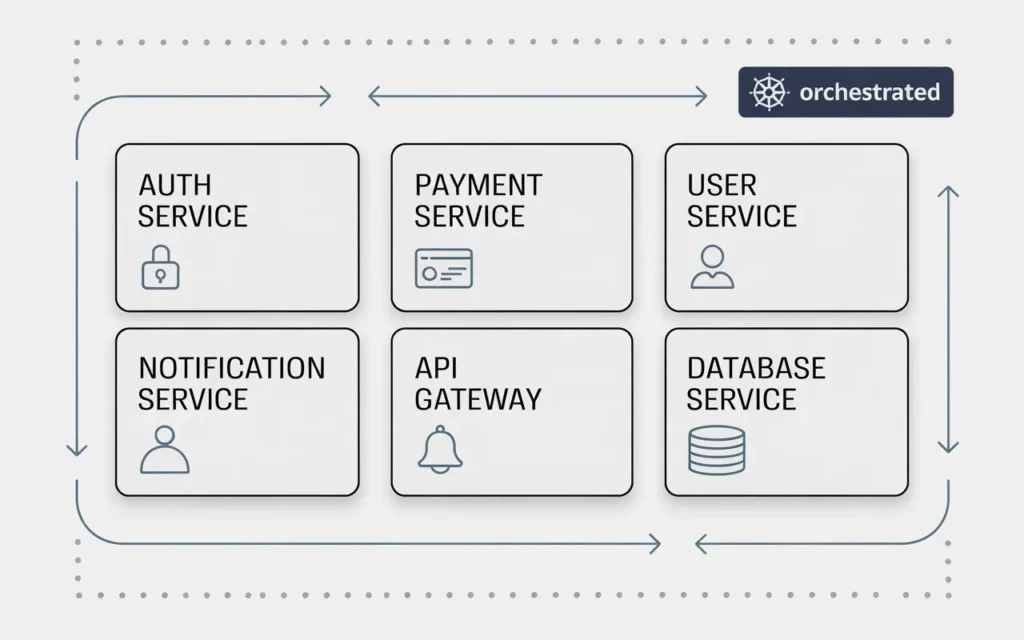
Independent service deployment
Containerization packages each application component, along with its dependencies, into an isolated, portable unit. Docker is the most common container runtime. Kubernetes manages those containers at scale.
The major benefit is that individual services can be deployed, updated, and scaled independently. Your payment processing service can be updated without touching your user authentication service. This reduces deployment risk and speeds up the release cycle.
Easier scaling and maintenance
With a monolithic application, scaling means scaling everything, even the parts that don’t need it. With microservices, you scale only the components under pressure. Your API gateway gets more instances during a traffic spike while your background jobs continue running on the same allocation.
Maintenance becomes more targeted too. Isolating a bug to a single service is far easier than hunting through a monolith. And if a service needs a major refactor, you can rebuild it without touching the rest of the platform.
Faster updates and continuous deployment
Microservices naturally support continuous integration and continuous deployment (CI/CD) pipelines. Small, independent services can be tested and released frequently without the complexity of coordinating a full-platform deployment.
For SaaS companies, faster deployments mean faster iteration. You can respond to customer feedback, fix bugs, and ship improvements in days rather than weeks.
How Does SkyNetHosting.Net Inc. Support Scalable SaaS Hosting?
High-performance cloud infrastructure
SkyNetHosting.Net runs NVMe SSD storage across its infrastructure, which delivers substantially faster read/write speeds than traditional SATA drives. For SaaS applications with database-heavy workloads, that difference is felt directly in application response times.
With 25+ global data centers and LiteSpeed-optimized servers, the infrastructure is built for the kind of consistent, high-throughput performance that SaaS platforms demand. Whether you’re choosing between infrastructure tiers or planning for growth, resources like this guide on choosing the right VPS plan help make the decision less overwhelming.
Multi-tenant and dedicated solutions for SaaS
Not all SaaS platforms have the same requirements. Early-stage products benefit from cost-efficient managed VPS hosting. Established platforms serving enterprise clients may need dedicated resources with stronger isolation guarantees.
SkyNetHosting.Net offers both. You can start on managed VPS and migrate to dedicated infrastructure as your customer base and compliance requirements grow, without changing providers or rebuilding your stack from scratch. For a full comparison of options, this breakdown of cloud, VPS, and dedicated hosting is a useful reference.
If you’re also managing client billing and provisioning for a SaaS or hosting business, integrating a platform like WHMCS can automate account creation, invoicing, and service delivery, eliminating manual overhead as you scale.
Reliable uptime and monitoring for mission-critical applications
SaaS applications aren’t forgiving of downtime. SkyNetHosting.Net provides 24/7 monitoring and support from technical staff, not automated scripts, so issues are identified and escalated quickly. For resellers and agencies building SaaS offerings on top of hosting infrastructure, that level of support reduces the operational burden significantly. You can explore options in more detail through their best VPS hosting provider guide.
How Do You Choose the Right SaaS Hosting Architecture?
Matching architecture to application complexity
A simple SaaS product with a few hundred users doesn’t need Kubernetes and a microservices mesh. Over-engineering early wastes time and creates unnecessary complexity.
Start with the simplest architecture that meets your current reliability and performance needs. A well-configured managed VPS with a solid database and automated backups gets many SaaS platforms through their early growth stages without issue.
Add complexity only when a real problem demands it. Traffic volume, performance bottlenecks, compliance requirements, team size, all of these signal when it’s time to evolve your architecture.
Planning for growth and scaling needs
Think at least 12 to 18 months ahead. If you’re onboarding customers at a consistent rate, when will your current infrastructure start to strain? Plan your migration or upgrade before you hit the ceiling, not after.
Horizontal scaling, adding more instances, is generally more flexible than vertical scaling, upgrading to a bigger server. Design your application to support stateless horizontal scaling from the start, and it becomes much easier to grow. This is where understanding the tradeoffs between colocation and cloud hosting becomes relevant as your infrastructure strategy matures.
Avoiding overprovisioning or underperformance
Both failure modes are costly. Overprovisioning burns your budget on idle resources. Underprovisioning causes performance problems that drive customers away.
Monitor actual resource usage, not theoretical maximums. CPU usage consistently above 70%, memory above 80%, these are real signals to act on. Right-sizing your infrastructure based on observed data gives you both cost efficiency and headroom for growth.
Build Your SaaS on Infrastructure That Scales With You
SaaS hosting architecture isn’t a one-time decision. It’s an ongoing design discipline that evolves as your product and customer base grow.
The fundamentals stay constant. Multi-tenancy for efficiency and scale. Strong data isolation and encryption for security. Redundancy and failover for availability. Containerization for deployment flexibility. And proactive monitoring so you see problems before your customers do.
Get these foundations right, and your hosting infrastructure becomes a competitive advantage. It lets you ship faster, serve more customers, and maintain the trust that keeps them renewing.
If you’re evaluating hosting infrastructure for a SaaS platform, SkyNetHosting.Net provides the managed cloud and VPS solutions, global data center coverage, and 24/7 expert support that mission-critical applications need. Explore their cloud server hosting for business to see what a well-supported hosting foundation looks like in practice.
For agencies and resellers building SaaS offerings on top of hosting infrastructure, their VPS reseller options also provide a scalable path to building your own managed hosting business.
FAQs
What defines SaaS hosting architecture?
SaaS architecture delivers software to multiple tenants via shared cloud infrastructure with strict data isolation using tenant IDs or schemas. It includes load balancers, microservices, container orchestration, and API gateways for secure, scalable multi-customer delivery worldwide.
How does multi-tenancy work securely?
Multi-tenancy shares app servers/databases across customers but isolates data through unique tenant identifiers, row-level security, or dedicated schemas per client. Encryption and access controls ensure one tenant cannot access another’s information despite running on identical infrastructure layers.
Why use microservices in SaaS platforms?
Microservices split monolithic apps into independent, containerized services (via Docker/Kubernetes) that scale separately based on demand. This enables faster deployments, fault isolation, and easier feature additions without disrupting the entire platform for all customers simultaneously.
What role do API gateways play?
API gateways centralize authentication (OAuth 2.0/JWT), rate limiting, caching, and request routing to backend microservices. They simplify third-party integrations, enforce security policies across tenants, and provide analytics on API usage patterns for optimization decisions.
How to scale SaaS during traffic spikes?
Auto-scaling groups monitor CPU/load metrics and spin up container instances instantly via Kubernetes orchestration. Load balancers distribute incoming requests evenly while CDN edge caching reduces origin server strain, ensuring zero-downtime scaling for global user growth.
What monitoring ensures SaaS reliability?
Prometheus/Grafana track latency, error rates, resource utilization across microservices; Stripe handles automated billing cycles. Alerting systems notify teams of SLA breaches while audit logs maintain GDPR/HIPAA compliance through comprehensive tenant activity and performance tracking.
