

How NVMe VPS Hosting Improves Website Speed & SEO Rankings
TL;DR
- NVMe handles 64K parallel queues versus SATA’s single queue, achieving 9.7x IOPS at realistic queue depth 64.
- P99 database latency drops from 12.4ms (SATA) to 0.89ms (NVMe) for consistent user experience.
- MongoDB inserts run 3.4x faster; Redis GET operations hit 454K ops/sec versus SATA’s 142K.
- Container deployments and CI/CD pipelines complete in seconds, not minutes, accelerating development cycles.
- 5x better IOPS per watt reduces power costs while maintaining high performance under sustained loads.
- Standard across SkyNetHosting VPS tiers ensures resellers deliver consistent client performance globally.
If your website is slow, you are losing visitors. And if you are losing visitors, you are losing rankings.
I have spent 10 years working in web hosting and performance optimization. One thing never changes: the fastest websites almost always win. And right now, the single biggest performance upgrade you can make is switching to NVMe VPS hosting.
In this guide, I will walk you through exactly how NVMe VPS hosting improves website speed, why that speed directly impacts your SEO rankings, and how to know when it is time to make the switch.
By the end, you will have a clear picture of whether NVMe VPS is right for your site—and what to look for when choosing a provider.
What Is NVMe VPS Hosting?
Before we get into SEO benefits, let me make sure we are on the same page about what NVMe VPS actually is.
Overview of NVMe Storage Technology
NVMe stands for Non-Volatile Memory Express. It is a storage protocol designed specifically for modern solid-state drives.
Traditional storage protocols were built for spinning hard drives. They were slow by design. NVMe throws all of that out and builds from scratch—optimized for the speed of flash memory.
NVMe drives connect directly to your server’s motherboard via PCIe (Peripheral Component Interconnect Express) lanes. That direct connection removes bottlenecks that older storage technologies simply cannot avoid.
The result? Dramatically faster read and write speeds. Lower latency. More operations handled every second.
Differences from SSD and Traditional VPS
Here is where many people get confused. Not all SSDs are NVMe. There is an important distinction.
A standard SATA SSD is fast compared to an old hard drive. But it still uses an older communication protocol that limits its ceiling.
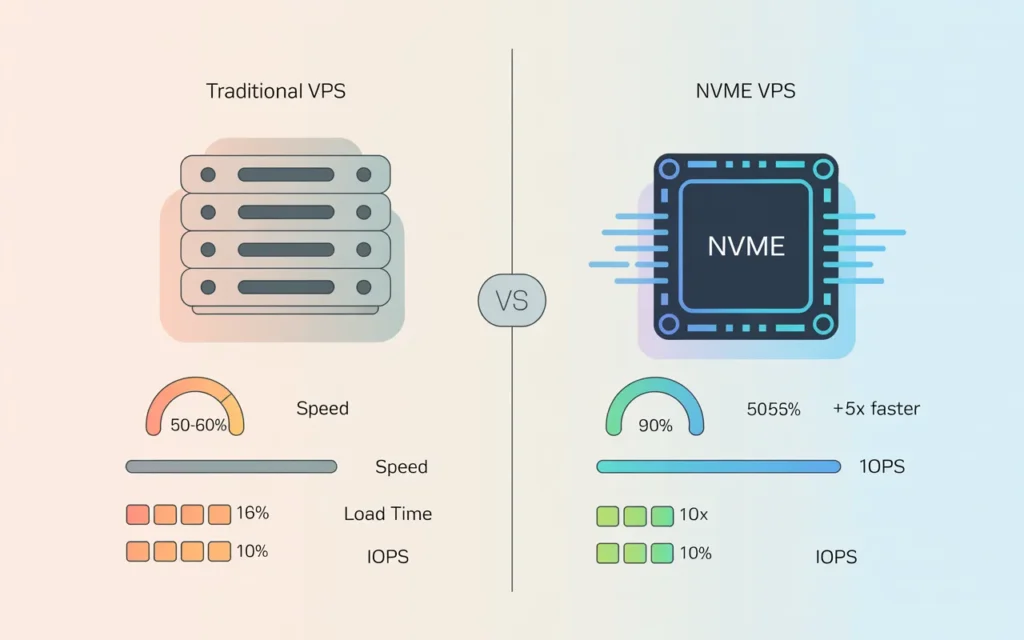
NVMe breaks through that ceiling. According to industry benchmarks, SATA-based drives top out at around 100,000 IOPS (input/output operations per second). NVMe drives can handle over 100,000 IOPS on the low end—and enterprise-grade NVMe drives can deliver well over 1 million IOPS.
Traditional VPS hosting often uses standard SSDs or, in older setups, spinning hard drives. That hardware was fine a few years ago. Today, it creates a measurable speed gap.
You can learn more about the differences in our NVMe Web Hosting with cPanel guide.
Why NVMe Is Faster
Three reasons.
First, the PCIe connection. NVMe drives talk directly to the CPU through PCIe lanes. Data takes a much shorter path.
Second, the command queue. SATA supports one I/O queue at a time, with up to 32 commands in that queue. NVMe supports up to 65,535 queues, each with up to 65,535 commands. That parallelism is massive.
Third, latency. SATA drives typically show latency of 100 microseconds or more. NVMe drives routinely achieve 10–20 microseconds. For a busy database, that difference adds up fast.
How Website Speed Affects SEO Rankings
Speed is not just a user experience issue. It is a ranking factor. Google has been explicit about this for years, and the signals keep getting stronger.
Core Web Vitals and Google’s Speed Metrics
Google’s Core Web Vitals are a set of metrics that measure real-world page experience. They feed directly into search rankings.
The three main Core Web Vitals are:
- Largest Contentful Paint (LCP): How long it takes for the main content of a page to load. Google wants this under 2.5 seconds.
- Cumulative Layout Shift (CLS): How much the page visually shifts while loading. Lower is better.
- Interaction to Next Paint (INP): How quickly your page responds to user interactions.
That last one is important. In March 2024, Google officially replaced the older First Input Delay (FID) metric with INP as part of Core Web Vitals. INP measures the full responsiveness of a page throughout a user’s visit—not just the first interaction.
A faster server—particularly one with NVMe storage—reduces the time it takes to process requests, load assets, and respond to interactions. That directly improves your LCP and INP scores.
Understanding DNS performance is also part of the equation. Slow DNS lookup adds to your Time to First Byte (TTFB), which hurts LCP. Our complete DNS guide covers how DNS contributes to overall page load performance.
Impact of Server Response Times on SEO
TTFB is one of the most overlooked SEO factors. It measures how long it takes for the server to send the first byte of data back to the browser after a request.
Google recommends keeping TTFB under 800 milliseconds. Many shared hosting environments struggle to meet this consistently, especially under load.
NVMe VPS hosting dramatically reduces TTFB. The reason is simple: when the server retrieves files from storage, NVMe does it faster. Database queries return faster. PHP processes execute faster. Less waiting means a lower TTFB.
Lower TTFB means better LCP. Better LCP means better Core Web Vitals. Better Core Web Vitals means better rankings.
User Experience and Bounce Rates
Rankings aside, speed matters for a practical reason: people leave slow websites.
Research consistently shows that even a one-second delay in page load time can significantly increase bounce rates. When users bounce, Google notices. High bounce rates are a negative engagement signal that can suppress your rankings over time.
A fast NVMe VPS creates a seamless experience. Pages load instantly. Users stay longer, click through more pages, and complete more actions. Those positive engagement signals reinforce your SEO performance.
How NVMe VPS Enhances Website Performance
Let’s get specific about what NVMe VPS does for your site’s performance on a technical level.
Faster Data Transfer and Low Latency
Every time someone visits your website, the server retrieves files. HTML, CSS, JavaScript, images, database records. Each retrieval is a read operation on the storage.
With NVMe, those read operations happen in microseconds rather than milliseconds. The cumulative effect is a page that assembles and loads noticeably faster.
Low latency is especially important for dynamic websites. If your page pulls data from a database, queries customer records, or generates content on the fly, NVMe ensures those operations complete quickly.
Higher IOPS for Database-Heavy Sites
IOPS (Input/Output Operations Per Second) is the metric that matters most for database-heavy applications.
Think about a WooCommerce store. Every product page involves multiple database queries: product data, pricing, stock levels, related items, reviews. Each query is an I/O operation.
On SATA storage, those queries queue up and wait. On NVMe, they process in parallel at enormous speed. The page that took three seconds to load on old hardware might load in under one second on NVMe.
This is also why NVMe matters so much for membership sites, LMS platforms, and any application running MySQL or MariaDB heavily.
Benefits for WordPress, eCommerce, and SaaS Applications
WordPress accounts for over 40% of all websites on the internet. It is also one of the most resource-intensive platforms when not optimized correctly.
NVMe hosting pairs powerfully with LiteSpeed Web Server and its built-in caching plugin (LSCache). That combination—NVMe storage delivering fast I/O plus LiteSpeed’s event-driven architecture handling thousands of connections—creates a hosting environment where WordPress sites genuinely fly.
For eCommerce and SaaS applications, the benefits are even more direct. Faster checkout pages reduce cart abandonment. Faster app response times reduce churn. These performance gains translate into real revenue.
Our detailed guide on LiteSpeed Web Server explains exactly how its architecture complements NVMe hardware for WordPress and eCommerce performance.
NVMe VPS vs SSD VPS vs Shared Hosting for SEO
Let’s do a direct comparison so you know exactly where each hosting type stands.
Speed and Reliability Comparison
| Hosting Type | Storage | Typical IOPS | Latency | Best For |
|---|---|---|---|---|
| Shared Hosting | SATA SSD / HDD | 500–1,000 | 100–500 µs | Personal blogs |
| SSD VPS | SATA SSD | 10,000–15,000 | 50–100 µs | Small–medium sites |
| NVMe VPS | NVMe PCIe | 100,000+ | 10–20 µs | High-traffic, eCommerce, SaaS |
NVMe VPS wins on every performance metric.
Resource Allocation Differences
Shared hosting puts multiple websites on a single server. They all share the same CPU, RAM, and storage. When one site gets a traffic spike, every other site on that server slows down.
A VPS gives you dedicated resources. Your CPU cores, RAM allocation, and storage are yours alone. You do not suffer from the “noisy neighbor” problem.
CloudLinux OS takes this even further in shared and reseller environments. It uses LVE (Lightweight Virtual Environment) technology to isolate each account’s resources. Even if someone else on the server has a sudden spike, it cannot impact your performance.
You can read about how CloudLinux isolation works in depth.
Which Hosting Type Benefits SEO the Most?
NVMe VPS, clearly.
Shared hosting is acceptable for low-traffic sites where Core Web Vitals are not heavily contested. The moment you start competing for rankings in any meaningful niche, shared hosting becomes a liability.
SSD VPS is a significant step up from shared, but NVMe is where modern performance lives. If your competitors are on NVMe infrastructure and you are not, you are fighting with a slower car.
Key Features to Look for in NVMe VPS Hosting
Not all NVMe VPS plans are equal. Here is what actually matters.
High-Performance CPUs and RAM
Storage speed means nothing if the CPU cannot process requests quickly. Look for VPS providers running modern Intel Xeon or AMD EPYC processors.
RAM is equally critical. More RAM means more data can be cached in memory, reducing the number of times your server needs to read from storage in the first place. For WordPress, 2GB of RAM is a workable starting point. For eCommerce or SaaS, 4GB or more is typically necessary.
Scalable Infrastructure for Traffic Spikes
Your hosting should handle growth without requiring downtime. Look for providers that allow you to upgrade RAM and CPU cores with a few clicks, without migrating your data to a new server.
Traffic spikes—from a viral post, a PR mention, or a successful campaign—can temporarily multiply your server load tenfold. A scalable NVMe VPS absorbs that without blinking.
Redundant Storage and Backup Systems
NVMe is reliable, but no hardware is infallible. Your provider should offer automated daily backups, and ideally snapshot functionality that lets you roll back to a previous state in minutes.
RAID configurations at the storage level provide an additional layer of protection. If a drive fails, data redundancy ensures continuity with no downtime.
The best VPS hosting providers for 2026 guide breaks down the infrastructure criteria in detail—useful reading before you make a decision.
How Does SkyNetHosting.Net Inc. Optimize NVMe VPS Hosting for SEO?
I want to talk specifically about what SkyNetHosting.net brings to the table, because the infrastructure choices they have made are directly relevant to the SEO performance conversation.
Modern NVMe-Powered Infrastructure
SkyNetHosting.net uses enterprise-grade NVMe drives across their hosting infrastructure. Their NVMe-based hosting is 900% faster than traditional SATA drives and 200% faster than standard SSDs.
That is not marketing language. The physics of NVMe over PCIe supports exactly those performance levels versus older SATA-based storage. It means faster TTFB, faster database queries, and better Core Web Vitals scores for hosted sites.
Their platform also runs LiteSpeed Web Server and CloudLinux OS. LiteSpeed’s event-driven architecture handles high concurrency without the resource overhead of traditional Apache. CloudLinux ensures that each account’s resources stay isolated. Together with NVMe storage, those three technologies create a hosting stack built for speed.
Fast and Reliable Uptime for SEO Performance
Uptime matters for SEO. A site that goes offline regularly sends negative signals to search engines. Googlebot cannot crawl what it cannot reach.
SkyNetHosting.net operates across 25+ global data center locations. Geographic distribution means reduced latency for visitors worldwide, and network redundancy means that if one path experiences issues, traffic routes around the problem automatically.
They back their infrastructure with 24/7 monitoring and a 99.9% uptime SLA. Their reseller hosting support and SLA commitments are documented in detail if you want to understand exactly what is covered.
Their team has been in business for over 20 years, hosting more than 700,000 websites. That track record matters. Stability comes from experience.
Scalable Solutions for Growing Websites
SkyNetHosting.net’s VPS plans are built to scale. You can start with a configuration appropriate for your current traffic and upgrade resources as your site grows—without server migrations or downtime.
For agencies and resellers, they offer a 50% discount on VPS and dedicated server reseller plans, creating a clear growth path from reseller hosting to fully managed dedicated infrastructure.
Their reseller plans also include a free WHMCS license, which automates client provisioning and billing. That is particularly relevant for agencies managing multiple client sites—a tool worth approximately $16/month included at no extra cost.
More detail on the full reseller offering can be found in the best reseller hosting providers comparison and the best hosting for agencies guide.
When Should You Upgrade to NVMe VPS for SEO Benefits?
Knowing why NVMe VPS is better is one thing. Knowing when to make the move is another.
Signs Your Current Hosting Slows Down SEO
Here are the clearest indicators that your current hosting is limiting your SEO performance:
- Google PageSpeed Insights shows a poor LCP score, particularly “Reduce server response times” as a recommendation
- Your TTFB consistently exceeds 800ms, especially on dynamic pages
- Core Web Vitals fail in Google Search Console
- Traffic spikes cause noticeable slowdowns or temporary 503 errors
- Database-heavy pages (product pages, search results, member dashboards) are visibly slow
Any one of these is a signal. All of them together mean your hosting is actively costing you rankings.
High-Traffic Website Needs
If your site regularly receives thousands of daily visitors, shared hosting is a ceiling you have already hit. The resource contention on shared servers creates an unpredictable performance environment.
High-traffic sites need guaranteed resources. They need NVMe storage to handle the volume of I/O operations generated by simultaneous visitors. They need a server environment that does not slow down when everyone shows up at once.
Preparing for Future Growth and Core Web Vitals
Core Web Vitals are not going away. Google’s investment in page experience signals has been consistent and growing. INP replacing FID in 2024 is just the most recent example.
The best time to optimize your hosting infrastructure is before a major traffic push—not after you have already lost rankings. Upgrading to NVMe VPS now builds a performance foundation that supports growth rather than constraining it.
Build Your SEO Foundation on the Right Hardware
Speed is infrastructure. Ranking is a result.
The chain runs from your storage hardware, through your server software, out to the browser, and ultimately into Google’s ranking algorithm. NVMe VPS is the foundation that makes every other optimization more effective.
Faster storage means faster TTFB. Faster TTFB means better Core Web Vitals. Better Core Web Vitals mean better rankings, lower bounce rates, and more organic traffic. That chain is direct, measurable, and actionable.
If your site is growing, competing for rankings, or simply falling behind on performance metrics, the move to NVMe VPS is one of the highest-leverage changes you can make.
SkyNetHosting.net’s NVMe VPS infrastructure—backed by LiteSpeed, CloudLinux, and 25+ global data centers—is built specifically for the performance demands that modern SEO requires. Explore their NVMe cPanel hosting plans and find the right configuration for your site today.
Frequently Asked Questions
Does NVMe VPS hosting directly improve Google rankings?
Not directly—Google does not rank sites based solely on hosting type. But NVMe VPS improves page speed, TTFB, and Core Web Vitals scores, all of which are ranking signals. The performance improvements create measurable SEO benefits.
How much faster is NVMe compared to a standard SSD VPS?
NVMe drives can handle 100,000+ IOPS, compared to roughly 10,000–15,000 IOPS for standard SATA SSDs. Latency is also 5–10 times lower. Real-world page load improvements vary by site, but database-heavy sites often see the most dramatic differences.
Is NVMe VPS worth it for a small WordPress blog?
For a low-traffic personal blog, the difference may not be immediately visible. But for any WordPress site targeting competitive keywords, or any site where speed is a factor in conversion rates, NVMe VPS is worth the upgrade.
What is the difference between managed and unmanaged NVMe VPS?
An unmanaged VPS gives you full root access and control, but you are responsible for OS updates, security patches, and configuration. A managed VPS means the provider handles the technical maintenance. If you are not comfortable with server administration, managed is the safer choice.
Can NVMe VPS help with Core Web Vitals specifically?
Yes. NVMe reduces server-side processing time, which directly improves LCP (Largest Contentful Paint) and INP (Interaction to Next Paint). These are two of the three Core Web Vitals that Google uses as ranking signals.
FAQs
What makes NVMe superior to SATA SSDs architecturally?
NVMe connects directly to CPU via PCIe with 64K parallel command queues versus SATA’s single-queue bottleneck, processing thousands of simultaneous database reads/writes instantly. This eliminates storage as the performance limiter for modern WordPress, APIs, and e-commerce platforms.
How much faster are real database workloads?
ServerMania benchmarks show NVMe delivering 650K IOPS versus SATA’s 95K maximum at queue depth 32—typical for MySQL/PostgreSQL. MongoDB mixed workloads achieve 3.4x faster inserts and 4.7x index builds, transforming database-heavy application responsiveness significantly.
Why does low latency matter more than peak throughput?
P99 latency measures worst-case user experience; NVMe achieves 0.89ms versus SATA’s 12.4ms in TPC-C tests. Redis cache operations run at one-third latency with 2.5x higher ops/sec, ensuring every visitor experiences fast page loads without outliers.
Does NVMe accelerate application deployments?
Container builds, Docker image pulls, and application updates complete in seconds rather than minutes due to NVMe’s 7GB/s+ sequential writes. Modern CI/CD pipelines deploying multiple times daily gain massive productivity while maintaining development velocity competitively.
How does NVMe improve energy efficiency?
NVMe delivers 5x better IOPS per watt than SATA SSDs through advanced controllers and parallel processing, reducing heat output and power draw significantly. Data centers save on cooling/electricity while providing higher performance to end customers efficiently.
Why standardize NVMe across all VPS plans?
Consistent NVMe performance eliminates “cheap plan = slow storage” complaints driving customer churn. Resellers market uniform speed across tiers while simplified infrastructure cuts support overhead, positioning hosting businesses competitively in 2026’s performance-driven market.
