

NVMe VPS for Developers: Docker, AI Models & High IO Apps
TL;DR
- NVMe uses PCIe for 65k queues and 7GB/s speeds vs SATA SSD’s 550MB/s cap, slashing latency to 20μs for IO-heavy tasks.
- Docker builds accelerate as overlay2 copy-on-write ops fly on NVMe; ideal for containerized microservices with root access isolation.
- AI model training/inference avoids stalls—high IOPS keeps data flowing to CPU/GPU, hitting 90% utilization per benchmarks.
- Databases like PostgreSQL/MySQL thrive with 650k IOPS at QD32, handling concurrent reads/writes without queue backups.
- Beats SSD VPS for high-concurrency SaaS/real-time analytics; shared hosting unsuitable due to no isolation or root.
- SkyNetHosting delivers NVMe VPS with global DCs, scaling, backups—perfect for devs prototyping to production.
If you’ve ever watched a Docker build crawl, or seen your AI model training stall while your GPU sits idle waiting for data, you already know the problem. Storage is often the bottleneck—and it’s the one developers overlook most.
I’ve spent over a decade working with hosting infrastructure, deploying everything from containerized microservices to machine learning pipelines. The single biggest performance leap I’ve seen in that time? Switching from standard SSD to NVMe storage on a VPS.
This guide is for developers who want to understand what NVMe VPS actually delivers—for Docker workloads, AI model training, database-heavy apps, and any high IO use case. No fluff. Just practical, technical insight you can act on today.
What Is NVMe VPS and Why Developers Should Care
NVMe storage technology explained
NVMe stands for Non-Volatile Memory Express. It’s a storage protocol designed from the ground up for flash storage—unlike SATA, which was originally built for spinning hard drives.
The key difference is the connection pathway. SATA drives communicate through the AHCI interface, which was designed for mechanical disks. That interface supports a single command queue with a depth of just 32 commands.
NVMe connects directly to the CPU via the PCIe bus. It supports up to 65,535 command queues, each capable of handling 65,536 commands. That’s not a small upgrade. That’s an entirely different architecture.
In practical terms:
- SATA SSD: Up to ~550 MB/s throughput, capped by the SATA III bus
- NVMe SSD: PCIe 3×4 drives reach up to 4 GB/s; PCIe Gen 4×4 can hit 8 GB/s
- Latency: NVMe’s optimized datapath delivers significantly lower latency than SATA/SAS, according to Kingston Technology
For workloads that are I/O intensive—and most serious developer workloads are—that difference is measurable.
Performance benefits for development workloads
As a developer, you’re not just loading web pages. You’re running build pipelines, querying databases under load, pulling Docker layers, shuffling model checkpoints, and handling concurrent connections. These operations hammer storage constantly.
NVMe doesn’t just make things faster in theory. It changes the feel of working on a server. Commands that used to block now return almost instantly. Compile times drop. Database queries that took seconds happen in milliseconds.
According to ServerMania benchmarks, at queue depth 32—which is typical for database operations—NVMe delivers around 650,000 IOPS compared to a 95,000 IOPS ceiling for SATA. That’s nearly 7x the throughput on concurrent read/write operations.
For an NVMe VPS designed for developer workloads, that performance profile translates directly into faster response times and less time staring at a terminal waiting for processes to finish.
Comparison with SSD VPS and shared hosting
Shared hosting is simply not in the conversation for serious development work. You’re competing for resources with hundreds of other accounts. The performance is unpredictable, and you have no root access to configure your stack.
Standard SSD VPS is a step up. You get dedicated resources and better isolation. But the storage throughput ceiling is real. If your workload exceeds what SATA can handle, you’ll see it in latency spikes and slow query times.
NVMe VPS removes that ceiling. The hardware matches what modern development workloads actually demand.
As noted in SkyNetHosting’s own infrastructure documentation, NVMe storage is up to 900% faster than traditional SATA drives and 200% faster than standard SSDs. For any compute-intensive or database-heavy project, that’s the difference between a pleasant developer experience and a frustrating one.
How NVMe VPS Supports Docker Containers
Running containerized apps efficiently
Docker’s performance is closely tied to the speed of the underlying storage. Every time you pull an image, build a container layer, or write logs, you’re hitting disk.
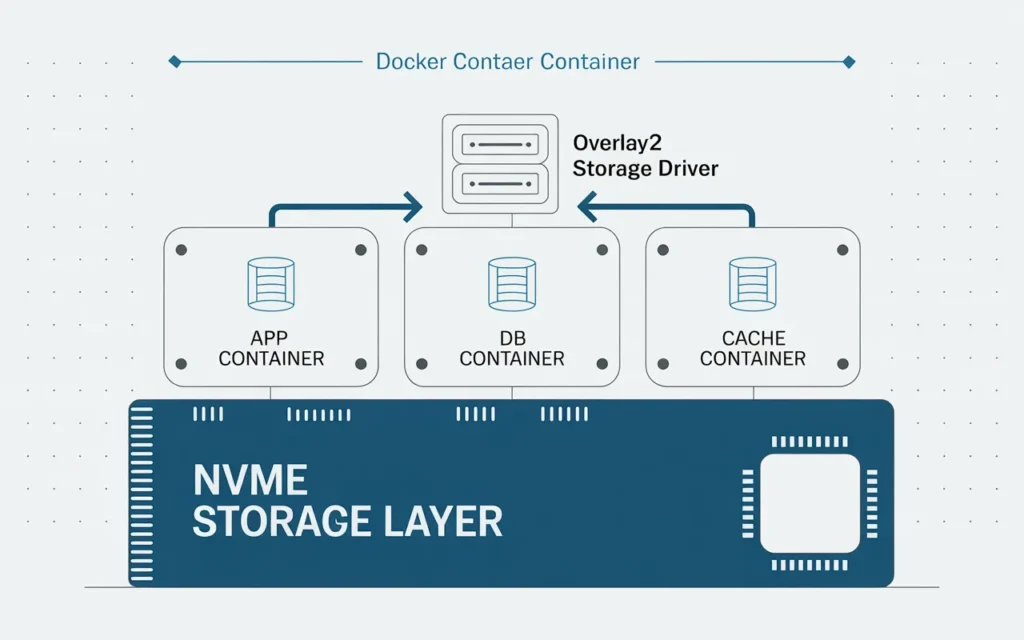
The overlay2 storage driver—the default on modern Linux distributions including Ubuntu, Debian, CentOS, and Fedora—uses a copy-on-write (CoW) strategy. When a container modifies a file, it copies that file from the read-only layer to the container’s writable layer. On slow storage, that copy_up operation creates a noticeable bottleneck.
On NVMe, those operations are fast enough that the overhead becomes negligible for most workloads. Build times shrink. Container startup is snappier.
Docker Docs recommends using overlay2 for broad Linux compatibility, and advises using Docker volumes (rather than container writable layers) for write-heavy workloads—which maps perfectly to NVMe-backed persistent volumes on a VPS.
For VPS hosting for SaaS platforms that rely on Docker-based deployment, NVMe storage is the natural complement to containerized architecture.
Resource allocation and isolation
One of the biggest advantages of VPS over shared hosting for Docker is resource isolation. On a well-configured NVMe VPS, your container gets access to guaranteed CPU cores, dedicated RAM, and storage I/O capacity that isn’t shared with another tenant’s runaway process.
This matters enormously for Docker-based production workloads. A misconfigured container on shared infrastructure can spike disk I/O and degrade every other service on the same machine. On a VPS, that risk is contained.
If you’re running multi-container applications with Docker Compose, or orchestrating with Kubernetes on a single-node setup, NVMe storage ensures your containers can handle concurrent reads and writes without starving each other of I/O bandwidth.
Scaling Docker workloads on NVMe VPS
Starting with Docker on a single NVMe VPS is a smart approach. You can host your app container, database container, and cache layer all on one well-provisioned server to start, then scale vertically—adding more RAM and CPU cores—before introducing horizontal scaling with additional VPS nodes.
The reason this works well on NVMe VPS specifically is that the storage never becomes the limiter during your initial scale-up phase. You hit CPU and memory constraints first, which are easier to predict and plan for.
As your SaaS app on VPS grows, you can move the database to a separate VPS, put a load balancer in front of your application containers, and build out a proper multi-node architecture—all while keeping your infrastructure predictable and cost-controlled.
Running AI Models on NVMe VPS
CPU vs GPU considerations
Most VPS plans, including NVMe VPS, run on CPU-only infrastructure. This shapes how you approach AI workloads significantly.
For training large neural networks from scratch, a GPU is substantially faster. GPUs are optimized for the kind of parallel matrix math that deep learning requires. For inference on a small-to-medium model, though, a well-provisioned CPU VPS is often adequate—especially when optimized frameworks like ONNX Runtime or llama.cpp are used for CPU inference.
The decision comes down to your use case:
- Training from scratch: GPU infrastructure is the right tool
- Fine-tuning smaller models: Modern CPUs with sufficient RAM can handle this
- Serving inference requests: CPU-based VPS is often sufficient for lower traffic volumes
Where NVMe storage becomes critical for AI on VPS is not the compute itself—it’s everything around the compute.
High IOPS storage impact on model training
Here’s something many developers don’t realize until they’ve watched it happen: storage I/O is often the real bottleneck in AI training pipelines, not compute.
According to RunPod’s analysis of AI training infrastructure, poorly optimized data pipelines can reduce GPU utilization to 40–60%, leaving expensive compute resources idle while waiting for data to be loaded from storage. Organizations with optimized data loading achieve 90%+ GPU utilization during training.
For model training workflows on CPU VPS, the same principle applies. If your data loader is waiting on disk reads, your training loop stalls. NVMe’s low-latency random access means your training data feeds through efficiently, keeping the pipeline moving.
Practical implications for AI workloads on NVMe VPS:
- Store your training datasets on NVMe-backed volumes, not network mounts
- Use memory-mapped file access for large datasets that exceed available RAM
- Implement multi-level caching—RAM for hot data, SSD tier for larger datasets
- Optimize file organization for sequential read patterns to minimize seek operations
RunPod’s guidance suggests language model training typically requires 1–5 GB/s storage throughput. NVMe is the only consumer-accessible storage technology that can consistently meet that requirement on a VPS.
Best practices for AI workloads on VPS
If you’re deploying AI models on a CPU-based NVMe VPS, here’s what actually works:
- Quantize your models. Reduced-precision models (INT8, INT4) run faster on CPU and fit in less RAM.
- Use Docker to isolate dependencies. ML environments are notorious for dependency conflicts. Containers keep everything clean.
- Store model artifacts on NVMe volumes. Model checkpoints and datasets should live on fast storage, not in container writable layers.
- Monitor CPU and memory utilization. If you’re hitting 95% CPU during inference under load, it’s time to scale vertically or add another node.
For developers experimenting with open-source models, NVMe VPS provides a cost-effective way to run inference workloads that would be prohibitively expensive on GPU cloud instances.
High IO Applications That Benefit from NVMe VPS
Database-intensive applications
PostgreSQL, MySQL, and Redis all have one thing in common: their performance is directly tied to storage speed.
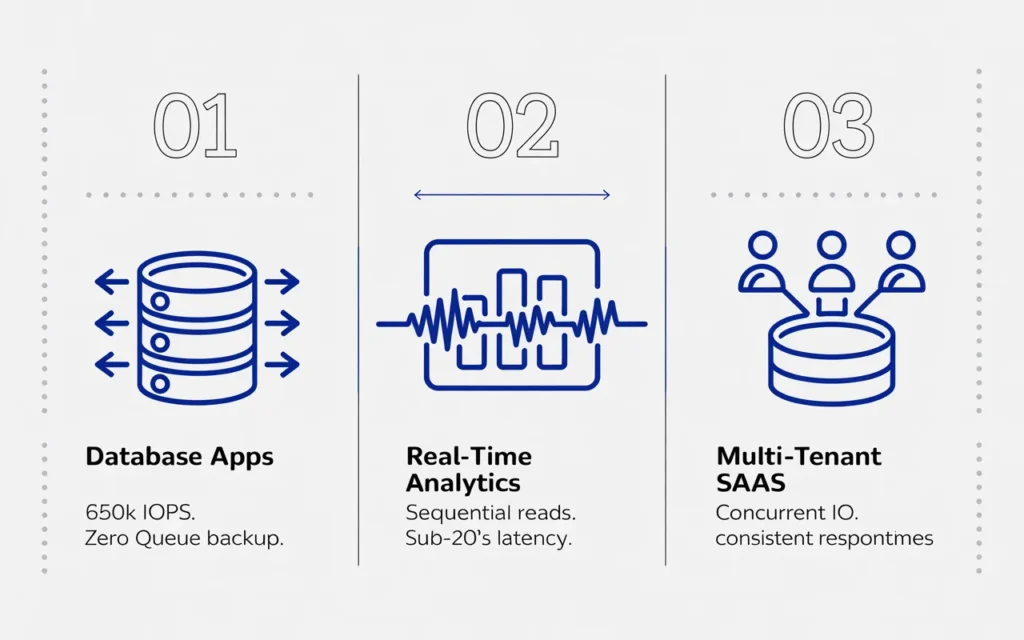
Databases perform constant random reads and writes. Query execution plans that look efficient on paper can be slow in practice if disk I/O can’t keep up. NVMe’s high IOPS profile—particularly at queue depths typical of production database loads—means queries return faster and your application feels responsive.
This is particularly impactful for write-heavy workloads. Logging tables, audit trails, analytics pipelines, and transactional systems all generate continuous writes. On SATA SSD, these operations queue up and create latency. On NVMe, the 65,000+ command queue handles them cleanly.
As a general rule: if your app is database-heavy, your VPS needs NVMe storage. Anything else creates a performance gap between your application tier and your data tier.
Real-time analytics and caching
Real-time analytics platforms process high volumes of events with low tolerance for latency. Every millisecond between event ingestion and query response matters when you’re building dashboards or alerting systems that need to reflect current state.
NVMe storage enables the kind of rapid sequential reads that columnar analytics databases like ClickHouse or time-series stores like InfluxDB thrive on. Pair that with an in-memory cache like Redis backed by NVMe for persistence, and you have a stack capable of handling demanding real-time workloads on a single, well-provisioned VPS.
The why VPS hosting matters principle applies here directly: the combination of dedicated resources and fast storage gives you a performance baseline that shared infrastructure simply cannot provide.
SaaS platforms and multi-tenant apps
Multi-tenant SaaS applications make many small reads and writes across many concurrent user sessions. The I/O profile is demanding—not because any single operation is large, but because there are so many of them happening simultaneously.
NVMe’s queue depth advantage is most visible here. Standard SSD hosting at high concurrency starts to show latency spikes as the command queue backs up. NVMe handles concurrent I/O gracefully, keeping your per-tenant response times consistent even as your user base grows.
For multi-tenant SaaS hosting architecture, NVMe VPS with proper tenant isolation via Docker or VM-level separation is a proven, scalable approach.
NVMe VPS vs SSD VPS vs Shared Hosting for Developer Workloads
Performance benchmarks
To make this concrete:
| Metric | Shared Hosting | SSD VPS (SATA) | NVMe VPS |
|---|---|---|---|
| Sequential read | Unpredictable | ~550 MB/s | 3,500–7,000 MB/s |
| IOPS (QD32) | Unpredictable | ~95,000 | ~650,000 |
| Latency | High, variable | 100–500 μs | 10–20 μs |
| Resource isolation | None | Dedicated | Dedicated |
These aren’t marginal differences. For developer workloads, the gap between NVMe and SATA SSD is significant—and the gap between NVMe and shared hosting is enormous.
Cost vs speed comparison
NVMe VPS plans cost more than shared hosting and slightly more than entry-level SSD VPS. But for most development workloads, the performance gain justifies the price difference.
Think about it this way: if slow storage adds 10 minutes to a CI/CD pipeline that runs 20 times a day, you’re losing over 3 hours of compute time daily. The cost of faster storage is often less than the cost of the wasted compute and developer time.
For teams evaluating the best VPS hosting options, NVMe storage should be a non-negotiable requirement for any serious development or production workload.
Choosing the right hosting for your app
Here’s a simple framework:
- Static site or low-traffic blog: Shared hosting is fine
- WordPress or small web app with moderate traffic: SSD VPS works
- Docker-based app, database-heavy backend, AI workloads, high-concurrency SaaS: NVMe VPS is the right choice
If you’re in the third category and running on anything less than NVMe, you’re leaving performance on the table.
Key Features Developers Should Look for in NVMe VPS Hosting
CPU, RAM, and storage IOPS
Match your VPS specs to your workload:
- Entry-level development: 2 vCPUs, 4 GB RAM, NVMe storage
- Production SaaS or AI inference: 4–8 vCPUs, 8–16 GB RAM, NVMe storage
- Heavy ML or database workloads: 8+ vCPUs, 32+ GB RAM, high-IOPS NVMe storage
Always check what processor generation the VPS runs on. A vCPU on a modern Intel Xeon or AMD EPYC is materially faster than one on older hardware. SkyNetHosting uses the latest Intel Dual Xeon CPUs—that matters for compute-bound workloads.
Network performance and low latency
Hosting latency affects developer experience. If your team is distributed or your users are global, choose a provider with data centers near your audience.
As a Cloudflare study noted, hosting closer to your customers can reduce latency by over 40%. For APIs and real-time apps, that’s significant.
SkyNetHosting operates across 25+ global locations. This lets you colocate your VPS near your users, not just near your office. And with a 1 Gbps minimum port speed, bandwidth-heavy workloads like large model uploads or dataset transfers don’t become a bottleneck.
Backup, redundancy, and scalability
For production developer workloads, backups aren’t optional. Configure automated daily snapshots. Test your restore process before you need it.
Look for providers that offer snapshot capabilities—the ability to save the exact state of your server before a major deployment. If an upgrade breaks something, rolling back takes minutes rather than hours.
For a deeper look at how to remote into a server and manage your VPS environment efficiently, SkyNetHosting’s blog covers that workflow in detail.
Scalability matters too. As your project grows, you should be able to add RAM and CPU cores without migrating your entire setup. Providers that support seamless vertical scaling let you grow without infrastructure disruption.
How SkyNetHosting.Net Inc. Supports Developer Workloads on NVMe VPS
High-speed NVMe infrastructure
SkyNetHosting uses enterprise-grade NVMe drives across their VPS infrastructure. Their NVMe plans deliver 900% faster performance compared to traditional SATA drives and 200% faster than standard SSDs—figures confirmed in their NVMe web hosting documentation.
That’s the baseline. What matters for developers is that the performance is consistent, not just peak. Database queries, Docker builds, and AI data loading all benefit from sustained high IOPS—not just burst speeds.
Optimized for Docker, AI, and high IO apps
SkyNetHosting’s VPS infrastructure provides root access, full OS flexibility across Linux distributions, and the resource isolation developers need to run Docker-based deployments cleanly.
Their platform is built for exactly the workloads covered in this guide. Whether you’re deploying a containerized SaaS backend, running a model serving API, or managing a high-concurrency database, the NVMe infrastructure supports it without the bottlenecks that degrade performance on standard SSD hosting.
Resellers and agencies also benefit from free WHMCS licensing, which automates billing and provisioning for teams managing multiple client environments.
Scalable solutions for growing projects
SkyNetHosting supports vertical scaling without requiring server migrations. As your development project scales from prototype to production, you can increase RAM and CPU within the same infrastructure setup.
Their 24/7 support team provides genuine technical assistance—not just knowledge base links. For developers who need help diagnosing a storage configuration issue or optimizing a Docker deployment, having access to knowledgeable support staff is a real practical advantage.
How to Choose the Right NVMe VPS for Your Development Projects
Evaluating resources for Docker and AI workloads
Start by profiling your actual workload. Run your application on a smaller plan and monitor CPU, memory, and I/O. Tools like htop, iostat, and Docker’s built-in stats give you a clear picture of where the bottlenecks are.
If you’re running AI model inference, check your model’s memory requirements before choosing a plan. A model that requires 8 GB of RAM to load needs a VPS with at least 12–16 GB to leave room for the OS and supporting services.
For Docker workloads, map out your container count, expected concurrent connections, and write frequency. This determines whether you need a single NVMe VPS or a multi-node setup from the start.
Ensuring scalability and performance
Choose a provider whose upgrade path is seamless. You shouldn’t need to re-deploy your entire environment to move from a 4 GB RAM plan to an 8 GB RAM plan.
Ask about their snapshot and backup policies before you commit. For production workloads, automated backups stored in a separate physical location are a minimum requirement—not a premium add-on.
For context on avoiding common VPS management mistakes, and making sure your billing and provisioning setup scales with your team, SkyNetHosting’s blog provides useful operational guidance.
Budget considerations and hosting support
NVMe VPS sits in the middle of the pricing spectrum—more expensive than shared hosting, less expensive than the major hyperscale clouds at equivalent performance. For most developer workloads, it hits the right balance.
Avoid being swayed by introductory pricing that triples at renewal. Check the renewal rate before committing. And verify what’s included—a plan that appears cheap but charges extra for backups, a control panel license, and bandwidth overages often costs more in practice than a transparent, slightly higher flat-rate plan.
NVMe VPS Is the Right Infrastructure for Modern Development
After a decade of deploying, tuning, and migrating developer workloads across hosting environments, the pattern is clear. Developers working on Docker-based apps, AI pipelines, database-heavy backends, and high-concurrency SaaS platforms hit the same performance ceiling on standard SSD VPS that shared hosting users hit years earlier.
NVMe VPS lifts that ceiling. The combination of low-latency random I/O, high sustained throughput, and dedicated resource isolation gives developers the foundation they need to build, test, and run serious workloads without fighting their infrastructure.
The choice of provider matters. SkyNetHosting.net offers enterprise-grade NVMe storage, 25+ global data center locations, modern Intel Xeon processors, and 24/7 technical support—all within a straightforward, reseller-friendly pricing model.
If you’re ready to stop letting storage be your bottleneck, explore SkyNetHosting’s NVMe VPS plans and see what your workloads can actually do.
FAQs
What makes NVMe superior to SATA SSD for devs?
NVMe connects via PCIe bus supporting 65,535 queues of 65k commands each, enabling 7GB/s throughput and 10-20μs latency versus SATA’s single-queue AHCI limit at 550MB/s—transforming IO-intensive compiles, queries, and builds.
How does NVMe boost Docker container performance?
NVMe speeds overlay2 storage driver’s copy-on-write operations during image pulls, layer builds, and logging, reducing startup times and enabling efficient multi-container Docker Compose setups with guaranteed resource isolation on VPS.
Why use NVMe VPS for AI model workloads?
Storage IO often bottlenecks AI pipelines, dropping CPU utilization to 40-60%; NVMe’s 1-5GB/s throughput and high IOPS ensure datasets load instantly, supporting quantization, memory-mapped files, and inference on CPU VPS cost-effectively.
Which apps benefit most from NVMe storage?
Database-heavy backends (PostgreSQL/MySQL/Redis), real-time analytics (ClickHouse/InfluxDB), and multi-tenant SaaS with concurrent small reads/writes excel, as NVMe handles random IO without latency spikes plaguing SATA SSD.
NVMe VPS vs SSD VPS vs shared: key differences?
Shared lacks isolation/root; SSD VPS caps at 95k IOPS/500μs latency; NVMe hits 650k IOPS/20μs with dedicated resources—essential for production Docker/AI vs entry-level sites fine on shared/SSD.
What features to seek in NVMe VPS providers?
Enterprise NVMe drives, modern Xeons/EPYC CPUs, 1Gbps ports, 25+ global DCs, snapshots/backups, seamless vertical scaling, and 24/7 tech support—like SkyNetHosting’s setup for developer scalability.
