Complete DNS Guide 2026: What Is DNS, How It Works, Records, Setup & Troubleshooting
TL;DR
- DNS is the phonebook of the internet, translating human-readable domains into IP addresses so browsers can reach the correct servers.
- DNS architecture relies on recursive resolvers, root servers, TLD servers, and authoritative nameservers to answer domain lookup requests efficiently.
- Core DNS records like A, AAAA, CNAME, MX, NS, TXT, and SOA define how web, mail, and verification services connect to a domain.
- Nameservers store authoritative DNS zones and control where a domain’s traffic is routed, including websites, email, and subdomains.
- DNS security uses measures such as DNSSEC, SPF, and other TXT-based policies to reduce spoofing, phishing, and email fraud risks.
- Proper DNS management and propagation awareness help avoid downtime, misrouting, and common errors like DNS misconfiguration or stale records.
I still remember the first time I tried to point a domain to a server back in 2014. I stared at the screen, sweating, terrified that one wrong click would wipe my client’s site off the face of the internet. If you’re feeling that anxiety right now—or if you’re just confused by all the acronyms—take a deep breath. You’re in the right place.
The Domain Name System (DNS) is the unsung hero of the web. It works silently in the background every single time you send an email or load a webpage. Yet, for many website owners, it remains a “black box” of mystery.
After a decade of managing servers and troubleshooting weird connection errors, I’ve learned that DNS isn’t actually magic; it’s just a very specific set of instructions. In this guide, we’re going to demystify it together. By the end, you’ll understand exactly how the internet’s phonebook works and how to manage it like a pro.
What Is DNS and Why Is It Important for the Internet?
Imagine if, to call your mom, you had to memorize a string of random numbers like 192.0.2.14 instead of just tapping “Mom” in your contacts list. You’d probably call her a lot less, right? That is the exact problem DNS solves for the internet.
Definition of Domain Name System (DNS)
DNS stands for Domain Name System. It is the internet’s phonebook. Its primary job is to translate human-friendly domain names (like skynethosting.net) into computer-friendly IP addresses (like 104.21.56.2).
Computers communicate using numbers, but humans communicate using words. DNS bridges that gap. Without it, we’d be navigating the web using long, impossible-to-remember numerical strings.
Why websites cannot work without DNS
If DNS servers went down globally right now, the internet as we know it would effectively break. The physical cables and servers would still be there, but you wouldn’t be able to find anything. It would be like trying to find a specific house in a city without street names, maps, or GPS—just a coordinate grid that nobody understands.
Every website lives on a server with a unique IP address. When you type a URL, the browser doesn’t know where that file is located until DNS tells it the specific address where the data lives.
DNS role in web hosting and email delivery
It’s not just about websites. DNS is the traffic controller for everything attached to your domain.
- Web Hosting: It tells visitors, “The files for example.com are on this specific server in this specific data center.”
- Email: It tells sending servers, “If you have an email for john@example.com, please deliver it to this specific mail server.”
If your DNS configuration is wrong, your website might stay online, but your emails could vanish into thin air. I’ve seen businesses lose thousands of dollars in leads simply because an MX record (we’ll get to those later) was missing a single period.
How Does DNS Work Behind the Scenes?
When I explain this to clients, I like to use the librarian analogy. When you look for a book, you don’t search every shelf yourself. You ask the librarian, who checks the catalog, tells you the aisle, and points you to the specific shelf.
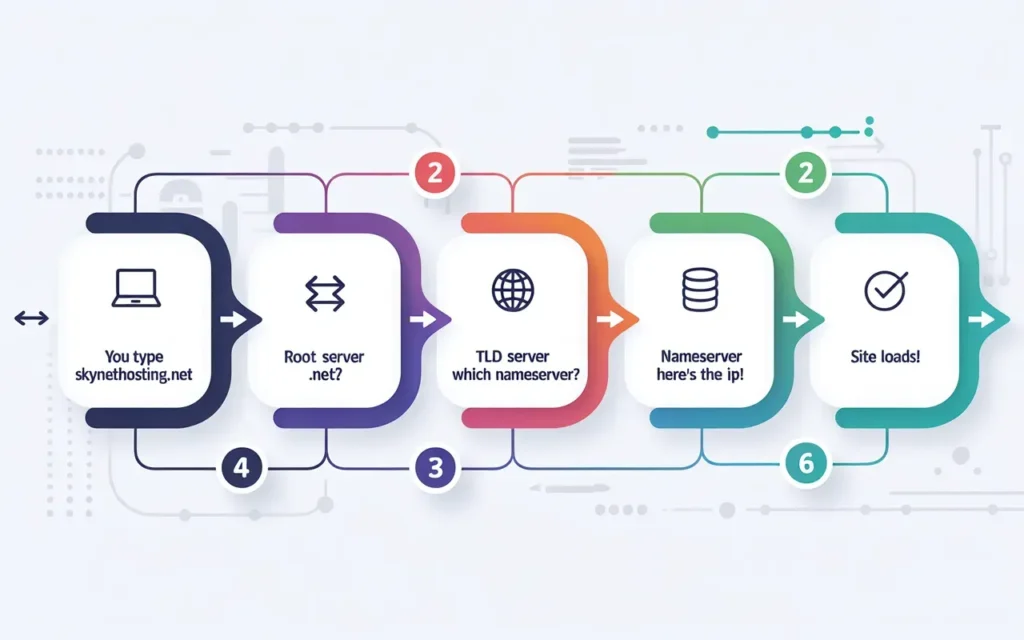
DNS lookup process explained step by step
Here is what happens in the milliseconds between hitting “Enter” and a website loading:
- The Request: You type skynethosting.net into your browser.
- The Recursive Query: Your browser asks your Operating System (OS) if it knows the IP address. If not, the OS asks a Recursive Resolver (usually provided by your Internet Service Provider).
- The Root Server: If the Resolver doesn’t know, it asks a Root Server. The Root Server doesn’t know the specific IP, but it knows where to find the .net servers.
- The TLD Server: The Resolver asks the .net TLD (Top Level Domain) server. This server says, “I don’t have the IP, but I know the Authoritative Nameservers for Skynethosting.net.”
- The Authoritative Server: Finally, the Resolver asks the Authoritative Nameserver. This server says, “Yes! The IP address is 104.21.56.2.”
- The Answer: The IP is sent back to your browser, and the website loads.
Role of DNS resolvers, root servers, and nameservers
- Recursive Resolvers: The diligent middlemen that run around the internet asking questions on your behalf.
- Root Servers: The starting point of the DNS hierarchy. There are 13 logical root server IP addresses globally.
- Authoritative Nameservers: The final authority. These are the servers where you actually edit your DNS records (like Cloudflare, GoDaddy, or your hosting provider’s nameservers).
How DNS caching improves website speed
If your computer had to do that 6-step dance every single time you clicked a link, the internet would be painfully slow.
To fix this, we use Caching. Once your browser finds the IP address for a site, it saves (caches) it for a set period. Next time you visit, your computer remembers the address and skips the lookup process entirely. This is great for speed, but it’s also why changes you make to your website don’t always show up immediately (a phenomenon called propagation).
What Are DNS Servers and Their Types?
Not all servers do the same job. In the DNS ecosystem, there are specialized workers.
Recursive DNS resolvers
These are the servers usually managed by your ISP (like Comcast or AT&T) or a third party like Google (8.8.8.8) or Cloudflare (1.1.1.1). They are the “askers.” They receive queries from client machines (like your laptop) and hunt down the answers.
Root DNS servers
These sit at the top of the DNS pyramid. They don’t know specific website addresses, but they direct traffic to the Top Level Domain servers. They are critical infrastructure for the entire internet.
TLD servers
These manage the extensions of domain names. There is a specific group of servers that handles all .com domains, another for .org, another for .io, and so on.
Authoritative DNS servers
These are the servers that actually hold your specific domain’s records. When you buy hosting from us at Skynethosting.net, we give you “nameservers” (like ns1.skynethosting.net). These are the authoritative servers that hold the map to your website.
What Are DNS Records and Why Do They Matter?
If DNS is a phonebook, DNS Records are the individual lines written inside it.
What is a DNS record?
A DNS record is a single instruction file located on your authoritative nameserver. It connects a domain to an IP address or another domain.
How DNS records control websites and email
You can have multiple records for one domain. One record might tell the world where your website lives (A Record), while another tells the world where to send your email (MX Record), and a third proves you own the domain (TXT Record).
Common DNS mistakes that break websites
In my 10 years of experience, the most common issues I see are typos.
- Entering an IP address with a typo.
- Forgetting to update the record when moving to a new host.
- Having two conflicting records (like two different instructions for where the email should go), which confuses the servers.
What Are the Most Important DNS Record Types?
You’ll see a dropdown menu full of confusing options when you log into your DNS manager. Here are the ones you actually need to know.
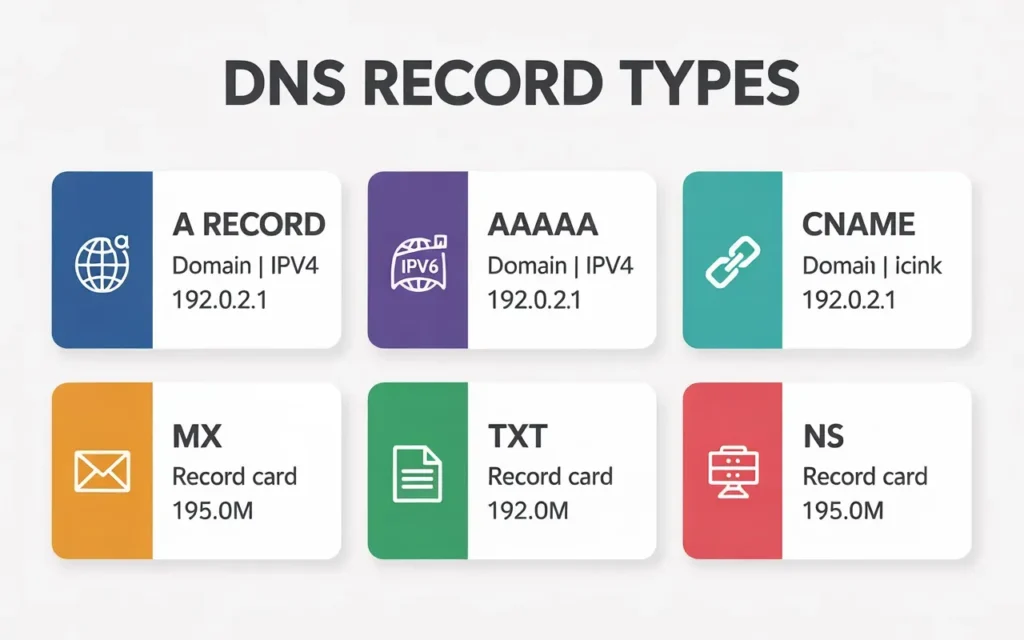
A Record – Pointing domain to server IP
The “Address” record. This is the most fundamental record. It maps a domain (like mysite.com) to an IPv4 address (like 192.0.2.1). If you delete this, your website goes offline immediately.
AAAA Record – IPv6 addressing
The internet is running out of standard IP addresses (IPv4), so we are slowly moving to IPv6, which uses much longer, more complex addresses. The AAAA record does the exact same thing as the A record, but for these newer IPv6 addresses.
CNAME Record – Domain aliases
CNAME stands for “Canonical Name.” It points one domain name to another domain name, not an IP address. You often use this for subdomains. For example, you might point www.mysite.com to mysite.com so that both load the same content.
MX Record – Email routing
MX stands for “Mail Exchange.” These records direct emails to your mail server. If you are using Gmail for business or our Premium MailChannels Cloud Email, your MX records direct incoming mail to those specific servers.
TXT Record – Verification, SPF, DKIM, DMARC
Originally used for human-readable text notes, these are now used strictly for machine-readable verification.
- Verification: Proving to Google or Facebook that you own the domain.
- Email Security: SPF, DKIM, and DMARC are all types of TXT records that prevent spammers from impersonating your domain.
NS Record – Nameserver delegation
NS stands for “Nameserver.” These records indicate which DNS server is authoritative for your domain. Usually, you will have two (e.g., ns1.skynethosting.net and ns2.skynethosting.net) for redundancy.
SRV Record – Service-specific routing
These are more advanced and used for specific protocols, like Voice over IP (VoIP), instant messaging, or connecting to Minecraft servers. Most standard website owners rarely touch these.
How DNS Propagation Works and Why It Takes Time
“I changed the setting, but nothing happened!”
I hear this at least once a week. This is due to DNS propagation.
What DNS propagation means
Remember the caching we talked about earlier? Because ISPs around the world cache DNS records to save time, they don’t instantly know when you change them. Propagation is the time it takes for those caches to expire and for every server around the world to update with your new information.
How TTL affects propagation speed
TTL stands for Time To Live. It is a setting in your DNS records (measured in seconds) that tells servers how long to cache the information.
- High TTL (86400 seconds = 24 hours): Good for stability, bad for quick changes.
- Low TTL (300 seconds = 5 minutes): Good when you are migrating a site, as changes update quickly.
How long DNS changes really take
Historically, we used to say “up to 48 hours.” In 2026, it’s usually much faster. Most changes propagate globally within 1 to 4 hours. However, some stubborn local ISPs may still hold onto old data for a day or so.
How to Set Up DNS Correctly for a Website
Ready to hook up your website? Here is the general workflow.
Pointing domain to hosting server
- Log in to where you bought your domain (the registrar).
- Find the “Nameservers” or “DNS Management” section.
- Enter the IP address provided by your host into the A Record.
Configuring nameservers
This is usually the easier method. Instead of editing individual A records, you just tell your registrar to let your host handle everything.
- Get your nameservers from your welcome email (e.g., ns1.skynethosting.net, ns2.skynethosting.net).
- Paste these into your domain registrar’s settings.
- Wait for propagation.
Using custom DNS vs hosting DNS
You can use the DNS provided by your web host, or you can use a third-party DNS provider like Cloudflare. Third-party DNS is often faster and provides security benefits, but it adds an extra layer of complexity to manage.
DNS setup for Skynethosting.net servers
If you are hosting with us, we make it easy. When you sign up for our Reseller or Shared plans, we automatically configure the DNS zones for you. You just need to point your domain to the nameservers listed in your welcome email, and our system handles the A records, MX records, and everything else automatically.
How to Configure DNS for Email Services
Email is fragile. Here is how to ensure your messages actually land in the inbox.
MX record setup
You usually need to set a priority for MX records.
- Priority 0 or 1: The main mail server.
- Priority 10 or 20: The backup mail server.
If you are using our MailChannels Cloud Email, ensure your MX records point exactly where our support docs specify, or you won’t receive mail.
SPF, DKIM, and DMARC explained
These are the “ID cards” of email.
- SPF (Sender Policy Framework): A list of IP addresses allowed to send email for you.
- DKIM (DomainKeys Identified Mail): A digital signature attached to your emails to prove they haven’t been tampered with.
- DMARC: A rule that tells receiving servers what to do if an email fails SPF or DKIM checks (e.g., “reject it” or “put it in spam”).
Preventing email spam and delivery issues
If your emails are going to spam, 9 times out of 10, it is a missing SPF or DKIM record. Setting these up correctly is mandatory in 2026 for high deliverability.
What Are Common DNS Problems and Their Causes?
Website not loading
Check your A Record. Does it match your hosting IP? Did your hosting IP change?
Email not working
Check your MX Record. Also, check if you accidentally created a CNAME record for your root domain (example.com), which often breaks MX records.
DNS_PROBE_FINISHED_NXDOMAIN error
This scary-looking Chrome error usually just means “This domain doesn’t exist.” It happens if you haven’t bought the domain yet, or if your nameservers are completely wrong.
Incorrect nameserver configuration
If you put a typo in your nameservers at the registrar level, the entire domain goes dark. Always copy and paste; never type them manually.
How to Troubleshoot DNS Issues Step by Step
Checking DNS with online tools
I live by tools like WhatSMydns.net. You enter your domain, and it shows you what IP address servers around the world are seeing. If they all show red X’s, your nameservers are wrong. If they show different IPs, you are waiting on propagation.
Using dig, nslookup, and ping
If you aren’t afraid of the command line (Terminal on Mac, CMD on Windows):
- ping example.com: Checks if your computer can reach the server.
- nslookup example.com: Asks your computer specifically what DNS records it sees.
Clearing DNS cache
Sometimes the world sees your new site, but you don’t because your computer is remembering the old IP.
- Windows: Open CMD and type ipconfig /flushdns
- Mac: Open Terminal and type sudo dscacheutil -flushcache; sudo killall -HUP mDNSResponder
When to contact your hosting provider
If you have checked your nameservers, waited 24 hours, cleared your cache, and the site is still down—open a ticket. At Skynethosting.net, our 24/7 team can look at the server logs and see if the request is even reaching us.
How DNS Affects Website Speed, SEO, and Uptime
DNS latency and page load time
Before your site loads, the DNS lookup happens. If you use a slow DNS provider, that lookup could take 200ms. If you use a fast one, it could take 20ms. That speed difference counts toward your total page load time.
Impact on Core Web Vitals
Google cares about speed (Core Web Vitals). Slow DNS contributes to a slow “Time to First Byte” (TTFB), which hurts your SEO rankings.
Why reliable DNS improves uptime
If your DNS server crashes, your site is effectively offline, even if your web server is fine. Redundant DNS (having multiple nameservers) ensures that if one fails, the other picks up the slack.
Why Reliable DNS Hosting Matters for Businesses
DNS redundancy and failover
For businesses, downtime means lost revenue. Premium DNS often includes “failover.” If your main server crashes, the DNS automatically detects it and updates the record to point to a backup server instantly.
Global DNS infrastructure benefits
A global DNS network (like the one we use for our reseller locations across 25 countries) ensures that a user in Japan gets a fast DNS response from a server near Japan, rather than waiting for a server in the USA.
Business risks of poor DNS providers
Free or cheap DNS providers are often targets for DDoS attacks. If they get attacked, your business goes offline as collateral damage.
Why Skynethosting.net DNS Is Optimized for Performance
We don’t just host files; we ensure your visitors find them fast.
High-availability DNS setup
We utilize a distributed DNS cluster. This means your DNS records are replicated across multiple servers. If one goes down for maintenance, the others keep serving requests.
Global data center DNS routing
With locations in the USA, UK, Netherlands, Singapore, India, and more, our infrastructure is designed to reduce latency by physically locating DNS and web servers closer to your target audience.
Expert DNS support for businesses
Unlike generic hosts where support agents read from a script, our team understands the nuances of A records, IPv6, and reverse DNS. Whether you are running a reseller business or a corporate site, we help you get the configuration right the first time.
DNS Best Practices for 2026 and Beyond
Security-focused DNS configuration
DNSSEC (Domain Name System Security Extensions) acts as a security guard, verifying that the DNS information hasn’t been intercepted or faked by hackers. Enabling this is becoming a standard best practice.
Monitoring and auditing DNS records
Regularly check your DNS records. Remove old verification TXT records you no longer need. Ensure no old subdomains are pointing to services you canceled (this prevents “subdomain takeover” attacks).
Future trends in DNS management
We are seeing a move toward “DNS over HTTPS” (DoH), which encrypts DNS queries so ISP’s and hackers can’t spy on what websites you are visiting. Privacy is the future of DNS.
Conclusion
We’ve covered a lot of ground, from the basic “phonebook” concept to the nitty-gritty of propagation and records. DNS can seem intimidating, but at its core, it’s just a set of directions.
Key DNS concepts every website owner should know
- DNS translates names to IPs.
- Nameservers control where the records live.
- Propagation takes time—patience is key.
- TTL controls how long servers remember old data.
Final checklist for correct DNS setup
- Domain is registered.
- Nameservers are updated at the registrar.
- A Record points to the correct hosting IP.
- MX Records point to the correct mail provider.
- SPF/DKIM records are added for email deliverability.
Choosing the right hosting and DNS partner
You don’t have to navigate this alone. Whether you are a reseller managing hundreds of client domains or a business owner managing one, having a host that understands DNS infrastructure is vital.
If you’re ready for hosting that includes robust DNS management, fast NVMe storage, and 24/7 expert support, check out our USA Reseller Hosting plans or our Cheap Budget Reseller options. Let us handle the technical heavy lifting so you can focus on building your business.
FAQs
What is DNS and why is it important?
What are the main types of DNS records?
What is a nameserver and how does it work?
What is DNS propagation and how long does it take?
How does DNS affect website performance and uptime?
Efficient DNS, with reliable authoritative nameservers and geographically distributed infrastructure, reduces lookup latency and improves load times. Correctly configured records also prevent misrouting or failures, helping maintain consistent uptime and minimizing errors like “server not found” or intermittent reachability.
How can DNS improve security?
DNS security improves through DNSSEC, which signs DNS data to prevent tampering, and TXT-based policies like SPF and DMARC that protect email domains. Blocking malicious domains at resolvers and monitoring records also reduce phishing, spoofing, and hijacking risks significantly.