How to Start a VPS Reseller Hosting Business (Complete 2026 Guide)
TL;DR
- VPS reselling lets you rent wholesale servers, brand them, automate sales via WHMCS for recurring profit without owning hardware.
- Target agencies/developers needing control/power; bundle migrations/backups to charge 2-3x wholesale cost for 50%+ margins.
- Requires NVMe infrastructure, WHMCS automation, white-label API; Skynethosting provides free licenses/modules for instant setup.
- Automate provisioning/suspensions; create 3-4 tiers (Starter 2GB/50GB, Pro 8GB/160GB) with annual discounts to cut churn.
- Niche market (WordPress agencies, gamers); upsell add-ons like firewalls/monitoring for pure profit beyond base VPS sales.
- Scale via more credits/dedicated nodes; focus service over price, test everything to avoid underpricing/support burnout.
If you have been looking for a way to build a steady, recurring income stream, you have probably stumbled across web hosting. But let’s be honest—basic shared hosting is a crowded market.
The real opportunity right now? VPS reseller hosting.
I have spent over a decade in the hosting industry, and I’ve seen the shift firsthand. Businesses, developers, and agencies are moving away from slow shared servers. They want power. They want control. They want Virtual Private Servers (VPS).
Starting a VPS hosting company used to mean buying expensive hardware and hiring a team of engineers. Not anymore. Today, you can launch a fully branded VPS business in less than 24 hours without owning a single server.
In this guide, I am going to walk you through exactly how to build a profitable VPS reseller business from scratch. No fluff, just the steps that actually work in 2026.
What Is a VPS Reseller Hosting Business?

Before we dive into the “how,” let’s clarify what this business model actually is.
As a VPS reseller, you rent high-performance server infrastructure from a larger provider (like us) at a wholesale price. You then slice that infrastructure into smaller Virtual Private Servers and sell them to your clients at a profit.
Think of it like real estate. You aren’t building the apartment complex. You are leasing the floors, renovating them, and renting them out to tenants under your own brand name.
VPS reseller vs shared reseller hosting
You might be wondering, “Why not just resell shared hosting?”
Shared hosting is great for beginners. But it has limits. In shared hosting, hundreds of users share the same resources. If one site spikes in traffic, others slow down.
VPS hosting is different. Using KVM virtualization, every client gets their own dedicated slice of CPU, RAM, and storage. Their neighbors don’t affect them.
For you as a reseller, this means you can target higher-paying clients. Developers and growing businesses will pay a premium for that stability.
How VPS reselling works
It is simpler than it sounds.
- You buy credits or a bulk plan from a parent host.
- You create packages (e.g., “Pro Plan: 4GB RAM, 80GB SSD”).
- Your client buys a plan from your website.
- The system automates the setup. Your billing software talks to our servers and spins up the VPS instantly.
Your client never knows the parent host exists. To them, you are the provider.
Why VPS reselling is in demand
The demand for VPS is skyrocketing. Why?
- Heavier Websites: Modern WordPress sites and apps need more power than shared hosting can give.
- Remote Work: Companies need private servers for VPNs and remote databases.
- Control: Developers need “root access” to install custom software, which shared hosting doesn’t allow.
This isn’t a trend that is going away. It is the new standard.
Is VPS Reseller Hosting Profitable?
Short answer: Yes, if you price it right.
I have seen resellers struggle because they try to compete on price with giants like Amazon AWS or DigitalOcean. Do not do that. You can’t beat them on price.
You win on service and specialization.
Revenue models and margins
The margins in VPS reselling are generally higher than shared hosting.
Let’s say you get a VPS Reseller plan that gives you a 50% discount on server costs.
- Your Cost: $20/month for a server.
- You Sell it for: $50/month.
- Your Profit: $30/month.
If you have just 100 clients, that is $3,000 in pure profit every single month.
Pricing strategies for resellers
Don’t just sell “server space.” Sell a solution.
If you sell to web designers, bundle the VPS with “Free Migration” or “Daily Backups.” If you sell to startups, offer “Pre-installed Software Stacks.”
When you add value, you can charge double or triple the base cost of the server.
Monthly recurring income potential
The best part of this business is the “recurring” part.
Unlike web design, where you get paid once and have to find a new client, hosting clients pay you every month. As long as their website is up, they keep paying. It is one of the most stable income models online.
What Do You Need to Start a VPS Reseller Business?
You don’t need a degree in computer science. But you do need the right toolkit.
VPS infrastructure requirements
You need a provider that uses enterprise-grade hardware. If the foundation is weak, your business will crumble.
Look for:
- NVMe Storage: It is significantly faster than standard SSDs.
- DDR4 or DDR5 RAM: For speed.
- 1Gbps Uplinks: So your clients’ sites load instantly.
At Skynet Hosting, we use high-end hardware so you don’t have to worry about performance issues.
Control panels and management tools
Your clients need a dashboard to manage their server. They will want to restart their server, reinstall their OS, or check bandwidth usage.
Standard control panels like cPanel or DirectAdmin are industry favorites. Ensure your provider offers these licenses so you can resell them too.
Billing and automation software
You cannot manually send invoices every month. You need automation.
WHMCS is the gold standard here. It handles:
- Client signups
- Invoicing and tax
- Automatic account creation
- Support tickets
We actually provide a free WHMCS license with our reseller plans because we know you can’t run a serious hosting business without it.
Choosing the Right VPS Provider for Reselling
Your reputation depends entirely on your provider. If our servers go down, your clients blame you. Choose wisely.
Performance and scalability
Can the provider scale? If your client starts small but grows into a massive e-commerce store, can you upgrade them instantly?
You need a provider that allows seamless upgrades without downtime.
White-label capabilities
White-labeling means your provider is invisible.
Check the hostname. Check the IP addresses. Even check the control panel branding. Everything should show your logo and your company name.
API and automation support
Does the provider have an API?
An API allows your billing software (WHMCS) to “talk” to the provider’s data center. This is what allows for instant provisioning. If a provider requires you to manually email them to set up a server, run away. That doesn’t scale.
SLA and uptime guarantees
Look for a 99.9% Uptime Guarantee. This is your safety net. It ensures that your business stays online, keeping your clients happy and paying.
How to Set Up VPS Products for Resale
Once you have your provider, it is time to build your “menu.”
Defining VPS plans (CPU, RAM, storage)

Keep it simple. Too many choices confuse buyers. Create 3-4 distinct tiers:
- Starter VPS: 1 vCPU, 2GB RAM, 50GB Storage (Good for personal blogs).
- Business VPS: 2 vCPU, 4GB RAM, 80GB Storage (Good for small business sites).
- Pro VPS: 4 vCPU, 8GB RAM, 160GB Storage (Good for heavy apps/shops).
Managed vs unmanaged VPS offerings
This is a huge decision.
- Unmanaged: You give the client the server keys, and they are on their own. Easier for you, but you can’t charge as much.
- Managed: You help update the OS, secure the server, and fix bugs. You can charge 50-100% more for this service.
Billing cycles and pricing structure
Offer incentives for long-term commitment. Maybe offer a 10% discount if they pay annually. This gives you cash flow upfront and reduces churn (clients leaving).
How to Automate VPS Sales Using WHMCS
Automation is the secret sauce. Here is how to set it up.
WHMCS VPS modules
WHMCS uses “modules” to connect to servers.
If you resell through Skynet, we provide a module. You simply upload it to your WHMCS, enter your API key, and you are connected.
Automated provisioning and suspension
Configure WHMCS to:
- Create the server automatically as soon as payment is received.
- Suspend the server automatically if an invoice is 7 days overdue.
- Terminate the server if payment is 30 days overdue.
This removes the emotion and manual labor from billing.
Client self-service features
Enable the client area within WHMCS. Your customers should be able to reboot their VPS, view graphs, and change passwords without ever talking to you. This saves you hours of support time.
Branding and White-Labeling Your VPS Business
Perception is reality. If you look big, people trust you.
Custom domain and branding
Do not use a free Gmail address. Get support@yourhostingbrand.com.
Set up custom nameservers (e.g., ns1.yourhostingbrand.com). This ensures that when a client looks up their domain details, they see your company, not ours.
Client portals and invoices
Customize your WHMCS theme to match your website colors. Add your logo to the PDF invoices sent to clients. These small touches make you look like a legitimate enterprise.
Building trust as a reseller
Add a phone number or live chat to your site. Even if you are a one-person show, being accessible builds massive trust. Display security seals and uptime badges prominently.
How to Acquire Your First VPS Clients
You have the business set up. Now, where are the customers?
Target customers (developers, startups, agencies)
Don’t target “everyone.”
Target niche groups.
- Agencies: They host client sites and need reliability.
- Developers: They need root access to test apps.
- Gamers: They need servers for Minecraft or other games.
Pricing and positioning strategy
If you are new, don’t try to be the “cheapest.” Be the “most helpful.”
Position yourself as the “VPS for WordPress Agencies” or “High-Performance VPS for Local Business.” Niche marketing is cheaper and more effective.
Upselling from shared or reseller hosting
If you already have shared hosting clients, look at their resource usage.
If a client is hitting their limits on a shared plan, email them: “Hey, I noticed your site is growing! A VPS would make it faster and more stable. Here is a discount to upgrade.” This is the easiest sale you will ever make.
Support and SLA Considerations for VPS Resellers
Support breaks many new resellers. Here is how to handle it.
Provider support vs reseller responsibility
Understand the line.
- Hardware issue? That is our job at Skynet. We fix the node.
- WordPress plugin broken? That is generally your client’s problem (or yours, if you offer managed support).
Creating your own SLA
Create a Service Level Agreement (SLA). Define how fast you will reply to tickets. Be realistic. “Reply within 24 hours” is better than promising “15 minutes” and failing.
Handling downtime and incidents
Communication is key. If there is an outage, tell your clients immediately. “We are aware of an issue and fixing it.” Silence makes clients angry; communication builds trust.
Legal, Billing, and Compliance Setup
Don’t skip the boring legal stuff.
Terms of service and acceptable use policy
You need an AUP (Acceptable Use Policy). Clearly state that illegal activities (spam, phishing, hacking) are banned. This protects you when we have to shut down a bad server.
Invoicing, taxes, and payments
WHMCS handles tax rules well. Set it up to collect VAT or sales tax depending on where you and your clients are located. Integrate payment gateways like PayPal and Stripe for easy payments.
Data protection responsibilities
If you have clients in Europe, you need to be GDPR compliant. Ensure your privacy policy explains what data you collect and how you store it.
Common Mistakes New VPS Resellers Make
I’ve seen many people fail. Avoid these traps.
Underpricing VPS plans
Do not sell a VPS for $5 if it costs you $4. One chargeback or support ticket will wipe out your profit for the year. Aim for at least 50% margins.
Over-promising support
Don’t promise “24/7 Phone Support” if it’s just you and a cell phone. Burnout is real. Set office hours or hire a remote team eventually.
Ignoring automation testing
Test everything. Buy a VPS from yourself using a fake account. Did the email arrive? Did the server spin up? Did the invoice generate? Find the bugs before your customers do.
When and How to Scale Your VPS Reseller Business
Adding more VPS nodes
As you grow, you might outgrow your initial reseller allocation. This is a good problem! You simply upgrade your plan with us to get more resources.
Moving to dedicated infrastructure
Eventually, you might have so many clients that it’s cheaper to rent a whole Dedicated Server and virtualize it yourself using software like SolusVM or Proxmox.
Expanding services (backups, security, monitoring)
Profit isn’t just in the VPS. Sell add-ons.
- Automated Remote Backups ($5/mo)
- Advanced Security Firewall ($10/mo)
- Server Monitoring ($2/mo)
These are pure profit and add huge value.
How Skynethosting.net Helps You Start a VPS Reseller Business
We built our platform specifically for resellers. We aren’t just selling you space; we are giving you a business in a box.
VPS reseller-friendly infrastructure
Our infrastructure uses NVMe storage, which is up to 900% faster than traditional SATA drives. This makes your hosting products look incredibly fast to your clients.
WHMCS-ready automation
We save you money right out of the gate. Our plans come with a free WHMCS license, saving you ~$18/month immediately. Plus, we provide the modules to automate everything.
White-label support and scalability
With 25 locations worldwide, you can sell VPS hosting in the USA, Europe, or Asia. And with our white-label support options, we can even help answer your clients’ technical questions while appearing to be part of your staff.
Conclusion
Starting a VPS reseller hosting business in 2026 is one of the smartest digital moves you can make. The infrastructure is better, the software is smarter, and the demand is higher than ever.
VPS reselling is a scalable business
You can start small with a low investment and grow indefinitely. There is no ceiling on how many clients you can have.
Automation is the key to profitability
The tools exist to run this business on autopilot. If you set it up correctly using the steps above, you can focus on marketing and growing, while the servers run themselves.
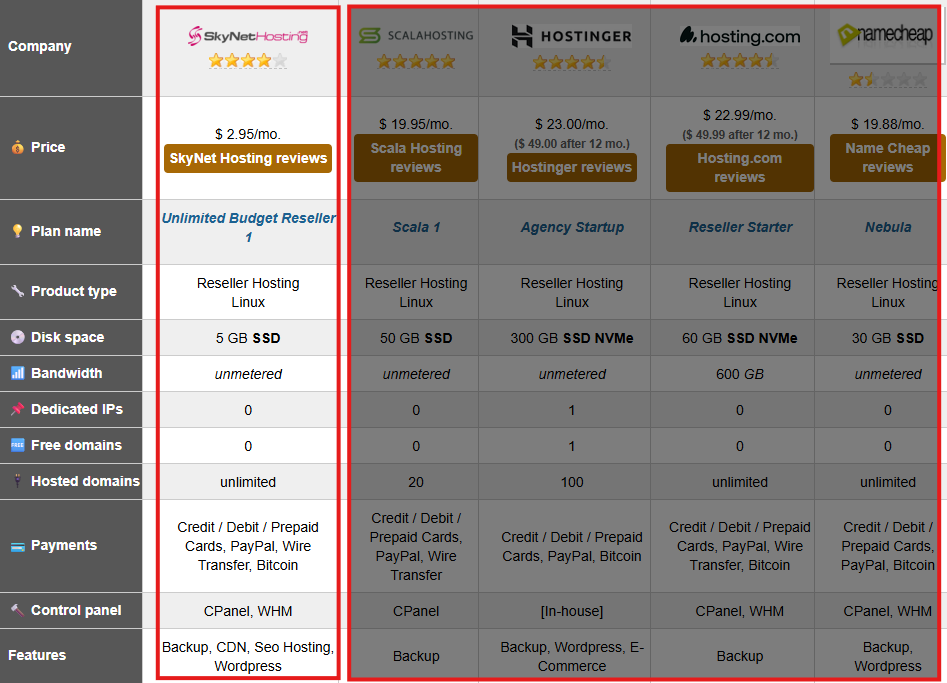
Another reason many entrepreneurs are choosing SkyNetHosting.Net is the recognition it has received within the hosting industry. The platform was recently ranked the #1 Reseller Hosting provider for 2026 by WHTOP, an independent hosting directory that monitors tens of thousands of hosting brands worldwide. WHTOP rankings are based on real user feedback, performance data, and long-term industry metrics rather than paid placements, making this recognition a strong indicator of reliability for anyone launching a hosting business.
Ready to launch? Check out our Reseller Hosting Plans and let’s get your business online today.
FAQs
What is VPS reseller hosting and how does it work?
VPS reselling means leasing bulk server resources wholesale, slicing into branded packages, automating client orders via WHMCS API for instant provisioning. Clients get dedicated CPU/RAM/SSD slices without shared slowdowns; you profit on markup while appearing as full provider.
Why choose VPS reselling over shared hosting?
Shared suits beginners but lacks power/control for modern apps; VPS demands premium pricing from developers/startups needing root access. Higher margins (sell $50 what costs $20), scalability without hardware, targets growing remote work/VPN/e-commerce needs exploding now.
What infrastructure and tools do you need to start?
Enterprise NVMe/DDR5 hardware, 1Gbps uplinks for speed; WHMCS for billing/provisioning/tickets with cPanel/DirectAdmin panels. Skynethosting offers reseller plans with free WHMCS license, modules, white-label API for 24-hour branded launch minus engineering hires.
How to price and package VPS for maximum profit?
Offer 3 tiers: Starter (1vCPU/2GB/50GB), Business (2vCPU/4GB/80GB), Pro (4vCPU/8GB/160GB); managed upsell adds 50-100%. Annual discounts boost cash flow; bundle backups/security for $5-10/mo pure profit atop 50% base margins targeting niches like agencies.
How to automate VPS business operations?
WHMCS modules connect to provider API: auto-create VMs on payment, suspend at 7 days overdue, terminate at 30. Enable client self-service for reboots/graphs; test end-to-end with fake orders to ensure emails/invoices/provisioning work flawlessly before live sales.
How does Skynethosting.net support VPS resellers?
Provides NVMe-optimized global nodes (25 locations), free WHMCS licenses/modules, full white-label (custom NS/hostname), optional support escalation. Seamless upgrades, 99.9% SLA ensure your reputation; start small, scale to dedicated without downtime or rebranding.