Low Cost VPS Server – Affordable Hosting Without Compromising Performance
TL;DR
- A low-cost VPS offers dedicated resources, root access, better security, and easy scalability compared to shared hosting, making it ideal for small businesses and developers needing more control.
- The main advantages include cost savings, flexibility, and a practical environment for learning server administration—without the limitations of shared hosting or the expense of dedicated servers.
- Budget VPS options can be sufficient for moderate workloads, staging environments, and multiple small sites, but upgrading is needed for resource-intensive apps, high traffic, or business-critical reliability.
- Essential evaluation factors include CPU, RAM, NVMe SSD storage, bandwidth, uptime, choice of OS/control panel, and quality customer support; prioritize reliable hardware over just cheap pricing.
- Managed VPS plans offer convenience with provider-managed maintenance and security, while unmanaged plans require technical skill but cost less and provide more learning opportunities.
- Performance tips: use Linux with SSD/NVMe, optimize software for resource use, leverage caching and CDN, and choose a provider like Skynethosting.net for global data centers, uptime guarantees, and affordable scalability.
Finding the right hosting can feel like walking a tightrope. On one side, you have the affordable but often restrictive world of shared hosting. On the other, the powerful but expensive realm of dedicated servers. For many small businesses, developers, and growing websites, the sweet spot lies right in the middle: a Virtual Private Server (VPS).
But what if your budget is tight? Can you really get reliable performance from a low-cost VPS server?
The short answer is yes. Over my 10 years in the web hosting industry, I’ve seen countless startups and developers thrive by starting with an affordable VPS. It’s all about knowing what to look for and how to separate the genuine deals from the performance nightmares.
A cheap VPS hosting plan doesn’t have to mean slow load times or constant downtime. It can be the perfect engine for your digital growth, offering a blend of control, power, and affordability that shared hosting simply can’t match.
This guide will walk you through everything you need to know about budget VPS hosting plans. We’ll break down what a VPS is, how to evaluate providers, and when a low-cost option is the right move for you. By the end, you’ll have the confidence to choose the best value VPS hosting that fuels your projects without draining your bank account.
What Is a VPS Server and How Is It Different From Shared Hosting?

Before we dive into the world of affordable VPS servers, let’s clear up what a VPS actually is and why it’s a significant step up from shared hosting. Understanding this difference is crucial to appreciating the value it offers.
Definition of Virtual Private Server
A Virtual Private Server (VPS) is a unique hosting environment that mimics a dedicated server within a shared server setting. Using virtualization technology, a single physical server is divided into multiple, isolated virtual servers.
Each of these virtual servers operates independently, with its own dedicated resources—CPU, RAM, and storage and its own operating system (OS).
Think of it like owning a condo instead of renting an apartment. In an apartment building (shared hosting), you share everything from plumbing to parking. In a condo (VPS), you have your own private, partitioned space with dedicated utilities, even though you’re still in a larger building. This isolation means the activities of your “neighbors” won’t directly impact your performance.
VPS vs Shared Hosting
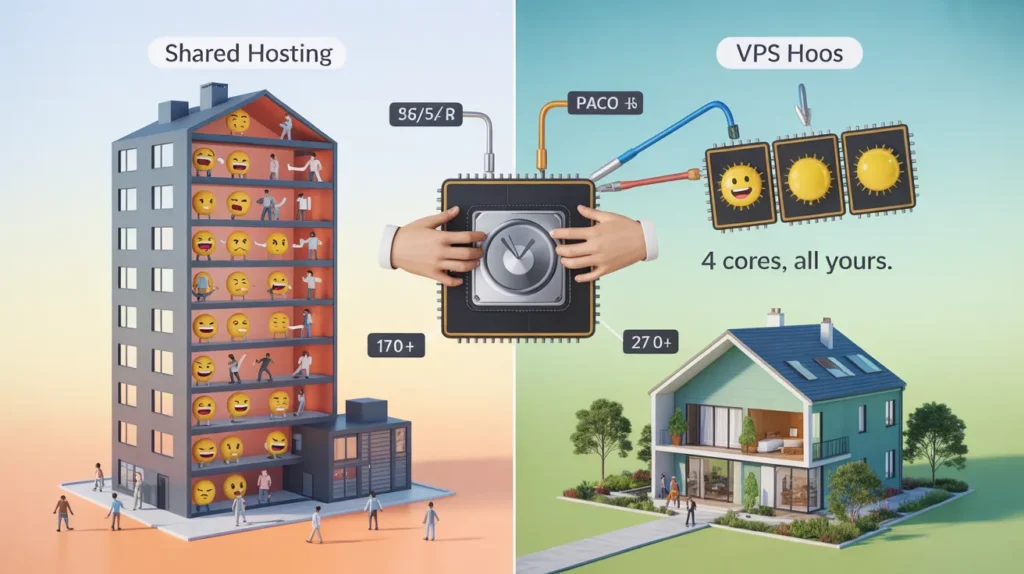
Shared hosting is the most common starting point for new websites. It’s cheap because you’re sharing a single server’s resources with hundreds, sometimes thousands, of other users. This works fine for small personal blogs or brochure websites with minimal traffic.
However, the “noisy neighbor” effect is a real problem. If another website on your shared server experiences a sudden traffic spike or gets hit with a DDoS attack, your site’s performance can plummet. You also have limited control over the server environment, with no root access and restrictions on the software you can install.
A low-cost virtual private server solves these problems by providing:
- Dedicated Resources: Your allocated CPU and RAM are yours alone.
- Root Access: You have full control to install custom software and configure the server to your exact needs.
- Improved Security: The isolated environment means other users’ security vulnerabilities are less likely to affect your site.
- Scalability: As your traffic grows, you can easily upgrade your VPS resources without needing to migrate to a new server.
Benefits of VPS for small businesses and developers
For small businesses and developers, the move to a VPS is often a game-changer. It provides the perfect middle ground for those who have outgrown shared hosting but don’t need the power (or expense) of a dedicated server. This makes VPS hosting for a small business an ideal, scalable solution that supports growth without demanding a huge initial investment.
Why Choose a Low Cost VPS Server?
Opting for an affordable VPS server is a strategic decision that balances cost with capability. It’s not just about saving money; it’s about getting the right tools for the job at a price that makes sense for your current needs.
Advantages of budget VPS hosting
The primary advantage is obvious: cost savings. Budget VPS hosting plans allow startups, freelancers, and small businesses to access a powerful and flexible hosting environment without a hefty price tag. This frees up capital that can be invested in other critical areas of the business, like marketing or product development.
Beyond the price, a low-cost VPS server offers a fantastic learning ground. If you’re a developer looking to experiment with server configurations or a business owner wanting more control, an unmanaged, affordable VPS gives you the freedom to learn and grow without a significant financial risk.
Cost-effectiveness vs features trade-off
When you’re comparing VPS server options, you’ll notice that lower prices often come with trade-offs. A cheap VPS hosting plan might offer less RAM, a single CPU core, or limited SSD storage. It might also be an unmanaged VPS, meaning you are responsible for all server maintenance, security, and updates.
This isn’t necessarily a bad thing. If your website has moderate traffic and doesn’t run resource-heavy applications, a basic plan is often more than enough. The key is to accurately assess your needs and avoid paying for resources you won’t use.
When a low-cost VPS is enough vs when to upgrade
A low-cost VPS is typically sufficient for:
- Websites that have outgrown shared hosting but aren’t yet at enterprise level.
- Developers needing a staging or testing environment.
- Hosting multiple small, low-traffic websites.
- Running specific applications that aren’t supported on shared hosting.
It’s time to upgrade when:
- Your website’s performance starts to lag due to high traffic.
- You consistently hit your RAM or CPU limits.
- You need to run more complex, resource-intensive applications.
- Your business has grown, and the cost of potential downtime now outweighs the savings from a budget plan.
How to Evaluate Low Cost VPS Hosting Providers
Not all cheap VPS hosting providers are created equal. A smart VPS server comparison involves looking beyond the sticker price. Here are the key factors to evaluate to find the best value VPS hosting.
CPU, RAM, and storage specifications
These are the core components of your server.
- CPU (Central Processing Unit): This is your server’s brain. For most small to medium websites, 1-2 cores are sufficient.
- RAM (Random Access Memory): RAM is crucial for handling concurrent processes. 1-2 GB of RAM is a good starting point for a simple website or application.
- Storage: Always opt for VPS hosting with SSD (Solid State Drive) or even better, NVMe SSD storage. It’s significantly faster than traditional HDD storage and dramatically improves website loading times. Check the amount of storage offered and ensure it’s enough for your files and databases.
Bandwidth and network performance
Bandwidth refers to the amount of data that can be transferred to and from your server. Most budget plans offer generous or even unmetered bandwidth, but pay attention to the port speed (e.g., 100 Mbps or 1 Gbps), as this affects how quickly data can move. A high VPS uptime guarantee (99.9% or higher) is non-negotiable.
Control panel and OS options
Your choice of Operating System (OS) and control panel will shape your user experience.
- OS: Most providers offer various Linux VPS distributions (like Ubuntu, CentOS) and sometimes Windows VPS. Linux is generally more common and cost-effective for web hosting.
- VPS Control Panel Options: Many low-cost plans are unmanaged and don’t include a control panel by default. You can often add popular options like cPanel or Plesk for a monthly fee or install a free alternative like CyberPanel or Hestia CP yourself.
Customer support and uptime guarantees
Even on an unmanaged plan, you’ll need support for network issues or hardware failures. Look for providers with 24/7 support via live chat, tickets, or phone. A solid uptime guarantee, backed by a Service Level Agreement (SLA), shows the provider is confident in their infrastructure.
Managed vs Unmanaged Low Cost VPS Servers
One of the most important decisions you’ll make is choosing between a managed and an unmanaged VPS. This choice directly impacts your responsibilities and overall cost.
Difference between managed and unmanaged VPS
An unmanaged VPS is a blank slate. The provider is responsible for the physical hardware and network availability, but everything else is up to you. This includes installing the OS, control panel, security patches, software updates, and troubleshooting any issues. It’s cheaper but requires technical expertise.
A managed VPS costs more because the hosting provider handles all the server administration for you. They’ll manage security, updates, backups, and performance monitoring. This is a great option if you don’t have the time or technical skills to manage a server yourself.
When to choose managed hosting
Choose a managed VPS if:
- You lack the technical knowledge (or desire to learn) to manage a server.
- You want to focus entirely on your business without worrying about server maintenance.
- The value of your time saved outweighs the additional cost.
Tips for managing your own VPS efficiently
If you go the unmanaged route, here are a few tips:
- Automate Updates: Set up automatic security updates for your OS to stay protected.
- Use a Firewall: Configure a firewall like UFW (Uncomplicated Firewall) to block unauthorized access.
- Monitor Resources: Keep an eye on your CPU and RAM usage to anticipate when you might need to upgrade.
- Regular Backups: Don’t rely solely on your provider. Set up your own automated, off-site backups.
How to Set Up a Low Cost VPS Server
Getting your VPS up and running involves a few key steps. It might seem daunting at first, but it’s a straightforward process.
Choosing your operating system
For most web hosting purposes, a Linux distribution like Ubuntu or CentOS is the standard choice. They are stable, secure, and have extensive community support. If you need to run specific Windows applications (like ASP.NET), you will need a Windows VPS, which is typically more expensive.
Installing a control panel (cPanel, Plesk, or free alternatives)
A control panel provides a graphical interface to manage your server, making tasks like creating email accounts, managing domains, and installing applications much easier.
- cPanel/Plesk: These are the industry standards but come with a monthly licensing fee.
- Free Alternatives: Tools like CyberPanel (which integrates well with LiteSpeed), Hestia CP, or Webmin are powerful, free options if you’re willing to handle the setup.
Basic security and optimization tips
Once your server is online, immediately take these steps:
- Change the root password.
- Create a new user with sudo privileges and disable direct root login.
- Set up a basic firewall.
- Install security software like Fail2Ban to protect against brute-force attacks.
Performance Tips for Budget VPS Servers
A low-cost VPS server can be surprisingly powerful if you optimize it correctly. Here’s how to squeeze every drop of performance out of your budget plan.
Optimizing RAM and CPU usage
Be mindful of the software you run. Choose lightweight alternatives where possible. For example, use a LiteSpeed web server or OpenLiteSpeed instead of Apache, as it uses fewer resources and offers superior performance. Regularly check for and terminate any unnecessary processes that are consuming CPU or RAM.
Using SSD storage for faster performance
This is a non-negotiable for VPS server performance. SSDs deliver data much faster than traditional hard drives, which means your website files and databases are accessed more quickly. This directly translates to faster page load times for your visitors. Every reputable provider should offer SSD or NVMe storage today.
Caching and CDN integration for speed
- Caching: Implement caching at multiple levels. Use a server-side caching solution like LiteSpeed Cache or Varnish, and a WordPress caching plugin if applicable. This stores pre-built versions of your pages, reducing the server’s workload.
- CDN (Content Delivery Network): A CDN like Cloudflare stores copies of your site’s static assets (images, CSS, JavaScript) on servers around the world. When a visitor comes to your site, these assets are served from the location closest to them, dramatically speeding up load times.
How Low Cost VPS Helps Small Businesses and Developers
The practical applications of an affordable VPS are vast. It’s a flexible tool that adapts to the unique needs of growing businesses and creative developers.
Hosting websites and applications affordably
A budget VPS provides a stable and secure home for your business website or custom web application. You get the performance and reliability you need to serve customers without the high overhead of a dedicated server, making it a perfect example of scalable VPS hosting.
Running multiple sites on a single VPS
With a control panel like cPanel or Plesk, you can easily host multiple websites on a single VPS. This is incredibly cost-effective for freelancers or agencies managing several client sites, consolidating hosting costs into one predictable monthly bill.
Experimenting with development and staging environments
For developers, a cheap VPS is an invaluable sandbox. You can set up a perfect replica of your production environment to test new features, updates, or entire applications without any risk to your live site. You can spin them up, tear them down, and experiment freely.
Why Skynethosting.net Is a Good Choice for Low Cost VPS
When it comes to finding a provider that hits the mark on both affordability and performance, Skynethosting.net stands out. They have been in the business for over 20 years, demonstrating reliability and experience.
Affordable plans with reliable performance
Skynethosting.net offers a range of VPS plans that are priced competitively, making them accessible for small businesses and developers. They don’t skimp on performance, utilizing powerful hardware and NVMe SSDs to ensure fast loading times.
Multiple global data centers for low latency
With data centers located around the world, including the USA, UK, Canada, and Australia, you can choose a server location that is physically closest to your target audience. This reduces latency and further improves your website’s speed for your primary user base.
VPS plans suitable for small businesses, freelancers, and developers
Whether you’re a freelancer launching your first client site or a small business needing a reliable e-commerce platform, Skynethosting.net has a VPS plan designed to fit. Their offerings provide the flexibility and resources needed to support growth at every stage.
Your Path to Smarter Hosting
Choosing a hosting solution is a pivotal decision for any online project. A low-cost VPS server represents a powerful, intelligent choice that bridges the gap between the limitations of shared hosting and the high cost of a dedicated server.
How to choose the best low cost VPS server
To find your perfect fit, start by realistically assessing your needs. Don’t overbuy. Look for a provider that offers the flexibility to scale up when you’re ready. A VPS server comparison should always go deeper than just the price.
Key features to prioritize
Focus on the fundamentals: SSD or NVMe storage, a strong uptime guarantee, and responsive customer support. These elements form the bedrock of a reliable hosting experience. The ability to choose your OS and control panel gives you the freedom to build the exact environment you need.
Combining affordability with reliability
Ultimately, the goal is to find a hosting partner that lets you grow with confidence. An affordable VPS server isn’t just a “cheap” option; it’s a strategic asset. By selecting a provider that balances cost with dependable performance, you empower your business or project to reach its full potential without being held back by its hosting.
FAQs
What makes a VPS different from shared hosting?
Why consider a low-cost VPS server?
What are common trade-offs with cheap VPS plans?
Budget VPS plans sometimes offer less RAM, lower CPU power, smaller SSD storage, or require you to manage the server yourself. That’s fine for simple websites or testing environments, as long as you know what you’re getting and don’t overbuy resources.
When is a budget VPS plan enough, and when should you upgrade?
How can you evaluate low cost VPS hosting providers?
What’s the difference between managed and unmanaged VPS hosting?
Managed VPS plans handle updates, security, and technical troubleshooting for you—they cost more but save time. Unmanaged plans are cheaper, but you’ll be responsible for everything from installing the OS to hardening security and monitoring performance.
Why is Skynethosting.net recommended for affordable VPS?
Skynethosting.net mixes low prices with reliable performance and global data centers. They use powerful hardware with NVMe storage, offer plans for all budgets, and a long track record of uptime—making them a smart pick for small businesses or solo developers.