
Reseller Hosting Account Limits Explained: What You Can and Can’t Do
TL;DR
- Account limits cap disk space, bandwidth, cPanel numbers, CPU/RAM/I-O per client via CloudLinux to isolate server issues safely.
- Inodes track files like emails/images/cache files; millions slow servers even under disk space—clean caches regularly now.
- “Unlimited” plans follow strict fair usage policies only; no media streaming or file hoarding ever allowed whatsoever.
- Host 30-50 WordPress sites safely on standard plans; limit usage to 80% capacity for traffic spikes.
- Exceeding triggers throttling with 503 errors or suspensions automatically; only affected account goes down, others stay up.
- Monitor WHM weekly, allocate realistic packages, educate clients on optimization to avoid surprises completely.
When I first started in the web hosting game about a decade ago, I hit a wall pretty quickly. I had this grand vision of cramming hundreds of clients onto a single, affordable reseller plan. I thought I’d found a loophole to infinite profit.
Spoiler alert: I hadn’t.
One morning, I woke up to a suspended account and a handful of angry emails from clients whose websites were down. I hadn’t run out of disk space. I hadn’t run out of bandwidth. I had hit an “inode limit”—something I didn’t even know existed at the time.
If you are looking to build a serious hosting business, understanding the boundaries of your account is just as important as selling the service. Limits aren’t there to stifle your growth; they are the guardrails that keep your business (and your neighbors on the server) safe.
Let’s break down exactly what these limits are, why they exist, and how you can manage them like a pro so you never wake up to that dreaded suspension email.
What Are Account Limits in Reseller Hosting?

Definition of account limits
Think of a reseller hosting server like an apartment building. You rent a floor (your reseller plan), and you sublet rooms (hosting accounts) to your tenants (clients).
Account limits are the rules set by the building management. They determine how much water, electricity, and space you and your tenants can use. In technical terms, these are caps on resources like storage, data transfer, and processing power. They define the maximum capacity your specific package can handle before things start to break or slow down.
Why hosting providers enforce limits
It’s easy to feel like limits are just a way for providers to upsell you. But honestly, they are necessary for survival.
If one “tenant” in our apartment analogy decides to run a heavy industrial welding machine in their living room, the lights are going to flicker for everyone else in the building. In hosting, if one of your client’s websites gets a massive traffic spike or runs a poorly coded plugin, it could hog the server’s CPU. Without limits, that single site could crash the entire server, taking down everyone’s websites—yours, mine, and the other resellers’.
How limits protect server stability
By enforcing limits, hosting providers ensure “fair usage.” It isolates problems. If a specific account hits its limit, only that account is throttled or temporarily suspended. The rest of the server keeps humming along perfectly. This isolation is the only way shared environments (which include reseller hosting) can remain stable and affordable.
Which Types of Limits Exist in Reseller Hosting?
Disk space and bandwidth limits
These are the “big two” that everyone looks at first.
- Disk Space: This is your storage locker. It holds website files, images, databases, and emails. If you have a 50GB limit, that’s the hard ceiling for all your clients combined.
- Bandwidth: This is the amount of data transferred to and from the server. Every time a visitor views a page, they use bandwidth.
Most resellers manage these well because they are visible numbers. But they are rarely the reason an account gets suspended.
Number of hosting accounts
Some plans, typically the budget-friendly ones, cap the sheer number of cPanel accounts you can create (e.g., 25, 50, or 100 accounts). This is a licensing and management limit. Even if you have plenty of disk space left, if you hit your 50-account cap, you can’t sign up client #51 without upgrading.
CPU, RAM, and I/O restrictions
These are the “hidden” performance limits, often governed by an operating system called CloudLinux.
- CPU: How much processing power a single cPanel account can use at once.
- RAM: The short-term memory available to run PHP scripts and processes.
- I/O (Input/Output): How fast data can be written to or read from the hard drive.
These limits usually apply per cPanel account, not to your entire reseller plan. This is great news for you because it means one heavy client won’t eat up your entire reseller resource pool.
What Are Inode Limits and Why Do They Matter?
What an inode actually is
This is the silent killer of hosting accounts. An inode (index node) represents a single file or folder on a Linux filesystem.
- 1 image = 1 inode
- 1 email = 1 inode
- 1 cache file = 1 inode
It doesn’t matter how big the file is. A 1KB text file uses the same inode count as a 1GB video file.
How inode usage affects performance
Servers have to keep track of every single file location. When file counts get into the millions, the file system struggles to index them. Backups take forever to run, and file checks become sluggish.
I once had a client who set up a cron job (an automated task) that created a small error log file every minute. After two years, they had over a million tiny files. It didn’t take up much space, but it absolutely crushed the inode limit.
Common inode overuse mistakes
The most common culprits I see are:
- Email accounts: Clients who never delete their Trash or Spam folders.
- Caching plugins: WordPress plugins that create thousands of cache files but fail to clear them.
- Unmanaged backups: Storing daily backups inside the hosting account instead of downloading them or sending them to cloud storage.
How Do “Unlimited” Reseller Hosting Plans Really Work?
Marketing vs technical reality
You will see the word “Unlimited” plastered everywhere in this industry. Unlimited Bandwidth! Unlimited Space!
Here is the truth from someone on the inside: Nothing is truly unlimited. Hard drives have physical limits. Network cables have physical capacity limits.
When a host says “Unlimited,” they usually mean “Unlimited*.” The asterisk is doing a lot of heavy lifting.
Fair usage policies explained
That asterisk points to the Terms of Service (ToS) or Fair Usage Policy. Usually, it means you can use as much space as you want for normal website operation.
If you try to use your “unlimited” hosting as a cloud storage drive for your movie collection, you will be flagged. If you host a file-sharing site, you will be flagged. “Unlimited” applies to standard web pages, not data warehousing.
What “unlimited” never includes
“Unlimited” almost never applies to:
- CPU/RAM usage: You will always be capped here to protect neighbors.
- Inodes: Even “unlimited space” plans often have a cap of 100,000 to 250,000 inodes per account.
- Media streaming: You usually can’t run a 24/7 radio station from a standard reseller account.
How Many Client Websites Can You Host on a Reseller Plan?

Estimating capacity per client type
This is the million-dollar question. The answer is: It depends on the clients.
- Static/HTML sites: You could probably host 100+ small brochure sites on a standard plan. They use almost no CPU/RAM.
- WordPress sites: These are heavier. A standard reseller plan might comfortably hold 30-50 active WordPress sites.
- Ecommerce/WooCommerce: These are resource hogs. You might only be able to fit 10-15 busy stores on a plan before things slow down.
Low-traffic vs high-traffic websites
Traffic isn’t just about bandwidth; it’s about concurrent connections. If ten people visit a site at once, the server has to work ten times harder.
If you have a client getting 50,000 visits a month, they probably shouldn’t be on a shared reseller account. They need their own VPS. Keeping them on your reseller plan is risky because if they go viral, they might hit the CPU cap and get suspended, making you look bad.
Safe account density guidelines
My personal rule of thumb for stability? Don’t fill your disk space or account limits to 100%. Aim for 80%.
If your plan allows 50 accounts, stop at 40. This gives you “wiggle room” for traffic spikes or when a client decides to upload a massive photo gallery overnight.
What Happens When You Exceed Account Limits?
Resource throttling and warnings
Modern hosting is smarter than it used to be. Instead of instantly shutting a site down, systems like CloudLinux will “throttle” the site.
If a client hits their CPU limit, their website will slow down significantly for a few moments until the usage drops. It might show a “503 Resource Limit Reached” error. This is a warning shot. It tells you that the site needs optimization or an upgrade.
Account suspensions and downtime
If the violation is severe—like a malware infection sending out thousands of spam emails (bandwidth abuse) or a script running out of control—the host will suspend that specific cPanel account.
In a good reseller environment, only that one bad apple gets taken offline. Your other clients stay up.
Impact on client trust
Technical suspensions are annoying, but the reputation damage is worse. If your client’s business site goes dark because of a resource limit, they lose money. They will blame you.
This is why proactive management is key. You never want the client to be the one to tell you that their site is down.
How Can Resellers Manage Account Limits Effectively?
Monitoring usage in WHM
Your best friend is WHM (Web Host Manager). This is your reseller control panel. There is a section usually called “List Accounts” or “Show Reseller Usage.”
Check this weekly. Sort your accounts by disk usage. Look for anyone getting close to their quota. If you see someone at 90% usage, upsell them! “Hey Client, you’re growing fast! Let’s bump you to the next tier so you don’t run out of room.”
Resource allocation best practices
When you create packages for your clients, don’t give them everything upfront.
If you sell a “Starter Plan,” don’t assign it 10GB of space if they only need 500MB.
Assign realistic limits.
- Starter: 1GB Space / 10GB Bandwidth
- Pro: 5GB Space / 50GB Bandwidth
You can always increase a limit instantly in WHM. It is much harder to take resources away from a client once you’ve promised them.
Preventing noisy-neighbor issues
Educate your clients. If you see a client installing five different backup plugins, send them a friendly email explaining why that’s a bad idea (inode limits). If they are uploading uncompressed 10MB images, suggest an optimization plugin.
Helping them manage their site better keeps your server load low and your margins high.
When Do Account Limits Mean You Should Upgrade?
Signs you’ve outgrown reseller hosting
Reseller hosting is the launchpad, but it’s not always the forever home. You know you’ve outgrown it when:
- Multiple clients are hitting resource caps regularly.
- You need custom software that the shared server doesn’t support.
- Performance is lagging during peak hours despite optimization.
- You are spending more time juggling resources than finding new customers.
Moving to VPS or hybrid setups
The next logical step is a VPS (Virtual Private Server). This gives you a slice of a server that is dedicated only to you. You get your own CPU and RAM that no one else can touch.
At Skynethosting.net, we often see resellers keep their smaller clients on a Reseller Plan and move their 2 or 3 biggest, high-traffic clients onto a separate VPS. This “hybrid” approach is smart—it keeps costs low for the small guys and performance high for the big guys.
Scaling without disrupting clients
The beauty of the WHM/cPanel ecosystem is that migrations are easy. You can move a cPanel account from a Reseller plan to a VPS usually with zero downtime. Your client won’t even know it happened; they’ll just notice their site is suddenly faster.
How Hosting Provider Quality Affects Account Limits
Server hardware and optimization
Not all limits feel the same. A 1GB RAM limit on an old, spinning hard drive server feels sluggish. A 1GB RAM limit on a server with NVMe storage and LiteSpeed Web Server feels incredibly fast.
Quality providers invest in better hardware so that the limits don’t feel restrictive. For example, Skynethosting.net uses NVMe storage which is 900% faster than traditional SATA drives. This means your clients can do more with the same account limits.
Overselling tolerance
“Overselling” is when a host puts too many resellers on one server, betting that they won’t all use their resources at once.
Budget hosts oversell aggressively. This makes the server unstable. Premium providers (like us) keep the density low. We’d rather have fewer, happier resellers on a server than a packed server that crashes every Tuesday.
Support response to limit issues
When you hit a limit, does your host help you find the cause, or do they just demand more money?
A good support team will say, “Hey, your client ‘Bob’s Burgers’ is hitting the CPU limit because of a broken calendar plugin.” A bad host will just say, “Upgrade or get suspended.”
How Skynethosting.net Handles Reseller Hosting Limits Transparently
Clearly defined resource allocations
We don’t like guessing games. At Skynethosting.net, we are upfront about what you get. Whether you choose our USA Reseller Hosting or a location in Europe or Asia, you know the specs. We use CloudLinux to ensure that no single website can slow down your business.
Fair usage without surprises
We believe in enabling your business, not blocking it. Our limits are designed to stop abuse, not legitimate growth. Because we use LiteSpeed Web Server and LiteSpeed Cache, our servers handle traffic spikes much better than standard Apache servers, meaning you hit those limits less often.
Easy upgrade paths
We’ve been doing this for 20 years. We know that businesses grow. You can start on a budget reseller plan for $6.95/mo, and as you gain clients, move to a Corporate VIP plan, and eventually to your own VPS or Dedicated Server. We even offer a 50% discount on VPS reselling for our VIP clients, making that transition affordable.
How to Choose the Right Reseller Plan Based on Account Limits
Beginner capacity checklist
Before you buy, ask yourself:
- How many sites do I have right now?
- What is the average size of these sites?
- Do any of them have high traffic?
If you are just starting, the “Unlimited” (Fair Usage) disk space plans are great because they remove one variable from your stress list.
Matching limits to business goals
If your goal is to host cheap, low-traffic sites for local plumbers and bakeries, a standard Reseller plan is perfect. You can stack many of them high.
If your goal is to host high-end, dynamic membership sites or heavy ecommerce stores, look for a plan that emphasizes CPU and RAM per account rather than just disk space.
Avoiding limit-related mistakes
Don’t buy the cheapest plan possible and hope for the best. It’s a recipe for disaster. Look for “CloudLinux,” “NVMe,” and “LiteSpeed” in the features list. These technologies stretch the limits further.
And remember, always have a backup (which we do daily and weekly for you!).
Conclusion
Account limits exist for stability, not restriction
It’s easy to look at a list of limits—inodes, bandwidth, CPU—and feel restricted. But try to reframe that mindset. These limits are the safety features of your hosting vehicle. They stop the engine from overheating and keep the passengers safe.
Planning limits leads to profitable reselling
The most successful resellers I know aren’t the ones who buy the biggest servers; they are the ones who manage their resources efficiently. They understand what their plan can handle, they price their services correctly, and they upgrade at the right time.
If you are ready to start a hosting business where the limits are fair, the hardware is blazing fast, and the support team actually has your back, check out our reseller plans. We’ll give you the tools—and the space—to grow.
In hosting, success requires a partner that empowers your business. At Skynet Hosting, we deliver top-tier reseller solutions with unparalleled performance, scalability, and support. Whether you’re starting out or scaling up, we have the resources to help you succeed. Join the thousands of resellers who trust us to fuel their growth.
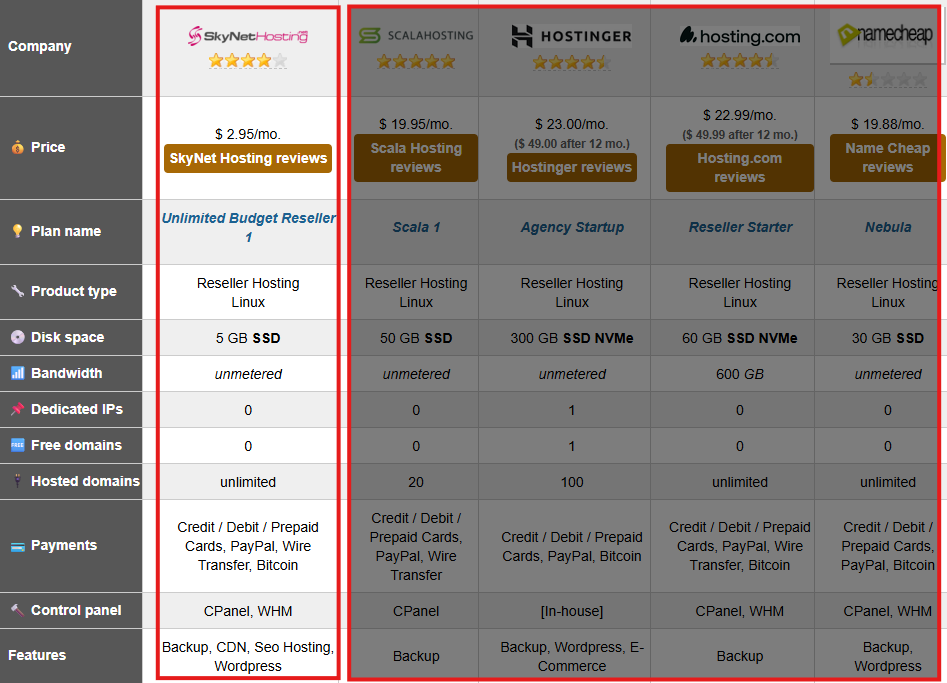
Industry recognition also reinforces this trust. SkyNetHosting.Net was recently ranked the #1 Reseller Web Hosting provider for 2026 by WHTOP, a well-known independent hosting directory that tracks tens of thousands of hosting providers worldwide. Their rankings are determined through real customer reviews, performance indicators, and long-term industry data rather than paid promotions, making this recognition a meaningful signal for businesses choosing a reliable reseller hosting platform.
Explore our reseller hosting plans today and unlock your business’s full potential!
FAQ
What are main reseller hosting account limits?
Why do inode limits cause unexpected issues?
How many client sites fit on a reseller plan?
100+ static sites; 30-50 WordPress; 10-15 e-commerce safely. Stay at 80% capacity; move high-traffic/viral risks to VPS for consistent performance without shared server risks.
What happens if limits are exceeded?
How to manage limits effectively?
Use WHM to monitor usage weekly, set conservative packages (e.g., 1GB starter), advise clients on caching/image optimization, aim for hybrid setups with VPS for top clients.