Reseller Hosting Migration: How to Move Your Clients Safely Without Downtime
TL;DR
- Reseller migration moves multiple client accounts to new infrastructure for better performance, scalability without downtime.
- Risks include downtime, data loss, DNS/email issues; prevented by backups, staging tests, phased rollout.
- Prepare with inventory audits, TTL reduction, verified multi-location backups before transfer.
- Use WHM transfer tools for files/databases/emails; test functionality, SSL, performance post-move.
- Communicate timelines transparently to clients; monitor 48hrs during DNS propagation.
- Skynethosting.net provides managed support, NVMe servers, free WHMCS for seamless reseller growth.
I’ll never forget my first reseller hosting migration. It was 2 AM on a Tuesday. I was moving 47 client websites to a new server. My hands were shaking as I clicked the final “Update Nameservers” button.
Would the sites go down? Would emails stop working? Would my clients wake up to broken websites?
Spoiler: Everything went smoothly. But only because I had learned from my mistakes the hard way.
If you’re reading this, you’re probably planning your own migration. Maybe your current host has become unreliable. Maybe you’ve outgrown their infrastructure. Or maybe you just found a better deal that makes business sense.
Whatever your reason, moving your reseller hosting accounts doesn’t have to be terrifying. With the right preparation and process, you can migrate dozens (or hundreds) of client accounts without causing downtime or losing data.
I’ve been managing servers and hosting migrations for over 10 years now. I’ve seen every possible mistake and every possible success. In this guide, I’m going to walk you through exactly how to migrate your reseller hosting business safely, step by step.
Let’s make sure your migration goes as smoothly as mine eventually did.
What Is Reseller Hosting Migration?

Reseller hosting migration means moving all your client accounts from one hosting provider to another. Unlike migrating a single website, you’re moving an entire business infrastructure.
Understanding how reseller-level migration differs from single-site migration
When you migrate one website, you move files, databases, and maybe some email accounts. Pretty straightforward.
Reseller migration is different. You’re moving:
- Multiple client accounts (each with their own websites, databases, and emails)
- All your white-label branding and custom settings
- Billing integrations (like WHMCS or other automation tools)
- DNS configurations for dozens of domains
- SSL certificates for each client site
It’s not just one website. It’s your entire business moving to a new home.
Think of it like moving a restaurant versus moving an entire shopping mall. The complexity multiplies fast.
Why planning is critical when managing multiple clients
Here’s the thing that keeps resellers up at night: one mistake affects multiple clients.
If you mess up a single client migration, that’s bad. If you mess up your entire reseller account, you could take down 50+ websites simultaneously. That’s a business-ending disaster.
Your clients trust you to keep their websites running. They don’t care about your hosting provider drama. They just want their site to work 24/7.
That’s why you can’t wing it. You need a solid plan before you touch anything.
Why Do Resellers Decide to Migrate to a New Hosting Provider?
Most resellers don’t migrate for fun. Something pushes them to make the move.
Performance limitations and uptime concerns
I once worked with a reseller who was losing clients because of server crashes. His host kept blaming “traffic spikes,” but the real issue was oversold shared resources.
His sites loaded slowly. They went offline during peak hours. Clients were complaining.
When he migrated to better hosting infrastructure, everything changed. Load times dropped by 60%. Uptime improved to 99.9%+.
Performance matters. If your current host can’t deliver speed and reliability, your clients will eventually leave.
Pricing structures that reduce profitability
Some hosting providers start cheap but raise renewal prices dramatically. Others charge extra for basic features like SSL certificates or daily backups.
I’ve seen resellers stuck paying $30/month for features that should be included. When you’re managing 50+ clients, those costs add up fast.
If your profit margins are shrinking because of your host’s pricing, migration makes financial sense.
Lack of scalability for growing reseller businesses
Success creates its own problems. You started with 10 clients. Now you have 50. Next year, you’ll have 100.
But your current hosting plan has resource limits. You can’t add more accounts. You can’t upgrade without switching to a completely different plan structure.
That’s when resellers realize they’ve outgrown their provider. They need a platform built for growth, not one that punishes success with artificial limits.
What Are the Biggest Risks During Reseller Hosting Migration?
Let’s talk about what can go wrong. Understanding the risks helps you avoid them.
Downtime affecting client websites
This is the nightmare scenario. You start the migration, and suddenly 30 websites go offline.
Downtime happens when DNS changes before your sites are fully set up on the new server. Or when you forget to test a database connection. Or when an SSL certificate doesn’t transfer correctly.
Even one hour of downtime costs your clients money. It damages your reputation. Some clients might leave after a botched migration.
The good news? Downtime is almost always preventable with proper planning.
Data loss or incomplete transfers
I once met a reseller who lost three months of client data during a migration. The backup was corrupted, and he didn’t verify it before starting the transfer.
Gone. Just like that.
Files can get skipped during transfer. Database exports might be incomplete. Email accounts might not include all folders.
You need verified backups before you start. And you need to test every single account after migration.
Email and DNS misconfigurations
Email is where most migrations fail. Your clients’ businesses depend on email working perfectly.
If you misconfigure MX records, emails bounce. If you forget to migrate email accounts, your clients lose access to their inboxes.
DNS issues are just as problematic. Point the nameservers too early, and the site loads from the old server. Point them too late, and you create unnecessary delays.
These technical details matter more than anything else.
How Can You Prepare for a Smooth Migration?
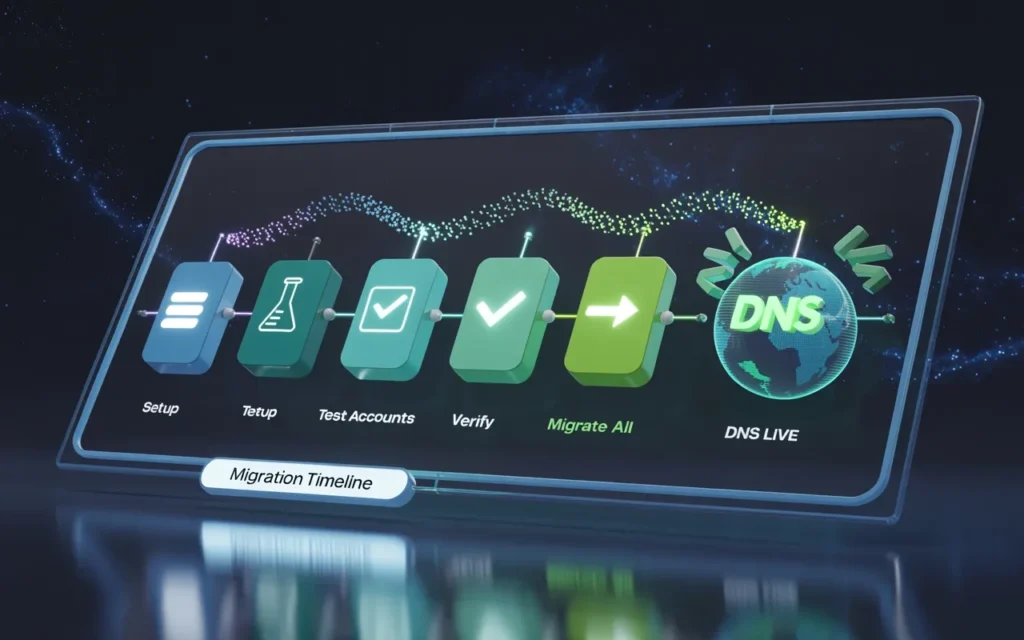
Preparation is 80% of a successful migration. Here’s what you need to do before moving anything.
Creating verified backups of all reseller accounts
Never trust a single backup. Ever.
Create full backups of every client account through your current hosting control panel. Download them to your local computer.
Then verify each backup by spot-checking a few files. Make sure databases are included. Confirm email accounts are backed up.
Store these backups in three places:
- Your local computer
- An external hard drive
- Cloud storage (like Dropbox or Google Drive)
If something goes wrong during migration, these backups are your safety net.
Auditing client websites, databases, and email systems
Before you migrate, you need to know exactly what you’re moving.
Create a spreadsheet listing:
- Every client domain
- How many websites each client has
- Database counts and sizes
- Email account numbers
- Active SSL certificates
- Special configurations (like custom PHP versions or specific scripts)
This audit serves two purposes. First, it helps you plan the migration timeline. Second, it gives you a checklist to verify everything transferred correctly.
Building a migration timeline to minimize disruption
Don’t migrate everything at once. That’s asking for trouble.
I recommend migrating in phases:
Phase 1 (Days 1-2): Set up your new reseller account and test environment
Phase 2 (Days 3-4): Migrate 5-10 test accounts (preferably your smallest clients)
Phase 3 (Days 5-6): Verify test accounts and fix any issues
Phase 4 (Days 7-10): Migrate remaining accounts in small batches
Phase 5 (Days 11-14): Final DNS updates and monitoring
Plan to complete your migration over 2-3 weeks. Yes, it takes time. But rushing causes mistakes.
Schedule migrations during off-peak hours (like weekends or late nights) when traffic is lowest.
What Is the Step-by-Step Process for Migrating Reseller Accounts?
Now let’s get into the actual migration process. This is where planning meets execution.
Server-to-server account transfers
Most modern hosting providers offer account transfer tools. These tools connect directly to your old server and pull accounts over automatically.
At SkyNetHosting.net, for example, the migration process uses cPanel’s transfer system. It’s designed specifically for moving multiple accounts safely.
Here’s the typical process:
Step 1: Log in to WHM (Web Host Manager) on your new server.
Step 2: Navigate to “Transfer Tool” or “Copy Multiple Accounts.”
Step 3: Enter your old server’s login credentials.
Step 4: Select which accounts to transfer.
Step 5: Let the system handle the file transfer, database import, and email migration.
The tool does most of the heavy lifting. But you still need to monitor the process and verify results.
For larger accounts, some providers offer managed migration services where their technical team handles everything for you.
Updating DNS and nameserver configurations
DNS is where migration gets tricky. Timing matters here.
Before you change anything, lower your DNS TTL values to 300 seconds (5 minutes). This makes DNS changes propagate faster.
Do this at least 48 hours before migration. It ensures when you make the actual switch, it happens quickly.
When you’re ready to switch:
Step 1: Verify every website works on the new server by testing through IP address or hosts file method.
Step 2: Update nameservers at the domain registrar to point to your new hosting provider.
Step 3: Monitor DNS propagation using tools like whatsmydns.net.
Step 4: Keep the old hosting active for 48-72 hours to catch any stragglers still resolving to the old server.
Don’t cancel your old hosting immediately. Give DNS time to fully propagate worldwide.
Testing each migrated account before going live
This step separates successful migrations from disasters.
Before updating DNS for any client, test their account thoroughly:
Website functionality: Visit every page. Submit contact forms. Test shopping carts if applicable.
Database connections: Confirm WordPress (or other CMS) connects to databases correctly.
Email testing: Send test emails from webmail. Verify all folders migrated.
SSL certificates: Ensure HTTPS works and certificates are valid.
Performance checks: Run speed tests to confirm the site loads faster (or at least as fast) as before.
Create a testing checklist and mark off each item for every client account. It’s tedious, but it prevents emergency calls at 3 AM.
How Can You Ensure Zero or Minimal Downtime for Clients?
Zero downtime is possible. It just requires careful coordination.
Using staging environments and synchronized transfers
The secret to zero-downtime migration is running both servers simultaneously for a brief period.
Here’s how it works:
Step 1: Set up all accounts on the new server while the old server is still running.
Step 2: Test everything on the new server without changing DNS.
Step 3: Do a final sync of any data that changed since the initial transfer (like new emails or uploaded files).
Step 4: Switch DNS to the new server.
Step 5: Keep both servers active for 48 hours during DNS propagation.
This way, even if some users still resolve to the old server, their sites keep working. No downtime window exists.
Managing DNS propagation strategically
DNS propagation is the biggest source of migration anxiety. Different internet providers update at different speeds.
Some users might see the new server in 5 minutes. Others might take 24 hours.
The key is planning for the worst-case scenario:
Before migration: Set TTL to 300 seconds (as mentioned earlier).
During migration: Update nameservers during your lowest-traffic hours.
After migration: Monitor both servers. Keep old hosting active until propagation completes globally.
Use DNS monitoring tools to track propagation across different regions. When 95%+ of global DNS servers show the new IP, you’re safe.
Communicating migration schedules with customers
Transparency builds trust. Don’t surprise your clients with a migration.
Send three emails:
Email 1 (One week before): “We’re upgrading our infrastructure to provide better performance. Here’s what to expect and when.”
Email 2 (One day before): “Migration starts tomorrow. You shouldn’t experience any downtime, but if you notice any issues, here’s how to reach us.”
Email 3 (After completion): “Migration successful! Your website is now on faster, more reliable infrastructure. Let us know if you notice any improvements.”
Most clients appreciate the communication. It shows professionalism and gives them confidence in your service.
What Should You Check After Migration Is Complete?
The migration isn’t finished when files transfer. You need to verify everything works perfectly.
Website functionality and database connections
Visit every client website. Click through major pages. Test all forms and interactive elements.
Check database-driven features specifically:
- Blog posts loading correctly
- Product pages displaying
- User login systems working
- Search functions operating
If a database didn’t migrate cleanly, you’ll discover it during this testing phase. Better to find issues before your clients do.
Email deliverability and SSL validation
Email is mission-critical. Test it thoroughly.
Send emails from each client’s domain. Verify they arrive (not in spam). Reply to those emails to test receiving.
Check that email authentication records (SPF, DKIM, DMARC) are configured correctly on the new server.
For SSL certificates, confirm:
- HTTPS loads without browser warnings
- Certificate shows the correct domain name
- Auto-renewal is configured for future expiration
An expired or misconfigured SSL certificate will trigger browser warnings that scare visitors away.
Performance benchmarking on the new server
This is the fun part. You should see improvements.
Run speed tests using tools like GTmetrix or Google PageSpeed Insights. Compare results to your old server baseline.
Check:
- Page load times
- Time to first byte (TTFB)
- Database query speeds
- Server response times
If performance didn’t improve (or got worse), investigate why. Sometimes server configurations need fine-tuning after migration.
At SkyNetHosting.net, most resellers see significant performance boosts after migration because of NVMe storage and optimized server configurations. Your experience should be similar on quality infrastructure.
How SkyNetHosting.net Simplifies Reseller Hosting Migration
Not all hosting providers make migration easy. Some deliberately create friction to prevent customers from leaving.
Managed migration support designed for resellers
At SkyNetHosting.net, we understand that reseller migrations are complex. That’s why we offer migration assistance as part of our service.
Our technical team can help with:
- Account transfer setup and monitoring
- DNS configuration guidance
- Post-migration testing and optimization
- Troubleshooting any issues that arise
You’re not alone during the process. We’ve helped hundreds of resellers migrate successfully over our 20+ years in business.
Infrastructure optimized for stability and scalability
Migration is pointless if your new host has the same limitations as your old one.
Our reseller hosting platform includes:
- NVMe SSD storage for 900% faster database performance
- LiteSpeed web servers that load websites 300% faster than Apache
- CloudLinux operating system for account isolation and stability
- 25 worldwide server locations so your clients’ websites load fast globally
We also include free WHMCS licenses (normally $15.95/month) with reseller plans. This means your billing automation transfers seamlessly.
Seamless onboarding for multiple client accounts
The worst part of migration is often the post-migration setup. Creating accounts, configuring settings, setting up backups.
We streamline this process:
White-label branding: Your nameservers (ns1.yourdomain.com) are configured automatically.
Automated backups: Daily and weekly backups activate immediately for all accounts.
End-user support: Our team can handle technical support tickets directly from your clients (under your brand).
Free domain reseller account: Start offering domains alongside hosting without additional setup.
You can focus on growing your business while we handle the technical infrastructure.
How Can Resellers Use Migration as an Opportunity to Grow?
Migration isn’t just about avoiding problems. It’s a chance to level up your entire business.
Upgrading service quality to attract new clients
When you migrate to better infrastructure, you can honestly tell prospects: “We recently upgraded to enterprise-grade servers with NVMe storage and 99.9% uptime guarantee.”
That’s a compelling sales pitch. It differentiates you from competitors still running on outdated hardware.
Your existing clients will notice improvements too. Faster load times and better reliability create natural word-of-mouth marketing.
Improving uptime and performance as a selling point
Performance and reliability become your competitive advantages.
Instead of competing on price (a race to the bottom), you compete on quality. You can charge premium rates because you deliver premium service.
When prospects compare hosting providers, they’ll see your superior infrastructure. That justification makes closing sales easier.
Scaling reseller operations with better infrastructure
The right hosting platform grows with your business.
At SkyNetHosting.net, our reseller plans scale from handling a few dozen clients to supporting thousands. You don’t hit artificial limits that force another migration in six months.
As you add clients, you can upgrade resources seamlessly. No downtime. No complicated migrations. Just smooth scaling.
This flexibility lets you focus on sales and client relationships instead of constantly worrying about technical limitations.
Conclusion
A successful reseller migration requires planning, precision, and the right environment
You’ve seen the complete process now. Migrating reseller hosting accounts isn’t something you do on a whim.
It requires:
- Detailed preparation and backups
- Systematic testing at every stage
- Careful DNS management
- Ongoing monitoring and verification
But when you follow the right process, migration becomes manageable. Even routine.
Choosing a reliable platform ensures long-term stability for your clients
Your hosting provider is the foundation of your reseller business. Everything builds on that foundation.
Choose a provider with proven infrastructure, responsive support, and a track record of stability. Don’t let low prices lure you into another problematic hosting situation.
SkyNetHosting.Net Inc. provides the performance, support, and scalability resellers need to migrate confidently and grow sustainably
We’ve been in the hosting business for over two decades. We’ve seen hosting trends come and go. What hasn’t changed is the need for reliable infrastructure and genuine support.
Whether you’re migrating from a problematic host or scaling beyond your current provider’s capabilities, we’re here to make the transition smooth.
Our reseller hosting includes everything you need: fast NVMe servers, free WHMCS, global locations, and 24/7 expert support.
Ready to migrate your reseller hosting business? Let’s make it happen without the stress and downtime you’ve been worried about.
FAQs
What exactly is reseller hosting migration?
Reseller hosting migration is moving all your client accounts—websites, databases, emails, and configurations—from one hosting provider to another. Unlike single-site migration, you’re transferring multiple businesses at once, along with white-label branding and billing systems.
Why do resellers migrate to new hosting providers?
Common reasons include performance problems with slow servers, poor uptime affecting client satisfaction, pricing structures that hurt profit margins, lack of scalability as client numbers grow, and inadequate technical support from the current provider.
What are the biggest risks during migration?
The main risks are downtime affecting multiple client websites simultaneously, data loss from incomplete backups or failed transfers, and email or DNS misconfigurations that disrupt business communications and website accessibility.
How long does a typical reseller migration take?
Plan for 2-3 weeks to migrate safely. This includes preparation, phased account transfers, testing, DNS updates, and monitoring. Rushing migrations causes mistakes; taking time prevents disasters.
Can I migrate without causing downtime?
Yes, zero-downtime migration is possible by setting up accounts on the new server first, testing thoroughly, lowering TTL values before switching, updating DNS strategically, and keeping both servers active during propagation periods.
How does SkyNetHosting.net help with reseller migrations?
SkyNetHosting.net offers migration assistance, optimized infrastructure with NVMe storage and LiteSpeed servers, free WHMCS licenses, 25 global locations, automated backups, and 24/7 support to ensure smooth transitions and long-term stability.