What Is a Virtual Private Server? Technical Definition & Key Benefits Explained
TL;DR
- A Virtual Private Server (VPS) is a virtual machine on a shared physical server that behaves like a dedicated server with its own CPU, RAM, and storage.
- VPS sits between shared and dedicated hosting, offering more performance, control, and isolation than shared hosting without the high cost of a full dedicated server.
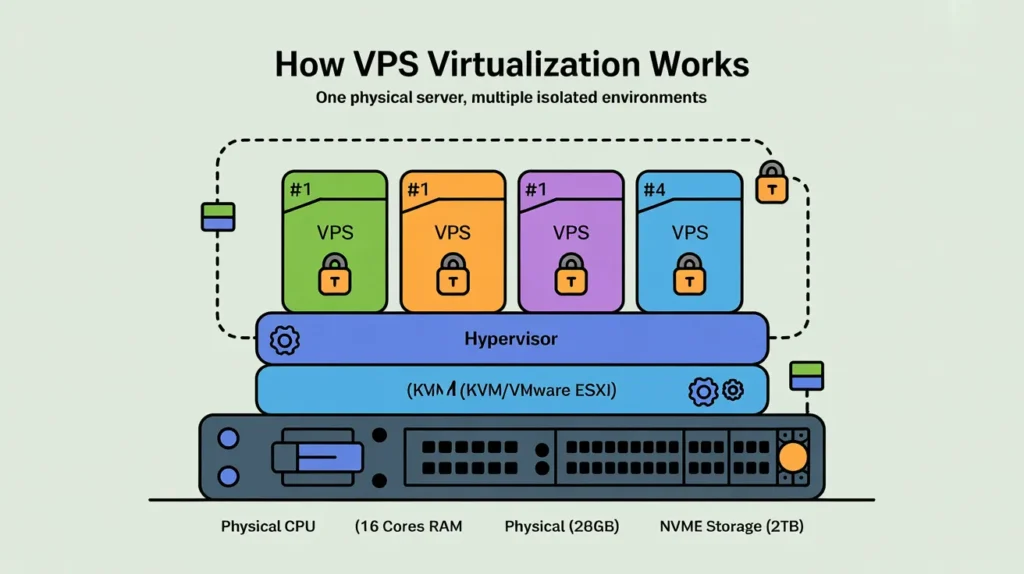
- Virtualization software (hypervisor) slices one physical server into multiple isolated environments, ensuring each VPS gets guaranteed resources and independent operating system access.
- VPS hosting is ideal for growing websites, eCommerce stores, SaaS apps, and developers who need root access, custom software stacks, and reliable performance.
- Key benefits include better speed, security, and scalability compared to shared hosting, with the ability to upgrade CPU, RAM, and storage as traffic and workloads grow.
- SkyNetHosting emphasizes NVMe storage, global data centers, and 24/7 support, making its VPS plans suitable for businesses wanting affordable but powerful hosting.
If you’ve ever stared at a hosting plan comparison chart and felt completely lost, you are not alone. In my decade of working with server infrastructure, I’ve seen countless business owners get stuck in the “Goldilocks” dilemma of web hosting. Shared hosting feels too small and risky, but a dedicated server feels too big and expensive.
This is exactly where a Virtual Private Server (VPS) fits in. It is the middle ground that powers a massive chunk of the modern internet.
But what actually is it? Is it just a marketing term, or is there real technology under the hood that makes it better than shared hosting?
In this guide, I’m going to break down the technical definition of a VPS, explain the virtualization technology that makes it work, and help you decide if it’s the right move for your digital growth.
What Is a Virtual Private Server (VPS)?
Technical definition of a VPS
At its core, a Virtual Private Server (VPS) is a virtualized operating system that lives within a parent server. It uses virtualization technology to provide you with dedicated (private) resources on a server with multiple users.
Think of it this way: A VPS mimics a dedicated physical server. To you, the user, the experience is identical. You have root access, you can install your own software, and you can reboot your system without affecting anyone else. However, in reality, you are sharing the physical hardware with other VPS containers, though your specific slice of the hardware is strictly isolated.
How a VPS differs from physical servers
A physical server (often called a “bare metal” server) is a single piece of hardware. If you rent a dedicated server, you are renting the entire box—every wire, chip, and drive. You are the only tenant.
A VPS acts like a physical server but is software-defined. A powerful physical server is sliced up into multiple smaller virtual servers. While a physical server offers the ultimate raw power, it is expensive and harder to scale. A VPS offers 90% of that functionality for a fraction of the cost because the hardware overhead is shared.
Why VPS exists in modern hosting
VPS hosting exists to solve the scalability gap. Before VPS technology became mainstream, if your website outgrew a $5/month shared hosting plan, your only option was often a $150/month dedicated server. That’s a massive jump in cost and technical responsibility.
VPS hosting bridges that gap. It allows growing businesses to access enterprise-level features—like isolated environments and dedicated IP addresses—without the enterprise-level price tag. It allows for “elasticity,” meaning you can usually add more RAM or CPU power with a simple click, something physically impossible with a bare metal server.
How Does a Virtual Private Server Work?
Virtualization and hypervisors explained
The magic behind a VPS is a layer of software called a hypervisor.
You can think of the hypervisor as the landlord of the building. Its job is to sit on top of the physical hardware (the bare metal) and divide it up into distinct units (the virtual machines). It allocates resources to each guest and ensures that no one guest can interfere with another.
There are two main types of hypervisors:
- Type 1 (Bare Metal): Installs directly on the hardware (e.g., VMware ESXi, KVM). This is most common for high-performance VPS hosting.
- Type 2 (Hosted): Runs inside an operating system (like VirtualBox running on your Windows laptop).
Most reliable VPS providers use Type 1 hypervisors because they are more efficient and secure.
Resource isolation: CPU, RAM, and storage
When you buy a shared hosting plan, you are fighting for resources. If another website on your server gets a traffic spike, your site slows down.
On a VPS, the hypervisor enforces resource isolation. If you pay for 4GB of RAM and 2 vCPUs (virtual CPUs), those resources are contractually reserved for you. Even if the VPS next door is crashing due to heavy traffic, your allocated RAM is untouched. Your file system is also completely separate; no other user on the machine can see your files, and you cannot see theirs.
Difference between VPS and containers
You might hear about “containers” (like Docker or Kubernetes) and wonder if they are the same as a VPS.
Not quite. A VPS virtualizes the hardware—it includes its own full operating system (kernel and all). A container, on the other hand, only virtualizes the application layer and shares the operating system kernel with the host.
A VPS is generally more secure and robust for hosting full websites or databases because of that deeper level of isolation. Containers are great for app deployment, but a VPS is usually the foundation you run them on.
Why Is VPS Hosting Different from Shared Hosting?
Performance and resource allocation
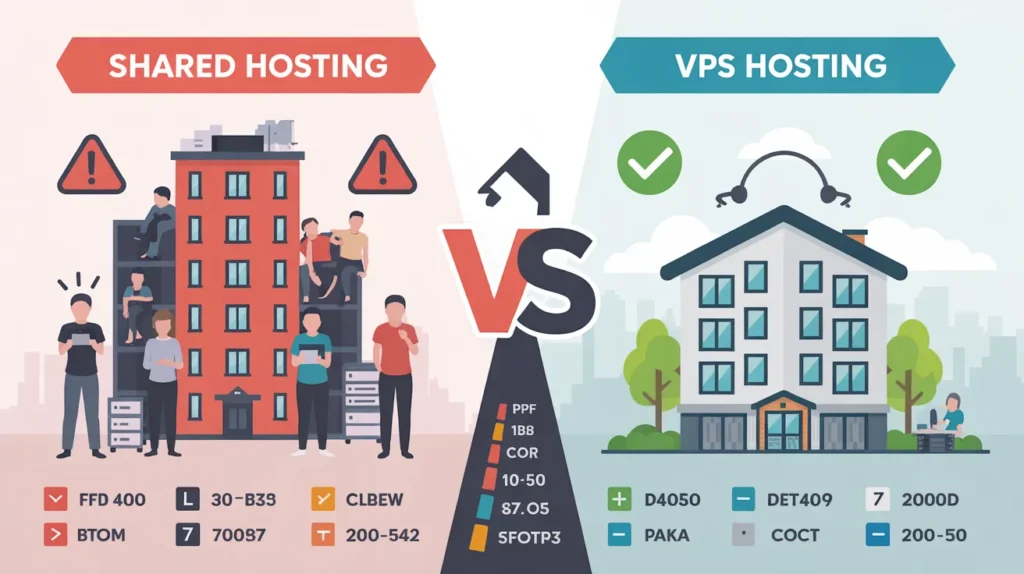
In shared hosting, resources are communal. It’s like living in a college dorm with a shared kitchen. If your roommate decides to cook a five-course meal (a massive traffic spike), you can’t use the stove (CPU).
With VPS hosting, you have your own kitchen. You have a guaranteed allocation of CPU cycles and memory. This consistency is crucial for businesses. You don’t want your checkout page loading slowly just because a random blog on the same server went viral.
Security and isolation benefits
Security is perhaps the biggest technical differentiator. In a shared environment, a security breach on one account can theoretically impact others if the server isn’t configured perfectly.
With a VPS, your environment is encapsulated. If a neighboring VPS gets infected with malware, it stays trapped within their virtual drive. It cannot cross the virtualization barrier to infect your server. This makes VPS hosting a compliance requirement for many industries handling sensitive data.
Control and customization
Shared hosting is restrictive. The hosting provider decides which version of PHP you run, which database software is installed, and which security modules are active.
On a VPS, you have Root Access (on Linux) or Administrator Access (on Windows). You can:
- Install any software you want.
- Configure custom firewall rules.
- Tweak server settings for better performance.
- Run specialized applications (like a Node.js server or a custom CRM).
What Are the Key Technical Components of a VPS?
vCPU and processing power
A vCPU is a “virtual central processing unit.” It represents a portion of the physical CPU’s time. When choosing a VPS, the number of vCPUs determines how many parallel tasks your server can handle. If you run a complex WordPress site with heavy plugins, you need more vCPUs to process requests quickly.
RAM allocation
RAM (Random Access Memory) is your server’s short-term workspace. Every visitor on your site and every script running requires RAM. If you run out, the server starts using the hard drive as temporary memory (swapping), which kills performance. A VPS guarantees your RAM limit, ensuring fast data retrieval.
Storage types (NVMe, SSD)
Storage speed is the bottleneck of the internet.
- HDD (Old): Spinning disks. Very slow. Avoid these for hosting.
- SSD (Standard): Solid State Drives. Fast and reliable.
- NVMe (Best): Non-Volatile Memory Express. This interface connects storage directly to the CPU via the PCIe bus.
Skynethosting.net, for example, utilizes NVMe storage. Technically, NVMe drives can be up to 900% faster than traditional SATA drives. This difference is noticeable every time your website needs to read from a database or load a file.
Network bandwidth
Bandwidth is the size of the pipe connecting your server to the internet. Most VPS plans come with a monthly transfer limit (e.g., 1TB or 5TB). However, the port speed is also vital. A 1Gbps or 10Gbps port ensures that even during traffic surges, your server can push data out to visitors without choking.
What Are the Main Benefits of Using a VPS?
Dedicated resources at lower cost
You get the reliability of a dedicated server without the hardware cost. You aren’t paying for the power supply, the chassis, or the rack space exclusively—you are just paying for the computing power you use.
Improved performance and stability
Because your resources are guaranteed, your performance is predictable. Predictability is the holy grail of IT infrastructure. You know exactly how your server will behave under load, which allows you to plan and scale effectively.
Full root or administrator access
For developers and agencies, this is non-negotiable. You aren’t stuck waiting for a support ticket to get a module installed. You have the keys to the castle. You can manage security patches, configure backups, and optimize the OS yourself.
Scalability and flexibility
This is where virtualization shines. If you are running a retail site and Black Friday is approaching, you can contact your host and double your RAM and CPU for the month, then scale back down later. Trying to do this with a physical server involves downtime and a technician physically swapping out hardware parts.
Who Should Use a Virtual Private Server?
Growing websites and businesses
If your website takes more than 3 seconds to load or if you are receiving warnings from your shared host about “resource usage,” it is time to upgrade. A VPS is the standard next step for blogs hitting 30,000+ monthly visits or small businesses that cannot afford downtime.
Developers and staging environments
Developers need sandboxes. A VPS provides a cheap, isolated environment to test new code, try out beta software, or stage a client’s website before it goes live. Since you can wipe and reload the OS easily, it’s perfect for experimentation.
eCommerce platforms
eCommerce stores (WooCommerce, Magento, Shopify custom apps) are database-heavy. Every time a customer searches for a product or adds an item to a cart, the server works hard. Shared hosting often fails here. A VPS provides the processing power needed to keep transactions smooth and secure.
SaaS and application hosting
If you are building a web application (Software as a Service), you cannot run it on shared hosting. You need a VPS to run the specific runtime environments (Python, Ruby, Go, Java) required for your app to function.
What Types of VPS Hosting Are Available?
Managed vs unmanaged VPS
- Unmanaged: You get the empty server and root access. You are responsible for security, updates, and software installation. It is cheaper but requires Linux skills.
- Managed: The hosting provider handles the technical backend—OS updates, security patches, and monitoring. You focus on your website. This is ideal for business owners who aren’t system administrators.
Linux VPS vs Windows VPS
- Linux (Ubuntu, CentOS, Debian): The industry standard. It’s free (open source), lightweight, and supports most web technologies (PHP, MySQL, Python).
- Windows: Necessary only if you run Microsoft-specific technologies like ASP.NET or MSSQL. It usually costs more due to licensing fees.
Cloud VPS vs traditional VPS
A traditional VPS sits on one physical server. If that server’s motherboard breaks, your VPS goes down.
A Cloud VPS spans multiple servers. If one piece of hardware fails, your virtual server instantly migrates to another node in the cluster. This offers higher uptime and redundancy.
How Secure Is a Virtual Private Server?
VPS isolation and security layers
The hypervisor layer acts as a formidable wall. It is extremely difficult for a hacker to “break out” of one VPS and access the host or other VPS instances. This architectural isolation is your first line of defense.
OS-level security controls
Because you have root access, you can harden the operating system. You can configure iptables or UFW firewalls, install intrusion detection systems (like Fail2Ban), and close unused network ports. On shared hosting, you rely entirely on the host’s general settings.
Best practices for securing a VPS
Owning a VPS means taking responsibility.
- Change the default SSH port to stop bot attacks.
- Disable root login and use a standard user with sudo privileges.
- Use SSH keys instead of passwords for authentication.
- Keep software updated. An unpatched server is a vulnerable server.
How VPS Hosting Impacts Website Speed and SEO
Resource stability and load times
Google uses Core Web Vitals to judge your site. One key metric is LCP (Largest Contentful Paint). If your server takes 2 seconds just to start sending data (Time to First Byte), you will fail this test. A VPS with NVMe storage drastically reduces this lag, directly boosting your SEO potential.
Uptime and ranking signals
Frequent downtime kills rankings. If Google crawls your site and finds it offline (Error 500) multiple times, it will de-index you. The stability of a VPS environment prevents the random downtimes often seen in shared hosting.
Core Web Vitals improvement
Beyond just speed, the ability to configure server-side caching (like Varnish or Redis) on a VPS allows you to serve pages instantly. This technical optimization helps you score higher on PageSpeed Insights, which correlates with better search visibility.
Why Skynethosting.net VPS Is a Reliable Choice
If you’ve decided a VPS is the right move, the hardware backing it matters. Skynethosting.net has built a VPS infrastructure designed for speed and reliability.
NVMe-powered VPS infrastructure
Skynethosting.net utilizes NVMe storage, which is 900% faster than traditional drives. In the world of databases and dynamic websites, this speed difference is noticeable. It means your queries run faster and your pages render quicker.
Global data centers
Latency matters. If your customers are in London, you don’t want your server in Los Angeles. With 25 worldwide locations, Skynethosting.net allows you to place your VPS physically closer to your users, shaving milliseconds off every interaction.
Scalable VPS plans with expert support
Whether you are a startup needing a small slice or a corporation needing massive power, the plans are scalable. Plus, with 20 years in business and 24/7 friendly customer service, you aren’t managing your infrastructure alone. You have expert technicians ready to assist if you hit a roadblock.
Conclusion
Recap of VPS definition and benefits
A Virtual Private Server is the perfect balance of power, price, and privacy. It uses virtualization to give you dedicated resources, ensuring your website is fast, secure, and isolated from other users.
When to upgrade from shared hosting
If you are seeing performance drops, need custom software, or are worried about security compliance, the time is now. Moving to a VPS is often the single most effective upgrade you can make for your site’s performance.
Choosing the right VPS provider
Look for a provider that offers modern hardware (NVMe), a choice of locations, and a track record of reliability. Don’t let your business be held back by slow hosting—a VPS gives you the room to grow.
FAQs
What is a Virtual Private Server (VPS)?
How is VPS different from shared hosting?
Who should use VPS hosting?
What are the main benefits of a VPS?
Is VPS hosting secure?
Yes, VPS hosting is generally more secure than shared hosting because each virtual server runs in its own isolated environment. You also control firewalls, software, and updates, allowing you to harden the system and reduce risks, especially for eCommerce, customer data, and business applications.
When should I upgrade from shared hosting to VPS?
Upgrade from shared hosting when your site slows down, faces resource limits, or needs software not allowed on shared plans. If you are handling higher traffic, processing payments, or running mission-critical apps, VPS provides the performance and control necessary to stay stable and professional.