WHMCS Payment Gateways: How to Accept Payments and Automate Hosting Billing
TL;DR
- Gateways connect WHMCS to processors for instant payments, auto-provisioning, and recurring billing without manual invoicing.
- Top global options: Stripe (135+ currencies), PayPal (trusted recurring), Authorize.Net (US fraud tools).
- Recurring setup auto-generates invoices, charges tokenized cards, sends reminders to ensure predictable cash flow.
- Enable tokenization, AVS/CVV, PCI basics like SSL/2FA to secure transactions and avoid compliance issues.
- Multi-currency support and regional gateways boost conversions by matching client locations and preferences.
- Avoid errors like misconfigured callbacks or unsupported gateways that cause unpaid invoices despite charges.
I still remember the first time I had to manually send invoices to 50 hosting clients. It took me three hours. By the time I finished, I had made at least five pricing errors, and two clients emailed me asking why their renewal didn’t match last month’s price.
That’s when I realized payment automation wasn’t a luxury. It was survival.
If you’re running a hosting business, you already know that collecting payments is just as important as keeping servers online. But here’s the truth: most resellers don’t fail because of bad hosting. They fail because they can’t keep billing consistent, timely, and automated.
WHMCS payment gateways solve this problem. They connect your billing system directly to the world’s most trusted payment processors, so your clients can pay instantly and your business gets paid automatically.
In this guide, I’ll walk you through everything you need to know about WHMCS payment gateways. We’ll cover how they work, which ones to use, how to configure them, and how to avoid the mistakes that cost new resellers thousands of dollars every year.
What Are WHMCS Payment Gateways?
A payment gateway is the bridge between your client’s bank account and your hosting business. When a customer clicks “Pay Now” on an invoice, the gateway securely processes that transaction and deposits the money into your account.
WHMCS payment gateways are pre-built modules that connect your WHMCS installation to processors like PayPal, Stripe, Authorize.Net, and many others. You activate the gateway, enter your API credentials, and suddenly your billing system can accept credit cards, bank transfers, and even cryptocurrency.
Role of gateways in hosting automation
Without a payment gateway, you’re stuck sending manual invoices and waiting for clients to pay via wire transfer or check. That’s slow, unreliable, and honestly, unprofessional.
With a gateway, the process becomes instant. A client orders hosting, the invoice generates automatically, they pay with a credit card, and WHMCS provisions their account within seconds. No human intervention required.
This is why WHMCS reseller automation is so powerful. It turns billing into a background process that runs 24/7.
How WHMCS connects billing and provisioning
Here’s how the workflow typically looks:
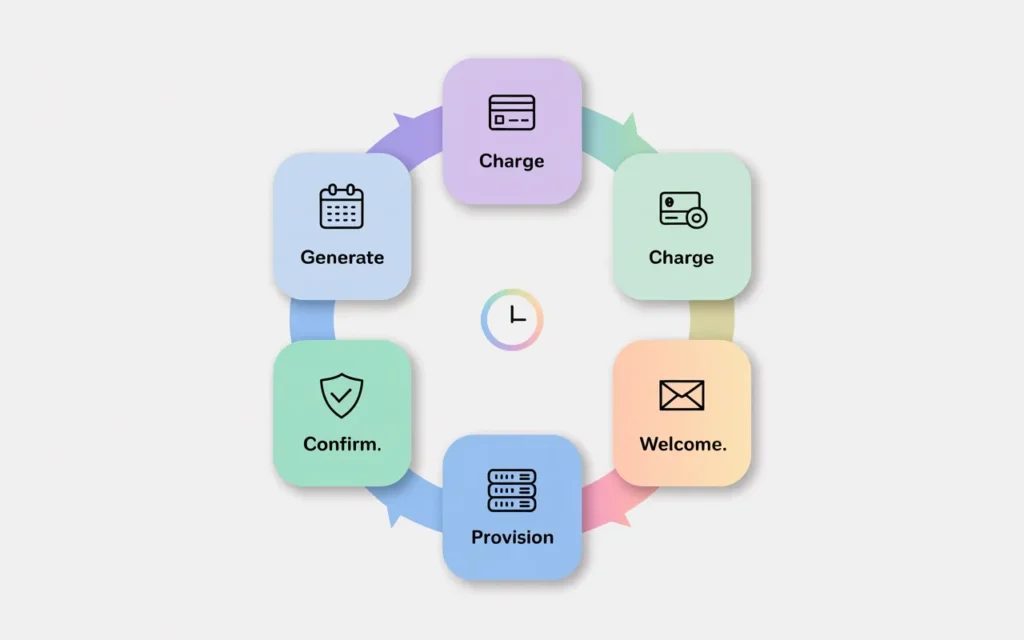
- Client places an order for a hosting plan
- WHMCS generates an invoice
- Client pays through your chosen gateway
- Gateway sends a callback to WHMCS confirming payment
- WHMCS marks the invoice as “Paid”
- WHMCS triggers account provisioning on your server
- Client receives a welcome email with login details
All of this happens in under 60 seconds. That’s the power of integrated payment automation.
Why payment integration is critical for resellers
Let me be direct: if you don’t have payment gateways configured correctly, you’re leaving money on the table.
I’ve seen resellers lose 30% of their revenue simply because their checkout process was too slow or confusing. Clients abandon carts. Invoices go unpaid. Services get suspended even though the client tried to pay.
A properly configured WHMCS payment gateway fixes all of this. It reduces friction, increases conversion, and ensures you get paid on time, every time.
How WHMCS Handles Recurring Payments
One of the biggest advantages of using WHMCS is its ability to handle subscription-based billing automatically. Most hosting plans are monthly or annual subscriptions, and WHMCS is built specifically for this model.
Subscription-based billing explained
When you set up a product in WHMCS, you define the billing cycle: monthly, quarterly, semi-annually, annually, or even biennially. WHMCS remembers this cycle and automatically generates a renewal invoice before the service expires.
For example, if a client signs up for a monthly hosting plan on March 1st, WHMCS will generate their April invoice on March 17th (assuming you have invoice generation set to 14 days in advance). The client gets an email reminder, and if you’ve enabled automatic payment capture, WHMCS will even attempt to charge their saved payment method.
Automatic renewals and invoice generation
This is where things get really powerful. With tokenized payment gateways like Stripe or PayPal Payments, WHMCS can store a reference to the client’s payment method securely. When the renewal invoice is due, WHMCS automatically charges the card without the client needing to log in and pay manually.
This creates a seamless experience for your customers and guarantees predictable cash flow for your business.
Reducing manual accounting work
Before I automated my billing, I spent at least 10 hours per week chasing late payments, sending reminders, and manually updating invoices. With WHMCS payment gateways and recurring billing, that workload dropped to under an hour.
The system does the heavy lifting. All I have to do is monitor the activity log for failed payments and reach out to those clients proactively.
If you want to dive deeper into how to set up your WHMCS system properly, check out our WHMCS reseller setup guide.
Which Payment Gateways Are Commonly Used With WHMCS?
WHMCS supports a wide range of payment gateways. The key is choosing the ones that match your business model and customer base.
Global gateways for international customers
If you’re targeting customers worldwide, you need gateways that work across borders. The most popular global gateways include:
Stripe: Accepts credit cards, Apple Pay, Google Pay, and many local payment methods. It’s incredibly easy to integrate and supports over 135 currencies.
PayPal: Almost everyone has a PayPal account. It’s trusted, widely recognized, and supports multiple currencies. You can use PayPal Basic for one-time payments or PayPal Payments for tokenized recurring billing.
Authorize.Net: A long-standing merchant gateway that works well for US-based businesses. It’s reliable and has robust fraud protection tools.
These gateways give your clients flexibility and make your business look professional and trustworthy.
Regional gateways for local markets
If you’re targeting a specific country or region, local gateways can improve conversion rates by offering familiar payment methods.
For example:
- 2CheckOut is popular in Europe and supports many local payment options
- Razorpay is widely used in India
- Mollie works well for European businesses, especially in the Netherlands
- GoCardless is great for UK-based direct debit payments
Offering a regional gateway shows your customers that you understand their market and makes checkout feel more natural.
Choosing based on your target audience
Here’s my rule of thumb: always offer at least two gateways. One should be a global option like Stripe or PayPal. The second should be tailored to your primary audience.
If 80% of your customers are in the US, add Stripe and Authorize.Net. If you’re targeting Southeast Asia, add Stripe and a regional option like PayTM or Razorpay.
This flexibility reduces checkout abandonment and increases your conversion rate significantly.
One-Time vs Recurring Payment Configuration
Not all payments in WHMCS are created equal. Understanding the difference between one-time and recurring payments is critical to avoiding billing errors.
Capture methods and payment cycles
A one-time payment is exactly what it sounds like: the client pays once, and that’s it. Examples include setup fees, domain registrations, or one-off services.
A recurring payment is tied to a subscription cycle. The client pays monthly, quarterly, or annually, and WHMCS automatically generates renewal invoices based on that schedule.
When you configure a product in WHMCS, you define its billing cycle. If you select “One Time,” the client will never be billed again unless they purchase something new. If you select “Monthly Recurring,” WHMCS will bill them every 30 days.
Managing renewals automatically
The magic happens when you enable automatic payment capture. With tokenized gateways, WHMCS stores a secure reference to the client’s payment method. When the renewal invoice is generated, WHMCS attempts to charge that method automatically.
If the payment succeeds, the invoice is marked as paid and the service continues. If the payment fails, WHMCS sends a notification to the client and gives them a grace period before suspending the service.
This automation eliminates the need for manual follow-up and ensures your revenue stays consistent.
Avoiding missed payments
The most common reason for missed payments is expired credit cards. Clients forget to update their payment details, and when the renewal comes around, the charge fails.
To combat this, I recommend enabling email reminders at multiple intervals: 14 days before, 7 days before, and 1 day before the due date. This gives clients plenty of time to update their information.
You should also consider using gateways that support automatic card updater services, which automatically refresh expired card details on file.
Multi-Currency and Global Payment Support
If you’re selling hosting internationally, you need to support multiple currencies. Clients are far more likely to buy if they see prices in their local currency.
Selling hosting worldwide
WHMCS supports all major global currencies. You can configure as many currencies as you need and set base conversion rates for each one.
For example, you might set your default currency to USD but also offer pricing in EUR, GBP, AUD, and INR. WHMCS will display prices in the client’s selected currency throughout the checkout process.
Currency conversion considerations
Here’s a critical tip: make sure your payment gateway supports all the currencies you enable in WHMCS. If your gateway only accepts USD, but a client tries to pay in EUR, the transaction will fail or be converted at an unfavorable rate.
Some gateways like Stripe automatically handle multi-currency transactions. Others, like PayPal, require you to have a business account with multi-currency enabled.
Always test your checkout flow in each currency before going live.
Improving checkout experience for clients
A smooth checkout experience builds trust. When clients see prices in their local currency and pay using their preferred method, they’re more likely to complete the purchase.
Avoid forcing everyone to pay in USD. It creates confusion and adds friction to the buying process.
Security Features You Must Enable
Payment security isn’t optional. If you handle credit card data improperly, you risk fines, lawsuits, and losing your payment processing privileges.
Tokenization and secure storage
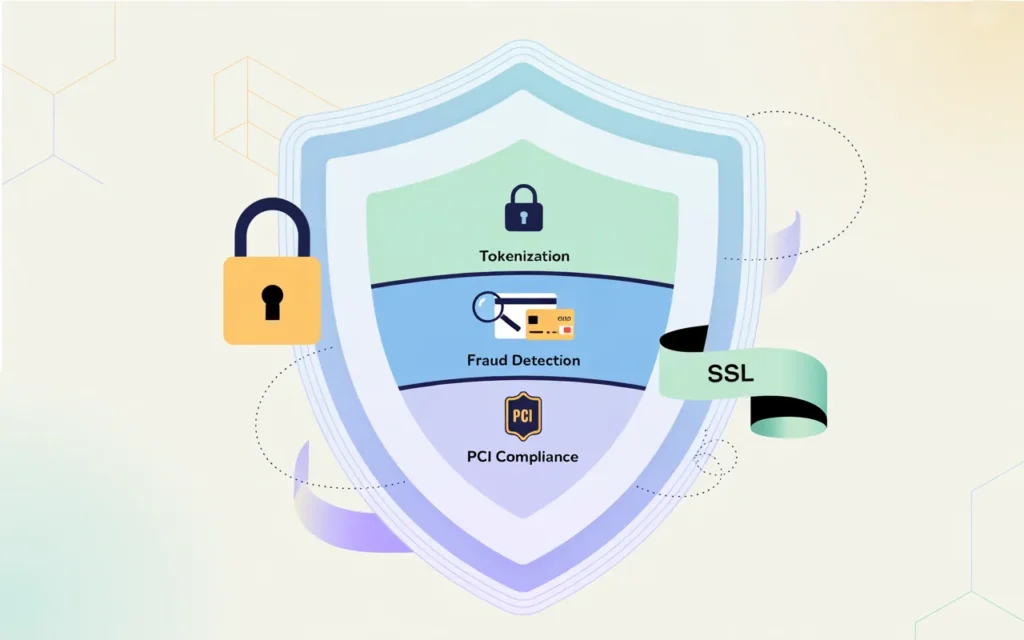
Tokenization is the process of storing payment details remotely with your payment gateway, rather than on your WHMCS server. Instead of storing a full credit card number, WHMCS stores a secure token that only the gateway can use.
This drastically reduces your PCI compliance burden and protects your clients’ data.
WHMCS supports many tokenized gateways, including Stripe, PayPal Payments, Authorize.Net CIM, and BluePay Remote. Always use tokenized gateways when possible.
For more details on how tokenization works in WHMCS, refer to the official WHMCS documentation on tokenization.
Fraud protection tools
Most modern payment gateways include fraud detection features like AVS (Address Verification System) and CVV checks. These tools compare the billing address and card security code provided by the customer against the bank’s records.
If there’s a mismatch, the transaction is flagged or declined. This protects you from chargebacks and fraudulent orders.
I also recommend enabling IP address geolocation checks. If a client in India tries to pay using a credit card issued in the US, that’s a red flag worth investigating.
PCI compliance basics
PCI DSS (Payment Card Industry Data Security Standard) is a set of security requirements for anyone who handles credit card data. If you’re using tokenized gateways and SSL encryption, you’re already meeting most of the basic requirements.
However, you should still:
- Keep WHMCS updated to the latest version
- Use strong passwords for your admin accounts
- Enable two-factor authentication
- Regularly review your activity logs for suspicious behavior
Security is an ongoing process, not a one-time setup.
How Payment Gateways Impact Hosting Cash Flow
Cash flow is the lifeblood of any hosting business. If money isn’t coming in consistently, you can’t pay for servers, support staff, or marketing.
Faster collections improve sustainability
With automated payment gateways, you get paid faster. Instead of waiting for clients to mail checks or initiate bank transfers, you receive funds within 1-3 business days.
This shortened payment cycle improves your cash flow and gives you more financial flexibility.
Reducing failed invoices
Failed payments are one of the biggest revenue leaks in hosting businesses. A client’s card expires, the payment fails, and suddenly you have an unpaid invoice sitting in your system.
The longer an invoice goes unpaid, the less likely you are to collect it. By enabling automatic retries and sending proactive reminders, you can recover a significant percentage of these failed payments.
To learn more about avoiding billing errors in general, read our guide on how to avoid billing errors in WHMCS.
Predictable recurring revenue
When your billing is fully automated, your revenue becomes predictable. You know exactly how much money you’ll collect each month, which makes budgeting and forecasting much easier.
This predictability is especially important when you’re trying to scale your business or secure financing.
Common WHMCS Payment Gateway Mistakes
Even experienced resellers make mistakes when configuring payment gateways. Here are the most common ones I’ve seen.
Using unsupported gateways
Not all payment processors have official WHMCS modules. If you try to integrate an unsupported gateway, you’ll run into issues with callbacks, invoice updates, and transaction logging.
Stick to gateways that have official WHMCS support. The full list is available in the WHMCS documentation.
Misconfigured callbacks and webhooks
Payment gateways use callbacks (also called webhooks or IPNs) to notify WHMCS when a payment is completed. If these callbacks aren’t configured correctly, WHMCS won’t mark invoices as paid, even though the client’s card was charged.
This is one of the most frustrating issues to troubleshoot, and it’s almost always caused by incorrect callback URLs or firewall rules blocking the gateway’s servers.
Always test your gateway in sandbox mode before going live, and verify that callbacks are working properly.
Poor checkout experience causing abandonment
If your checkout page is slow, confusing, or riddled with errors, clients will abandon their carts. I’ve seen resellers lose 40% of their sales simply because their payment page took too long to load.
Make sure your checkout page:
- Loads quickly
- Displays prices clearly in the client’s currency
- Shows trust signals like SSL badges
- Offers multiple payment methods
Test the entire checkout flow yourself before launching.
How Skynethosting.net Simplifies WHMCS Payment Integration
Setting up payment gateways can be technical and time-consuming. That’s where a good hosting provider makes all the difference.
Pre-configured WHMCS-ready hosting environment
At Skynethosting.net, we provide hosting environments that are optimized for WHMCS from day one. Our servers are pre-configured with the correct PHP settings, database optimization, and cron job support needed for seamless billing automation.
You don’t have to worry about compatibility issues or performance bottlenecks.
Compatible infrastructure for seamless billing automation
We’ve tested every major payment gateway with our WHMCS installations to ensure callbacks work reliably and invoices update instantly. Our infrastructure supports high-volume transaction processing without slowdowns.
Plus, we include a free WHMCS license with all reseller hosting plans, so you can start accepting payments immediately without paying extra for software.
Reliable performance for uninterrupted transactions
Payment processing requires consistent uptime. If your server goes offline during checkout, you lose sales. Our NVMe-powered infrastructure ensures your WHMCS installation stays fast and available 24/7.
We also provide 24/7 support if you run into any issues with your payment gateway configuration. Our team knows WHMCS inside and out and can help you troubleshoot quickly.
How to Choose the Right Gateway for Your Hosting Business
Choosing a payment gateway isn’t just about picking the most popular option. You need to consider your specific business needs.
Match gateway to your customer geography
Where are most of your clients located? If you’re targeting the US, Stripe and Authorize.Net are great choices. If you’re focused on Europe, consider Stripe and Mollie. For Asia, look at Razorpay or PayTM.
Offering a gateway that supports local payment methods increases conversion rates significantly.
Evaluate fees vs automation benefits
Every payment gateway charges fees. Stripe typically charges 2.9% + $0.30 per transaction. PayPal is similar. Authorize.Net charges a monthly fee plus per-transaction fees.
While it’s tempting to choose the cheapest option, remember that automation saves you time and reduces errors. A gateway that costs slightly more but offers better automation features is usually worth the investment.
Plan for scalability as you grow
As your hosting business grows, your payment processing needs will evolve. You might start with PayPal for simplicity, but eventually, you’ll want to add Stripe for better tokenization and automatic retries.
Choose gateways that can scale with you. Make sure they support high transaction volumes and offer advanced features like subscription management and multi-currency support.
If you’re serious about growing your hosting business, check out our guide on what is reseller hosting to understand the foundation you’re building on.
Conclusion
Payment gateways are the backbone of your hosting business’s revenue system. Without them, you’re stuck chasing payments manually and losing money to billing errors and missed renewals.
Payment automation is the backbone of hosting revenue
The right WHMCS payment gateway setup automates your entire billing process, from invoice generation to payment capture to account provisioning. It reduces manual work, eliminates errors, and ensures your clients can pay easily and securely.
The right setup ensures predictable growth
When your billing is automated and reliable, your revenue becomes predictable. You know exactly how much money is coming in each month, which lets you plan for growth, invest in infrastructure, and scale your business confidently.
If you’re ready to launch a hosting business with fully automated billing, start with Skynethosting.net’s reseller hosting plans. You’ll get a free WHMCS license, optimized infrastructure, and expert support to help you get everything configured correctly from day one.
Don’t let payment processing hold your business back. Set up your WHMCS payment gateways correctly, automate your billing, and watch your hosting business grow.
FAQs
What are WHMCS payment gateways?
WHMCS payment gateways link billing to processors like Stripe or PayPal for secure credit card processing, auto-invoicing, and instant account provisioning. They eliminate manual work, enabling 24/7 automation from order to welcome email.
How does recurring billing work?
WHMCS defines cycles (monthly/annual), generates renewal invoices early, auto-charges tokenized cards via gateways. Failures trigger reminders and grace periods before suspension, creating seamless renewals and steady revenue with little oversight
Which gateways for global resellers?
Stripe supports 135+ currencies, Apple/Google Pay; PayPal enables recurring; Authorize.Net offers US fraud checks. Add regionals like Razorpay (India) or Mollie (Europe) to raise conversions across international client bases. (
What security must be enabled?
Tokenization stores no card data locally, AVS/CVV flags fraud, IP geolocation spots risks. Add PCI steps like SSL, 2FA, updates to prevent chargebacks, fines, and data breaches effectively.
Why support multi-currency?
Local currencies cut abandonment by showing familiar pricing; WHMCS converts automatically. Match gateways to currencies to avoid failures or bad rates, improving trust and checkout completion worldwide.