

DNS Records Types Explained 2026: A, CNAME, MX, TXT, NS Records & DNS Configuration
TL;DR
- DNS records act like a contact list for your domain, directing web traffic, email delivery, and verification to the correct servers; a single mistake can take sites or mail offline.
- A records map domains to IPv4 addresses, CNAMEs create aliases to other hostnames, MX records route email, TXT records handle security/verification, and NS records delegate which provider manages all DNS for your domain.
- Correct configuration of A, CNAME, MX, TXT, and NS records in your DNS manager (cPanel, custom panels, etc.) ensures websites load correctly and emails reach inboxes instead of bouncing or going to spam.
- TTL values control how long other servers cache your DNS data; shorter TTLs speed up propagation for planned changes, while longer TTLs improve performance and reduce DNS lookup load.
- DNS propagation still typically takes a few hours up to 48 hours worldwide, so changes may appear inconsistent across networks until caches expire and resolvers update to the new records.
- Troubleshooting uses tools like dig, nslookup, and global DNS checkers to spot missing records, wrong IPs, misconfigured nameservers, or conflicting entries, often with help from hosting support teams.
If you’ve ever stared at a blank screen after buying a new domain, wondering why your website isn’t showing up, you aren’t alone.
In my 10 years working with servers and hosting, I’ve seen more sites go down due to a single typo in a DNS record than any major hack. DNS is the backbone of the internet. It’s the invisible system that translates the human-friendly names we type (like google.com) into the computer-friendly IP addresses that servers use.
But here’s the thing: managing DNS doesn’t have to be scary.
Whether you are a developer, a business owner, or just a student trying to get a project online, understanding these records is a superpower. In this guide, we are going to break down exactly how DNS records work in 2026, how to configure them without breaking your site, and how to troubleshoot when things go wrong.
Let’s dive in.
What Are DNS Records and Why Are They Important?
Think of the Domain Name System (DNS) as the contacts list on your smartphone. You don’t memorize your best friend’s phone number anymore; you just tap their name.
DNS records are the individual entries in that contact list. They tell the internet exactly where to go when someone looks for your domain.
Role of DNS records in domain management
When you buy a domain name, it’s just a label. It doesn’t do anything on its own. DNS records are the instructions that give that label a purpose. They tell the internet:
- “Send website traffic to this server.”
- “Send emails to this provider.”
- “Verify that this service is allowed to send emails on my behalf.”
Without these records, your domain is just a name floating in the void.
How DNS records affect websites and emails
Your website and your email run on different tracks, even if they share the same domain name. DNS records act as the switch operator.
If you mess up your A Record, your website goes offline. If you accidentally delete your MX Record, your emails bounce, and your clients can’t reach you. I’ve seen businesses lose days of revenue because someone tweaked a record they didn’t understand. Accuracy here is everything.
Understanding DNS propagation
This is the part that frustrates everyone. When you change a DNS record, it doesn’t happen instantly. The update has to spread (or “propagate”) across the entire internet.
Internet Service Providers (ISPs) all over the world cache DNS data to speed up browsing. When you change a record, you have to wait for those caches to expire. In 2026, this is faster than it used to be, often taking just a few hours, but it can still take up to 48 hours in some cases. Patience is key here.
What Is an A Record and How Does It Work?
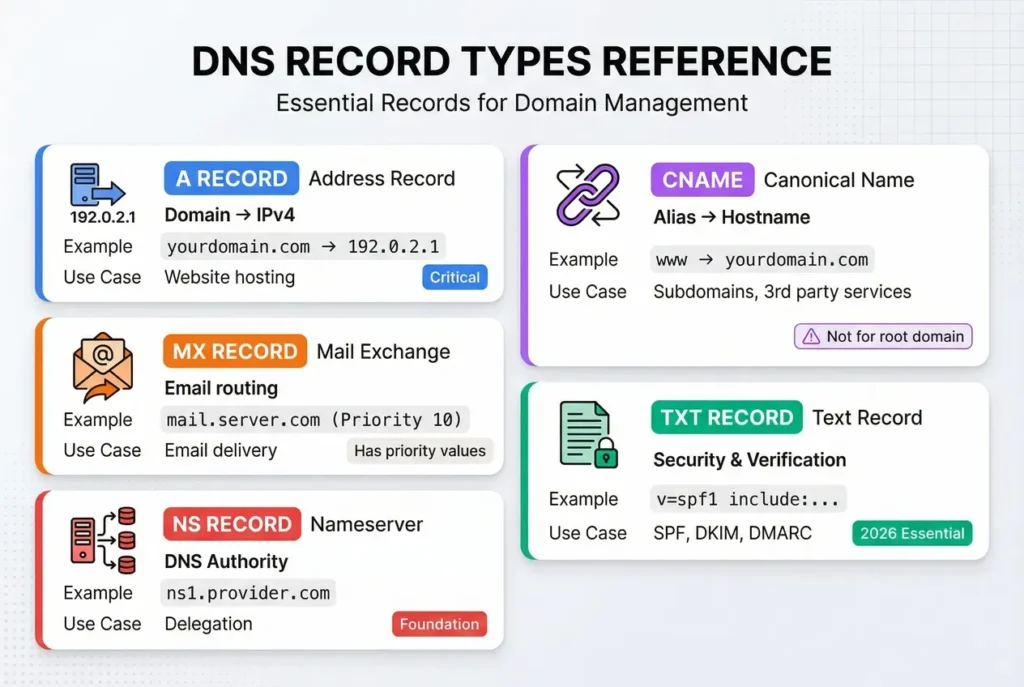
The A Record (Address Record) is the grandfather of DNS. It is the most fundamental record type you will deal with.
Definition of A record
Simply put, an A Record connects your domain name to the IP address of the computer hosting your website. It handles IPv4 addresses, which look like 192.0.2.1.
Mapping domains to IPv4 addresses
When you type skynethosting.net into your browser, your computer asks the DNS system, “Where is this site?”
The A Record replies, “Oh, that site lives at 104.21.55.2.” Your browser then connects to that IP address to download the website files.
Configuring A records for websites
Setting this up is usually the first step in launching a site. You will typically see two entries in your DNS settings:
- @ (Root): This points
yourdomain.comto your server’s IP. - www: This points
www.yourdomain.comto the same IP.
Pro Tip: If you change web hosts, the IP address usually changes. You must update your A Record to point to the new host, or your site will stay on the old server (or go down).
What Is a CNAME Record and When to Use It?
CNAME stands for Canonical Name. If the A Record is your home address, the CNAME is a “See Also” sign.
Definition of CNAME record
A CNAME record maps a hostname to another hostname, not an IP address. It creates an alias.
For example, you might want blog.yourdomain.com to point to the same place as yourdomain.com. Instead of typing in the IP address again, you just point the CNAME to the domain name.
Alias domains and subdomain mapping
This is incredibly useful for subdomains. Let’s say you use a third-party service like Shopify or a helpdesk platform. They often ask you to set up a CNAME.
They might say: “Point shop.yourdomain.com to shops.myshopify.com.”
This allows the third-party service to change their IP addresses whenever they want without breaking your site. Your DNS just follows the alias.
Best practices for CNAME configuration
There is one golden rule for CNAMEs that trips people up constantly:
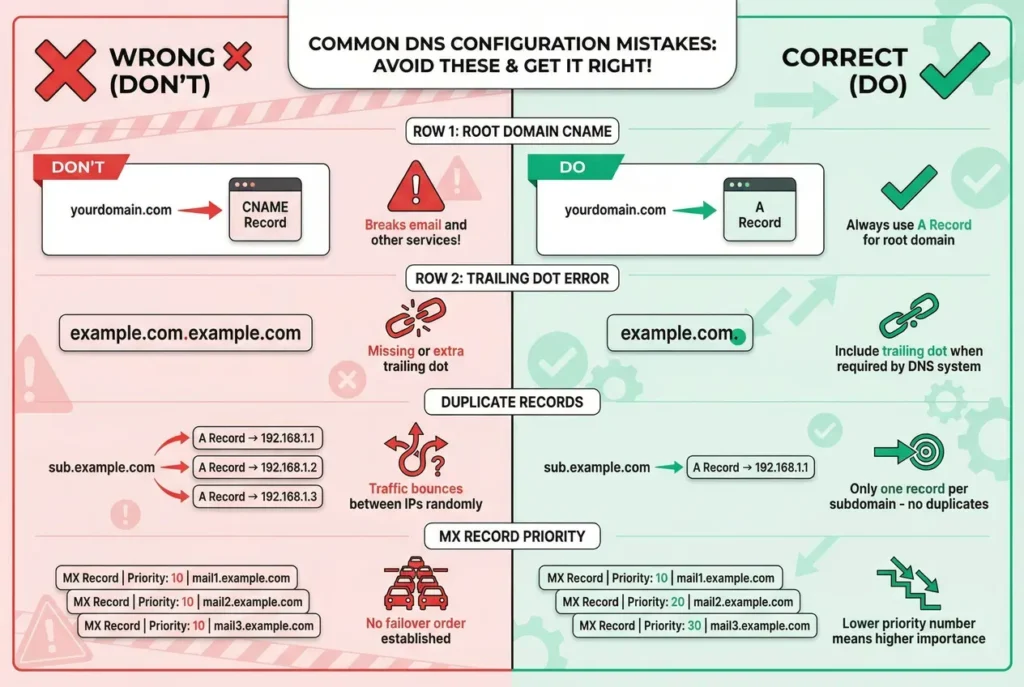
Never use a CNAME for your root domain (e.g., yourdomain.com).
The root domain usually requires an A Record. Using a CNAME at the root level can break your email and other services. Only use CNAMEs for subdomains like www, blog, or mail.
What Is an MX Record and How Does It Affect Email Delivery?
MX stands for Mail Exchange. If you want to receive email at your domain (like info@yourdomain.com), you need these records.
Definition of MX record
The MX record tells the internet which mail server accepts email for your domain. It’s like the “Inbox” label on your house. If this record is missing, sender emails have nowhere to go, and they will bounce back to the sender.
Priority values in MX records
MX records are unique because they have a Priority value (like 0, 10, or 20).
This tells sending servers which mail server to try first.
- Priority 0: “Try this server first.”
- Priority 10: “If the first one is down, try this one.”
Lower numbers mean higher priority. It’s a failsafe system to ensure you don’t miss emails even if a server goes offline.
Setting up MX records for email hosting
If you are using the default email provided by your host (like Skynethosting.net), the MX record usually points to your main domain name.
However, if you use a remote service like Google Workspace or Microsoft 365, you will need to input specific MX records they provide.
- Example:
ASPMX.L.GOOGLE.COM(Priority 1)
Expert Insight: Always remove old MX records before adding new ones from a different provider. Having conflicting MX records is a recipe for lost emails.
What Is a TXT Record and How Is It Used?
TXT (Text) records were originally designed to hold human-readable notes. Today, however, they are the security guards of your domain.
Definition of TXT record
A TXT record allows you to enter arbitrary text into your DNS. Machines scan these records to verify ownership or check security policies.
SPF, DKIM, and DMARC examples
In 2026, email deliverability is stricter than ever. If you don’t have these three TXT records, your emails will likely land in Spam folders:
- SPF (Sender Policy Framework): A list of IP addresses allowed to send email for you.
- Example:
v=spf1 include:spf.skynethosting.net ~all
- Example:
- DKIM (DomainKeys Identified Mail): A digital signature that proves the email hasn’t been tampered with.
- DMARC: A rule that tells receiving servers what to do if an email fails the SPF or DKIM checks (e.g., “Reject it” or “Quarantine it”).
Security and verification purposes
TXT records are also used to verify that you own a domain. When you sign up for Google Search Console or an SSL certificate provider, they will often ask you to add a specific code as a TXT record. It’s a safe way to prove ownership without affecting your website traffic.
What Is an NS Record and Why Is It Critical?
NS stands for Nameserver. This is the “Manager” record.
Definition of NS record
NS records delegate the authority of your domain to a specific DNS provider. They tell the rest of the internet, “Go ask this company for the A records and MX records.”
Delegation to authoritative nameservers
When you buy a domain, you usually point the NS records to your hosting provider.
- Example:
ns1.skynethosting.netandns2.skynethosting.net.
This means Skynethosting is now responsible for answering all DNS queries for your domain.
Ensuring domain resolution reliability
You should always have at least two NS records for redundancy. If one nameserver goes down (which is rare, but possible), the second one takes over. Without valid NS records, your entire domain—website, email, everything—vanishes from the internet.
How to Configure DNS Records Correctly
Now that we know what the records are, how do we actually add them?
Using hosting control panels
Most hosts provide a graphical interface. At Skynethosting.net, for example, we often use cPanel or a custom dashboard.
- Log in to your hosting account.
- Look for “Zone Editor” or “DNS Manager.”
- Select your domain.
- Click “Add Record,” choose the type (A, CNAME, etc.), and fill in the values.
It’s usually as simple as filling in a form.
Common DNS misconfiguration mistakes
Here are the blunders I see most often:
- The Trailing Dot: Some DNS systems require a dot at the end of a domain name (e.g.,
example.com.). If you miss it, the system might append your domain name twice (example.com.example.com). - Duplicate Records: Having two A records for the same subdomain pointing to different IPs causes “conflict,” and traffic will bounce between them randomly.
- Typing the IP wrong: It sounds obvious, but double-check your numbers.
Propagation and verification tools
Once you save your changes, use a tool to check if they are working.
- Global DNS Checkers: Websites like
whatsmydns.netshow you how your record is propagating around the world. - Command Line: If you are technical, verify locally using
ping yourdomain.com.
How DNS Record TTL Affects Website and Email Performance
You will see a field called TTL (Time To Live) next to every record. It is measured in seconds.
What is TTL
TTL tells other servers how long they should “remember” (cache) your DNS information before checking back for an update.
Best TTL values for performance and updates
- Standard (14400 or 4 hours): Good for stable records that don’t change often. It speeds up browsing because computers don’t have to look up the IP every single time.
- Short (300 or 5 minutes): Use this before you migrate a website.
Balancing propagation speed and caching
If you know you are going to move your website to a new server next week, lower your TTL to 300 seconds today.
Why? Because when you make the switch next week, the rest of the world will notice the change in 5 minutes instead of 4 hours. Once the move is done, raise the TTL back up to reduce the load on your nameservers.
How to Troubleshoot DNS Records Issues
Is your site down? Let’s check the DNS.
Common DNS errors explained
- DNS_PROBE_FINISHED_NXDOMAIN: This means “Non-Existent Domain.” The A record is likely missing or your domain expired.
- ServFail: The nameservers are set up, but they aren’t answering correctly. This is often a configuration error at the host level.
Tools for DNS record testing
You don’t need fancy software.
- Dig: A command-line tool for Mac/Linux. Type
dig yourdomain.comto see exactly what the A record says. - Nslookup: The Windows equivalent. Type
nslookup yourdomain.com. - Browser Developer Tools: The “Network” tab can sometimes show if a DNS lookup failed.
Skynethosting.net support for DNS troubleshooting
If you are hosted with us, you don’t have to fight these errors alone. Our team can run traces to see exactly where the connection is dropping. Sometimes the issue isn’t your settings, but a routing issue halfway across the world. We can help identify that.
Why Skynethosting.net Provides Reliable DNS Management
I’ve used a lot of hosts, and I can tell you that not all DNS infrastructure is created equal.
Global DNS infrastructure
At Skynethosting.net, we operate across 25 worldwide locations, from the USA and UK to Singapore and Australia.
Why does this matter for DNS? Because speed relies on distance. If your DNS server is in New York and your user is in Tokyo, there is a delay. With our distributed network, the DNS lookup happens closer to the user, making your site load faster.
Easy control panel for A, CNAME, MX, TXT, NS records
We believe in making things easy. Whether you are on our USA Reseller Hosting or a Budget Plan, you get access to standard control panels (like cPanel) that make adding an MX record or editing a CNAME a matter of clicks, not code. You also get Free WHMCS software with reseller plans to automate this for your own clients.
Expert support and best practices
We have been in business for 20 years. We have seen every DNS configuration possible. If you are trying to set up complex SPF/DKIM records for email deliverability, our 24/7 support team is there to guide you. We don’t just host your site; we help you keep it connected.
Conclusion
DNS might seem like a complex alphabet soup of acronyms, but it follows a logical set of rules.
Recap of DNS record types and configuration
- A Records point to IP addresses.
- CNAMEs act as aliases.
- MX Records handle your mail.
- TXT Records handle security and notes.
- NS Records control who manages it all.
Importance of accurate DNS for website and email performance
Getting this right means your website loads instantly and your emails never hit the spam folder. It is the foundation of your digital presence.
Choosing Skynethosting.net for reliable DNS management
If you want a hosting partner that simplifies DNS management while providing the power of NVMe storage and global locations, check out our plans at Skynethosting.net.
Don’t let DNS stress you out. With the right knowledge and the right partner, you’re in full control.
FAQs
What are DNS records and why do they matter?
What is an A record and when should I edit it?
An A record links a domain or subdomain to an IPv4 address, such as your web server’s IP. You edit it when changing hosting providers or moving servers so browsers reach the new server instead of the old location or an offline address.
When should I use a CNAME record instead of an A record?
Use a CNAME for subdomains that should point to another hostname, such as www, blog, or third‑party services like shops or helpdesks. Avoid using CNAME on the root domain; keep an A record there to prevent breaking email or other services.
How do MX and TXT records affect my email?
MX records decide which mail servers receive email for your domain, using priority values for failover. TXT records carry SPF, DKIM, and DMARC policies plus verification tokens, influencing whether messages are accepted, flagged as spam, or rejected by receiving providers.
What does TTL mean in DNS and what value should I use?
How can I safely check and troubleshoot DNS changes?
After editing records, use online propagation checkers and command‑line tools like dig or nslookup to confirm values from multiple locations. Look for typos, duplicate records, wrong priorities, or misconfigured nameservers when diagnosing issues like downtime, NXDOMAIN errors, or missing email.

One thought on “DNS Records Types Explained 2026: A, CNAME, MX, TXT, NS Records & DNS Configuration”