

VPS Hosting for Node.js: Best Options & Setup Guide (2026)
TL;DR
- VPS provides full control, dedicated resources, root access essential for Node.js apps unlike shared hosting limits.
- Need NVMe SSD, 2GB+ RAM, Ubuntu LTS, high single-core CPU for optimal event loop performance and scalability.
- Use PM2 for process management, NGINX reverse proxy for HTTPS/WebSockets, secure with UFW/SSH keys from start.
- Unmanaged VPS suits devs for freedom/cost; managed adds backups/support but limits custom tweaks.
- Skynethosting.net offers NVMe speed, global DCs, free WHMCS for agencies, LiteSpeed for static assets.
- Automate CI/CD, monitor with PM2/htop, backup daily to avoid downtime pitfalls in production.
Building a Node.js application is a bit like buying a high-performance sports car. You’ve got this incredible engine that’s built for speed, real-time responsiveness, and handling massive amounts of traffic. But if you try to drive that sports car on a dirt track full of potholes—aka a cheap shared hosting plan—you’re going to have a bad time.
You need a racetrack. In the hosting world, that racetrack is a Virtual Private Server (VPS).
If you’ve been struggling with sluggish API responses, timeouts during traffic spikes, or just the frustration of not having sudo access to install the packages you actually need, you’re in the right place. I’ve spent the last decade deploying everything from simple chat apps to complex enterprise SaaS platforms, and I can tell you: the hosting environment makes or breaks a Node.js project.
In this guide, we’re going to cut through the marketing fluff. We’ll look at why VPS is the gold standard for Node.js, walk through the exact setup you need, and compare the best hosting options available in 2026.
Why Use VPS Hosting for Node.js Applications?
When I first started with Node.js, I tried running a real-time notification app on shared hosting. It was a disaster. The app crashed constantly because I hit the process limit, and I couldn’t even install a process manager like PM2 to restart it. Moving to a VPS changed everything. Here is why it’s the only logical choice for serious projects.
Full control over server environment
Node.js isn’t just a static website; it’s a runtime environment. You need specific versions of Node, npm, or yarn. You might need a specific database like MongoDB or Redis running alongside your app.
On shared hosting, you are stuck with whatever the host gives you. On a VPS, you are the captain. You can install any library, change OS settings, and tweak the environment to match your package.json perfectly.
Better performance than shared hosting

Node.js is single-threaded and non-blocking. It’s incredibly efficient, but it does require consistent CPU performance to handle the event loop.
In a shared environment, “noisy neighbors” (other websites on the same server) can hog CPU resources, causing your application’s event loop to lag. A VPS gives you dedicated slices of CPU and RAM. Your resources are yours. This means consistent latency and faster response times for your users.
Scalability and flexibility for apps
One day, your app has 10 users. The next, you might get featured on Product Hunt and have 10,000.
Node.js is famous for horizontal scaling (clustering). A VPS allows you to scale vertically (adding more RAM/CPU to one server) or prepare for horizontal scaling (adding more servers behind a load balancer). You can upgrade your plan in minutes without migrating your entire data set.
Root access for custom configurations
Sometimes, you need to dig deep. Maybe you need to edit the nginx.conf file to handle WebSockets correctly for a chat app. Maybe you need to set up a cron job that runs a specific maintenance script. With root access (SSH), you have the keys to the castle. You can configure firewalls, manage users, and secure the server exactly how you see fit.
Node.js Hosting Requirements on VPS
Not all VPS plans are created equal. Node.js has a specific appetite. Before you swipe your credit card, make sure the server specs align with what a JavaScript runtime needs to breathe.
Supported operating systems (Linux, Ubuntu, Debian)
While Node.js runs on Windows, Linux is the native language of the server world. Ubuntu (specifically LTS versions like 22.04 or 24.04) is the industry standard for Node deployment. It has the best community support and the easiest package management via apt. Debian is a solid, stable runner-up. Avoid CentOS if you are new to this, as the ecosystem has shifted towards Debian-based distros for ease of use.
CPU, RAM, and storage recommendations
- RAM: Node.js can be memory hungry. For a small app or API, 1GB of RAM is the absolute minimum. If you are running a database on the same server, aim for 2GB or 4GB. If your app runs out of memory, it crashes. Simple as that.
- CPU: Since Node is single-threaded, high single-core performance matters. Look for high-frequency cores.
- Storage: NVMe SSDs are non-negotiable in 2026. Node applications often involve reading and writing many small files (hello,
node_modules), so the high I/O speed of NVMe storage makes a noticeable difference in startup times and build processes.
Network bandwidth and latency considerations
Node.js is often used for real-time apps (chat, gaming, collaboration tools). These rely on WebSockets. You need a host with low latency and a high bandwidth cap (or unmetered bandwidth). If your server is in New York and your users are in London, latency will kill the “real-time” feel. Choose a VPS provider with global data center locations.
Security and firewall setup
Because you are opening ports for your app (usually port 3000, 8080, or similar), you need a robust firewall. You should be able to configure UFW (Uncomplicated Firewall) easily. The host should also offer DDoS protection, as Node apps can be vulnerable to request flooding attacks.
Managed vs Unmanaged VPS for Node.js
This is the most common dilemma I see developers face. Do you want to be a sysadmin, or do you just want to code?
Pros and cons of managed VPS
Pros:
- The host handles updates, security patches, and backups.
- Often comes with a control panel (like cPanel or a custom dashboard) to install Node.js with one click.
- Support teams can actually help you debug server issues.
Cons:
- More expensive.
- Sometimes you have less freedom to install obscure packages or modify root configs.
Pros and cons of unmanaged VPS
Pros:
- Much cheaper. You are paying for the raw iron.
- Total freedom. You get a blank Linux box and root access.
- Great for learning exactly how your infrastructure works.
Cons:
- You are on your own. If you break the server, you fix it.
- Security patching is your job.
When developers prefer unmanaged VPS
If you are comfortable with the command line and want to save money, unmanaged is the way to go. It’s also preferred by agencies who have their own DevOps team to manage the infrastructure. However, if downtime costs you significant money, the peace of mind of a managed service is usually worth the premium.
How to Deploy Node.js Apps on VPS
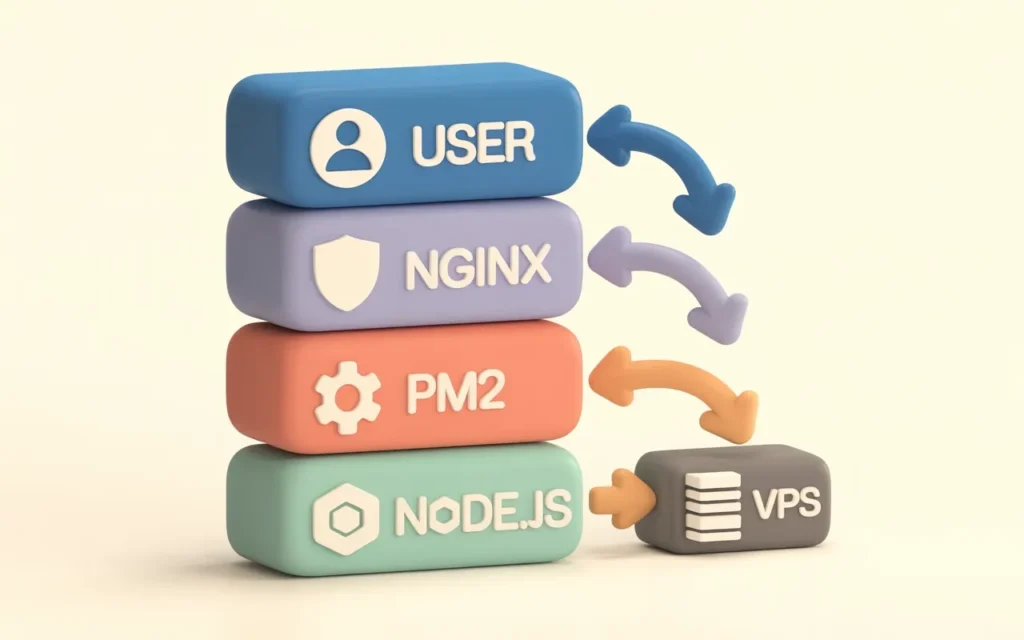
Okay, let’s get technical. Assuming you’ve bought an unmanaged Ubuntu VPS, here is the high-level roadmap to getting your app live.
Setting up the server environment
First, SSH into your server: ssh root@your_server_ip.
Immediately update your package lists:sudo apt update && sudo apt upgrade.
Create a new user (don’t run everything as root!) and give them sudo privileges.
Installing Node.js and NPM
Don’t use the default Ubuntu repositories; the Node version is usually ancient. Use NodeSource:
curl -fsSL https://deb.nodesource.com/setup_20.x | sudo -E bash -
sudo apt-get install -y nodejs
Verify it with node -v and npm -v.
Configuring process managers (PM2)
You can run your app with node index.js, but if it crashes or you close the terminal, the app dies. You need a process manager. PM2 is the industry standard.
sudo npm install pm2@latest -g
Start your app:pm2 start app.js
PM2 will automatically restart your app if it crashes. It can also handle clustering to utilize all CPU cores.
Reverse proxy setup (NGINX/Apache)
Your Node app usually runs on port 3000. You want users to access it via port 80 (HTTP) or 443 (HTTPS). You need a reverse proxy to forward traffic. NGINX is faster and better suited for this than Apache.
You will install NGINX and configure a server block to pass requests to localhost:3000. This also adds a layer of security and makes handling SSL certificates (via Certbot/Let’s Encrypt) much easier.
VPS Hosting Providers Ideal for Node.js
There are hundreds of hosts out there, but only a few truly cater to the performance needs of JavaScript applications.
Skynethosting.net — performance, global data centers, NVMe storage
If you are looking for raw performance and reliability, Skynethosting.net is a top-tier contender. They offer NVMe storage, which, as we discussed, is crucial for Node.js file handling.
With 25 worldwide locations, you can spin up your VPS right next to your user base, killing latency issues. Plus, their LiteSpeed web server integration is a massive bonus if you are serving static assets alongside your Node app. They offer incredible value, specifically for resellers or agencies needing to host multiple Node apps for clients.
Provider A — features and limitations
(Hypothetical Competitor A) might offer cheap entry-level VPS, but they often use older hardware (SATA SSDs) which can bottleneck your I/O. They are good for hobby projects, but be careful with production workloads.
Provider B — developer-friendly tools
(Hypothetical Competitor B) focuses heavily on UI. They might have a great dashboard for one-click deployments, but you will pay a “convenience tax” in the form of higher monthly fees.
Provider C — scaling options
(Hypothetical Competitor C) specializes in enterprise cloud scaling. They are fantastic if you are Netflix, but for a standard startup, their pricing model (pay-per-minute) can be confusing and lead to surprise bills.
Optimizing Node.js Performance on VPS
Getting the server is step one. Tuning it is step two.
CPU and memory tuning
Node.js has a default memory limit. If your VPS has 8GB of RAM, you need to tell Node it’s allowed to use it. You can do this using the --max-old-space-size flag when starting your process.
Monitoring server load
You cannot improve what you don’t measure. Use tools like htop on Linux to see real-time resource usage. For Node-specific metrics, PM2 has a built-in monitor (pm2 monit) that shows loop delay and memory usage per process.
Auto-scaling and caching
If your database is the bottleneck, install Redis on your VPS. Caching frequently accessed data in memory reduces the load on your CPU significantly. For traffic spikes, ensure your VPS provider allows for easy upgrades to add more cores temporarily.
Security hardening
- Change the SSH port from 22 to something random to stop bot attacks.
- Disable password login and use SSH keys only.
- Set up Fail2Ban to ban IPs that try to brute-force your server.
Node.js VPS Hosting Best Practices
I’ve learned these the hard way, so you don’t have to.
Regular backups
Servers fail. Data gets corrupted. Skynethosting.net offers daily and weekly backups, which is a lifesaver. Never host a production app without an automated backup strategy in place.
Automate deployments and updates
Don’t manually drag-and-drop files via FTP. That’s a recipe for errors. Set up a CI/CD pipeline (using GitHub Actions or Jenkins) so that when you push code to Git, it automatically deploys to your VPS.
Monitoring logs and uptime
Use an uptime monitor (like UptimeRobot) to ping your site every minute. Internally, configure PM2 to write logs to a file so you can debug why your app crashed at 3 AM.
Client notifications for downtime
If you are hosting for clients (perhaps using a Reseller Account), be transparent. If the server needs maintenance, let them know. Trust is harder to build than code.
Common Mistakes to Avoid
Using underpowered VPS
Trying to run a heavy Node app + MongoDB + Redis on a 512MB RAM server is suicide. You will hit “Out of Memory” errors constantly. Start with at least 2GB RAM for a full stack.
Skipping security setup
“I’ll secure it later” is the most dangerous phrase in DevOps. Secure the firewall and SSH keys before you deploy the app.
Ignoring updates and patching
Old versions of Node.js have known security vulnerabilities. Keep your OS and your runtime updated.
How Skynethosting.net Supports Node.js VPS Hosting
When I look for a host for a new project, I look for infrastructure that gets out of my way and just works.
Pre-configured Node.js VPS
With VPS options that include NVMe drives, your npm install commands will fly. The speed difference compared to standard SSDs is up to 2X.
WHMCS integration for automation
If you are an agency or a reseller, Skynethosting.net provides a free WHMCS license. This allows you to automate the billing and provisioning of VPS servers for your own clients, turning your Node.js skills into a hosting business.
24/7 technical support and global availability
Sometimes, you just hit a wall. Having 24/7 end-user support means you have a safety net. Plus, with data centers in the USA, UK, Singapore, and more, you can deploy your Node app right where your customers live.
Conclusion
VPS is ideal for scalable Node.js apps
Shared hosting is a sandbox; a VPS is a construction site where you can build a skyscraper. For the performance, security, and control required by modern JavaScript applications, a VPS is the only serious option.
Choose VPS with performance, reliability, and automation in mind
Don’t just look at the price tag. Look at the storage type (NVMe), the virtualization tech (KVM), and the support. Your hosting is the foundation of your business.
Skynethosting.net as a top Node.js VPS provider
With 20 years in the business, NVMe storage, and global reach, Skynethosting.net offers the perfect balance of raw power and managed support for your next Node.js project.
Ready to deploy your app on a server that can actually handle it? Check out the VPS options at Skynethosting.net and give your code the home it deserves.
FAQs
Why VPS over shared hosting for Node.js?
Shared limits processes, CPU sharing causes lags, no root for PM2/NGINX installs needed for real-time apps. VPS guarantees dedicated RAM/CPU slices, full environment control, consistent latency for APIs/chats handling traffic spikes without crashes.
What server specs suit Node.js VPS best?
Minimum 2GB RAM (4GB+ with DB), NVMe SSD for fast I/O on node_modules, high-frequency CPU cores since single-threaded. Ubuntu 22.04/24.04 LTS for apt packages; 1Gbps unmetered bandwidth, low-latency DC near users for WebSockets.
How to deploy Node.js on unmanaged VPS?
SSH as root, apt update/upgrade, add NodeSource repo for latest Node/npm, install PM2 globally. Run pm2 start app.js, setup NGINX reverse proxy to port 3000, Certbot SSL; enable UFW firewall allowing SSH/80/443 only.
Managed vs unmanaged VPS for Node.js devs?
Unmanaged cheaper with total freedom for custom configs like nginx.conf tweaks but requires sysadmin skills. Managed handles patches/backups/support ideal for focus on code; choose unmanaged if comfortable CLI, scaling via clusters.
How does Skynethosting.net optimize Node.js hosting?
NVMe storage speeds npm installs 2x, 25 global DCs cut latency, LiteSpeed accelerates static files with Node. Free WHMCS automates reseller billing/provisioning; 24/7 support debugs server issues for agencies/clients.
What Node.js VPS best practices avoid mistakes?
Start 2GB+ RAM to prevent OOM kills, secure SSH keys/no passwords/Fail2Ban day one, automate CI/CD deploys. Monitor PM2 logs/uptime, daily backups; tune –max-old-space-size flag, Redis cache for production scale.
