

cPanel Hack 2026: CVE-2026-41940 Zero-Day Nightmare – 70M Domains at Risk
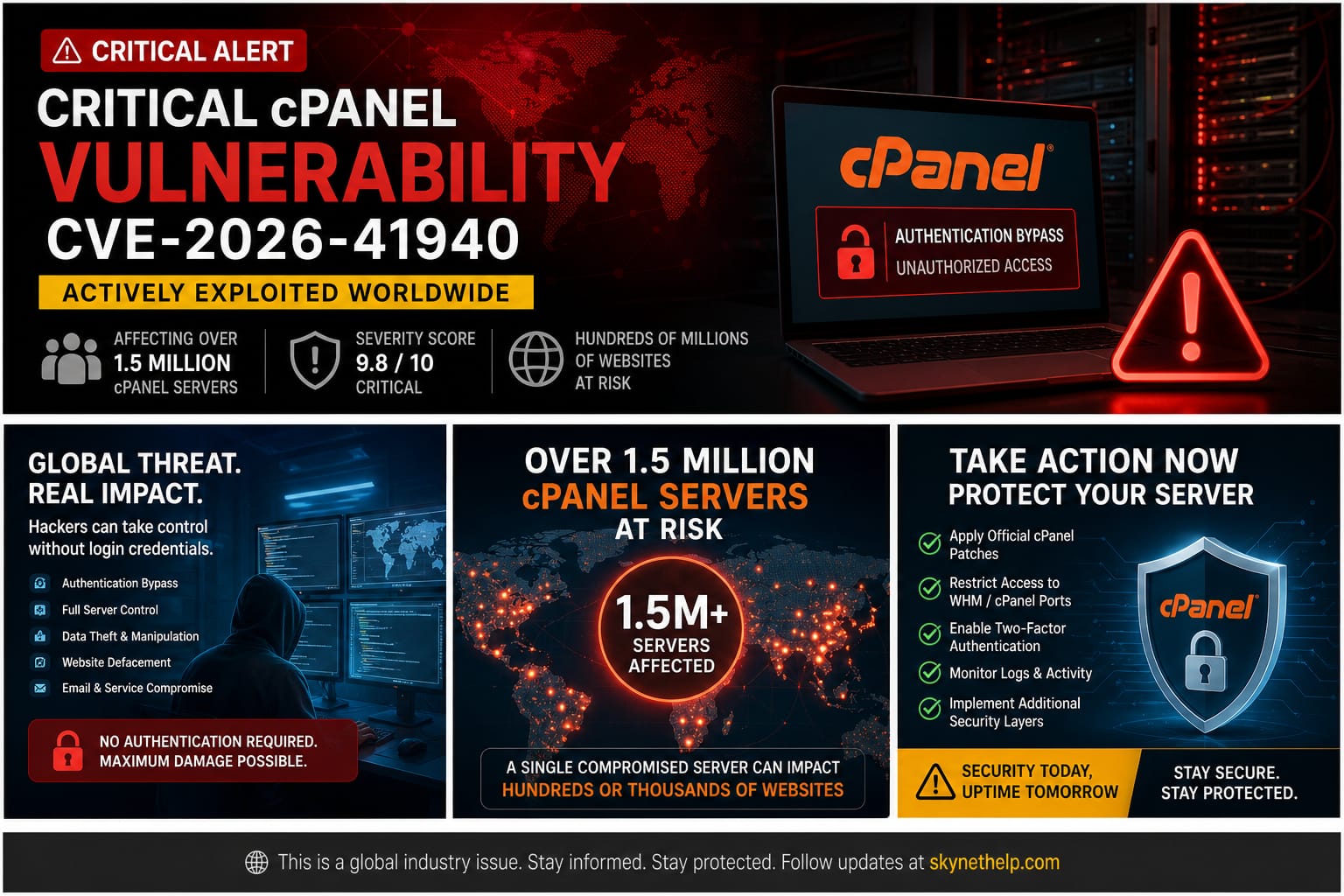
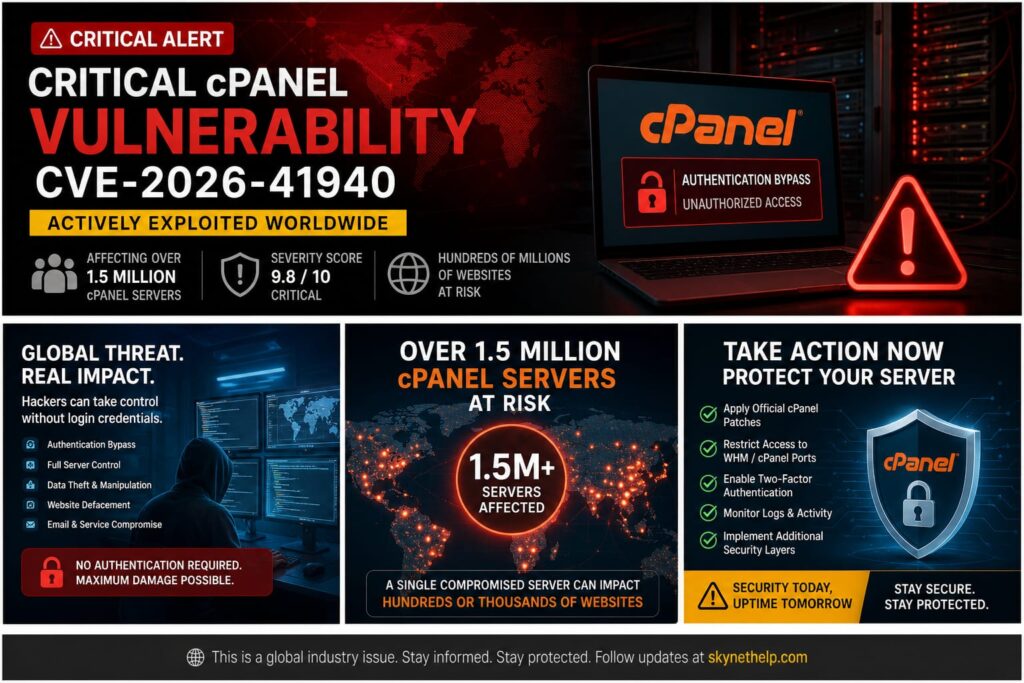
Seventy million domains at risk. Over 1.5 million exposed servers. Hackers actively exploiting a critical vulnerability for 65 days before a patch was released. The cPanel hack of 2026 is one of the most severe cybersecurity nightmares we have seen in the web hosting industry.
I have managed hosting servers for over 20 years. I have seen my fair share of malware and exploits. But the severity of CVE-2026-41940 is different. It carries a CVSS 9.8 rating out of 10. This means it is a critical security flaw. Hackers do not even need a password to gain full root access to your server.
Whether you are a website owner, a systems administrator, a reseller, or a developer, you need to understand this threat. This cPanel zero-day exploit allows attackers to completely bypass login screens. Once inside, they have total control over every file and database on the server.
If you rely on cPanel to manage your websites, you cannot ignore this. Read the summary below to take immediate action, and then review the full breakdown to understand how this attack works.
TL;DR Action Box
- What happened: A critical authentication bypass exploit (CVE-2026-41940) allows hackers to get root server access without a password.
- Who is affected: All supported versions of cPanel & WHM, plus End-of-Life versions and WP Squared.
- What to do now: Update your cPanel software immediately. Check your
/var/cpanel/sessions/raw/directory for unauthorized session files. Audit your API tokens and Cron jobs for backdoors.
What Is the cPanel Hack? And Why Should Every Website Owner Care?
Breakdown of the April 2026 cPanel Security Breach
In late April 2026, cybersecurity researchers at watchTowr Labs published a report on a massive security flaw. They discovered a way to bypass the cPanel login screen completely. Attackers could trick the server into thinking they were authenticated administrators. They did not need to guess passwords or crack two-factor authentication. They just walked right through the front door.
Severity Analysis of CVE-2026-41940 (CVSS 9.8 Rating)
Security experts rate vulnerabilities using the Common Vulnerability Scoring System (CVSS). A score of 9.8 out of 10 is as bad as it gets. It means the vulnerability is easy to exploit over the internet, requires no special privileges, and results in a total system compromise. This CVSS 9.8 vulnerability leads to unauthenticated RCE (Remote Code Execution) hosting takeovers.
Impact of the cPanel Hack on Website Owners vs Server Administrators
The impact changes depending on your role. For website owners on shared hosting, a hacked server means your customer data, emails, and website files are stolen or deleted. For server administrators, the damage is catastrophic. Hackers gain full WHM root access vulnerability control. They can lock you out of your own dedicated server provider hardware, install ransomware, or use your server to launch further attacks.
How Did Hackers Actually Break Into cPanel? The Full Attack Explained
Understanding CRLF Injection and Its Impact on cPanel Security
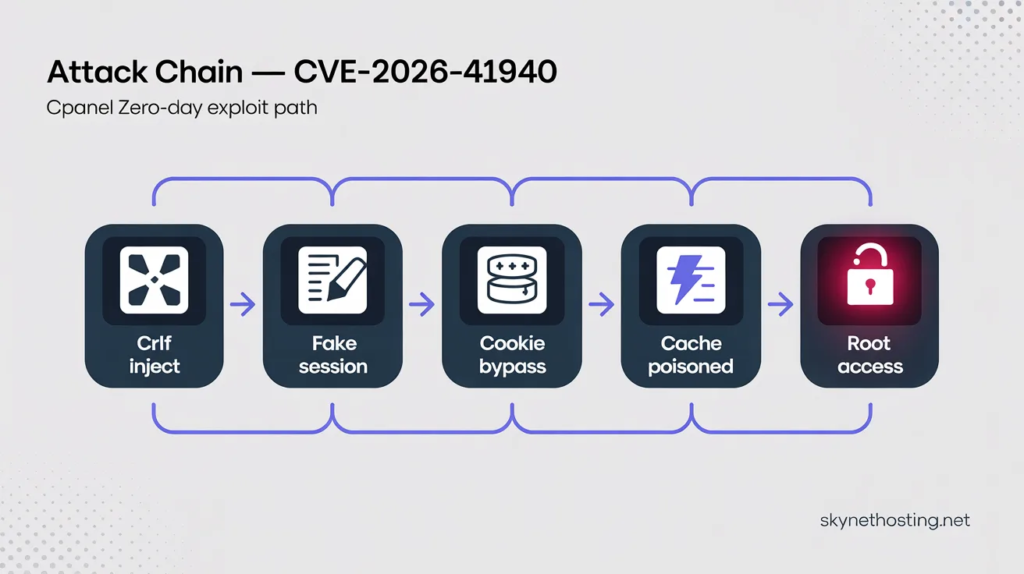
The attack relies on a method called a CRLF injection attack. CRLF stands for Carriage Return Line Feed. It is the computer equivalent of pressing the “Enter” key on your keyboard. By sending a malicious web request, hackers injected these invisible “new line” characters into the server’s backend processes. This allowed them to break the intended code structure and insert their own commands.
Creation of Fake Authenticated Sessions Without Passwords
When you log in to cPanel, the server creates a file tracking your request. This is the cpsrvd session file. Because the server failed to properly filter out the hacker’s CRLF characters, the hackers could force the server to write new lines into this raw session file. They injected a specific command: hasroot=1.
Exploitation of the whostmgrsession Cookie Mechanism
To make this work, attackers targeted the whostmgrsession cookie. By manipulating this cPanel session cookie, they avoided the server’s normal encryption process. The manipulated cookie, combined with the CRLF injection, created a session hijacking web hosting scenario. The server looked at the session file, saw hasroot=1, and assumed a legitimate administrator had successfully logged in.
Role of the JSON Cache Vulnerability in Achieving Root Access
There was one hurdle for the hackers. cPanel usually loads sessions from a fast cache to save time, ignoring the raw files. Writing fake data into the raw file was not enough. The attackers had to force the server to read the manipulated raw file and push it into the main JSON cache.
The do_token_denied Technique and Privilege Escalation to Admin Level
The researchers found a brilliant but terrifying bypass. By requesting specific parts of the software without a security token, they triggered a function called do_token_denied. This specific error forced the server to run Modify::new and Modify::save commands. This action read the corrupted raw file and saved it to the active cache. The server was instantly fooled, granting the attacker complete cPanel server takeover.
Patch Fix Explanation: The filter_sessiondata Code Update
The core of the problem was a missing security check. The system had a tool called filter_sessiondata designed to clean user input. However, cPanel did not use it at the right stage of the login process. The cPanel emergency patch updated the code to ensure filter_sessiondata runs correctly, sanitizing all inputs before they ever reach the session files.
What the Official cPanel Advisory Actually Says
The official cPanel security advisory for CVE-2026-41940 was published on April 28, 2026, and describes the core issue as “an issue with session loading and saving.” It confirms that all cPanel and WHM versions after 11.40 are vulnerable, and lists specific patched builds across every supported release track.
The advisory instructs administrators to run the standard update script immediately, verify the installed build number, and restart the cpsrvd service to ensure the patch is properly active. For environments where immediate patching is not possible, the advisory recommends blocking inbound traffic on ports 2083, 2087, 2095, and 2096 at the firewall level as a temporary measure.
Notably, cPanel also published a detection script alongside the advisory. This script scans the /var/cpanel/sessions directory and flags suspicious session files — specifically those containing both a token_denied marker and a cp_security_token, or pre-authentication sessions that already carry authenticated attributes.
If you have not read the advisory directly, do so now. It is the single most authoritative source on what versions are safe and what steps are required.
How Long Were Hackers Exploiting This cPanel Vulnerability Before Anyone Knew?
Timeline of Initial Exploitation of CVE-2026-41940 in the Wild
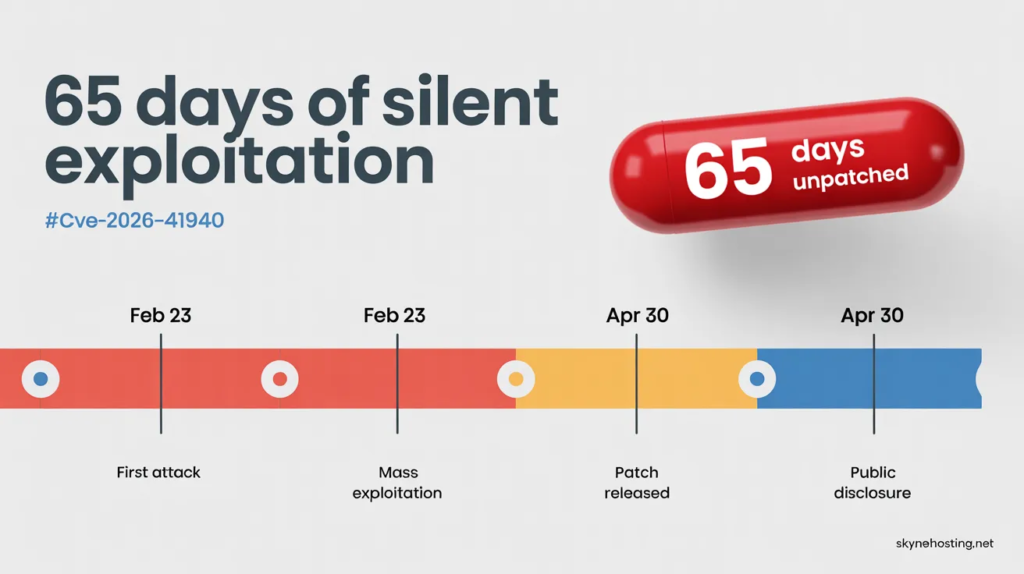
The most alarming part of this cPanel hack is the timeline. The official patch update dropped on April 28, 2026. TechCrunch and other news outlets reported the active exploitation on April 30. But the hacking actually started months earlier.
Evidence Supporting Zero-Day Exploitation Since February 2026
Hosting providers noticed strange behavior long before the patch. KnownHost CEO Daniel Pearson reported seeing unauthorized access attempts on customer servers as early as February 23, 2026. This confirms the bug was actively exploited as a zero-day attack hosting provider threat for weeks.
cPanel’s Awareness Prior to Public Disclosure
WebPros International, the company behind cPanel, worked quietly to develop a fix once the zero-day exploit was discovered. In cybersecurity, this is a delicate balancing act. If you announce a vulnerability before a patch is ready, every hacker in the world will try to use it.
Analysis of WebPros’ Initial Response to the Vulnerability
WebPros International security teams finally released the fix on April 28. They urged customers to update their systems immediately. However, because the flaw existed in a core component, the patch required a major, network-wide update.
Implications of 65 Days of Unpatched Zero-Day Exploitation
For roughly 65 days, hackers had a golden key to millions of servers. During this window, attackers could quietly install backdoors, steal databases, or alter website files. Even if you apply the patch today, your server might already be compromised.
How the Server Admin Community Responded in Real Time
As the news broke, server administrators across the globe shared live updates in the r/cPanel community thread on the zero-day auth bypass. The discussion confirmed that KnownHost flagged active exploitation as early as February 23, 2026, and that major providers including Namecheap, HostPapa, InMotion Hosting, and hosting.com had already blocked cPanel and WHM ports at the network level before a patch was even available.
Community members also raised a critical concern: cPanel had reportedly been privately notified of the flaw roughly two weeks before the April 28 public advisory, yet its initial response was that nothing was wrong.
The thread remains one of the most detailed real-world accounts of how this crisis unfolded hour by hour, and is worth reading if you want to understand what other administrators found in their logs.
Which Versions of cPanel Are Vulnerable? Is Your Version on the List?
List of Affected cPanel and WHM Version Numbers
This is not an isolated issue affecting an old, forgotten build. It impacts all supported versions. The vulnerable release tracks include 110.0.x, 118.0.x, 126.0.x, 132.0.x, 134.0.x, and 136.0.x. You must upgrade to the patched versions (like 11.110.0.97 or 11.136.0.5) immediately.
Impact on End-of-Life (EoL) cPanel Versions
Many server administrators run older, End-of-Life versions of cPanel to avoid paying for license upgrades. This is a fatal mistake. The vulnerability exists in all legacy versions dating back years. If you run EoL software, you are highly vulnerable and must update your entire operating environment.
Vulnerability Status of WP Squared (WordPress Hosting on cPanel)
cPanel also offers a specialized WordPress management tool called WP Squared. Because it shares the same underlying architecture, it is just as vulnerable. If you run WordPress sites, you need to patch WP Squared and follow best practices to secure your WordPress site on shared hosting.
Methods to Check the Current cPanel Version on Your Server
Do not guess your software version. Run a cPanel version check terminal command. Log into your server via SSH as root and type /usr/local/cpanel/cpanel -V. This will instantly display your active build number so you can verify if the patch is applied.
How Do I Fix the cPanel Hack Vulnerability? Step-by-Step Patching Guide
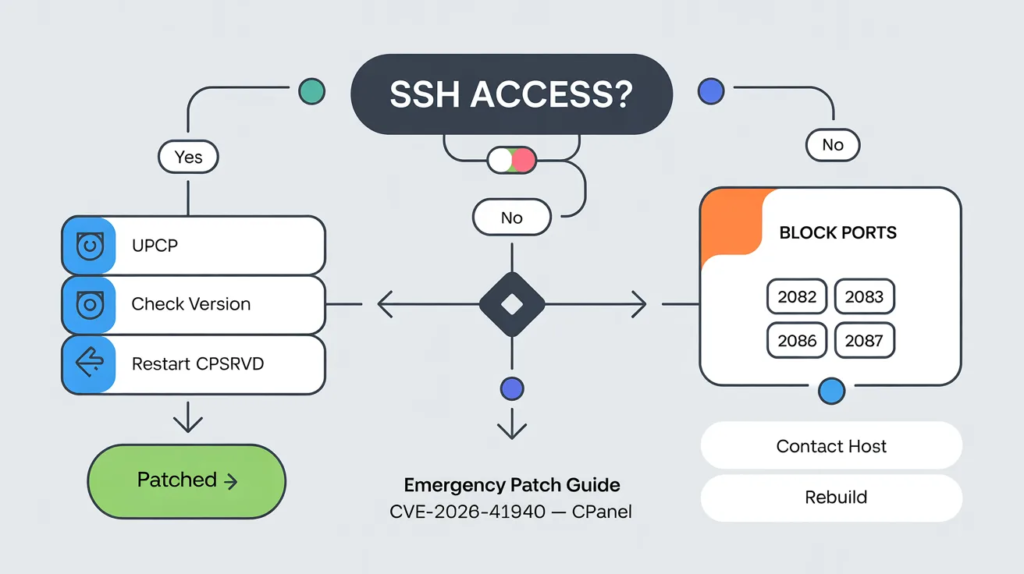
Your first priority is applying the official cPanel emergency patch. WebPros International released an urgent security update on April 28, 2026. You must install this update immediately to stop the authentication bypass exploit.
Required Patched cPanel Versions for CVE-2026-41940 Mitigation
Not all versions of cPanel are safe. You need to verify that your server runs one of the patched releases. The fixed versions include 11.110.0.97, 11.118.0.63, 11.126.0.54, 11.132.0.29, 11.134.0.20, and 11.136.0.5. If your server uses an older release, you remain exposed to the CRLF injection attack.
Updating cPanel via SSH Command Line with Copy-Paste Commands
Updating your server is actually very simple. Log into your server as the root user using SSH. Once connected, type the following command: /scripts/upcp. Press enter. This script forces cPanel to download and install the latest security updates.
Verifying Successful cPanel Patch Installation
After the update finishes, you must confirm the patch applied correctly. In your SSH terminal, type /usr/local/cpanel/cpanel -V. This command checks your cPanel version via the terminal. Make sure the output matches one of the secure versions listed above.
Temporary Firewall Mitigations When Immediate Patching Is Not Possible
Sometimes, you cannot update your server right away. In these cases, you need a temporary shield. You can configure cPanel on your VPS using a firewall like CSF. Restrict access to your management ports so only your specific IP address can reach the login screen.
Critical Ports to Block During the Vulnerability Exposure Window
The CVE-2026-41940 flaw targets the cPanel and WHM login interfaces. To block the attack, restrict access to ports 2082, 2083, 2086, and 2087. Blocking these ports at the firewall level prevents unauthorized external access while you prepare to update.
Restarting the cpsrvd Service After Applying the Patch
The vulnerability specifically targets the cpsrvd session file. After updating, you should restart this service to clear out any old, compromised sessions. Run the command /scripts/restartsrv_cpsrvd in your terminal. This ensures your server uses the newly patched code.
What Should You Do If Your cPanel Was Already Hacked?
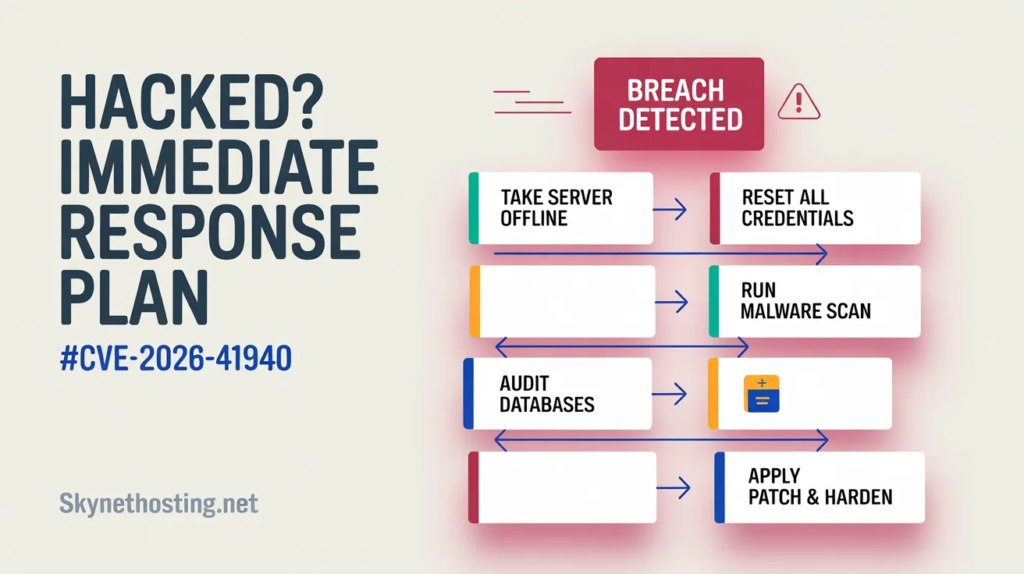
Finding out you are a victim of a server root access attack is stressful. If hackers exploited the whostmgrsession cookie to breach your system, you must act fast. Here is how to contain the damage.
Immediate Response Steps After Detecting a cPanel Breach
First, take the server offline or disconnect it from the public internet. This stops the attacker from stealing more data or doing further harm. Next, check your cPanel access log forensics for strange IP addresses or unauthorized session creations.
Securely Resetting cPanel, MySQL, FTP, and SSH Credentials
Once the server is isolated, change every single password. Do not leave anything untouched. Reset your root SSH keys, WHM passwords, cPanel user accounts, database passwords, and FTP credentials. Assume the attacker scraped all existing passwords during the breach.
Malware Scanning and Removal After cPanel Compromise
Hackers rarely leave quietly. They usually install backdoors. You need to run a deep malware scan using tools like Imunify360 or ClamAV. If you offer hosting to others, you might want to review your Hosting SLA Template to see what remediation services you owe your clients.
Cleaning and Verifying WordPress Databases Post-Breach
A full server compromise means all hosted websites are at risk. Hackers often inject malicious code directly into WordPress databases. You must thoroughly clean and secure your WordPress site on shared hosting by checking the wp_options and wp_users tables for rogue admin accounts.
Customer and User Notification Best Practices After a Security Incident
If you host websites for clients, honesty is your best policy. Notify them about the security incident promptly. Explain the steps you took to secure their data. Transparent communication builds trust, even during a crisis.
Deciding Between Full Server Rebuild and Targeted Cleanup
Sometimes a server is too infected to save. If you find multiple rootkits, a targeted cleanup might fail. The safest option is often a complete server rebuild. Wipe the machine, install a fresh operating system, apply the cPanel security update 2026, and restore your data from clean backups.
How Do You Secure cPanel and WHM to Prevent Future Hacks?
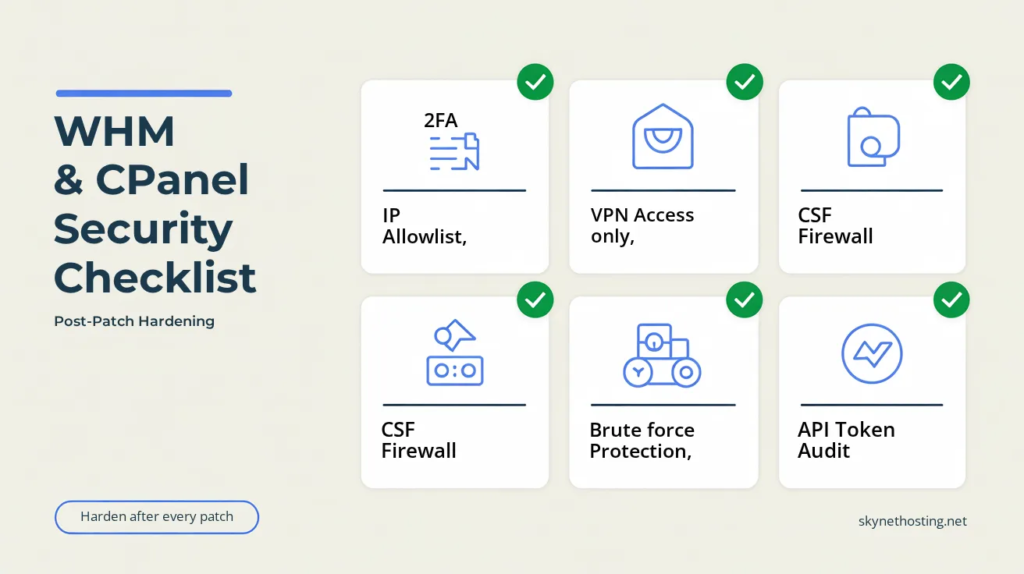
Patching the CVE-2026-41940 vulnerability fixes today’s problem. However, you must harden your server to block tomorrow’s threats. Here are the steps I always take to lock down a web server admin panel.
Enabling and Configuring Two-Factor Authentication (2FA) on WHM
Passwords are no longer enough. You must enable Two-Factor Authentication (2FA) for all WHM and cPanel logins. It is a critical step, especially if you use billing platforms like WHMCS for hosting startups. 2FA stops attackers even if they steal your password.
Restricting WHM Access to Trusted IP Addresses Only
The easiest way to stop a WHM root access vulnerability is to hide the door. Go to the “Host Access Control” section in WHM. Set it so only your office or home IP address can access the WHM login panel. Deny access to everyone else.
Securing WHM Access Behind a VPN Layer
For maximum security, put your server management behind a Virtual Private Network (VPN). This means you must connect to your private VPN before you can even load the WHM login page. It adds a massive layer of invisible protection.
Configuring ConfigServer Security & Firewall (CSF) with cPanel
A strong firewall is mandatory. I highly recommend installing ConfigServer Security & Firewall (CSF). It is free and integrates seamlessly with cPanel. A proper cPanel CSF setup will automatically block suspicious traffic and port scans.
Implementing Brute Force Protection and Login Rate Limiting
Attackers use bots to guess passwords thousands of times a minute. Enable cPHulk Brute Force Protection in WHM. This tool monitors login attempts and automatically bans IP addresses that fail to log in after a few tries.
Disabling Password Recovery to Prevent Email-Based Account Takeovers
Password reset emails are a common attack vector. If a hacker compromises your email, they can reset your cPanel password. Disable the password reset feature for the root user in the “Tweak Settings” menu to close this loophole.
Enabling File Integrity Monitoring on cPanel Servers
You need to know if someone modifies your core system files. Enable file integrity monitoring using a tool like AIDE or OSSEC. These tools alert you the moment a hacker tries to alter critical system binaries or inject a cPanel API token backdoor.
Auditing and Securing cPanel API Tokens
API tokens allow third-party apps to control your server without a password. Hackers love generating these tokens for persistent access. Regularly audit your API tokens in WHM. Delete any tokens you do not recognize or no longer use.
What Are the Different Ways cPanel Can Be Hacked Beyond CVE-2026-41940?
The current cPanel zero-day exploit relies on a missing filter_sessiondata check. But hackers have many other tricks. Understanding these methods helps you spot the signs of cPanel compromise early.
Understanding Brute Force Attacks on cPanel Login Systems
A brute force attack is simple but effective. Hackers program scripts to try millions of password combinations until they get lucky. Weak passwords are the main reason these attacks succeed. Always use long, complex passphrases.
Exploitation Risks in cPanel Password Recovery Mechanisms
Many website owners use easily guessable security questions. If an attacker figures out your mother’s maiden name, they can bypass your password. As an expert, I always advise disabling security questions for password recovery.
API Token Backdoors and Their Use in Persistent Access Attacks
Once a hacker gets in, they want to stay in. They generate API tokens that act as hidden keys. Even if you change your passwords, the API token still grants them full access. You must revoke these during any post-hack cleanup.
WordPress Compromise as an Entry Point to Full cPanel Access
Hackers often target weak websites first. An outdated WordPress plugin can give them a foothold on your server. If you do not isolate your accounts properly, this can lead to a full server takeover. It is vital to read up on the Top 7 Questions to Ask Before Choosing a Shared Hosting Provider to ensure they use proper account isolation.
Risks Associated with Fraudulent or Compromised cPanel Licenses
Cheap hosting providers sometimes use nulled or cracked cPanel licenses to save money. These illegal versions are riddled with malware. You can read more about avoiding these bad hosts in our guide on the Top 7 Hosting Scams in 2025.
What Does This cPanel Hack Mean for Managed vs. Self-Hosted Server Users?
Your response to this crisis depends entirely on the type of hosting you use. Let us break down who is responsible for patching the system.
Responsibilities for Users with Managed cPanel Hosting Providers
If you pay for managed hosting, your provider handles server administration. Giants like Namecheap and HostGator patched their systems almost immediately. If you have questions about what your host covers, check out our Web Hosting FAQs.
Security Actions Required for cPanel Resellers
As a reseller, you sit in the middle. You might not have root access to apply the patch yourself. However, you are responsible for your clients’ data. You must contact your upstream provider to confirm the patch is live. Also, learn How to Backup WHMCS to protect your client billing data.
Risk Differences Between Shared Hosting and VPS/Dedicated Servers
Shared hosting places hundreds of sites on one server. If one shared hosting security breach happens, all sites face risks. VPS and dedicated servers offer better isolation. If you are confused by the differences, our guide explaining What Is WHM vs cPanel? is very helpful.
Enterprise Response Strategies for Self-Managed cPanel Environments
Enterprises running self-managed dedicated servers must handle everything themselves. Your IT team is solely responsible for applying the cPanel patch update, auditing logs, and communicating with stakeholders.
Is This the Worst cPanel Hack Ever? How Does CVE-2026-41940 Compare to Past Vulnerabilities?
I have monitored hosting control panel vulnerabilities for a long time. This specific bug is uniquely terrifying due to its simplicity and the level of access it grants.
Historical Overview of Critical cPanel Vulnerabilities
cPanel has faced security issues before. In the past, attackers exploited cross-site scripting (XSS) or minor privilege escalations. But those usually required the hacker to have a basic user account first. Unauthenticated remote code execution (RCE) flaws are incredibly rare.
Unique Risk Factors That Make CVE-2026-41940 Especially Dangerous
What makes this cPanel WHM hack so bad is the lack of authentication. The hacker does not need a username. They do not need a password. They just inject a carriage return line feed (CRLF) command into the session cookie. Suddenly, they own your entire server.
Impact of AI-Driven Vulnerability Research on Future Hosting Security
Hackers are getting smarter. Security teams like watchTowr Labs find these bugs, but malicious actors use AI to find them too. AI helps attackers spot code weaknesses faster than human developers can patch them.
Frequently Asked Questions About the cPanel Hack
Is cPanel safe after applying the official patches?
Yes, your server is safe from CVE-2026-41940 once you apply the official update. The patch fixes the missing session data validation. However, you must still scan for malware in case hackers breached your server before you updated.
How can I verify whether my hosting provider has patched their cPanel servers?
You can ask your hosting provider’s support team directly. Many reputable hosts publish security bulletins on their status pages. If you have terminal access, you can run the version check terminal command mentioned earlier.
Can shared hosting users still be at risk without receiving any alerts?
If you use shared hosting and haven’t heard from your host, do not assume you are safe. Reach out to them. Ask specifically if they have patched the CVE-2026-41940 vulnerability.
What is WP Squared and how is it related to this vulnerability?
WP Squared is a WordPress management tool created by cPanel. Because it shares underlying code with cPanel, it also suffered from this WP Squared vulnerability. WebPros released a fix for it alongside the main cPanel update.
Is there a public proof-of-concept (PoC) exploit available for CVE-2026-41940?
Yes, security researchers have published proof-of-concept (PoC) scripts. This is a double-edged sword. It helps system admins test their defenses, but it also gives script kiddies an easy tool to attack unpatched servers.
Discovery and Disclosure of the CVE-2026-41940 Vulnerability
The web hosting provider KnownHost noticed active exploitation of this bug in late February 2026. Security researchers then analyzed the attacks and worked with WebPros to develop a patch before publicly disclosing the flaw.
What Is the Final Verdict and Action Plan for the cPanel Hack?
This cPanel login bypass flaw is a stark reminder that no software is perfectly secure. But with swift action, you can protect your digital assets.
Complete 10-Step Emergency Patching and Response Checklist
- Verify your current cPanel version.
- Run
/scripts/upcpvia SSH. - Restart the
cpsrvdservice. - Block external access to ports 2086 and 2087 if you cannot patch.
- Review your access logs for suspicious IPs.
- Change all root and user passwords.
- Run a server-wide malware scan.
- Enable cPHulk brute force protection.
- Audit your API tokens.
- Turn on Two-Factor Authentication.
Long-Term cPanel Security Hardening Roadmap (30-Day Plan)
Over the next month, take time to improve your overall security posture. Install CSF. Move your WHM access behind a VPN. Set up automated backups to a remote location. Security is not a one-time task; it is an ongoing habit.
Key Resources and References
To stay informed and verify everything covered in this article, the following sources provide the most authoritative and detailed information available on CVE-2026-41940.
SkyNetHosting.Net Resources
- Critical Security Advisory: Temporary Shutdown of cPanel-Based Services — Our official incident update page with live recovery progress
- cPanel Hack CVE-2026-41940: What You Need to Know — Our full technical breakdown of the vulnerability and how to protect your server
External Technical References
- watchTowr Labs: CVE-2026-41940 Authentication Bypass — Full Technical Analysis — The security researchers who reverse-engineered the exploit and published the proof-of-concept
- r/cPanel Community Discussion: Massive cPanel 0-Day Auth Bypass — Real-time responses from server administrators and hosting providers as the crisis unfolded
A Note From SkyNetHosting.Net: Our Response to CVE-2026-41940
As a hosting and reseller hosting provider, we at SkyNetHosting.Net have been directly in the middle of this crisis alongside our clients. This is not a threat we are writing about from a distance.
As of our latest update, approximately 15% of all affected servers have been fully restored and over 30% of reseller hosting servers are back online. Every restored system has been upgraded to a patched cPanel version, fully rebuilt where necessary, and security-hardened before reactivation. Services are being restored in phases because system integrity comes before speed.
If you are a SkyNetHosting.Net client, we appreciate your patience. Follow our live recovery progress on our official incident update page for the latest status.
The cPanel hack of 2026 is a defining moment for the web hosting industry. CVE-2026-41940 has made it clear that no control panel, no matter how widely trusted, is immune to a catastrophic zero-day. Whether you manage one website or one thousand, the lesson is the same: security is not a feature you enable once and forget.
It is a process you maintain every single day. Patch your systems, audit your access logs, harden your configurations, and never assume that because your server was fine yesterday, it is fine today. If your server was exposed during the 65-day exploitation window, treat it as compromised until you can prove otherwise. A rushed recovery that leaves a backdoor open is not a recovery at all.
