


How to Make an Email Server with a VPS in 5 easy Steps
TL;DR: Build Your Own VPS Email Server in 2026 – Key Takeaways
- Building an email server on a VPS gives you ultimate control, boosted security, reliability, and scalability compared to shared or free services.
- The main steps: choose a VPS and domain, install email server software (Postfix/Exim), configure sending/receiving, and create user accounts.
- Proper DNS setup with SPF, DKIM, and MX records is essential for strong deliverability and spam prevention.
- Implement SSL certificates, firewalls, and regular updates to maintain strong security and data integrity.
- Ongoing monitoring and frequent backups are crucial for stable, uninterrupted email server operations on a VPS.
- You can host multiple domains, manage individual accounts, and fully customize your mail server to fit your needs using a VPS.
Would you rather like to run your own amazing email server? Just think about having absolute control over your email hosting, including security and personalization. If you’re not sure how to set up an email server with a VPS then good news is: it’s possible, and it’s not a pipe dream.
In this tutorial, we’ll explain how to create an email server using Postfix and Dovecot that can serve as a centralized platform for supporting multiple domains, and correspondingly many users. It’s super simple for IT pros, small business owners & tech enthusiasts. And it’s a good alternative to free email, especially if you aren’t supporting your own domain, or would rather not host your email on the same computer that hosts your web server.
There are many great reasons to host your email server with a VPS. You’ll benefit from increased security, more resources and the ability to upload files larger than 1GB. Plus, with the increasing awareness of data privacy a dedicated VPS mail server is more important then ever before.
Let’s see how to set up an email server on a VPS and get started!
Email Servers and Their Components Explained
Email servers are the innards of internet communication. They are responsible for sending, receiving and storing emails, working behind the scenes each time you tap “send.” Very basically, an email server is a computer system that sends and relays emails between users or other servers.
The email compartment of a server must be adequately configured for everything to flow smoothly.
When we refer to email servers, there are two primary types it could be: Mail Transfer Agents (MTAs) and Mail Delivery Agents (MDAs).
MTAs such as Postfix are outgoing mail servers that is used to send outgoing email, and MDAs are responsible for delivering incoming email.
Once all these in place your VPS email will now setup a smooth communication according to what you need using an SMTP server.
Why Use a VPS for Your Email Server. Benefits of VPS Mail
You have a number of benefits from using a VPS email server in preference to standard shared hosting for your email. VPS hosting, first of all, provides you with more control over your server resources (you can configure settings the way you want). This flexibility lets you tailor performance and security for your VPS mail.
Security is the most important when we are to handle sensitive information. VPS allows you to enforce strict security statutes that decrease susceptibilities present in shared hosting service. Here’s a good way to make sure exchange services is only accepting legitimate connections from known, or trusted senders: with properly configured mail settings of course you can harden security even more for your sensitive email server.
A VPS is also scalable. That means you can scale your email server with your business. It is capable to address your traffic and storage requirements as you grow, making your mail server on VPS a future-proof option. What is more, VPS also offers the power of server-side control, giving you the ultimate control over admin without associated setups of usual server hosting.
Prerequisites for Setting Up Your VPS Email Server
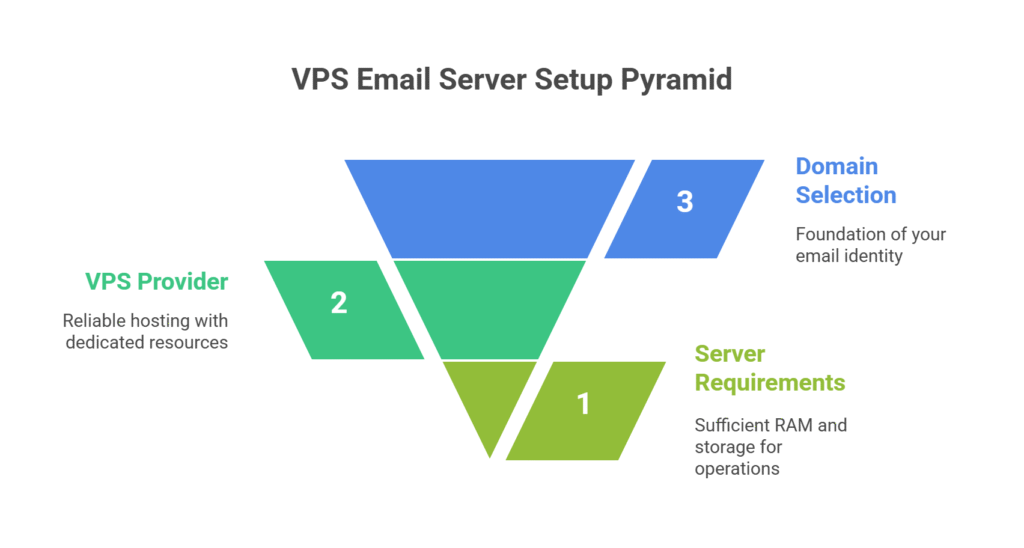
Before we get under way setting up a VPS email server, you need to have some basics in place.
- Choose Domain Name: The very first step in the process is to select a domain name which defines your email address (Here, you will address e. com). This part is especially important, as in many cases it will be the building blocks of your email identity.
- Select a VPS Provider: Then select a VPS provider that best fits your requirements. Services like Skynethosting.net have low cost, high quality solutions that are great to use as an email server with dedicated resources.
- Meet Server Requisites: Furthermore, ensure your VPS has the required specifications in terms of RAM and space to run your email server without any lag. Keep in mind that strong email management is only as good as your server administration.
How to Make an Email Server with a VPS: Step-by-Step Guide
So let’s take a look at some of the key five steps to establish your very own powerful VPS email server: Step 1 Install MTA Just in case you have an anti-spammer lobby to please or something else that would make using postfix unkind, installing MTA is the first step.
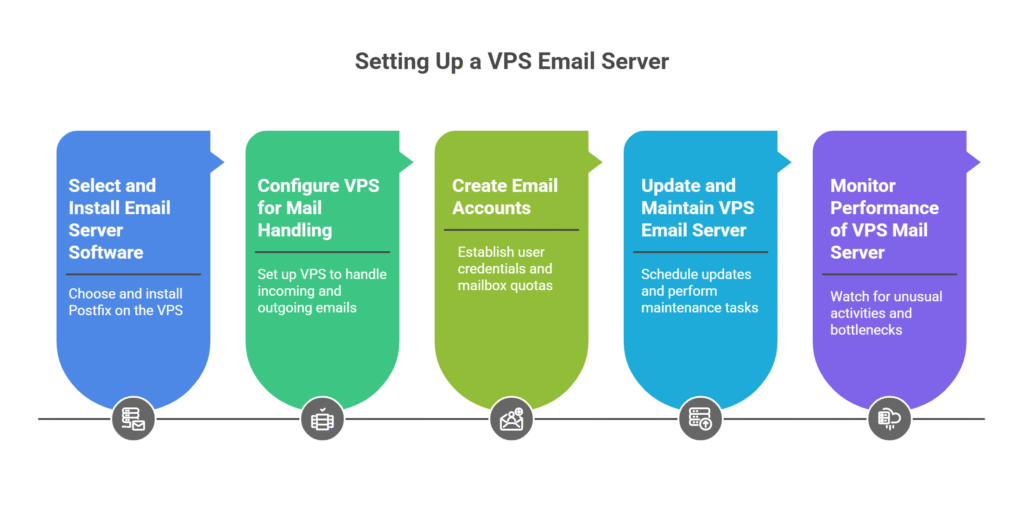
Step 1: Choose and Install Email Server Software
Start by finding an email server software that you need. Postfix is very popular as Mail server for VPS because it’s easy to operate, due to its stability and performance. Install Your Software on the VPSStepsOnce you have a chosen software, you are to go ahead and install it onto your VPS. This setup will enable you to start working with email.
Step 2: Set up your VPS for mail delivery
After you install the program set up your VPS to send and receive email. This setup is crucial as it creates the appropriate routes for your VPS email to communicate without hindrance. Make sure that your server’s settings are correctly set up to send and receive emails within and outside of user accounts.
Step 3: Create Email Accounts
Once you have your mail server vps ready, go ahead and create individual email accounts. Add user credentials and specify mailbox quotas so that users can send and receive emails through your email server. This is an important step to control user access and email storage.
Step 4: Update Your VPS Email Server and Keep It that way
If you want your VPS email server to run flawlessly, be sure to update and maintain it regularly. Put these in the calendar and take care of your server to keep it up to date, secure and efficient!
Step 5: Check Your VPS Mail Server Performance Also the performance of your mail server is important.
And finally, just watch on your mail server vps performance. Keep an eye out for any strange behavior or traffic that will bog down email management. Dealing with any problems quickly, will ensure your VPS email workflow stays effective and downtime is avoided.
Setting Up DNS for Your VPS Email Server
The DNS configuration has a huge impact on email server deliverability. They make sure your emails are delivered to its receiver without labeling them spam and that is what is essential for your VPS mail.
- Add SPF (Sender Policy Framework) Record: Start by adding DNS records. Add an SPF record. This record validates IP address of your email server and reduces possibility of spoofing.
- DKIM (DomainKeys Identified Mail) Record: Also create a DKIM record, confirming your emails are genuine and they haven’t been tampered with.
- MX (Mail Exchange) Record: An MX record directs incoming mail to your VPS email server.
By getting these DNS settings right, you seriously boost the reputation of your mail server on VPS and get better deliverability.
Selecting Software for VPS Mail Server that Suits You
Choosing the right software for your email server is very important as VPS typically doesn’t provide high disk performance which can highly impact the performance of your mail server. Virgin choices are either Postfix or Exim, both of which provide a powerful suite of features to control email traffic. Review which one matches your needs and likings.
When selecting your software, keep in mind things like ease of use, interoperability and community support. Follow industry best practices when setting up a VPS email server such as keeping updates and patches current. These measures help maintain the security and efficiency of the server.
Security Aspects of your VPS Email Server
VPS email server security is important to safeguarding critical information and ensuring that users can trust your system.
- Add SSL Certificates: Encrypt the information transfer that can protect files from being intercepted.
- Use Firewalls: Prevent unauthorized access and keep an eye on your server for any unusual activity.
- Frequent Software Updates: Always maintain your mail server VPS software updated to fix any vulnerabilities.
- Use Spam Filters: Keeping unwanted emails out of inboxes.
Those precautions make it safe for both your VPS mail server, and the people who use it, to trust that data will be kept secure and private.
How to Add and Delete Email Accounts on Your VPS Mail Server
Proper handling of email accounts are necessary for a strong user experience on your VPS mail server.
- Administer and implement user accounts, including requisite permissions and mailbox size policies.
- Formulate clear email standards to guide users in appropriate use of email.
- Check email flow to detect any issues like unauthorized access and spamming.
- Periodically review email accounts for policy violations, and take corrective action as necessary.
The Most Common Problems & Solutions for Your VPS Email
Problems are also normal in setting up an email server VPS, but they are easily solved.
- Email Delivery Issues: Usually due to having DNS settings misconfigured. Check your SPF, DKIM, and MX records to fix this.
- Server Outage: May cause email server issues. We also provide monthly support for your VPS mail server, keeping it in best condition with upgrades and update and attend to any hardware & software issues.
- Backups and Recovery: Setup backup & recovery strategies so you don’t lose data in the event of server failure.
How to Host Multiple Domains on One VPS Email Server
It is possible to host multiple domains on one VPS email server, but with limitations.
- Set them up as virtual mailboxes for each domain and have them work in there own right.
- Configure customized DNS records for every domain and control the flow of email.
- Periodically check the health of domains to verify they’re functioning optimumly and correct problems.
With this setup, you can manage several email domains from single VPS mail server.
Conclusion: Use a VPS Email Server to Strengthen your Communication
Setting up an Email Server On a VPS Provides You Total Control Robust Security Practices Scalable Email Hosting What we will do?
With the right tools in place, you can bolt-on an even better email communication network and bypass the general services. By understanding what VPS hosting is and how to setup a email server, you can find solution that exactly matches your need.
Explore further possibilities with Skynethosting.net’s USA VPS Now Offers 100 Mbps and Windows Server Hosting OpneVZ Linux VPS, Xen Linux VPS, 100 Mbps Linux VPSand WIndows/Linux VMs From $5.
They craft their dependable services to accomodate your VPS email server configuration at a great value for your business. Discover how to create an email server with a VPS now and unleash the power of personalized VPS mail hosting.
FAQs
What are the main steps to set up an email server on a VPS?
Why use a VPS for your email server?
Which email software is recommended for VPS servers?
How do you configure DNS for a VPS email server?
What security steps are crucial for a VPS email server?
Can you host multiple domains on a single VPS email server?
What are common troubleshooting tips for VPS email servers?
