SkynetHosting.net vs InMotion Hosting vs Hosting.com: Which Reseller Hosting Provider Is Right for You in 2026?
TL;DR
- SkynetHosting.net packs more reseller features at a lower entry price than InMotion Hosting and Hosting.com, making it attractive for budget-focused or early-stage hosting businesses.
- Entry promo pricing is about $9.95/month for SkynetHosting.net with 5 cPanel accounts, $14.99/month for InMotion with 25 accounts, and $22.99/month for Hosting.com with up to 30 accounts.
- The article compares SkynetHosting.net, InMotion Hosting, and Hosting.com on pricing, features, performance, support, and scalability to guide reseller decisions.
- Budget-conscious resellers should start with SkynetHosting.net, then compare InMotion and Hosting.com based on how much they value stronger support or higher performance.
- Choosing the right platform boosts profitability and client satisfaction through reliable uptime, automation tools like WHMCS/Blesta, and solid white-label branding instead of chasing “unlimited” resources.
- InMotion suits agencies needing top-tier support and uptime, Hosting.com fits performance-critical clients, and SkynetHosting.net wins on features-per-dollar but expects more self-service.
Choosing the right reseller hosting provider can make or break your hosting business. Whether you’re a web designer looking to offer hosting to clients, an agency expanding your service portfolio, or an entrepreneur building a hosting brand from scratch, the platform you choose will directly impact your profitability, client satisfaction, and long-term growth.
In this detailed comparison, we’ll put three popular reseller hosting providers under the microscope: SkynetHosting.net, InMotion Hosting, and Hosting.com. We’ll break down pricing, features, performance, support, and everything else that matters when you’re building a hosting business.
Let’s dive in and find the best reseller hosting solution for your needs.
What Should You Really Look for in a Reseller Hosting Provider?
Before we jump into comparing specific providers, it’s important to understand what actually matters in reseller hosting. Too many people get caught up in the marketing hype and miss the fundamentals.
Why reseller hosting is more than just disk space and bandwidth
When you first start researching reseller hosting, you’ll see providers throwing around impressive numbers: “Unlimited storage!” “Unmetered bandwidth!” “500 cPanel accounts!”
Here’s the reality: those numbers don’t tell the whole story.
What actually matters more than raw storage is how resources are allocated and managed. A provider offering 1TB of storage on overcrowded servers will perform worse than one offering 250GB on optimized, low-density infrastructure. Think about it this way: would you rather have unlimited seats on a slow, packed bus, or guaranteed seats on a fast train?
The quality of the infrastructure matters tremendously. Features like NVMe SSD storage (which is significantly faster than traditional SSDs), LiteSpeed web servers, CloudLinux OS for account isolation, and proper caching mechanisms all contribute to better performance for your clients’ websites.
Your reputation as a reseller is only as strong as the uptime and speed you can deliver. No client cares that you got “unlimited everything” if their website loads slowly or goes down regularly.
Key differences between beginner and professional reseller plans
Not all reseller plans are created equal, and understanding the tiers can save you from costly mistakes.
Beginner reseller plans typically offer 5-25 cPanel accounts, basic white-label features, standard support, and limited automation tools. These are perfect if you’re testing the waters, managing a handful of client websites, or just starting your hosting business. The investment is lower, but so are the bells and whistles.
Professional reseller plans come with 50-100+ cPanel accounts, advanced automation through WHMCS or Blesta, premium features like dedicated IPs and priority support, end-user support options where the host handles client tickets on your behalf, and the ability to resell additional services like VPS or dedicated servers.
The jump from beginner to professional isn’t just about more accounts. It’s about automation, scalability, and having the tools to actually run a real hosting business instead of just manually managing a few client sites.
How brand reputation and infrastructure impact your clients
Here’s something many new resellers don’t think about: when you resell hosting, your clients’ success becomes your success. If their websites are fast, secure, and always online, you look like a hero. If they experience downtime or security issues, you’re the one fielding angry calls and emails.
The infrastructure your provider runs on directly affects your clients’ experience. Modern data centers with redundant power, network connectivity, and cooling systems ensure better uptime. Server-level technologies like CloudLinux OS provide account isolation so one bad actor on the server doesn’t impact everyone else (a huge issue with shared environments). Regular security updates, malware scanning, and DDoS protection keep client sites safe without you having to become a security expert.
Your provider’s reputation also matters when problems arise. Established providers with proven track records are more likely to handle crises professionally and have the resources to resolve issues quickly.
How Do SkynetHosting.net, InMotion, and Hosting.com Compare Overall?
Let’s start with the big picture before we dive into the details. Here’s what you need to know about each provider upfront.
Quick overview of each reseller hosting provider
SkynetHosting.net has been in business for over 20 years, positioning itself as a veteran in the hosting industry. They operate from 25 data center locations worldwide, giving resellers excellent geographic flexibility. Their plans are aggressively priced and pack in features that many competitors charge extra for, including free WHMCS licenses, domain reseller accounts, and even end-user support on higher tiers.
InMotion Hosting is a well-established U.S.-based provider with a strong reputation for reliability and customer support. They’re known for their 90-day money-back guarantee (much longer than the industry standard), NVMe SSD storage across most plans, and comprehensive reseller features. InMotion operates their own data centers in Los Angeles and Washington D.C., giving them direct control over infrastructure quality.
Hosting.com (formerly A2 Hosting for their reseller division) positions themselves as a premium option with Turbo server technology for enhanced performance. They focus on speed and reliability, offering both standard and Turbo-boosted plans. Their infrastructure is geared toward businesses that prioritize performance and are willing to pay a bit more for it.
Target audience and ideal use cases for each platform
These three providers target slightly different audiences, even though there’s some overlap.
SkynetHosting.net is ideal for budget-conscious resellers who want maximum features for minimum investment, international resellers who need specific geographic server locations, entrepreneurs testing reseller hosting without major upfront costs, and small hosting companies looking to scale affordably. If you’re watching every dollar and want the most features possible, SkynetHosting makes a compelling case.
InMotion Hosting appeals to U.S.-based agencies and consultants who value brand reputation, resellers who want bulletproof support and longer money-back guarantees, businesses managing WordPress sites for multiple clients, and those who prioritize reliability over rock-bottom pricing. If you’re willing to pay a bit more for peace of mind and premium support, InMotion delivers.
Hosting.com targets performance-focused resellers managing high-traffic client sites, development agencies that need speed for client satisfaction, SEO-conscious businesses where page speed impacts rankings, and technical users comfortable with premium pricing for premium infrastructure. If speed and performance are your top priorities and budget is less of a concern, Hosting.com’s Turbo servers are worth considering.
First impressions: dashboards, onboarding, and setup
The onboarding experience differs notably across all three platforms.
SkynetHosting.net offers a straightforward signup process with instant activation on most plans. You get immediate access to WHM (Web Host Manager), and their interface is standard cPanel/WHM, which means if you’ve used these before, you’ll feel right at home. The learning curve is minimal for experienced users, though newcomers might feel overwhelmed without much hand-holding. They do provide tutorials and documentation, but the approach is more “here are the tools, figure it out” rather than guided setup.
InMotion Hosting provides a more polished onboarding experience with guided setup options and comprehensive documentation. Their customer portal is modern and intuitive, and they offer free migration services that include actual human assistance (not just automated scripts). For someone new to reseller hosting, InMotion’s approach feels more welcoming and supportive from day one.
Hosting.com strikes a middle ground with professional account setup and clear documentation. Their control panel experience is clean and functional, though perhaps not as hand-holdy as InMotion. They do offer free migrations and setup assistance, but the overall approach assumes you have at least basic familiarity with hosting concepts.
Which Reseller Hosting Provider Offers the Best Value for Money?
Let’s talk dollars and sense. Value for money isn’t just about the lowest price—it’s about what you get for what you pay.
Entry-level reseller pricing comparison
Here’s where the pricing stands based on current 2025 promotional rates (note that these are introductory prices; renewal rates are typically higher):
| Provider | Entry Plan | Promo Price | Regular Price | Storage | Bandwidth | cPanel Accounts |
|---|---|---|---|---|---|---|
| SkynetHosting.net | Cheap Reseller | $9.95/month | $9.95/month | 25GB NVMe SSD | 1TB | 5 |
| InMotion Hosting | R-1000S | ~$14.99/month | ~$19.99/month | 80GB NVMe SSD | 800GB | 25 |
| Hosting.com | Kickstart | $22.99/month | $49.99/month | 60GB SSD | ~600GB | Up to 30 |
Pricing as of January 2025. Always verify current rates on provider websites as promotional offers change frequently.
Right off the bat, you can see SkynetHosting offers the most aggressive entry pricing. However, InMotion gives you more cPanel accounts out of the gate, which could be valuable if you’re planning to onboard multiple clients quickly. Hosting.com sits at the premium end, but their renewal price jump is the steepest—something to keep in mind for long-term planning.
The sweet spot for most beginners is probably InMotion’s entry tier: reasonable price, decent resources, and enough accounts to serve multiple clients without immediately needing to upgrade.
What features are included vs. locked behind upgrades
This is where things get interesting, because the headline price doesn’t tell the full story.
SkynetHosting.net includes free WHMCS license on all plans (valued at ~$15.95/month if purchased separately), free domain reseller account on Business plan and above, free SSL reseller account on Business plan and above, SitePad website builder on all plans, and basic white-label features. Higher tiers add MailChannels cloud email, end-user support, live sales chat, premium website templates, and the ability to resell VPS/dedicated servers at 50% discount.
The standout here is the free WHMCS on even the cheapest plan. Many providers charge extra for this or only include it on mid-tier plans.
InMotion Hosting bundles free WHMCS license with all reseller plans, free eNom domain reseller account, free white-label branding, unlimited free SSL certificates, up to 5 dedicated IPs (varies by plan), and automated backups with self-service restore. Their Monarx Security anti-malware protection is included across all tiers, which is a nice security bonus.
Hosting.com provides WHMCS or Blesta billing software (choice of platform), white-label branding capabilities, free SSL certificates, automated backups, and Turbo server upgrades on premium plans (offering up to 20x faster page loads). Their standard plans use regular servers, while Turbo plans command a premium but deliver significantly better performance.
Long-term costs and renewal pricing transparency
This is critical and often overlooked. Those enticing promotional prices usually only apply to your first term.
SkynetHosting.net has relatively straightforward renewal pricing. Their “Cheap Reseller” plan stays at $9.95/month even on renewal. Mid-tier plans like Business Reseller jump from $6.95 promotional to $26.95 regular pricing, which is a significant increase. The transparency is decent—renewal rates are clearly stated on their plan pages.
InMotion Hosting renewal rates typically range from 30-50% higher than promotional rates. For example, plans advertised at $14.99/month might renew at $24.99/month or more. However, their 90-day money-back guarantee gives you more time to evaluate before you’re locked in long-term. They’re reasonably transparent about renewal pricing in their terms.
Hosting.com has the highest renewal price differential. Plans promoted at $22.99/month can jump to $49.99/month on renewal—more than double. This aggressive promotional pricing is great for getting started cheaply, but you need to plan for significantly higher costs after year one. To their credit, the renewal pricing is disclosed, but it’s definitely something to factor into your long-term budget.
Pro tip: When calculating your reseller hosting costs, always budget based on renewal pricing, not promotional rates. That’s your real long-term cost.
How Reliable Is the Performance and Uptime of Each Provider?
Performance and uptime are non-negotiable. Your clients don’t care why their website is down—they just want it back up.
Server locations and infrastructure differences
SkynetHosting.net operates from an impressive 25 data center locations worldwide, including USA (multiple cities), UK, Singapore, Australia, Canada, India, Japan, Germany, Netherlands, Hong Kong, South Africa, and Brazil. This geographic diversity is excellent for international resellers or those serving clients in specific regions. They use NVMe SSD storage on all but their entry tier (which uses standard SSDs) and LiteSpeed web servers on Corporate plans for enhanced performance.
InMotion Hosting runs two company-owned data centers in Los Angeles, California and Washington, D.C. While less geographically diverse than SkynetHosting, owning their own facilities gives them direct control over hardware, network, and infrastructure quality. All reseller plans include NVMe SSD storage and benefit from their Smart Routing technology for optimized network paths.
Hosting.com leverages multiple global data centers (specific locations vary by plan). Their standard plans use SSD storage with modern infrastructure, while Turbo plans feature NVMe SSDs and LiteSpeed web servers configured for maximum performance. They emphasize their server optimization and low-density hosting (fewer accounts per server) for better resource availability.
Real-world speed and response time considerations
Based on independent testing and user reports:
SkynetHosting.net delivers solid performance, particularly on their Corporate VIP plans with NVMe drives and LiteSpeed servers. Average server response times hover around 200-400ms from their U.S. servers, which is respectable. International locations may vary. The use of CloudLinux OS and CageFS provides good account isolation, preventing resource-hogging neighbors from impacting your clients.
InMotion Hosting consistently achieves excellent speed test results, with server response times often under 200ms from U.S. locations. Their NVMe infrastructure and well-maintained servers contribute to fast page loads. Independent reviews frequently praise InMotion for stable, consistent performance rather than just peak speeds. For WordPress sites specifically, their optimized caching and server configurations often result in page load times under 2 seconds, which is solid.
Hosting.com (particularly Turbo plans) achieves some of the fastest speeds among shared/reseller hosting providers. Their Turbo technology can deliver page loads 20x faster than standard hosting in optimal conditions—though real-world results are typically more modest (perhaps 2-3x faster). Standard plans perform comparably to other quality providers, while Turbo plans are where the speed advantage really shows up.
Uptime guarantees and how often they are actually met
All three providers offer uptime guarantees, but let’s look at what they promise and what users actually experience:
SkynetHosting.net promises 99.9% uptime with an SLA (Service Level Agreement). Based on user reviews and monitoring data, they generally meet this commitment on their modern infrastructure. Some users report occasional brief outages, typically lasting minutes rather than hours. Their 20+ years in business suggests reasonable reliability, though they’re not quite as bulletproof as some premium providers.
InMotion Hosting guarantees 99.99% uptime on their reseller plans, which translates to less than 53 minutes of downtime per year. Independent monitoring and user testimonials suggest they consistently meet or exceed this target. Many users report months or even years of uninterrupted service. Their redundant infrastructure and owned data centers contribute to excellent reliability. It’s worth noting that 99.99% vs 99.9% might sound minor, but it’s the difference between 53 minutes and 8.7 hours of downtime annually.
Hosting.com offers a 99.9% uptime guarantee across their reseller plans. Real-world performance appears to meet this standard reliably, with most users reporting stable service. Their Turbo infrastructure may offer slightly better uptime due to less server crowding, though this isn’t explicitly guaranteed.
The reality: All three providers will occasionally experience brief outages due to maintenance, updates, or unexpected issues. What matters more is how quickly they respond and resolve problems when they occur.
Which Reseller Hosting Platform Is Easier to Manage?
The best reseller hosting in the world doesn’t help if you can’t figure out how to use it. Let’s talk about usability and management tools.
Control panels and reseller management tools
All three providers use cPanel/WHM (Web Host Manager), which is the industry standard for reseller hosting. This is actually great news because it means:
- Skills transfer between providers
- Abundant tutorials and documentation online
- Familiar interface for clients who’ve used cPanel before
SkynetHosting.net provides standard cPanel/WHM with no significant customizations. You get full WHM access with complete control over package creation, resource allocation, and client management. They include Softaculous for one-click app installs (important for clients wanting WordPress, Joomla, etc.) and access to CloudFlare CDN integration directly from cPanel. The interface is functional rather than flashy—everything you need, nothing you don’t.
InMotion Hosting also provides standard cPanel/WHM but with some nice touches. Their custom server configurations optimize cPanel performance, and they include helpful documentation and video tutorials specifically for their reseller platform. Monarx Security is integrated into cPanel, making malware detection and removal accessible without leaving the control panel. The overall experience feels more polished and professional.
Hosting.com delivers cPanel/WHM with their customizations focused on performance optimization. The interface is clean and responsive, and their Turbo server configurations ensure the control panel itself loads quickly (nobody likes waiting for slow admin panels). They provide WHMCS or Blesta integration that connects seamlessly with WHM for automated provisioning.
Account creation, WHM access, and client management
Creating and managing client accounts is your bread-and-butter activity as a reseller. Here’s how it works with each provider:
SkynetHosting.net makes account creation straightforward through WHM. You can create packages with defined resources (storage, bandwidth, email accounts, databases, etc.) and assign them to client accounts. The process is standard WHM workflow: create package, create account, assign package. They support custom nameservers (ns1.yourcompany.com, ns2.yourcompany.com) for proper white-labeling. Overselling is enabled on their plans, meaning you can allocate more total resources to clients than you technically have—useful for resellers, though it requires responsible management.
InMotion Hosting provides the same WHM package/account creation system with excellent documentation. Their account provisioning is reliable and quick (accounts typically activate within seconds). They make it easy to set up proper white-label nameservers and provide clear guides for the entire process. One nice feature: their migration team can help move existing client accounts to your new reseller platform if you’re switching from another provider.
Hosting.com handles account creation efficiently with fast provisioning. Their WHMCS integration is particularly smooth—when a client orders through your WHMCS storefront, the account can be created automatically in WHM without manual intervention. This automation is a huge time-saver as you scale.
Automation features for scaling reseller businesses
Here’s where professional resellers separate from hobbyists: automation.
SkynetHosting.net includes WHMCS free on all plans, which is their primary automation tool. WHMCS handles client billing, automated provisioning, account suspensions for non-payment, renewal reminders, support ticket management, and integration with payment gateways (PayPal, Stripe, etc.). On Corporate VIP plans, they add end-user support where their technicians handle client tickets on your behalf—a massive time-saver. They also offer a ready-made hosting company website template (MyCompanyWeb) that integrates with WHMCS for automated sales.
InMotion Hosting bundles WHMCS free and provides comprehensive setup documentation. Their automation stack includes automatic account creation/suspension through WHMCS, billing automation with multiple payment gateway options, and support ticket integration. While they don’t offer end-user support like SkynetHosting’s premium plans, their own support team is excellent if you need help troubleshooting client issues.
Hosting.com gives you a choice: WHMCS or Blesta. Both are professional-grade billing and automation platforms. WHMCS is more popular and has more modules/plugins, while Blesta is simpler and some find it easier to use. Either way, you get full automation for provisioning, billing, suspensions, and client communication. Their higher-tier plans include faster provisioning and additional automation features.
How Do White-Label and Branding Features Compare?
If you’re building your own hosting brand, white-label features are essential. Nobody wants their clients discovering they’re really buying from someone else.
White-label DNS, nameservers, and branding options
SkynetHosting.net offers 100% white-label hosting across all plans. You can set up private nameservers (ns1.yourdomain.com, ns2.yourdomain.com) that completely hide SkynetHosting’s branding. WHM allows you to customize logos, colors, and interface elements. WHMCS can be fully branded with your company name, logo, and color scheme. On higher-tier plans, even client-facing support appears to come from your company—SkynetHosting’s technicians respond using your company signature.
InMotion Hosting provides comprehensive white-label capabilities including custom nameservers that mask InMotion branding, WHM/cPanel branding customization, and WHMCS full white-labeling support. Their reseller-specific documentation includes branding guides to help you set everything up properly. One thoughtful touch: their migration services can help rebrand existing accounts if you’re switching from another provider.
Hosting.com delivers complete white-label branding with private nameserver setup, cPanel/WHM customization options, and WHMCS/Blesta branding support. Their interface makes it relatively straightforward to remove any Hosting.com branding elements. On Turbo plans, even server-level indicators are white-labeled.
Client-facing experience and professionalism
How your clients experience their hosting says a lot about your brand.
SkynetHosting.net client experience varies by plan tier. On basic plans, clients get standard cPanel access branded with your logo and colors. It’s functional and professional enough for most clients. On Corporate VIP plans with end-user support, clients can submit tickets directly through your WHMCS help desk, and SkynetHosting’s technicians respond as if they’re your employees—clients never know the difference. This creates a very professional experience.
InMotion Hosting clients receive a polished cPanel experience with your branding. The interface is clean, modern, and responsive. InMotion’s infrastructure stability means clients experience few issues, which reflects well on your brand. When problems do arise, clients contact you (not InMotion), and you can contact InMotion’s reseller support for assistance.
Hosting.com provides clients with a professional, fast cPanel experience. On Turbo plans particularly, the speed and performance create positive impressions. Clients interact entirely with your branded interface and don’t see any Hosting.com branding unless they specifically dig into server details.
Flexibility for building a hosting brand from scratch
SkynetHosting.net provides extensive tools for brand building including six exclusive hosting website templates (free with higher plans), MyCompanyWeb ready-made hosting company website integrated with WHMCS, free domain reseller account to sell domains under your brand, free SSL reseller account with 85% discount on certificates, and VPS/dedicated server reselling capability at 50% discount. For someone wanting to build a complete hosting company rather than just manage a few client sites, these bundled features are exceptionally valuable.
InMotion Hosting offers solid branding flexibility with free domain reseller account (eNom integration), WHMCS customization capabilities, and strong infrastructure your brand can rely on. While they don’t provide pre-made website templates like SkynetHosting, the core reselling tools are comprehensive. The 90-day money-back guarantee gives you substantial time to build and test your brand before you’re committed.
Hosting.com focuses more on infrastructure and performance than bundled brand-building tools. You can absolutely build your brand, but you’ll need to handle more of the website/marketing side yourself. What they provide is the reliable technical foundation and automation tools to run a professional operation.
Which Provider Delivers Better Customer Support for Resellers?
When something breaks at 2 AM, support quality becomes very important very quickly.
Availability of reseller-specific technical support
SkynetHosting.net provides 24/7/365 live chat support with real humans (they specifically emphasize this isn’t chatbot support). Response times average 20-30 minutes for tickets, though live chat is often faster. They guarantee 1-hour response time on support tickets. Their support extends to both you as the reseller and (on Corporate VIP plans) to your end-users. This means you can actually outsource client support, which is a huge differentiator. Support quality appears solid based on user reviews, with technicians handling routine cPanel/WHM issues efficiently.
InMotion Hosting is renowned for exceptional support. They offer 24/7/365 support via phone, live chat, and ticket system. Average response times are excellent—often under 10 minutes for chat, under 1 hour for tickets. Their support team is U.S.-based (with some international staff) and well-trained. For resellers specifically, they provide guidance on WHM/WHMCS setup, account migration assistance, and troubleshooting. Multiple users note that InMotion’s support is notably better than industry average.
Hosting.com provides 24/7/365 “Guru Crew” support via chat, phone, and tickets. Response times are generally good, though perhaps not quite as fast as InMotion. Support quality is professional and technically competent. Their knowledge base is comprehensive, and many resellers report being able to resolve issues through self-service documentation.
Response times and support channels
SkynetHosting.net: Live chat (fastest, usually 5-10 minutes), ticket system (1-hour guarantee, often faster), and extensive knowledge base. No phone support is prominently advertised, which might be a drawback for those who prefer voice communication.
InMotion Hosting: Phone, live chat, and ticket system all available 24/7. Phone support is particularly notable—many providers have eliminated phone support entirely. Response times are consistently fast across all channels.
Hosting.com: Live chat, phone, and ticket support 24/7. Chat is generally the fastest channel. Phone support available but may have wait times during peak hours. Ticket responses typically within 1-2 hours.
Knowledge base, tutorials, and onboarding assistance
SkynetHosting.net maintains a knowledge base with articles covering common reseller tasks, video tutorials available, and cPanel/WHM demos you can access before purchasing. Their documentation is functional but not as extensive or polished as some competitors. The approach is more “DIY with support available if needed” rather than extensive hand-holding.
InMotion Hosting excels here with comprehensive documentation specifically for resellers, video tutorials covering common tasks and setup processes, step-by-step guides for WHMCS configuration, and free migration service that includes actual human assistance. They also offer Launch Assist on some plans—professional services to help get you started. For someone new to reseller hosting, InMotion’s educational resources are exceptional.
Hosting.com provides a solid knowledge base with reseller-specific articles, documentation for WHMCS/Blesta setup, and migration guides. Their resources are professional and useful, falling between SkynetHosting’s basics and InMotion’s comprehensive approach.
How Secure Are These Reseller Hosting Platforms?
Security breaches can destroy your reputation overnight. Let’s examine what each provider does to keep sites safe.
Included security features and malware protection
SkynetHosting.net includes CloudLinux OS for account isolation (prevents one compromised site from affecting others), CageFS security technology, free unlimited SSL certificates, CloudFlare CDN integration with DDoS protection, and SpamAssassin for email spam filtering. On Corporate plans, they add MailChannels Cloud for spam-free email delivery. The security foundation is solid, though perhaps not as cutting-edge as some competitors.
InMotion Hosting provides Monarx Security anti-malware protection (a significant differentiator—most providers don’t include this), free SSL certificates (unlimited), DDoS protection at network level, custom firewall rules, and malware scanning and removal. Their Monarx Security integration is particularly valuable—it proactively monitors for malware and can detect threats before they cause problems. InMotion reports a 40% reduction in security-related support tickets after implementing Monarx.
Hosting.com includes free SSL certificates, DDoS protection, firewall protection, malware scanning on higher tiers, and Imunify360 security on some plans (powerful server-level protection). Their security features are solid across the board, with Turbo plans getting additional security enhancements.
Backup systems and disaster recovery options
SkynetHosting.net provides JetBackup for automated backups with self-service restore capability (clients can restore files themselves from cPanel), daily automatic backups, and weekly backup retention. The self-service restore feature is excellent—clients don’t need to wait for you or submit tickets to recover a accidentally deleted file. Higher-tier plans may include additional backup features.
InMotion Hosting includes automatic server-level backups, backup retention (timeframe varies by plan), and free backup restoration upon request. Their backup system is reliable, though it may not offer the same self-service features as SkynetHosting’s JetBackup. However, their support team is very responsive if you need to restore data.
Hosting.com provides automated daily backups, backup retention varying by plan, and cloud backups for additional safety. Their backup infrastructure is solid, with both on-site and off-site storage options. Restoration processes are straightforward through support tickets.
Account isolation and reseller-level security controls
SkynetHosting.net uses CloudLinux OS and CageFS on all plans, which creates isolated environments for each hosting account. This means if one of your client’s sites gets hacked, it can’t easily spread to other accounts on the same server. You also get WHM security controls for managing client access, two-factor authentication options for securing your WHM account, and ability to enforce SSL on client accounts.
InMotion Hosting implements account isolation through their server configurations, WHM security tools for managing client permissions, two-factor authentication available, and Monarx Security working at the account level to detect threats. Their infrastructure includes built-in isolation, though they don’t specifically mention CloudLinux.
Hosting.com provides account isolation at the server level, WHM security management tools, SSL enforcement capabilities, and server-level security hardening. Their approach is professional and thorough.
Can These Reseller Hosting Plans Scale as Your Business Grows?
Starting small is fine, but you need a provider that can grow with you.
Upgrade paths and plan flexibility
SkynetHosting.net offers clear upgrade paths: Cheap Reseller (5 accounts) → Business Reseller (25 accounts) → VIP Reseller (40 accounts) → Corporate VIP (100 accounts). Upgrades are straightforward through their client area. The pricing jumps are reasonable, and each tier adds meaningful features rather than just more resources. Beyond reseller plans, they offer the ability to resell VPS and dedicated servers at 50% discount, creating additional revenue streams as you grow.
InMotion Hosting provides four main reseller tiers with 25, 50, 75, or 100+ cPanel accounts. Upgrades between tiers are seamless—no migration required, just a plan change and billing adjustment. As you outgrow reseller hosting entirely, they offer VPS Reseller Hosting that combines VPS resources with reseller features, giving you dedicated resources instead of shared infrastructure. This is an excellent middle step before jumping to dedicated servers.
Hosting.com offers multiple tiers with varying resources and account limits. Their upgrade path includes both resource scaling (more storage/bandwidth) and infrastructure upgrades (from standard to Turbo servers). You can upgrade plans without migrating accounts. As your needs grow beyond their reseller offerings, they have VPS and dedicated server options, though these may not integrate as seamlessly as InMotion’s VPS Reseller plans.
Resource allocation and performance under load
SkynetHosting.net uses “unlimited” storage and bandwidth on most plans with fair usage policies. In practice, this means you won’t hit hard caps under normal usage, but extremely heavy use (like hosting huge file downloads or video streaming) might trigger warnings. CloudLinux OS includes LVE (Lightweight Virtual Environment) limits that prevent individual accounts from monopolizing server resources. Corporate plans with NVMe drives and LiteSpeed servers handle growth better than entry-level plans.
InMotion Hosting provides defined resource allocations that are more transparent than “unlimited” claims. Their NVMe infrastructure and low-density hosting (fewer accounts per server) means better performance even as you add clients. Resources can be increased when upgrading plans, and their VPS Reseller option provides completely dedicated resources if shared hosting reaches its limits.
Hosting.com defines storage and bandwidth clearly by plan. Standard plans offer solid resources, while Turbo plans provide significantly better performance through LiteSpeed servers and optimized configurations. Resource allocation is generally reliable, with performance remaining consistent even as you approach plan limits.
Suitability for agencies and long-term hosting businesses
SkynetHosting.net is well-suited for long-term hosting businesses because of extremely competitive renewal pricing on some plans, comprehensive feature set including end-user support, domain/SSL reselling capabilities, and VPS/dedicated reselling options for expanding services. The 20+ year track record suggests they’ll be around for the long haul. For agencies specifically, the end-user support option on Corporate VIP plans is a game-changer—you can focus on web design/development while they handle hosting support.
InMotion Hosting serves long-term businesses excellently through proven reliability and uptime, exceptional support that scales with your growth, comprehensive documentation and resources, and transparent business practices. Agencies appreciate their professional reputation—InMotion is a name you can mention to clients without hesitation. The 90-day money-back guarantee also reduces risk for agencies testing the platform with new clients.
Hosting.com works well for long-term businesses focused on performance-critical clients through Turbo server technology for competitive advantage, scalability from standard to premium tiers, professional infrastructure backed by experienced teams, and solid support for technical users. Their higher-tier pricing may limit profitability for budget-focused resellers, but for agencies serving clients who value performance, the premium positioning can justify higher service fees.
Which Reseller Hosting Provider Is Best for Beginners?
If you’re just starting out in reseller hosting, some providers will be easier to work with than others.
Ease of setup for first-time resellers
SkynetHosting.net offers instant activation on most plans, getting you started quickly. The setup process is straightforward if you’re familiar with web hosting concepts, but there’s less hand-holding for complete beginners. You’ll receive WHM login credentials and be expected to configure things yourself using their documentation. Free WHMCS is included even on entry plans, which is great, though configuring WHMCS can be daunting for first-timers. Overall difficulty for beginners: Moderate.
InMotion Hosting provides the most beginner-friendly experience with guided setup documentation, free migration assistance that helps you understand the process, launch assistance on some plans, and responsive support for newbie questions. Their comprehensive knowledge base specifically addresses common beginner concerns. If you get stuck, their support team is patient and helpful. Overall difficulty for beginners: Easy.
Hosting.com sits in the middle. Setup is professional and relatively straightforward, with clear documentation covering the essentials. They don’t hold your hand quite as much as InMotion, but the process is less sink-or-swim than SkynetHosting. Their choice between WHMCS and Blesta is nice (Blesta is simpler for beginners), but having to choose might confuse newcomers. Overall difficulty for beginners: Moderate.
Learning curve and documentation quality
SkynetHosting.net has a functional knowledge base covering common tasks. Documentation exists for most features, though it may not be as polished or detailed as competitors. Expect to supplement with general cPanel/WHM tutorials from other sources. The good news: since they use standard cPanel/WHM, countless tutorials online will apply to your setup. Video tutorials are available for some features. Learning curve: You’ll figure it out, but it might take some trial and error.
InMotion Hosting excels in documentation quality with comprehensive guides specifically for resellers, video walkthroughs for complex tasks, searchable knowledge base with detailed articles, and active blog with hosting tips and best practices. Their documentation anticipates beginner questions and provides step-by-step answers. You could realistically set up a reseller business using only their documentation without contacting support. Learning curve: Gentle slope with clear guidance.
Hosting.com provides solid documentation that’s professional and useful. Articles cover essential topics thoroughly, and their knowledge base is well-organized. While perhaps not as extensive as InMotion’s resources, you’ll find answers to most common questions. Learning curve: Moderate—you’ll need to read and learn, but resources are available.
Hand-holding vs. self-service approaches
SkynetHosting.net leans toward self-service. They provide the tools and documentation, and expect you to figure things out. Support is available when needed, but the general approach is “here’s everything you need, go build your business.” This works fine for tech-savvy users but might frustrate those wanting more guidance. The upside: you learn deeply by doing it yourself.
InMotion Hosting offers significant hand-holding without being condescending. Free migration services include actual human assistance, not just automated scripts. Support will walk you through setup steps if needed. Launch Assist provides professional help getting started. This approach is perfect for beginners who want expert guidance during the learning phase.
Hosting.com provides professional assistance when requested but doesn’t proactively guide you through every step. Their migration service helps with account transfers, and support answers questions, but the general expectation is that you’re reasonably self-sufficient. This balanced approach works for many users who want help available but don’t need constant supervision.
Recommendation for complete beginners: InMotion Hosting provides the smoothest onboarding experience with excellent documentation and patient support. However, if budget is your primary concern, SkynetHosting’s lower pricing might justify the steeper learning curve.
Is SkynetHosting.net a Better Choice Than InMotion and Hosting.com?
Now for the big question: which provider actually deserves your business?
Where SkynetHosting.net clearly stands out
SkynetHosting.net shines in several key areas that make it compelling for specific use cases:
Price-to-feature ratio: SkynetHosting packs more features into lower price points than competitors. Free WHMCS on all plans (including the $9.95 entry tier), free domain and SSL reselling on mid-tier plans, end-user support on Corporate VIP plans, six exclusive website templates, and VPS/dedicated reselling at 50% discount create exceptional value. You’d pay significantly more to assemble this feature set from most competitors.
Geographic diversity: With 25 data center locations worldwide, SkynetHosting offers unmatched flexibility for international resellers or those targeting specific geographic markets. Need servers in Singapore, South Africa, or Brazil? SkynetHosting delivers options that InMotion and Hosting.com can’t match.
End-user support option: The ability to outsource client support to SkynetHosting’s technicians (on Corporate VIP plans) is a massive differentiator. This feature alone can transform your business model, allowing you to focus on sales and client relationships while technical support is handled professionally under your brand.
Entry barrier: The $9.95 Cheap Reseller plan provides the lowest-risk entry into reseller hosting. You can test the business model without significant financial commitment.
Long-term affordability: Unlike competitors with steep renewal price increases, some SkynetHosting plans maintain relatively stable pricing. This helps with long-term profitability planning.
Areas where InMotion or Hosting.com may appeal to specific users
While SkynetHosting offers excellent value, the other providers have strengths worth considering:
InMotion Hosting excels when:
You prioritize proven reliability and uptime above aggressive pricing. InMotion’s 99.99% uptime guarantee and track record surpass SkynetHosting’s 99.9% commitment.
Exceptional customer support matters deeply to your business. InMotion’s support reputation is sterling, with faster response times and more comprehensive assistance. The 90-day money-back guarantee (vs. SkynetHosting’s 30 days) provides substantial risk reduction.
You’re serving U.S.-based clients who benefit from InMotion’s domestic data centers and infrastructure. For agencies building a premium hosting brand, InMotion’s reputation allows you to position yourself higher in the market. Their NVMe infrastructure across all plans ensures consistent performance.
Hosting.com makes sense when:
Website speed and performance are your competitive advantage. Their Turbo server technology delivers measurably faster page loads than standard shared hosting, which can be a compelling selling point for clients concerned about SEO and user experience.
You’re targeting performance-conscious clients willing to pay premium prices for premium infrastructure. You need a choice between WHMCS and Blesta rather than being locked into one billing platform.
You prefer working with a provider that emphasizes cutting-edge technology and continuous optimization. For agencies serving high-traffic clients (e-commerce sites, popular blogs, business applications), Hosting.com’s infrastructure can handle demanding workloads better than budget-focused alternatives.
Final verdict based on real reseller needs
There’s no single “best” reseller hosting provider—the right choice depends on your specific situation, priorities, and business model.
Choose SkynetHosting.net if you:
- Are budget-conscious and need maximum features for minimum investment
- Require specific international server locations
- Want to outsource end-user support (Corporate VIP plan)
- Plan to expand into domain/SSL/VPS reselling for additional revenue
- Prefer stable long-term pricing without dramatic renewal increases
- Are comfortable with moderate support and self-service
Choose InMotion Hosting if you:
- Prioritize reliability, uptime, and professional reputation
- Want the best customer support in the industry
- Serve U.S.-based clients primarily
- Need extensive documentation and learning resources
- Prefer conservative, proven infrastructure over cutting-edge features
- Are willing to pay moderate premiums for peace of mind
- Value transparent business practices and ethical company culture
Choose Hosting.com if you:
- Compete on performance and speed as a differentiator
- Serve clients with high-traffic, performance-critical websites
- Can charge premium prices to justify higher hosting costs
- Prefer having more control (choice of WHMCS vs. Blesta)
- Focus on technical excellence rather than support hand-holding
- Target markets where “fastest hosting” is a significant selling point
The honest take: For most beginners starting their first reseller hosting business, SkynetHosting.net’s Business or VIP Reseller plans offer the best combination of affordability, features, and capabilities. The free WHMCS, domain reselling, SSL reselling, and reasonable resource allocations let you build a complete hosting business without breaking the bank.
For established agencies or resellers who’ve outgrown budget providers and need bulletproof reliability with outstanding support, InMotion Hosting justifies its higher price point. You’re paying for consistent performance, exceptional support, and a reputation you can leverage with clients.
For performance-focused resellers serving demanding clients, Hosting.com’s Turbo plans provide measurable speed advantages that can justify premium pricing and client satisfaction.
Conclusion: Making Your Decision
Choosing reseller hosting is ultimately about matching provider strengths to your specific business needs and constraints.
All three providers discussed here—SkynetHosting.net, InMotion Hosting, and Hosting.com—offer legitimate, professional reseller hosting platforms. None are scams, fly-by-night operations, or unsuitable for serious business use. Your decision should be based on honest evaluation of what matters most to your particular situation:
Budget vs. Premium: Are you bootstrapping and watching every dollar? SkynetHosting wins. Can you invest more for premium infrastructure and support? InMotion or Hosting.com make sense.
Geographic Requirements: Need servers in specific international locations? SkynetHosting’s 25 data centers provide options others can’t match. Focused on U.S. markets? InMotion’s domestic data centers are ideal.
Support Expectations: Want outstanding support that quickly resolves any issue? InMotion excels. Comfortable with adequate support and self-service? SkynetHosting or Hosting.com work fine.
Performance Requirements: Standard website performance acceptable? All three deliver. Need maximum speed for competitive advantage? Hosting.com’s Turbo servers are worth considering.
Business Model: Just managing a few client sites? Entry-level plans from any provider work. Building a full hosting company with outsourced support? SkynetHosting’s Corporate VIP with end-user support is transformative.
Risk Tolerance: Want minimal risk? InMotion’s 90-day money-back guarantee and proven track record provide security. Comfortable with standard 30-day guarantees? SkynetHosting and Hosting.com offer adequate protection.
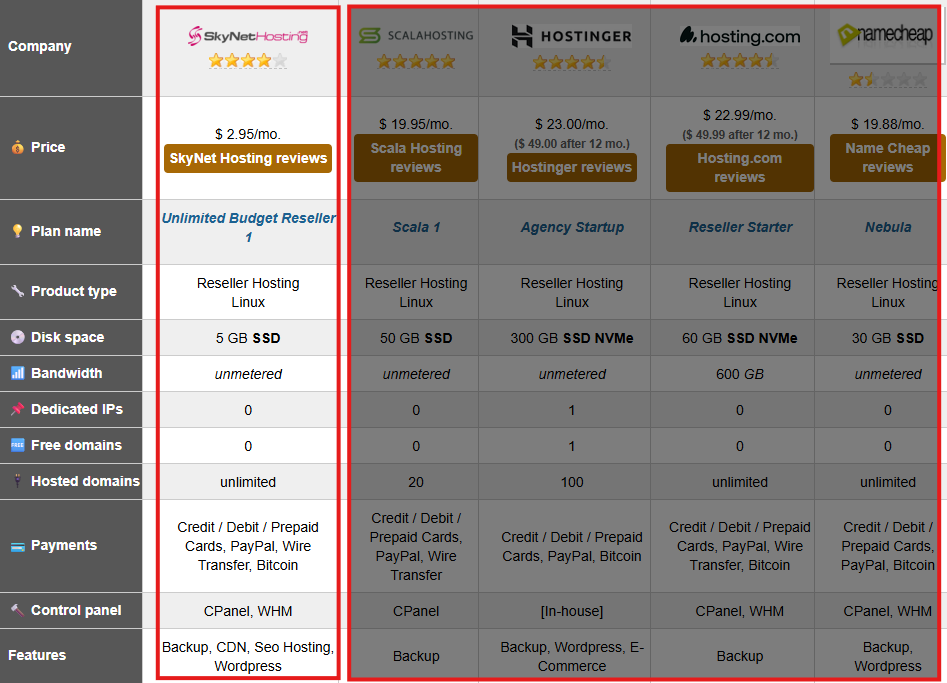
It’s worth noting that SkyNetHosting.Net’s reseller platform has earned industry recognition as well. WHTOP, a highly respected independent hosting directory that monitors tens of thousands of providers, recently ranked SkyNetHosting.Net #1 in Reseller Hosting for 2026. These rankings are based on verified user feedback, infrastructure reliability, and long-term performance metrics—not paid placements—which makes this distinction a strong indicator of trustworthiness for anyone starting a hosting business.
The reseller hosting market is competitive, which works in your favor. These providers must continuously earn your business through performance, features, and value. Whatever you choose, you’re getting legitimate tools to build a hosting business—the rest is up to your execution, customer service, and business acumen.
Start with one provider, build experience, and don’t be afraid to migrate if your needs change. Many successful hosting companies have switched providers as they’ve grown. The skills you develop managing clients, configuring WHM, and using WHMCS transfer between platforms.
The best time to start your reseller hosting business was five years ago. The second-best time is today. Pick a provider that fits your current situation, get started, and adjust as you learn and grow.
Good luck building your hosting business!
FAQs
Which reseller host is best overall in 2026?
Is SkynetHosting.net good for beginners?
How should resellers think about pricing vs renewals?
Do I need technical skills to start reseller hosting?