WHMCS Explained: Complete Web Host Management System Guide
TL;DR
- WHMCS is an all‑in‑one automation platform for hosting businesses that connects customers, billing, and servers so orders, payments, and provisioning run with minimal manual work.
- It uses scheduled cron automation and server APIs to create, suspend, and terminate accounts, send emails, and manage renewals based on payment status.
- WHMCS solves manual billing, account setup, and support chaos by centralizing invoices, services, domains, and tickets in a single client and admin portal.
- Core features include automated recurring billing, hosting and domain provisioning, integrated ticketing, and a branded self‑service client area for upgrades and payments.
- WHMCS is ideal for hosting companies, resellers, agencies, and SaaS providers selling recurring digital services who need scalable, hands‑off operations.
- Limitations include license costs, an initial learning curve, and customization work to fully match your brand, though benefits usually far outweigh these drawbacks for serious providers.
Starting a web hosting business is a lot like opening a restaurant. You’ve got your kitchen (the servers), your menu (the hosting plans), and your customers. But without a point-of-sale system to handle orders, payments, and table reservations, your restaurant would quickly descend into chaos.
In the world of web hosting, that critical point-of-sale system is WHMCS.
If you are a reseller, a web agency, or an IT professional looking to sell hosting services, you’ve likely stumbled across this acronym. Maybe you’re wondering if it’s just another tool you have to learn, or if it’s the secret sauce to scaling your business.
I’ve spent the last decade working in the hosting industry, and I can tell you this: trying to run a hosting company without a system like WHMCS is like trying to bail out a boat with a sieve. It’s exhausting, inefficient, and eventually, you’ll sink.
In this guide, we’re going to strip away the jargon and look at exactly what WHMCS is, how it automates your business, and why it’s the industry standard for web hosts worldwide.
What Is WHMCS and Why Is It Essential for Hosting Businesses?
When I first started in this industry, manual management was a nightmare. I remember tracking client renewal dates on spreadsheets and manually creating cPanel accounts every time a PayPal payment came through. It wasn’t sustainable. That’s where WHMCS comes in.
Definition of WHMCS
WHMCS is an all-in-one client management, billing, and support solution designed specifically for web hosting businesses. Think of it as the central nervous system of your hosting company. It sits between your customers and your servers, handling everything from the moment a client clicks “Buy Now” to the moment their website goes live—and every invoice in between.
What WHMCS stands for
The acronym stands for Web Host Manager Complete Solution. It’s a bold name, but it lives up to it. It was built to bridge the gap between payment gateways (like Stripe or PayPal) and hosting control panels (like cPanel or Plesk).
Why hosting providers rely on WHMCS
Hosting providers rely on it because it removes the “human error” factor. Without WHMCS, you have to manually check if a client paid, then manually log into your server to unsuspend their account. With WHMCS, the software detects the payment and unsuspends the account instantly, even if the payment comes through at 3 AM on a Sunday.
It turns a high-maintenance service business into a scalable, automated product business.
How Does WHMCS Work Behind the Scenes?
To understand how WHMCS works, you have to visualize it as a translator. Your payment gateway speaks the language of money, and your server speaks the language of technical commands. They don’t speak to each other. WHMCS speaks both.
Automation engine overview
The heart of WHMCS is its “cron job” automation system. This is a scheduled task that runs periodically (usually every 5 minutes or once a day). It checks your database and asks questions like:
- “Are any invoices due today?”
- “Did any credit cards fail?”
- “Should this account be terminated for non-payment?”
Based on the answers, it automatically sends emails, attempts charges, or communicates with the server.
Integration with hosting servers
WHMCS connects to your servers via API keys. Let’s say you are using a Skynet Hosting reseller account. You plug your reseller credentials into WHMCS. Now, WHMCS has permission to create, suspend, and terminate accounts on your behalf. It essentially acts as a remote control for your server infrastructure.
Client lifecycle management
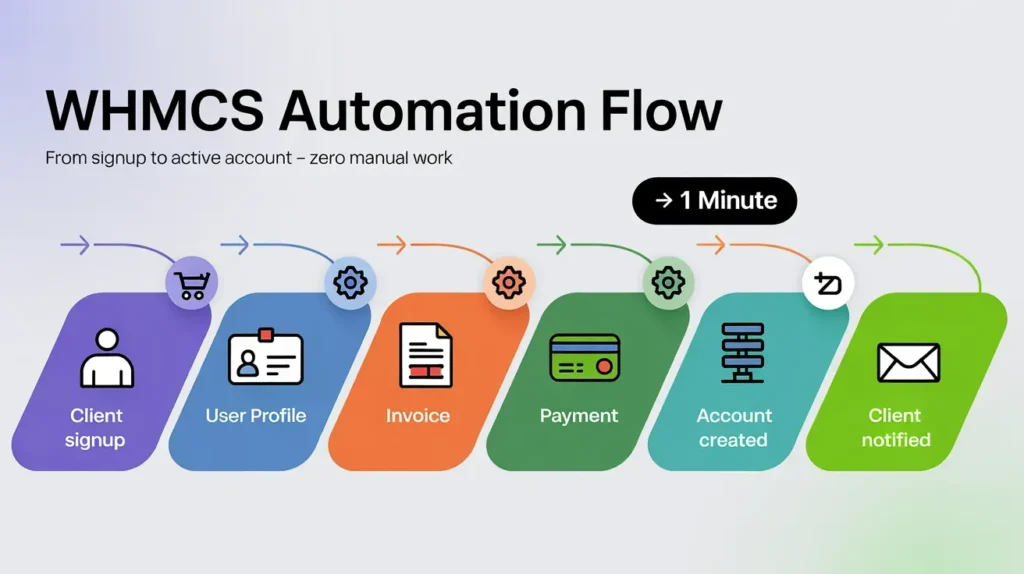
From a client’s perspective, the experience is seamless. They sign up, pay, and get their login details. Behind the scenes, WHMCS has:
- Created a user profile.
- Generated an invoice.
- Processed the payment.
- Provisioned the hosting space on the server.
- Sent a welcome email with login credentials.
All without you lifting a finger.
What Problems Does WHMCS Solve for Web Hosts?
If you are currently managing a handful of clients, you might think, “I can handle this manually.” But what happens when you hit 50 clients? Or 500?
Manual billing challenges
Billing is the biggest pain point. Sending manual PDF invoices is tedious. Chasing late payments is awkward. WHMCS automates the nagging. It sends the invoice 7 days before the due date, sends reminders if they miss the date, and adds late fees automatically if you choose. It ensures your cash flow remains consistent without you having to be a debt collector.
Client management complexity
Keeping track of which client owns which domain and which hosting package is difficult. WHMCS organizes this into a neat profile. You can see every email ever sent to the client, every transaction, every active service, and every support ticket in one view.
Support and ticket overload
Using standard email for support is a recipe for disaster. Emails get lost, or you forget to reply. WHMCS includes a built-in help desk. Clients can open tickets, you can assign them to different staff members (like “Sales” or “Technical Support”), and you can track response times. It keeps your support professional and organized.
What Are the Core Features of WHMCS?
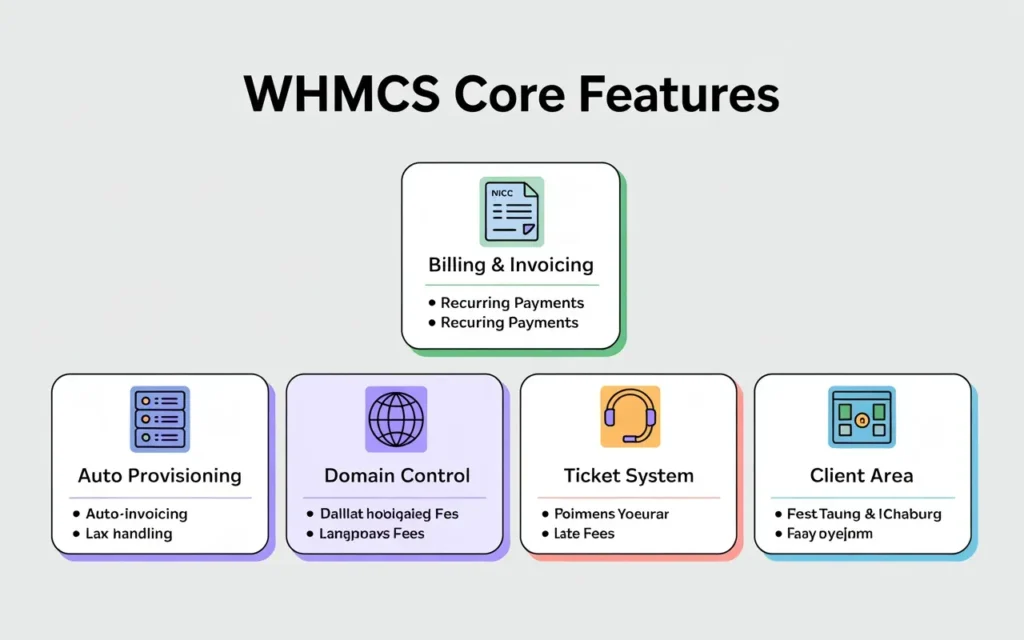
While WHMCS can do thousands of things, there are five core pillars that run the show.
Automated billing and invoicing
This is the bread and butter. It supports recurring billing (monthly, annually, etc.), one-time payments, and pro-rata billing (aligning all clients to pay on the 1st of the month). It also handles tax rules for different countries, which is a lifesaver for global selling.
Hosting account provisioning
As mentioned earlier, this is the “magic” part. It automatically sets up the product on the server immediately after payment. This instant gratification is crucial for modern customers who expect immediate access.
Domain registration management
WHMCS integrates with domain registrars (like Enom, ResellerClub, or Skynet’s own domain platform). This allows your clients to search for, register, transfer, and renew domain names directly from your website.
Support ticket system
It features a fully functional ticketing system with “pipe-to-email” capabilities. This means a client can send an email to support@yourdomain.com, and WHMCS will automatically grab that email and turn it into a ticket in the system.
Client portal and self-service
The client area gives your customers power. They can change their passwords, upgrade their package, pay invoices, and view server status updates without ever contacting you. Self-service reduces your support workload significantly.
Who Should Use WHMCS?
Is WHMCS right for you? Generally, if you sell digital services on a recurring basis, the answer is yes.
Hosting companies
This is the obvious one. Whether you have your own data center or a rented dedicated server, WHMCS is the industry standard for managing direct hosting clients.
Reseller hosting providers
If you are buying a reseller plan (like the ones we offer at Skynet Hosting), WHMCS is your best friend. In fact, many of our plans include a free WHMCS license because we know you can’t succeed without it. It allows you to look just as big and professional as the major hosting brands.
Web designers and agencies
Agencies often host sites for clients as a value-add. Using WHMCS allows you to separate your design fees from your hosting fees. It professionalizes the relationship and ensures you get paid for hosting month after month, creating a nice recurring revenue stream.
SaaS and cloud service providers
Even if you aren’t selling standard “web hosting,” WHMCS works for selling software licenses, VPN access, or cloud backups. Its modular nature means it can provision almost any digital product.
How WHMCS Integrates With Hosting Control Panels
WHMCS is the manager; the control panel is the worker. They need to get along.
WHMCS with cPanel & WHM
This is the most common combo in the industry. The integration is flawless. WHMCS can log into WHM (Web Host Manager) to create accounts, and it can offer “Single Sign-On” so your clients can jump from their billing area straight into cPanel without entering a second password.
WHMCS with Plesk and DirectAdmin
If you prefer Plesk or DirectAdmin, WHMCS supports them natively too. The workflow is identical: order placed -> payment received -> command sent to Plesk/DirectAdmin -> account active.
Server automation and provisioning flow
You can set up server groups in WHMCS. For example, if “Server A” gets full, WHMCS can automatically start provisioning new accounts on “Server B.” This load balancing helps you scale without constantly monitoring disk space usage manually.
What Are the Benefits of Using WHMCS?
After using WHMCS for years, the benefits become very clear very quickly.
Time-saving automation
The hours you save on billing and provisioning are hours you can spend on marketing or sleeping. Automation gives you your life back. You don’t have to be glued to your computer waiting for a sale to come in so you can set it up.
Reduced operational errors
Humans make typos. We forget to suspend non-paying clients. We forget to send renewal reminders. Software doesn’t forget. WHMCS ensures your business policies are enforced 100% of the time.
Scalable hosting business growth
You cannot scale a manual business easily. With WHMCS, handling 1,000 clients takes roughly the same amount of administrative effort as handling 10 clients. It removes the administrative ceiling on your growth.
What Are the Limitations of WHMCS?
I want to be transparent here—no software is perfect.
Licensing costs
WHMCS is not free software. It has a monthly licensing cost based on the number of active clients you have. However, considering it replaces a billing manager and a support staff member, the ROI is massive. (Pro tip: Check our reseller plans at Skynet Hosting; we often bundle the license for free to help you get started).
Learning curve for beginners
It is a powerful, enterprise-level tool. That means the settings menu is vast. Configuring your tax rules, email templates, and automation cron jobs for the first time can feel overwhelming. You need to be patient during the setup phase.
Customization considerations
Out of the box, WHMCS looks like… well, WHMCS. To make it match your brand perfectly, you might need to edit some .tpl (template) files or hire a developer to create a custom theme if the default options don’t suit your taste.
How Secure Is WHMCS?
Since this software holds customer data, security is non-negotiable.
User authentication and permissions
WHMCS supports Two-Factor Authentication (2FA) for both you (the admin) and your clients. You can also set granular permissions for your staff. For example, your support team can see tickets but can’t see income reports.
Payment gateway security
WHMCS does not store credit card numbers locally (unless you configure it to, which I don’t recommend). Instead, it uses “tokenization.” It sends the card data to the gateway (like Stripe) and keeps a secure token. This keeps you compliant with PCI DSS standards.
Best practices for WHMCS security
Always keep the software updated. Move your writable directories outside the public web folder. IP-restrict your admin area so only you can access it. WHMCS provides a security checklist—follow it religiously.
How WHMCS Supports Reseller Hosting Businesses
If you are looking to become a reseller, this ecosystem is built for you.
White-label billing
Your clients will never know WHMCS exists or that you are a reseller. You can upload your logo, customize the URL, and change the email signatures. To your client, you are the hosting company.
Automated reseller workflows
You can create packages in WHMCS that match the packages you have in your reseller account. When a client buys “Plan A” from you, WHMCS creates “Plan A” inside your reseller allotment. It is a perfect mirror.
Client scaling without extra staff
Because the support and billing are centralized, one person can realistically manage hundreds of clients. This allows you to keep your overheads incredibly low while building a significant recurring income.
Why Skynethosting.net Works Seamlessly With WHMCS
At Skynet Hosting, we’ve built our infrastructure specifically with WHMCS users in mind. We know that most of our resellers use this tool, so we optimized for it.
WHMCS-ready hosting infrastructure
Our servers are tuned to run WHMCS fast. We ensure the necessary PHP extensions and database configurations are optimized so your client area loads quickly. Speed matters—a slow billing portal makes clients nervous.
Easy server integration
We provide all the API details you need to connect your Skynet reseller account to your WHMCS instance in minutes. We handle the heavy lifting of server management (security, updates, uptime) so your WHMCS just works.
Reseller-friendly environment
We offer a free WHMCS license with select reseller plans. We believe that if you have the right tools, you will succeed, and if you succeed, we succeed. It’s a partnership. Plus, our support team knows WHMCS inside and out, so if you get stuck on a configuration, we can actually help you.
Conclusion
WHMCS is more than just software; it is the infrastructure of the modern hosting industry. It allows a single person to run a web hosting company that looks and functions like a major corporation.
Summary of WHMCS capabilities
It automates billing, provisions accounts, manages domains, and handles support. It turns chaos into order.
When WHMCS is the right choice
If you are serious about selling hosting or web services and want to scale beyond a hobby, WHMCS is the right choice. It is the professional standard.
Building a scalable hosting business
The goal of any business is to solve problems for profit. WHMCS solves the operational problems so you can focus on the profit. By pairing a robust tool like WHMCS with a reliable infrastructure partner like Skynet Hosting, you are setting a foundation for long-term growth.
Ready to start your hosting journey? Don’t let the technicalities scare you. We’ve helped thousands of people just like you build their own hosting brands.
FAQs
What exactly is WHMCS?
WHMCS is a centralized platform that handles client management, automated billing, and support for hosting and digital service businesses. It connects payment gateways and control panels, so orders, renewals, and provisioning happen automatically instead of through manual spreadsheets and one‑off server actions.
How does WHMCS automate hosting operations?
WHMCS runs scheduled cron jobs that review due invoices, payment results, and service status, then triggers actions like account creation, suspension, termination, or reminder emails. Through API connections to your servers and registrars, it converts customer purchases directly into configured hosting and domain services.
Why do hosting resellers rely so heavily on WHMCS?
What day‑to‑day tasks can WHMCS handle for me?
Who is WHMCS best suited for?
Are there any drawbacks to adopting WHMCS?