

Proxies for School – Bypassing Blocks Safely and Responsibly in 2026
TL;DR
- What Proxies Are and How They Work: Proxies act as intermediaries between your device and the internet, helping bypass school firewalls by masking your connection.
- Types of Proxies for Students: Options include web-based proxies, browser extensions, mobile proxies, and Smart DNS services, each with unique pros and cons.
- Top Proxy Recommendations: Reliable options like Hidester, KProxy, and ProxySite are highlighted for their safety and effectiveness.
- Legal and Ethical Considerations: While proxies aren’t illegal, they often violate school policies, potentially leading to disciplinary actions.
- Safe Browsing Tips: Use HTTPS-secured proxies, avoid entering personal data, and clear your browser history to stay secure and responsible.
Proxies for School: How Schools Detect Them
Thousands of students hit a blocked page at school every day and go looking for a way around it. Search for that topic and you will find dozens of near identical guides listing the same handful of proxy sites. This one takes a different angle.
We will explain what a proxy actually does, why schools filter content in the first place (there is a real federal law behind it, not just a vague policy), what the popular free proxy lists get wrong, and, because a growing share of our own hosting customers are school IT departments and MSPs managing campus networks, what actually stops proxy circumvention on a modern school network. If you are a student researching how this technology works, a parent trying to understand what your kid is describing, or an administrator trying to close a gap, this post is written for all three.
Last updated: July 2026
What Is a Proxy, and How Does It Actually Work in School?
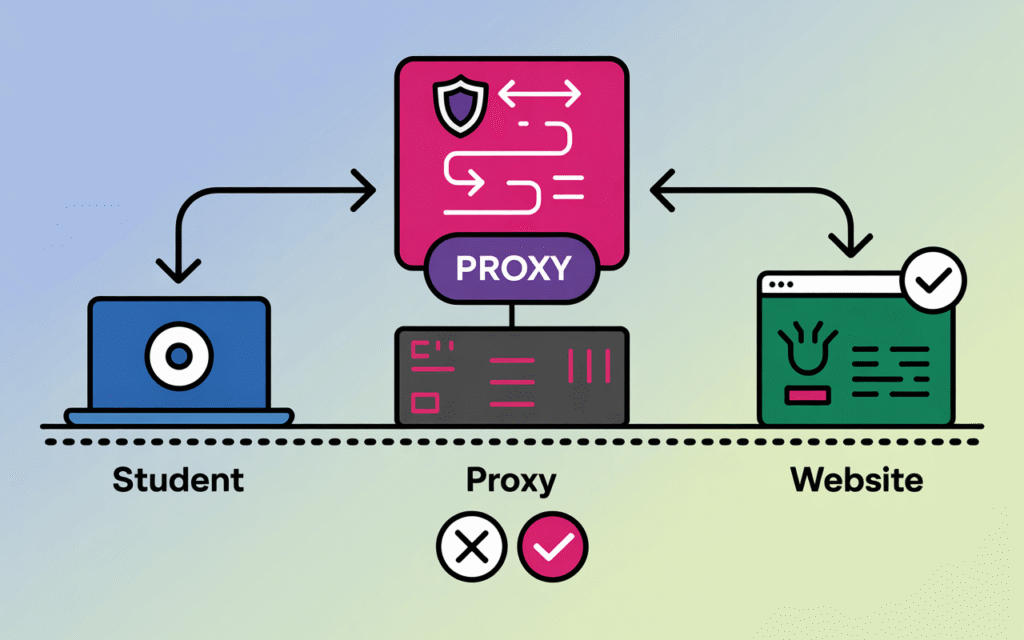
A proxy is a server that sits between your device and the website you want to reach. Instead of your laptop connecting straight to that site, it connects to the proxy first, and the proxy fetches the page on your behalf and hands it back to you.
From the school network’s point of view, your device is only ever talking to the proxy. Your request leaves your browser, reaches the proxy server, gets forwarded to the real destination, and the response comes back through the same path. The school’s firewall sees one connection to the proxy, not a connection to the blocked site, which is the entire mechanism these tools rely on.
Proxy vs VPN vs Tor: What’s Actually Different
A web proxy typically reroutes traffic from a single browser tab and rarely encrypts everything you send, which makes it fast but easy for a network to fingerprint once it knows what to look for. A VPN encrypts the entire device’s traffic at the operating system level, which is slower to set up but far harder for a school firewall to selectively inspect.
Tor routes traffic through at least three volunteer relay nodes with a fresh layer of encryption at each hop, which gives it the strongest privacy of the three but also the worst speed, and most school filters already block known Tor entry nodes outright. For a network that is actively trying to detect circumvention, the practical difference matters less than most guides suggest. All three leave a pattern, and pattern detection is exactly what the detection section further down covers.
It also helps to be specific about what a proxy does not do. It does not remove a school’s ability to see that a connection happened, it does not make a student’s device invisible on the network, and it does not survive a filtering layer built around behavior rather than a fixed list of domains. Students researching this as a genuine networking topic will get more out of understanding why that is true than out of memorizing which proxy is fastest this month.
Why Do Schools Block Websites, and What Does the Law Require?
Two separate things are happening at once. Schools block distracting or bandwidth heavy sites as a matter of local policy, and in the United States, federally funded schools are legally required to filter certain categories under the Children’s Internet Protection Act, known as CIPA.
CIPA passed in 2000 and ties E-Rate internet discount funding to a school’s use of technology protection measures, according to the Federal Communications Commission. The law specifically requires blocking visual depictions that are obscene, that constitute child pornography, or that are harmful to minors, and it requires the school to have a written internet safety policy on file to keep the funding.
There is an honest nuance most guides skip. CIPA’s actual text is narrower than the blocklists schools deploy in practice. The statute covers pictures and video in those three categories; the additional blocking of social media, gaming, streaming, and general entertainment sites is a local policy decision layered on top, not something the federal law itself demands.
An adult, such as a teacher conducting research, can request the filter be disabled for a legitimate purpose. Students cannot make that request themselves, and schools are not required to track or log every site a minor visits under CIPA, though most do anyway for other reasons.
Types of Proxies Students Use in School
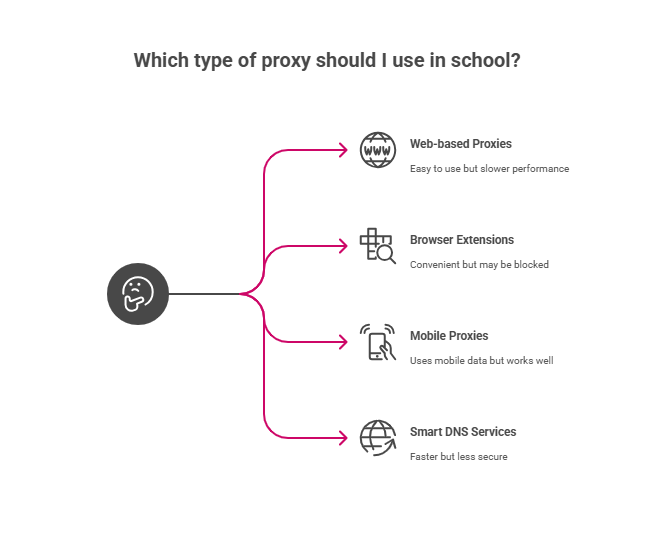
Students generally reach for one of four categories: a web based proxy site typed straight into the address bar, a browser extension that proxies traffic automatically, a personal mobile hotspot used in place of school WiFi, or a Smart DNS service that reroutes only DNS lookups rather than full traffic.
Web Based Proxy Sites
These are ordinary websites where a student pastes in the URL they want to visit and the site fetches it for them. They need no installation, which is exactly why they are also the easiest category for a filter to add to a blocklist once discovered.
Browser Extensions
A proxy extension reroutes traffic automatically once installed, without the student retyping a URL each time. On school managed devices, this category is also the easiest for IT to shut down entirely, since extension installation can be disabled at the account level.
Personal Mobile Data
Tethering a laptop to a phone’s mobile data swaps the school’s network for a cellular one the filter has no visibility into at all. It works reliably, but it burns through a personal data plan fast and offers the school zero control, which is why some districts separately restrict phone use during class specifically to close this gap.
Smart DNS Services
Smart DNS only reroutes the lookup that turns a domain name into an IP address, leaving the rest of the connection unencrypted and untouched. That makes it faster than a full proxy or VPN, but also the easiest of the four to catch, since the actual traffic afterward still touches the school’s network in plain sight.
None of these four categories is static. A web based proxy that works this semester is frequently added to a blocklist within weeks, a mobile hotspot only works until a school separately restricts personal device use, and a Smart DNS provider’s IP range gets flagged the first time enough traffic from one campus routes through it. The churn is the point: every category here trades some combination of speed, privacy, and durability, and none of the four trades all three favorably at once.
Top Free & Safe Proxies for School (2025 Updated List)
Search this topic and you will land on a rotating cast of the same handful of names, most commonly Hidester, KProxy, ProxySite, and CroxyProxy. The lists read like recommendations, but the honest framing is closer to a description of what currently exists, since the specific sites that work change monthly as schools update their blocklists.
One survey of student proxy use found that a majority of students believed their school’s network already monitored their browsing, and a meaningful share reported landing on a phishing page through an unreviewed proxy, per research summarized by Wegic. That risk is the actual story here, not which site loads fastest.
The practical differences between these services come down to three questions worth actually asking before trusting one with anything: does it force HTTPS on every connection, does it publish a real no log policy rather than just claiming one, and does it ask for a login or payment detail at any point. A free proxy that asks for either of the last two is a data collection tool wearing a proxy’s interface.
HTTPS support, video and streaming compatibility, and stated logging policy vary across all of them, and none of that variation changes the underlying risk profile: shared, anonymous relay servers are an attractive target for anyone trying to harvest credentials, and a school network that already has visibility into your device traffic can usually see that a proxy connection is happening even if it cannot see what is inside it.
- Hidester: HTTPS-secured, mobile-friendly, reliable uptime
- KProxy: Fast connection speeds, works with most video sites
- ProxySite: Clean interface, good for basic browsing
- CroxyProxy: Supports modern web applications, YouTube-friendly
- Plain Proxies: Simple to use, multiple server locations
Hidester: Strong Privacy and Reliable Uptime
Hidester is a robust proxy service well-regarded for its strong encryption and no-logs policy, ensuring user privacy and data security. It supports secure HTTPS connections and is mobile-friendly, making it accessible on a variety of devices. The service offers reliable uptime, which makes it a stable choice for consistent access to blocked content in school environments. Additionally, Hidester’s global server network allows users to bypass geo-restrictions efficiently while maintaining anonymity.
KProxy: Fast Speeds with Video Streaming Support
KProxy stands out for its fast connection speeds, which is particularly beneficial for streaming video content from platforms often blocked in schools. It supports browser extensions, simplifying usage and making it a convenient option. The proxy maintains a good balance between speed and privacy, providing a smooth browsing experience without complex configuration. KProxy’s effective handling of video sites makes it an excellent choice for students needing access to multimedia content.
ProxySite: Clean, User-Friendly Interface for Basic Browsing
ProxySite offers a straightforward and clean interface that is easy to navigate, focusing on providing a simple browsing experience. It supports SSL connections and is well suited for basic web page access where minimal interaction beyond standard browsing is required. While not optimized for heavy multimedia use, ProxySite’s reliable performance makes it a good option for users who want quick, uncomplicated access to blocked websites without advanced features or bandwidth needs.
CroxyProxy: Full Support for Modern Web Apps and YouTube
CroxyProxy is designed with contemporary web applications in mind, supporting technologies that enable seamless use of platforms like YouTube and other interactive services. Its ability to handle modern web standards makes it ideal for dynamic content and media-heavy sites common in educational settings. This proxy excels when users need reliable access to complex websites with video and interactive features, while maintaining strong privacy protections.
Plain Proxies: Simple, Versatile Proxy Solution
Plain proxies provide an uncomplicated way to bypass restrictions with multiple server locations available for choice. They are basic HTTP/HTTPS proxies that may lack advanced encryption or interface sophistication but offer versatility and ease of setup. These proxies are suitable for straightforward access needs where privacy is less of an immediate concern and the main goal is to overcome simple network blocks quickly.
Whoer.net Proxy: Transparency with Privacy Monitoring
Whoer.net proxy service incorporates tools that allow users to monitor their anonymity levels, including IP, DNS, and browser fingerprint transparency. This added insight helps users understand their exposure and maintain better control over their online privacy. While it may not offer the broadest multimedia support, Whoer.net is perfect for privacy-conscious users who need to be aware of their security status during proxy use.
4EverProxy: Secure, Location-Flexible Proxy
4EverProxy provides users with numerous server locations worldwide and supports SSL encryption for secure browsing. Its flexibility in switching between server locations enables users to optimize speed and bypass more sophisticated network filters. This proxy service is beneficial for those needing secure access from different geographical points, enhancing the ability to access content even in heavily restricted school networks.
Important safety note: Always use HTTPS-secured proxies. Unsecured proxies can expose your data to hackers.
Speed varies depending on server load and your school’s internet connection. Test different options to find what works best.
Comparison Table
What Are the Real Risks and Benefits of Proxy Use at School?
The honest answer is both are real. Proxies can genuinely restore access to legitimate research and educational material that an overly broad filter blocked by mistake, and they can just as easily expose a student’s login credentials to whoever operates the relay.
Where Proxies Genuinely Help
- Recovering access to a legitimate research site or tool caught by an overly broad category block
- Reaching educational video or reference material blocked alongside entertainment sites
- Giving international students access to resources normally geo restricted outside their home country
- Learning, in a hands on way, how routing and network filtering actually work
Where Proxies Create Real Risk
- Free, anonymous proxies are a known vector for credential theft, since every request briefly passes through a server you do not control
- Disciplinary consequences ranging from a lost internet privilege to suspension, depending on the school’s acceptable use policy
- Slower browsing, since every request now makes an extra hop before it reaches the destination
- Malware delivered through ad heavy or poorly maintained proxy sites, a pattern our support team recognizes from the same unmanaged relay behavior that shows up in abuse reports across shared hosting generally
That last point is worth being direct about. Running infrastructure for a large number of client sites means seeing the same failure pattern repeatedly: an unmanaged, unmonitored relay point is exactly where credential theft tools get planted, whether that relay is a compromised shared host or a free school proxy nobody is auditing. The fix in both cases is the same, which is control over the infrastructure rather than trust in whoever is running it.
Weighing these honestly matters more than picking a side. A student using a proxy purely to reach a wrongly blocked research tool is taking on real risk for a legitimate need, and the better fix for that specific case is almost always a five minute conversation with a teacher rather than a proxy at all. A student using the same tool purely for entertainment during class is taking on the same technical risk for a much weaker reason, and that distinction is worth making honestly rather than treating every use case as identical.
How to Use a Proxy in a School Network
Here’s your step-by-step guide to using proxies safely.
Method 1: Web-based Proxy
- Open your browser
- Go to a trusted proxy website (like Hidester)
- Enter the blocked website URL
- Click “Go” or “Browse”
- Browse normally through the proxy interface
Method 2: Chrome Proxy Extension
- Open Chrome Web Store
- Search for “proxy extension”
- Install a reputable extension
- Configure your preferred proxy server
- Enable the extension when needed
Method 3: Manual Browser Setup
- Open browser settings
- Find “Network” or “Proxy” settings
- Enter proxy server details
- Save configuration
- Browse with proxy enabled
Remember to disable proxy settings when you’re done browsing.
Proxy vs VPN – What’s Better for School Use?
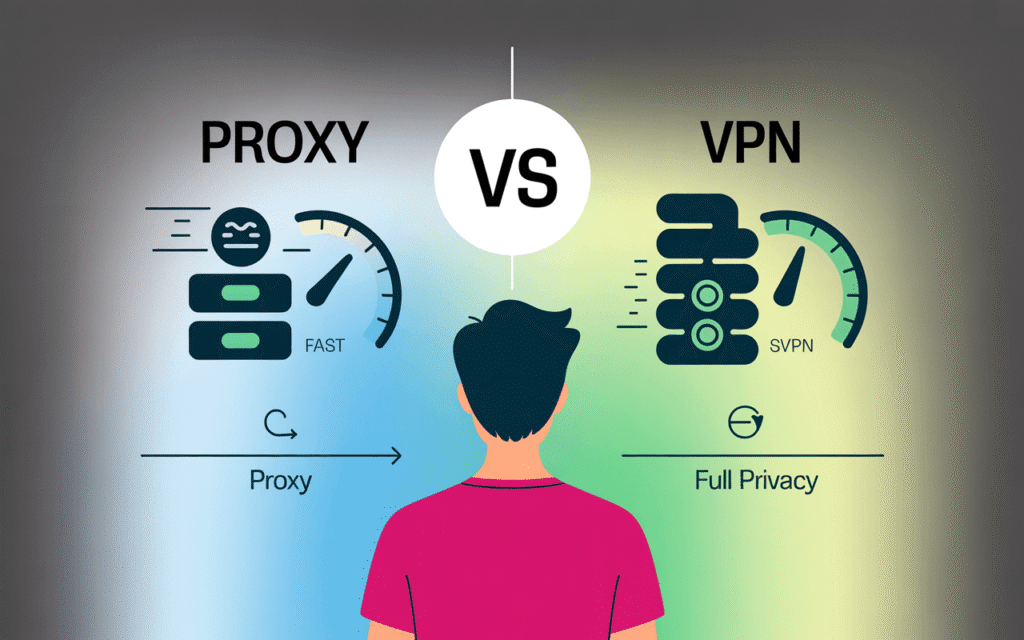
Both tools play important roles in school environments, each serving unique purposes to enhance learning and support educational goals.
Proxies are better when:
- You need quick access to specific sites
- Speed is more important than privacy
- You’re on a shared computer
- You want simple setup
VPNs are better when:
- You need full device protection
- Privacy is your top priority
- You’re using your personal device
- You have time for proper setup
For most students, proxies offer the right balance. They’re faster and easier to use for casual browsing.
Is Using a Proxy at School Legal, and What Happens If a Student Is Caught?
Using a proxy is not illegal in the way that, for example, unauthorized network access is. It almost always violates a school’s acceptable use policy, though, which most students and parents sign at the start of the year without reading closely.
Consequences vary by district but commonly include a written warning, loss of device or internet privileges, detention, a parent notification, or suspension for repeat violations. Some schools also treat proxy use as a technology misuse incident separate from whatever content the student was actually trying to reach, which can carry its own consequence independent of that content.
There is an institutional stake here too. A school that cannot demonstrate an effective, actively maintained filtering policy risks its own CIPA certification, and by extension its E-Rate discount, which is a funding risk that has nothing to do with any individual student and everything to do with why districts invest in the detection layer covered next.
Safe Browsing Tips for Students Using Proxies
Protect yourself when using proxies at school to access restricted websites or content.
Always ensure you’re using safe and reliable proxies to avoid security risks, protect your personal information, and stay within school guidelines.
Essential safety tips:
- Never enter passwords on proxy sites. Your login data could be stolen.
- Avoid downloading files through proxies. They may contain malware.
- Clear your browser history after proxy use. This removes evidence and protects privacy.
- Only use HTTPS-secured proxy sites. Look for the padlock icon in your address bar.
- Don’t access personal accounts through public proxies. Use them only for general browsing.
- Be cautious of proxy sites with excessive ads. They’re often unsafe.
- Log out completely when finished browsing.
Making Smart Decisions About Proxy Use
Proxies can help you access blocked content at school. But they come with real risks.
The smartest approach? Use them sparingly and responsibly. Focus on legitimate educational needs rather than entertainment.
Consider talking to teachers about accessing specific educational sites. Many schools will unblock legitimate resources when asked.
Remember that your digital actions have consequences. Make choices you can defend if questioned.
Stay safe, stay smart, and use technology responsibly. Your future self will thank you for making good decisions now.
How Do Schools and IT Teams Detect and Stop Proxy Circumvention?
Modern school networks use five layers together: DNS and firewall category filtering, deep packet inspection with SSL interception, AI based behavioral detection, device and account lockdowns, and ongoing monitoring tied to a clear policy. No single layer catches everything, which is why districts stack them.
DNS and Firewall Level Filtering
The first layer blocks by category at the domain name level, matching every request against a list of known proxy, VPN, and adult content domains before the connection is even made, often through a Cloudflare CDN and DNS filtering layer sitting in front of the school’s own network. This catches known offenders instantly but is always a step behind brand new proxy domains registered that same week, which is the core weakness every later layer exists to cover.
Deep Packet Inspection and SSL/TLS Interception
Because most web traffic is encrypted, a filter that only reads domain names cannot see what happens inside an HTTPS connection to an allowed site. Deep packet inspection solves this by installing a trusted SSL certificate on every managed device, which lets the school’s gateway decrypt, inspect, and re-encrypt traffic in real time before it reaches the browser. This is also why a proxy that only encrypts the connection to itself, rather than obscuring the traffic pattern entirely, is still visible to a network running this layer.
AI and Behavioral Detection Systems
The newest layer does not rely on a static blocklist at all. It watches traffic patterns, connection timing, and known proxy fingerprints, and flags anything that looks like circumvention even from a domain the filter has never seen before. GoGuardian’s Smart Alerts feature, one widely used example, reportedly flags many times more proxy sites than a traditional blocklist alone by using this kind of behavioral detection instead of waiting for a human to categorize each new site.
Some of the specific signals these systems watch for include TLS handshake fingerprints that match known proxy software rather than an ordinary browser, connection timing patterns that look like automated relaying rather than a person clicking around, and IP addresses that suddenly receive traffic from an unusual number of devices on the same campus network at once. None of that requires the filter to know the destination site at all, which is why behavioral detection catches proxies a pure blocklist never will.
Locking Down Devices and Accounts
The layers above only work if a student cannot simply reconfigure the device to skip them. Restricting local administrative rights, blocking manual proxy setting changes in the network menu, and preventing browser extension installs on managed accounts closes the most common workaround before it starts. Districts running this infrastructure themselves, rather than fully outsourcing it, generally want it on hardware with built-in security and backup features they control directly, since a filtering appliance is only as trustworthy as the uptime and backup discipline behind it.
This layer has a real limitation worth stating plainly. It works cleanly on school owned, centrally managed devices, but a bring your own device policy weakens it considerably, since a personally owned laptop or phone was never enrolled in the school’s management profile in the first place. Districts with a significant BYOD population generally lean harder on the network side layers above, DNS filtering, SSL inspection, and behavioral detection, precisely because the device side layer cannot reach a device it does not manage.
Monitoring, Logging, and a Clear Escalation Policy
Every layer above generates logs, and logs are only useful if someone reviews them and a documented policy defines what happens next. CIPA itself requires the written internet safety policy; a school without a clear, published escalation path for a first, second, and third filtering violation is relying on the technology alone to do a job that also needs a human process behind it.
Districts managing this at scale, especially ones running their own logging and reporting dashboard rather than only a vendor portal, benefit from performance headroom for the log volume a busy campus network generates, which is where an NVMe VPS earns its keep over a slower disk based server. Deploying that kind of internal dashboard through a one-click installer rather than a manual build saves an IT team real setup time, and hosting the underlying staff email on a spam-filtered email platform closes a related gap, since phishing attempts targeting school staff credentials are a common companion problem to student side filtering issues.
What Should Students, Parents, and Schools Actually Do With This?
Each of the three groups reading this gets a different, practical takeaway rather than a single blanket answer.
For Students
- If a legitimate research site or tool is blocked, ask a teacher or librarian to request it unblocked. Most districts can whitelist a specific site faster than most proxies stay working
- Never enter a school account password or personal payment detail into a public proxy site
- Understand that most managed school networks already log blocked attempts, not just successful visits
For Parents
- A school’s CIPA-driven filter only covers the school network. A home device needs its own separate plan for filtering or monitoring
- A student describing a slow or broken school WiFi connection is sometimes describing the side effect of a proxy attempt being throttled by the filter, not an actual outage
For Schools and IT Departments
- Publish a genuinely fast, low friction process for a teacher to request a legitimate site be unblocked, since slow unblock requests are the single biggest driver of student proxy use
- Layer detection rather than relying on a single blocklist, per the five layers above
- Keep the written internet safety policy current, since it is both a CIPA requirement and the actual document that makes an escalation policy enforceable
Final Thoughts: Building Infrastructure You Actually Control
Whichever side of this you are reading from, the underlying lesson is the same. A shared, anonymous proxy you do not control is a black box, and a filtering stack built entirely on a single vendor’s blocklist is also, in its own way, a black box.
For a school district or MSP building its own filtering, logging, or monitoring layer instead of depending entirely on a third party portal, the infrastructure underneath that decision matters. SkyNetHosting.Net runs hosting across 25 worldwide data center locations with 24/7 support, and a district that wants full control over its own detection stack, rather than routing every log through someone else’s dashboard, typically starts on a dedicated server for the headroom and control, with a VPS hosting plan as the lighter entry point for a smaller campus or a pilot deployment. A larger district juggling budgets across multiple campus networks often ends up managing that infrastructure through WHMCS billing automation, and hosting the policy documentation and staff portal itself on straightforward cPanel hosting rounds out a setup a district actually owns end to end.
That is the honest smarter path here. Not a better free proxy, and not a stricter blocklist alone, but infrastructure a school, a parent, or a student actually understands and controls.
None of that requires a district to rip out an existing filtering vendor overnight. Most of the districts we talk with start by mirroring logs to their own dashboard alongside the vendor portal, comparing the two for a semester, and only then deciding how much of the stack to bring in house. That gradual path costs far less in setup time than a full migration and still gives an IT team the independent visibility this post has been building toward the whole way through.
FAQs – School Proxy Use
Can students get in trouble for using a proxy at school?
Yes. Most schools treat proxy use as an acceptable use policy violation on its own, separate from whatever content a student was trying to reach, with consequences ranging from a warning to suspension.
Is using a proxy at school actually illegal?
No, not in the way unauthorized computer access is. It is a policy violation, not a crime, though repeated violations can still lead to serious school consequences.
What does CIPA actually require schools to block?
Only visual depictions that are obscene, that are child pornography, or that are harmful to minors. Broader blocking of social media, gaming, and streaming sites is a local district decision layered on top of that federal minimum.
Why do proxy sites stop working after a while?
Schools and their filtering vendors continuously update blocklists, and behavioral detection systems can flag a new proxy domain within hours of it becoming popular, long before it ever gets manually categorized.
Can IT staff see when a student tries to reach a blocked site, even if the attempt fails?
Usually, yes. Most filtering platforms log blocked attempts by default, not only completed visits, which is part of why proxy attempts show up in disciplinary records even when the underlying site was never actually reached.
Do proxies work on school managed Chromebooks and iPads?
Less reliably than on a personal device, since managed device profiles typically restrict local proxy setting changes and extension installs directly, which removes two of the four common proxy categories before a student even tries.
Does a school need special software to comply with CIPA, or is basic blocking enough?
CIPA itself does not mandate a specific product, only that the filter actually blocks the three legally defined categories and that the school has a written internet safety policy. In practice, a filter that stops there and does nothing about circumvention attempts tends to drift out of compliance quickly, since a technology protection measure that is trivially bypassed is hard to defend as effective if it is ever formally reviewed.
